ธีม XStore
Menu Categories
สูงสุด 20%
  • อัปเกรดหน้าจอ Android ขนาด 10.25 นิ้ว สำหรับ Audi Q7 ปี 2006–2015 พร้อมระบบ CarPlay แบบไร้สาย
  • 03 6
  • 10 1
  • 09 1
  • 02 5
  • 06 3

อัปเกรดหน้าจอ Android ขนาด 10.25 นิ้ว สำหรับ Audi Q7 ปี 2006–2015 พร้อมระบบ CarPlay แบบไร้สาย

(2 บทวิจารณ์จากลูกค้า)

จาก: $395.00

ปลอดภาษี สหภาพยุโรปและสหรัฐอเมริกา · ค่าส่งแสดงในตะกร้าสินค้า สหภาพยุโรปและสหรัฐอเมริกา · ค่าส่งในตะกร้าสินค้า
ปลอดภัยโดย เพย์พาล
บริการชำระภาษีล่วงหน้า DDP

เราจะจัดการภาษีมูลค่าเพิ่ม (VAT) และภาษีนำเข้าที่บังคับใช้สำหรับคำสั่งซื้อจากสหภาพยุโรป (EU) และสหรัฐอเมริกา (USA) ที่ตรงตามเงื่อนไข การประหยัดที่คาดการณ์: $120–$280 .

ค่าส่งเป็นค่าใช้จ่ายแยกต่างหาก. ค่าจัดส่งที่แม่นยำจะถูกคำนวณตามจุดหมายปลายทาง และแสดงในตะกร้าสินค้าของคุณก่อนการชำระเงิน.

สหรัฐอเมริกา (48 รัฐ) ออสเตรีย เบลเยียม บัลแกเรีย โครเอเชีย ไซปรัส เช็กเกีย เดนมาร์ก เอสโตเนีย ฟินแลนด์ ฝรั่งเศส เยอรมนี กรีซ ฮังการี ไอร์แลนด์ อิตาลี ลัตเวีย ลิทัวเนีย ลักเซมเบิร์ก มอลตา เนเธอร์แลนด์ โปแลนด์ โปรตุเกส โรมาเนีย สโลวาเกีย สโลวีเนีย สเปน สวีเดน
จัดส่งถึง จีน
กำลังตรวจสอบการจัดส่ง…
หรือ
ชำระเงินอย่างปลอดภัยด้วย Paypal ชำระเงินอย่างปลอดภัยด้วยวีซ่า ชำระเงินอย่างปลอดภัยด้วยมาสเตอร์การ์ด ชำระเงินอย่างปลอดภัยด้วย JCB ชำระเงินอย่างปลอดภัยด้วย American Express ชำระเงินอย่างปลอดภัยด้วย Alipay ชำระเงินอย่างปลอดภัยด้วย Google Pay ชำระเงินอย่างปลอดภัยด้วย Klarna ชำระเงินอย่างปลอดภัยด้วย DISCOVER ชำระเงินอย่างปลอดภัยด้วย Apple Pay
รับประกันการชำระเงินที่ปลอดภัยและมั่นคง
มากกว่าแค่ฮาร์ดแวร์

ออกแบบมาเพื่อพอดีกับคุณ พร้อมการสนับสนุนที่เหนือกว่าการส่งมอบ.

การตรวจสอบความเข้ากันได้, การคุ้มครองความเข้ากันได้แบบครบถ้วน, การรับประกันอุปกรณ์ฮาร์ดแวร์เป็นระยะเวลา 12 เดือน และการสนับสนุนอย่างต่อเนื่องหลังการติดตั้ง.

หลังการชำระเงิน เรามุ่งมั่นทำให้ถูกต้องตั้งแต่ครั้งแรก
ดูกระบวนการสั่งซื้อทั้งหมด กระบวนการทั้งหมด
01 รับคำสั่งซื้อแล้ว คำสั่งซื้อ
02 การตรวจสอบความเข้ากันได้ขั้นสุดท้าย ตรวจสอบ
03 ทดสอบและเตรียมพร้อม ทดสอบ
04 แพ็คและจัดส่ง จัดส่ง
05 การติดตามและการสนับสนุน การสนับสนุน

เป้าหมายของเราคือทำให้คำสั่งซื้อของคุณถูกต้องก่อนที่สินค้าจะออกจากเรา. เราตรวจสอบความเข้ากันได้ เตรียมการตั้งค่าที่ถูกต้อง และจะติดต่อคุณเฉพาะเมื่อมีสิ่งที่ต้องยืนยันเท่านั้น.

Audi Q7 10.25 Android screen upgrade installed dashboard with CarPlay interface
Audi Q7 4L · 2006–2015 · 10.25 หน้าจอ Android
Audi Q7 10.25 อัปเกรดหน้าจอ Android เพื่อแผงหน้าปัดสไตล์โรงงานที่ดูสะอาดขึ้น

อัปเกรด Audi Q7 4L ของคุณด้วยหน้าจอ Android ขนาด 10.25 นิ้วเฉพาะรุ่น ที่เพิ่ม CarPlay ไร้สาย, Android Auto, ระบบนำทาง GPS, เสียง DSP, WiFi/4G และการสลับระบบ Audi ที่รองรับ โดยไม่ทำให้ห้องโดยสารกลายเป็นการติดตั้งแท็บเล็ตทั่วๆ ไป.

หน้าจอขนาด 10.25 นิ้ว ระบบ CarPlay แบบไร้สาย แอนดรอยด์ ออโต้ ดิจิตอลสัญญาณเสียง WiFi / 4G ตรวจสอบ LHD / RHD ตรวจสอบ MMI / Bose / MOST

ก่อนจัดส่ง iKAGOO จะตรวจสอบรุ่นปีรถ กรอบแผงหน้าปัด แผง CD/MMI ตำแหน่งพวงมาลัย แอมป์โรงงาน เส้นทางไฟเบอร์ออปติก MOST ระบบกล้อง และรูปขั้วต่อ เพื่อเตรียมหน้าจอ ชุดสายไฟ และอินเทอร์เฟซรถที่ถูกต้องสำหรับคำสั่งซื้อของคุณ.

คำตอบอย่างรวดเร็ว

Audi Q7 10.25 อัปเกรดหน้าจอ Android 2006–2015

การอัปเกรด iKAGOO นี้เป็นหน้าจอ Android 10.25 ที่ออกแบบเฉพาะสำหรับรถ Audi Q7 4L บางรุ่น ตั้งแต่ปี 2006 ถึง 2015 โดยเปลี่ยนประสบการณ์หน้าจอโรงงานเดิมให้เป็นหน้าจอสัมผัส Android ที่กว้างขึ้น พร้อม CarPlay ไร้สาย, Android Auto, ระบบนำทาง GPS, บลูทูธ, WiFi/4G และเสียง DSP บนฮาร์ดแวร์ที่รองรับ ฟังก์ชัน Audi ที่รองรับ เช่น การสลับระบบเดิม, ปุ่มควบคุมบนพวงมาลัย, สัญญาณกล้องเดิม, เสียงลำโพงเดิม และข้อมูลรถยนต์ ยังคงทำงานได้หลังจากการเตรียมเฟรม, CANBUS, อะแดปเตอร์เสียง และตัวถอดรหัสอย่างถูกต้อง ก่อนจัดส่ง iKAGOO จะตรวจสอบปีรถ, ตำแหน่งพวงมาลัยซ้าย/ขวา (LHD/RHD), แผง MMI/CD, ความต้องการระบบ Bose หรือ MOST fiber-optic และรูปถ่ายขั้วต่อ เหมาะสำหรับเจ้าของ Q7 ที่ต้องการอัปเกรดหน้าจอให้ทันสมัย แทนที่จะซ่อมแซมหรือเก็บหน้าจอ MMI เดิมไว้เพียงอย่างเดียว.

การซื้อคุณค่า

ทำไมการอัปเกรดหน้าจอ Android 10.25 นี้จึงเหมาะกับ Audi Q7 4L

หน้าจอที่ทันสมัยโดยไม่ดูเหมือนแท็บเล็ตราคาถูก

แผงหน้าปัดของ Q7 มีพื้นที่หน้าจอโรงงานที่กว้าง หน้าจอขนาด 10.25-นิ้วนี้ใช้รูปทรงเฟรมเฉพาะของรถยนต์ ทำให้การอัปเกรดดูกลมกลืนกับชิ้นส่วนตกแต่งดั้งเดิม.

CarPlay และ Android Auto สำหรับใช้ในชีวิตประจำวัน

ใช้แผนที่ โทรศัพท์ เพลง ข้อความ และฟังก์ชันเสียงที่เข้ากันได้บนหน้าจอในแผงหน้าปัดที่ใหญ่ขึ้น แทนการพึ่งพาอินเทอร์เฟซ MMI เดิมเพียงอย่างเดียว.

MMI, Bose and MOST checked before shipment

Audi Q7 screen upgrades fail when the audio route is guessed. iKAGOO checks the MMI panel, amplifier and fiber-optic route before preparing the order.

Main SEO direction for this different appearance version: Audi Q7 10.25 Android Screen Upgrade. “Audi Q7 Android Head Unit” is kept only as a secondary phrase to avoid competing with your other Q7 product page.
ฟังก์ชันของโรงงาน

Original Audi Functions Supported After Correct Matching

These functions depend on the confirmed vehicle system, correct harness, CAN decoder, camera route, audio adapter and installation configuration.

  • การเข้าถึงเมนู Audi เดิม
    Supported original-system switching can be retained through the matched integration route.
  • ปุ่มควบคุมบนพวงมาลัย
    Supported steering-wheel buttons can continue to work through the matched CAN decoder.
  • Original camera route
    Rear camera AHD/CVBS and 360 camera routes must be confirmed before shipment.
  • Bose / amplifier audio route
    Factory speaker output can work when the correct amplifier or MOST fiber-optic decoder route is prepared.
  • ข้อมูลรถเดิม
    Supported vehicle data can continue to display through the correct system-switching and CANBUS route.
  • การป้องกันสายไฟในโรงงาน
    ชุดสายไฟที่จับคู่ได้รับการออกแบบสำหรับการเชื่อมต่อที่สะอาดโดยไม่ตัดสายไฟหลักของโรงงานที่รองรับโดยเจตนา.
ความเข้ากันได้เป็นอันดับแรก

Confirm Your Audi Q7 4L Before We Prepare the Screen

ข้อมูลยานพาหนะที่ต้องการก่อนการขนส่ง

  • Exact Audi Q7 year and market region.
  • พวงมาลัยซ้ายหรือพวงมาลัยขวา.
  • Original dashboard and screen photo.
  • Original CD / MMI control-panel photo.
  • Factory audio system: Bose, external amplifier or standard audio.
  • Original connector photos if requested.
  • Whether your Q7 has MOST fiber optic, original rear camera or 360 camera.
  • Preferred hardware version: 4GB+64GB or 8GB+256GB.

Why these details matter

The Audi Q7 4L can use different dashboard frames, CD panels, MMI systems, Bose amplifiers, MOST fiber-optic audio routes, camera systems and LHD/RHD interiors. These details help iKAGOO prepare the correct 10.25 Android screen, wiring harness, CAN decoder, audio adapter, fiber-optic decoder and camera route.

This reduces wrong-order risk such as no sound, wrong frame, no original menu switching, camera mismatch or unsupported steering control behavior after installation.

ข้อมูลจำเพาะ

ข้อมูลจำเพาะของสินค้าหลัก

ประเภทสินค้าAudi Q7 10.25 Android screen upgrade / Android stereo / vehicle-specific Android head unit route.
ความเข้ากันได้หลักSelected Audi Q7 4L vehicles in the 2006–2015 range. Some 2005 market-year vehicles may match the same route after dashboard and CD/MMI panel photo confirmation.
ขนาดหน้าจอ10.25-inch vehicle-specific display.
ระบบAndroid 13 system shown in current product attributes.
ซีพียู8-core CPU route according to selected motherboard.
เมนบอร์ดTSK / TSK8259 / TSK8667 according to selected hardware route.
Checkout Memory Options4GB+64GB 8-core and 8GB+256GB 8-core options shown on the current purchase area.
เสียงDSP 32-band EQ support where selected hardware and audio route support it.
บลูทูธBT 4.0 / BT 5.0 depending on selected hardware version.
การนำทางGPS / Glonass support for compatible online or offline navigation apps.
เครือข่ายWiFi / 4G support where selected hardware and local service allow it.
DVRUSB front / rear 1080P DVR route where compatible accessories are used.
วิทยุFM / AM / RDS หรือ FM / RDS ขึ้นอยู่กับเส้นทางฮาร์ดแวร์ที่เลือก.
เส้นทางกล้องRear view camera AHD, rear view camera CVBS and 360 panorama routes require vehicle and version confirmation.
ตำแหน่งการบังคับเลี้ยวLeft-hand drive and right-hand drive routes must be confirmed before shipment.
ข้อมูลแพ็กเกจListed weight: 3.5 kg. Listed dimensions: 85 × 35 × 25 cm.
ตัวเลือกการกำหนดค่า

Choose the Right Hardware Version

Balanced

4GB + 64GB 8-core

A practical choice for buyers who mainly want CarPlay, Android Auto, Bluetooth, navigation and daily media use without choosing the highest storage option.

  • Good daily usability
  • Better than basic memory routes
  • Suitable for normal app and navigation use
แนะนำ

8GB + 256GB 8-core

The stronger option for owners keeping the Q7 long term and wanting smoother Android operation, more storage and better multitasking space.

  • Highest listed storage route
  • Better for heavier app use
  • Recommended for long-term ownership
Do not choose only by price. For Audi Q7 4L, the correct dashboard frame, MMI panel, Bose/MOST audio route and LHD/RHD fitment matter as much as RAM and storage.
มาตรฐาน iKAGOO

iKAGOO Purchase Assessment for This Q7 Screen Upgrade

มูลค่าการอัปเกรด

ความจำเป็นในการอัปเกรด iKAGOO

89/100

Strong Upgrade Case. The first-generation Audi Q7 interior benefits clearly from a modern 10.25-inch Android screen, wireless smartphone integration, navigation and improved media usability.

ดูมาตรฐานความจำเป็นในการอัปเกรด
การคงคุณสมบัติจากโรงงาน

iKAGOO ความเข้ากันได้ของยานพาหนะดั้งเดิม

84/100

Good compatibility route when the correct dashboard frame, MMI route, CAN decoder, amplifier adapter and fiber-optic requirement are checked before shipment.

A score of 84/100 does not mean that 16% of factory functions are lost. It means this product requires stricter checking because Audi Q7 4L audio and MMI configurations vary.

ดูมาตรฐานความเข้ากันได้
ระดับการติดตั้ง

ระดับความยากในการติดตั้ง iKAGOO

ระดับ 3

Advanced DIY. Suitable for experienced DIY installers or an automotive electronics technician. Q7 MMI, MOST fiber optic, amplifier, camera and CANBUS routes must be checked carefully before final reassembly.

View Installation Difficulty Guide
ทำไมต้อง iKAGOO

Why Owners Choose iKAGOO for This Audi Q7 Screen Upgrade

การเตรียมการเฉพาะสำหรับยานพาหนะ

iKAGOO checks your Q7 year, dashboard photos, MMI panel, steering side and audio system before shipment so the correct version can be prepared.

การจับคู่หน้าจอ ชุดสายไฟ และอินเทอร์เฟซ

The correct CAN decoder, amplifier route and fiber-optic requirement matter more than buying a screen by size alone.

การผสานฟังก์ชันดั้งเดิม

The upgrade is prepared to retain supported original menus, steering-wheel controls, camera display and vehicle information where the matched route allows it.

การป้องกันสายไฟในโรงงาน

The matched wiring harness is designed to avoid unnecessary cutting of the original main wiring when the vehicle and harness match.

การสนับสนุนการติดตั้งและการตั้งค่า

If your installer needs help identifying the MMI type, fiber-optic route or function test result, iKAGOO can provide order-based support.

การรับประกันฮาร์ดแวร์ของ 12-month

ปัญหาฮาร์ดแวร์ที่มีสิทธิ์ได้รับการแก้ไขจะอยู่ภายใต้การรับประกันแบบจำกัด 12 เดือนของ iKAGOO พร้อมบริการสนับสนุนหลังการขายสำหรับการวินิจฉัยและแนวทางแก้ไขที่เหมาะสม.

Decision Guide

Keep the Old MMI, Add a Box, or Upgrade with iKAGOO?

เก็บต้นฉบับ

Factory MMI Only

Best only if you are satisfied with the old screen size, old interface and limited smartphone integration.

  • ไม่มีค่าใช้จ่ายในการอัปเกรด
  • Old interface remains
  • Limited app experience
ส่วนเสริมพื้นฐาน

โมดูลสำหรับ CarPlay เท่านั้น

Useful if you only need phone projection, but it does not give the Q7 a new Android display or modern screen layout.

  • Limited visual change
  • ไม่มีระบบ Android แบบเต็มรูปแบบ
  • ขึ้นอยู่กับสภาพหน้าจอเดิม
Generic Route

Universal Android Screen

May be cheaper, but Audi Q7 dashboard frame, MMI, Bose, MOST fiber and camera integration can become the real risk.

  • ความไม่แน่นอนในการติดตั้ง
  • อาจดูเป็นแบบหลังการผลิต
  • Higher audio risk

สรุปการซื้อ

If you want your Audi Q7 4L to feel modern without making the dashboard look cheap or creating MMI/audio problems, this iKAGOO 10.25 Android screen upgrade is the stronger route than a generic screen or a small add-on box.

สื่อผลิตภัณฑ์

รูปภาพสินค้าและสิ่งที่ช่วยให้คุณตัดสินใจ

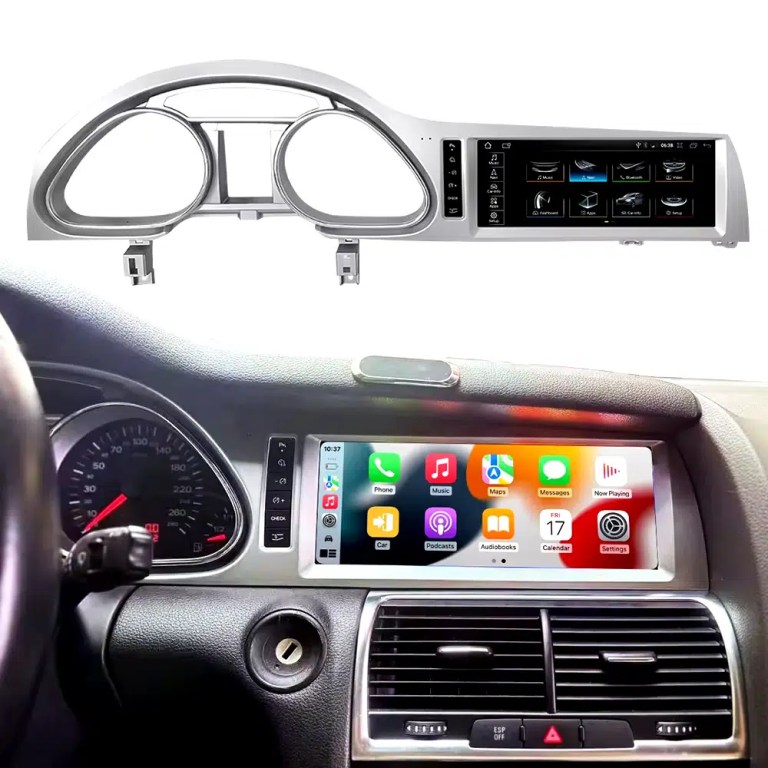
See the installed result inside the Audi Q7 dashboard

This cockpit view helps you judge the final screen position, dashboard balance and CarPlay-style daily-use interface before ordering.

Audi Q7 10.25 Android screen upgrade installed dashboard with CarPlay view

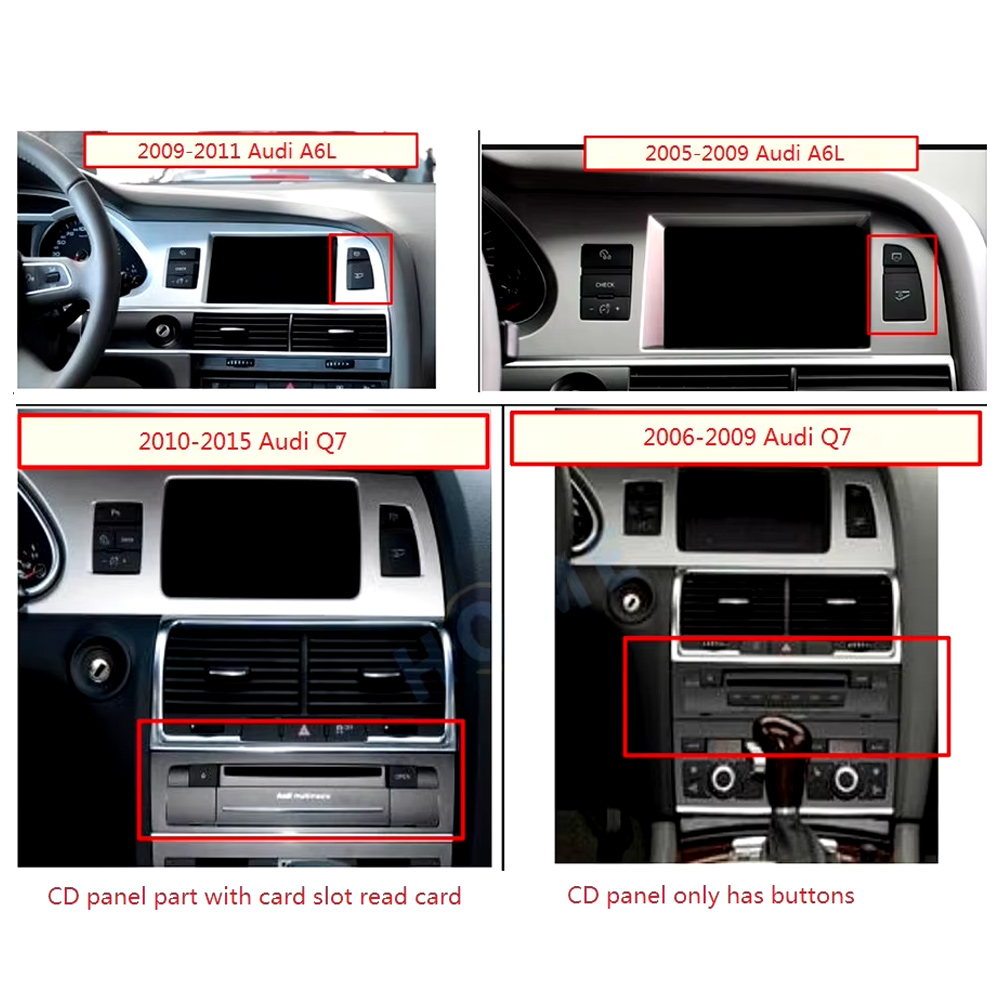
Check the original dashboard and CD/MMI panel before ordering

The correct Audi Q7 Android screen route depends on the original screen area, button layout, CD panel and model-year dashboard structure.

Audi Q7 2005 2009 2010 2015 dashboard CD MMI panel comparison for Android screen upgrade

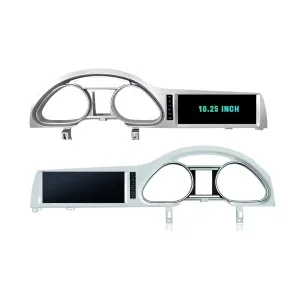
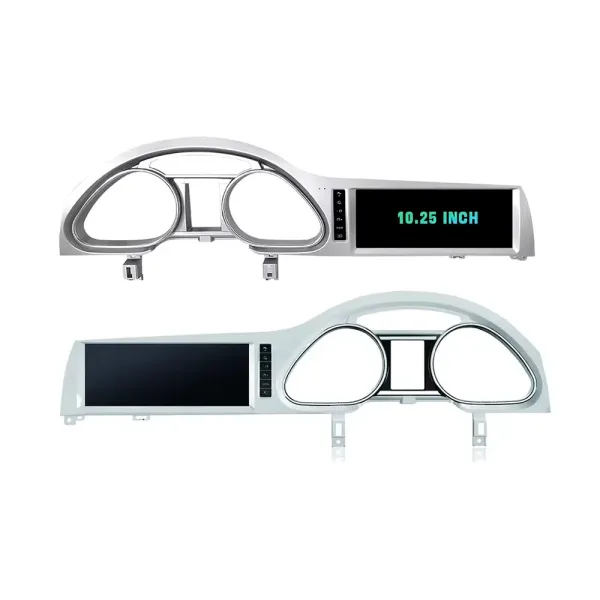
Confirm the 10.25-inch screen frame shape

The product frame view helps you compare steering-side layout and screen position so iKAGOO can prepare the correct Q7-specific frame.

Audi Q7 10.25 Android screen LHD and RHD frame product view

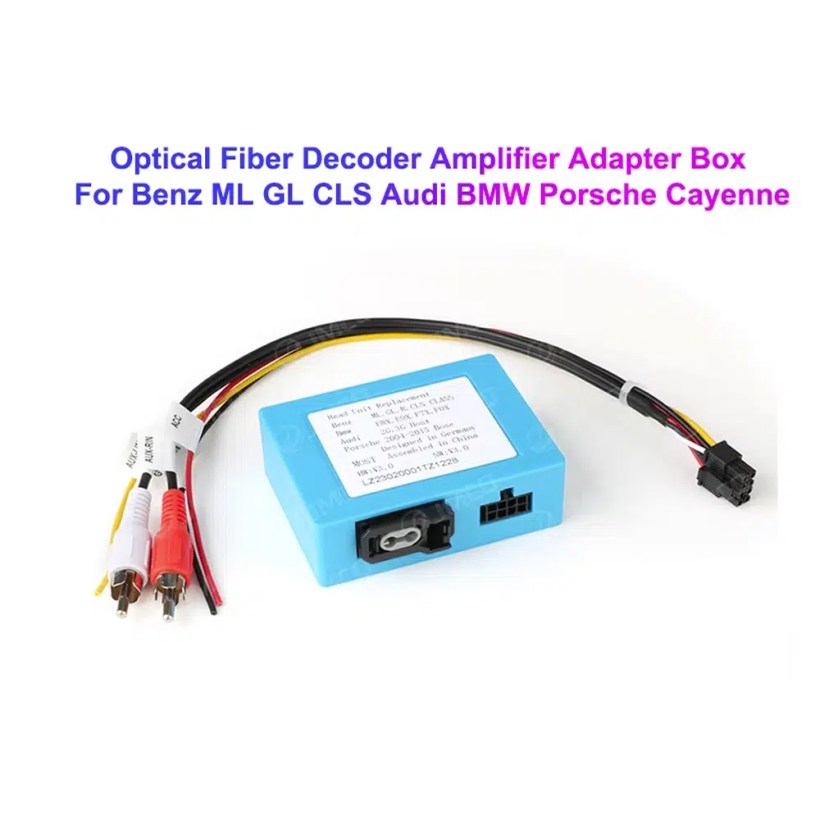
Understand the Bose and MOST fiber-optic decoder route

Many Q7 audio issues come from the amplifier and fiber-optic route. The required decoder must match the original Audi audio system and connector layout.

Audi Q7 MOST optical fiber decoder amplifier adapter for Android screen upgrade

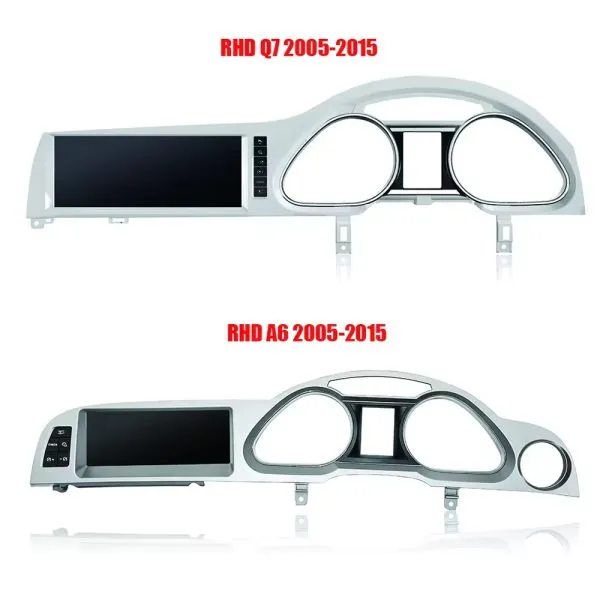
Compare Q7 and A6 frame routes carefully

This product reference makes one point clear: similar Audi frames are not automatically interchangeable. Your dashboard photo must be checked before shipment.

Audi Q7 4L Android screen frame comparison with Audi A6 frame route

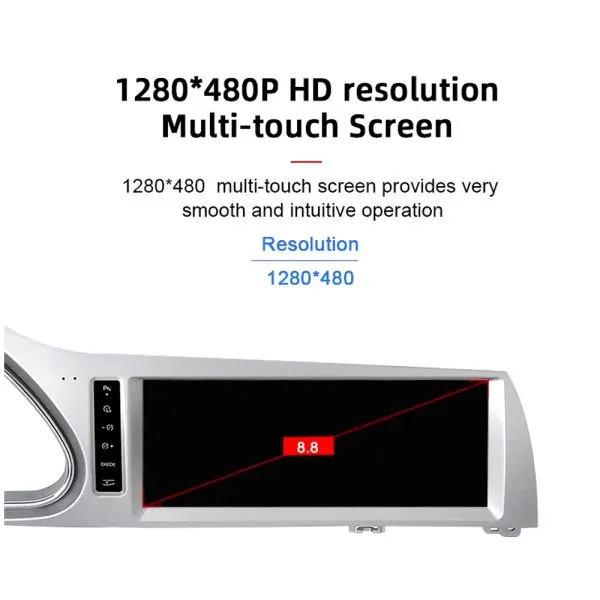
Review the 1280×480 screen reference

The wide display format is designed for the Q7 screen area and gives a cleaner navigation and media layout than the older factory display experience.

Audi Q7 10.25 Android screen 1280x480 multi touch display reference

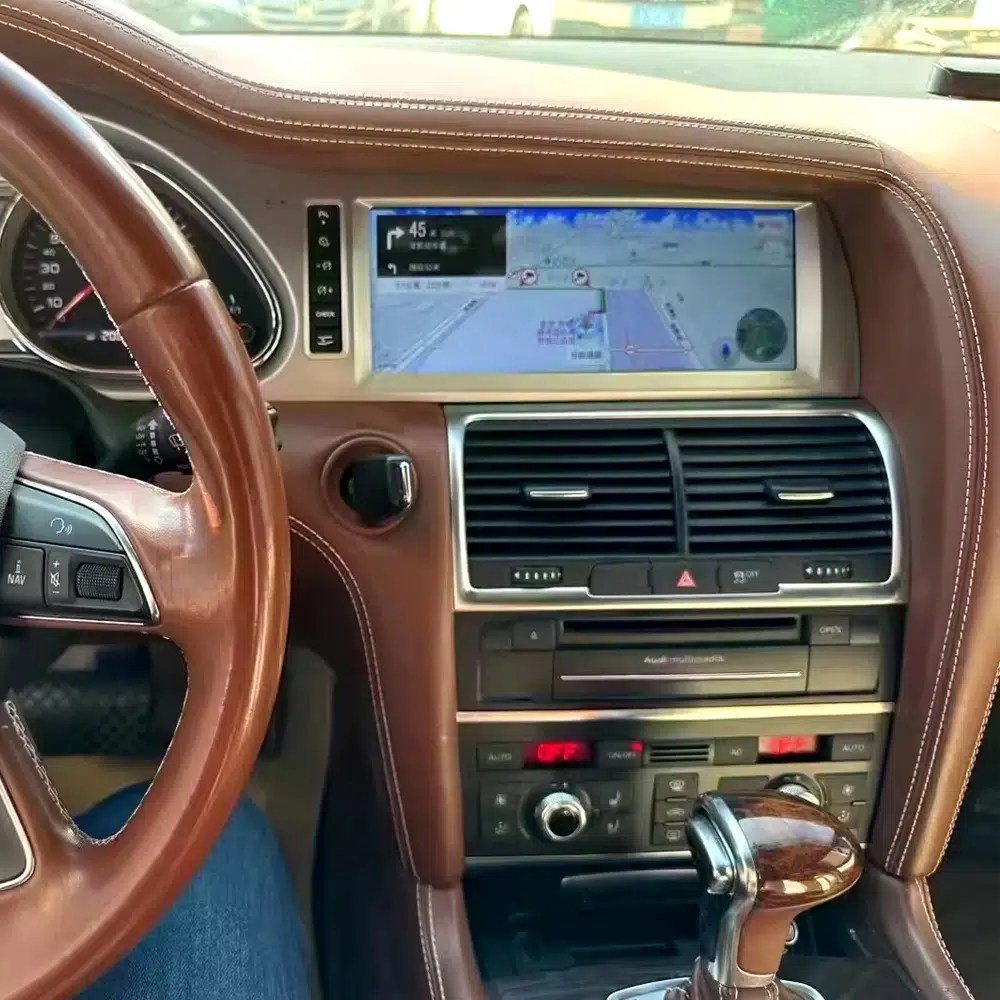
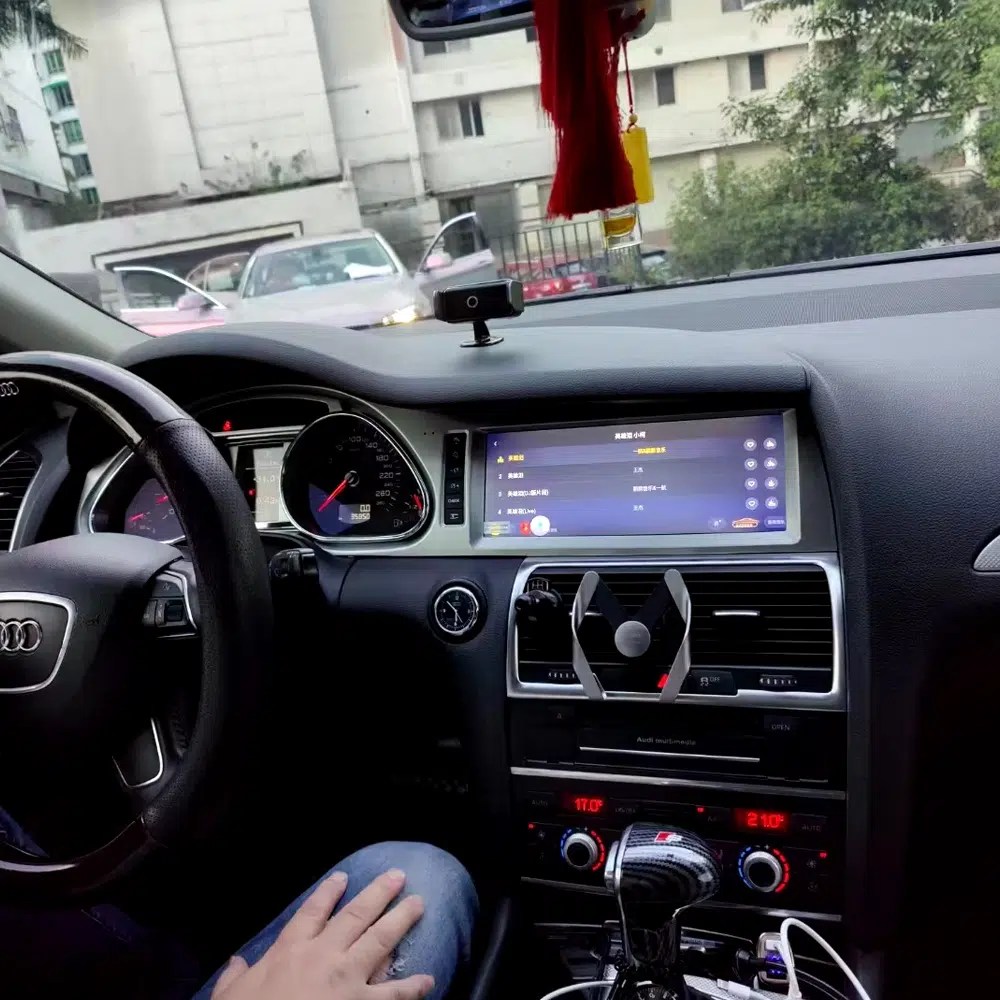
See navigation running inside a real Audi Q7 interior

The installed navigation view helps you judge driver visibility, screen angle and how the 10.25 Android display sits inside the used Q7 cabin.

Audi Q7 Android navigation screen installed in dashboard

Check another real installation interface

This cabin view gives another practical reference for screen readability, dashboard integration and menu position after installation.

Audi Q7 Android screen installed dashboard interface view

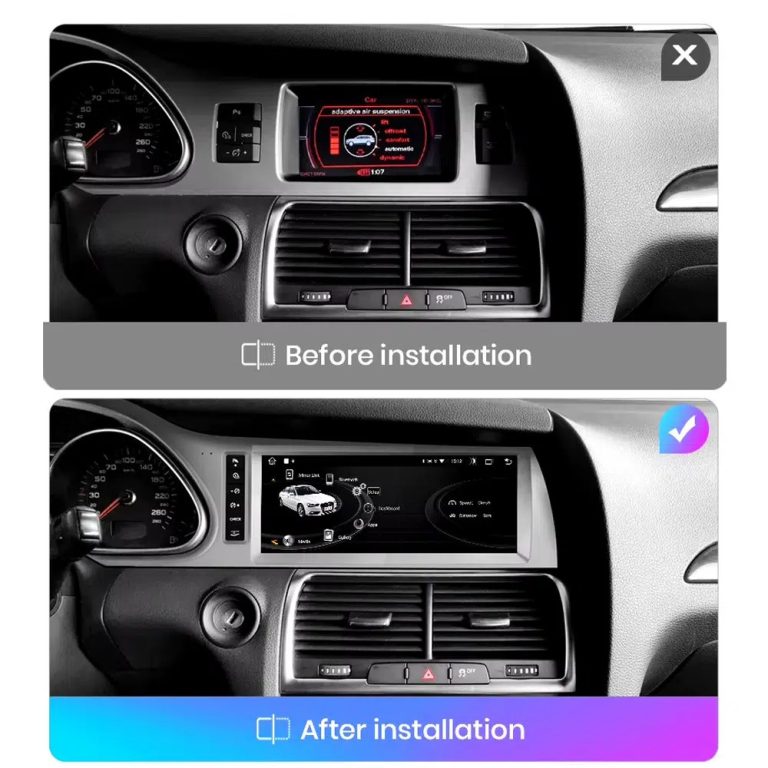
Compare the old display with the upgraded Android display

The before-and-after view shows the main visual change: the old screen area becomes a wider Android interface with a more modern layout.

Audi Q7 original screen before and Android screen after installation comparison

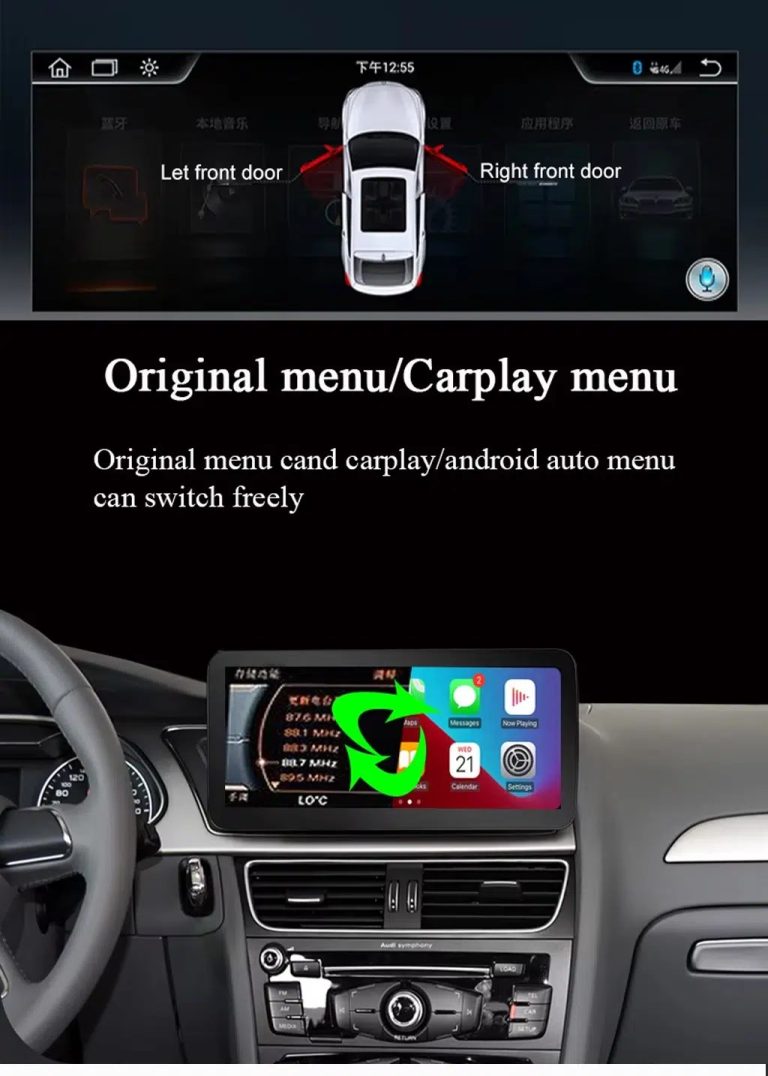
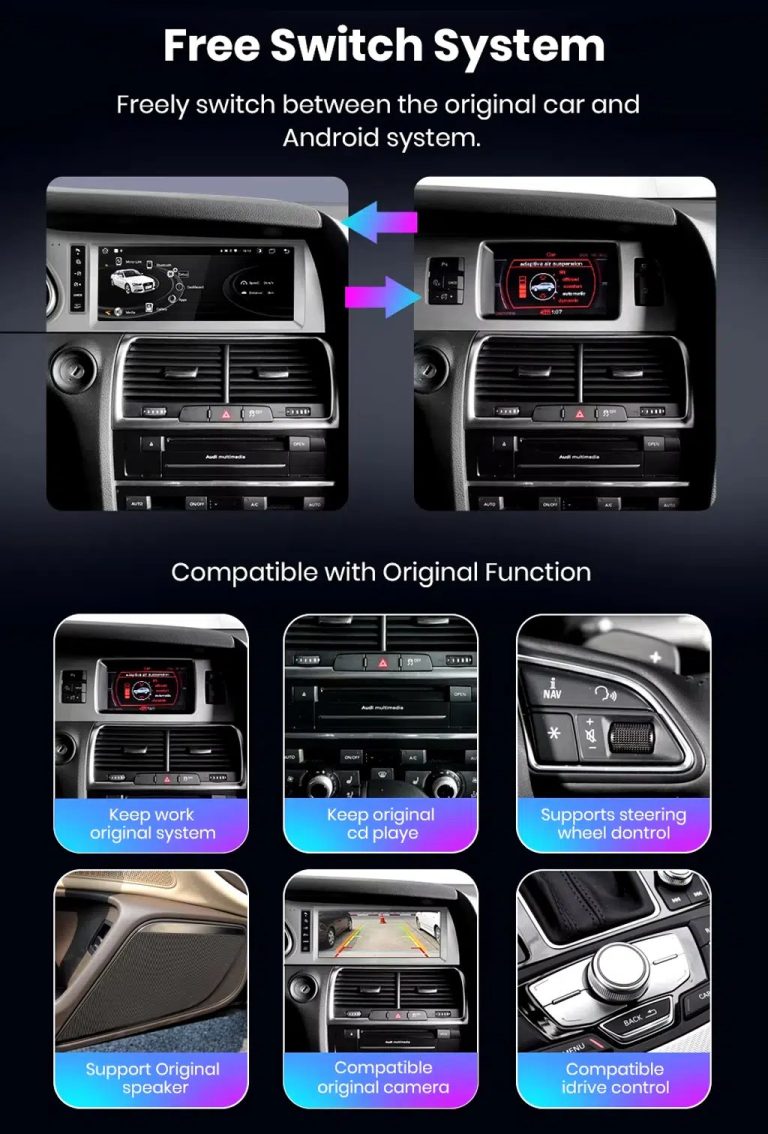
Switch between Android and supported original Audi systems

System switching matters for Q7 owners because it helps keep supported Audi menus available while adding Android, CarPlay and Android Auto functions.

Audi Q7 Android screen free switch between Android and original Audi system

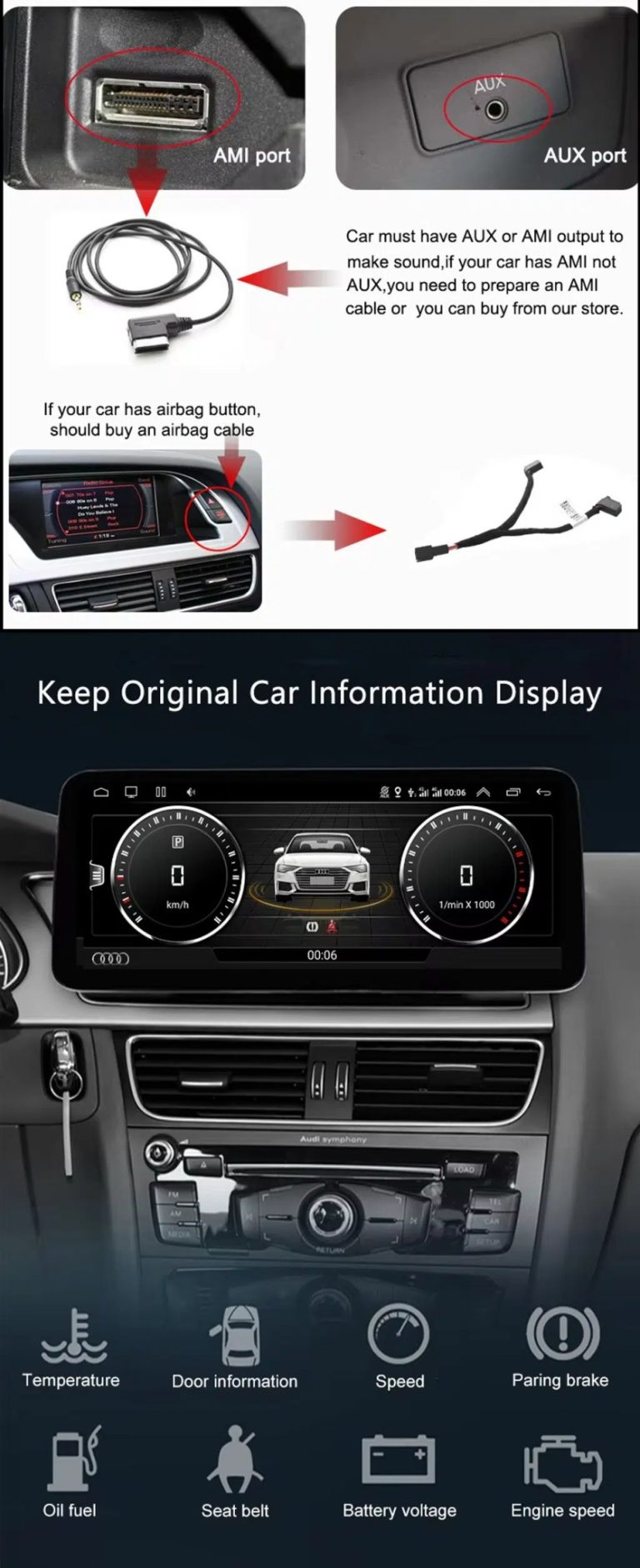
Check AUX, AMI and original vehicle information routes

Some Q7 configurations need the correct AUX, AMI or adapter route for sound and original data display. This should be checked before installation.

Audi Q7 AUX AMI cable original vehicle information display Android screen upgrade

Use original menu and CarPlay menu switching

This interface direction shows how the owner can move between the supported original Audi interface and modern CarPlay or Android Auto style display.

Audi Q7 original menu and CarPlay menu switching Android screen upgrade

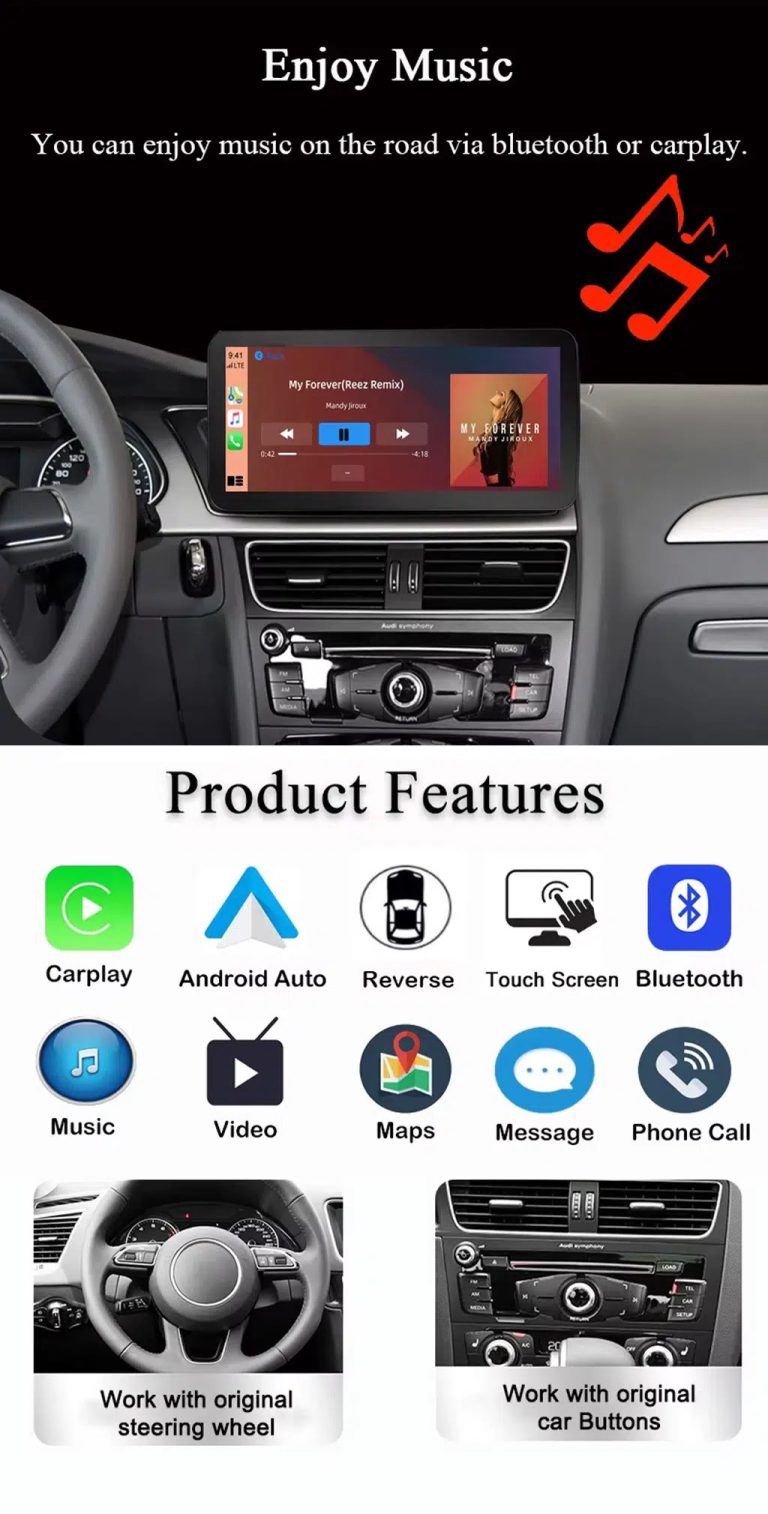
Use music, maps, calls and steering-wheel controls every day

The function overview explains the daily value of the upgrade: music, video, maps, messages, calls, touch operation and supported steering-wheel control.

Audi Q7 Android screen music Bluetooth maps CarPlay steering wheel features

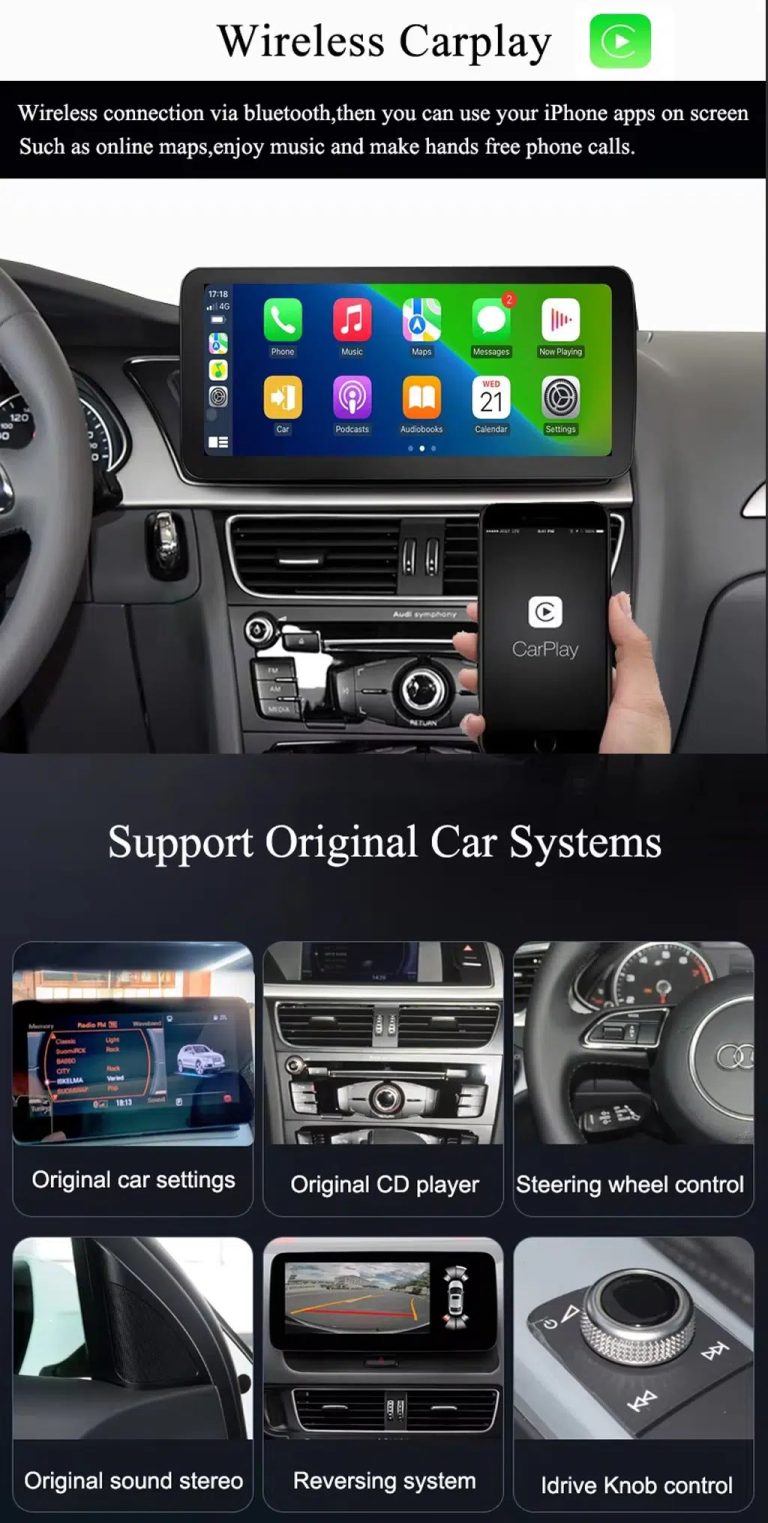
Use wireless CarPlay while keeping supported original car systems

This visual combines wireless CarPlay with original-system value, helping buyers understand that this is more than a simple screen swap.

Audi Q7 wireless CarPlay screen upgrade with original car system support

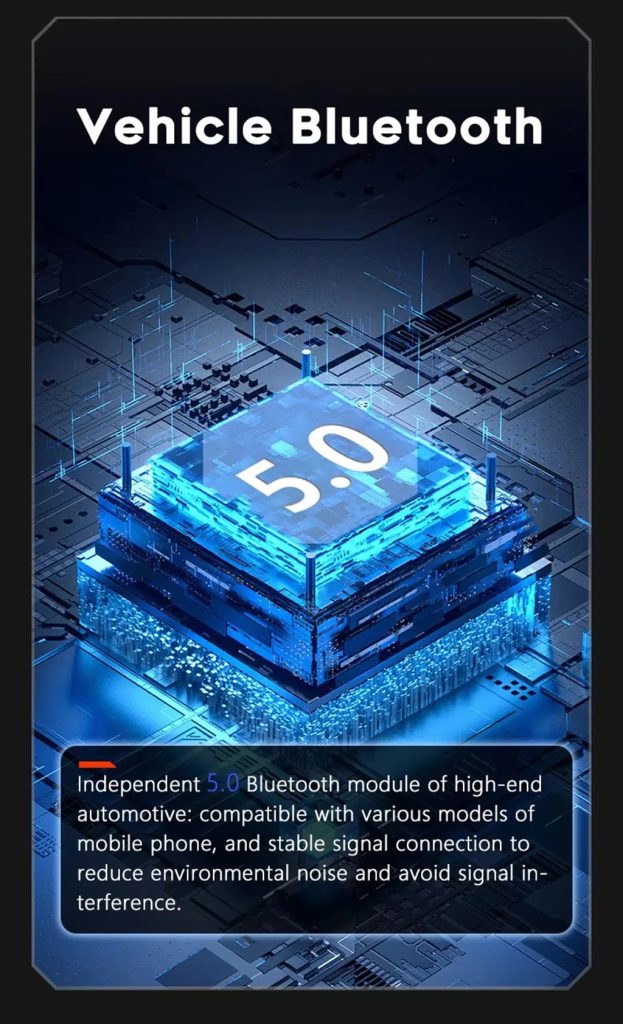
Improve Bluetooth connection on supported hardware

Bluetooth version depends on the selected hardware route, but the upgrade direction supports more practical phone and media connection than relying only on old factory behavior.

Audi Q7 Android screen Bluetooth 5 feature reference

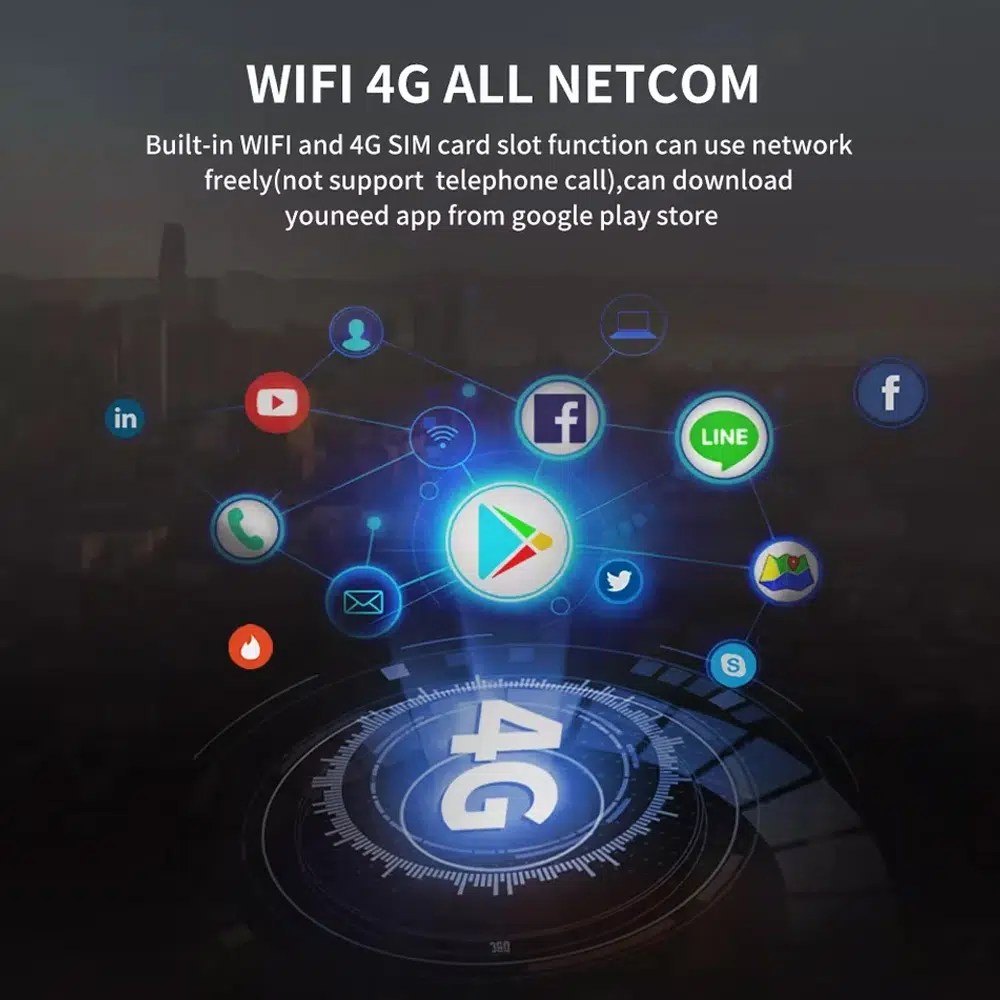
Use WiFi and 4G for apps and online navigation

WiFi and compatible 4G support online maps, app downloads and connected Android functions where local network and selected hardware allow it.

Audi Q7 Android screen WiFi 4G Google Play app connection

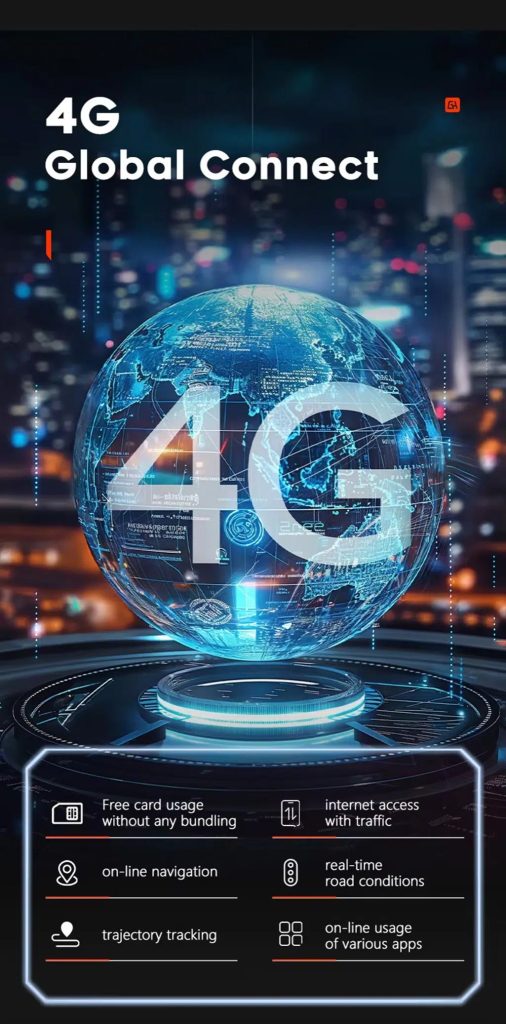
ใช้ฟีเจอร์เครือข่าย 4G เมื่อบริการในพื้นที่เอื้ออำนวย

Online navigation, traffic information and app access depend on compatible network service, SIM support and selected hardware configuration.

Audi Q7 Android screen 4G global connect online navigation apps

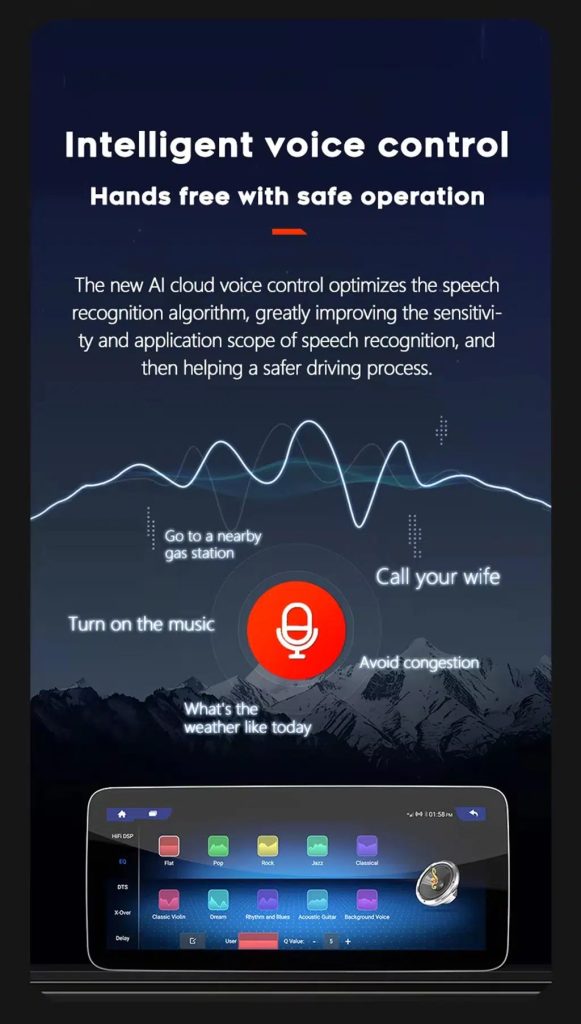
Use voice control with compatible apps

Voice control can make navigation, music and calls easier, but recognition depends on the app, microphone, language, internet connection and phone compatibility.

Audi Q7 Android screen intelligent voice control function

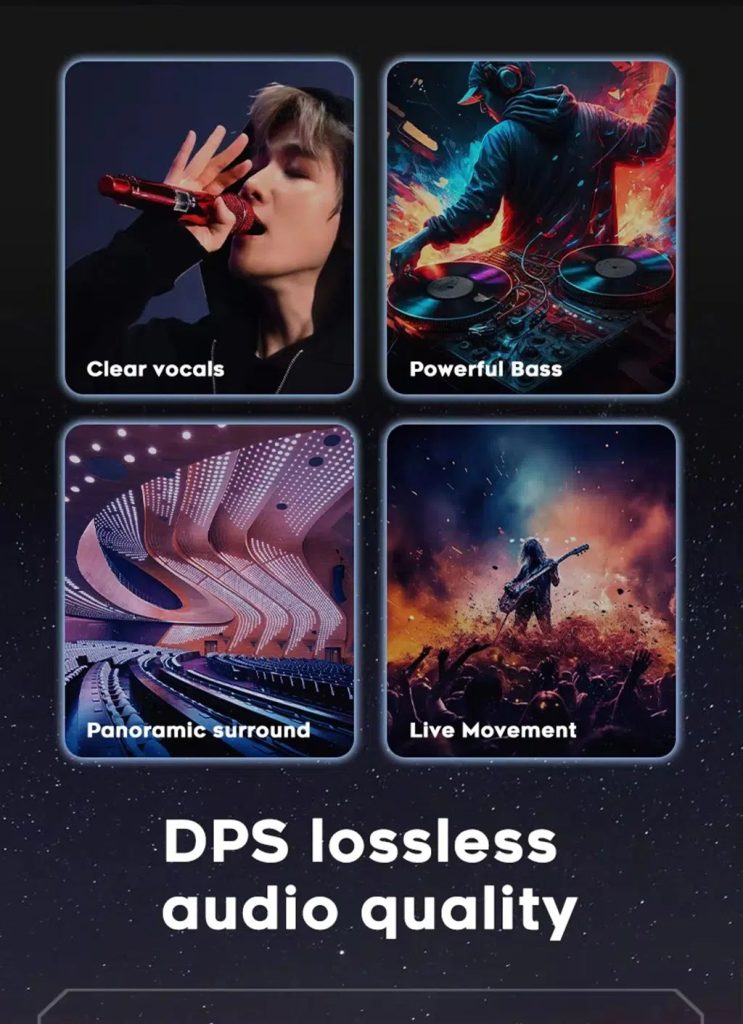
Tune the audio with DSP where supported

DSP helps tune vocals, bass, surround feeling and sound staging when the selected hardware version includes the supported DSP route.

Audi Q7 Android screen DSP audio quality feature reference

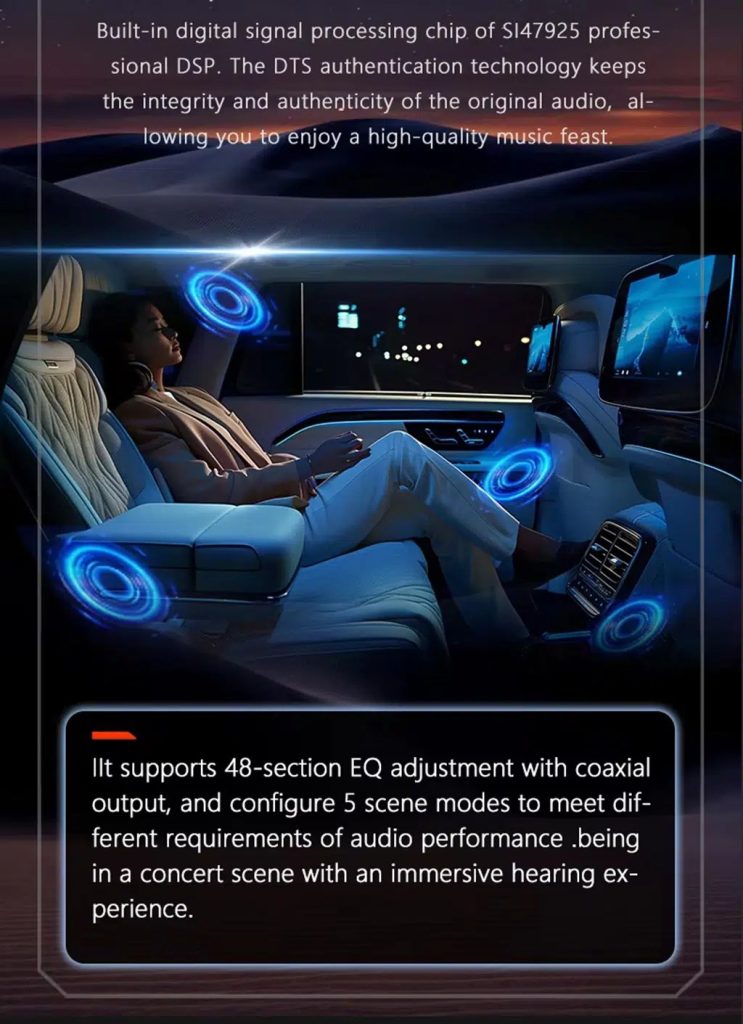
Review multimedia and DSP function direction

This additional media reference helps buyers understand the entertainment and equalizer direction before choosing the hardware version.

Audi Q7 Android screen DSP and multimedia adjustment feature reference

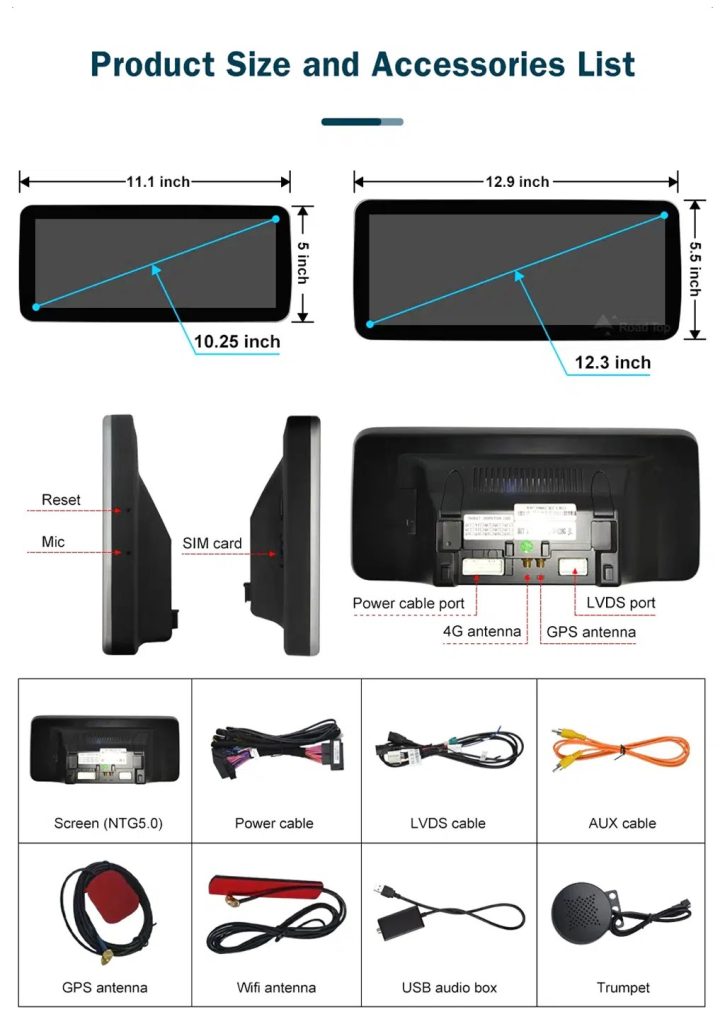
Check product size, rear ports and accessories

The accessory view helps installers understand the screen size, rear connection area, LVDS, power cable, AUX cable, GPS antenna, WiFi antenna, USB audio box and other included parts.

Audi Q7 Android screen product size rear ports and accessories list

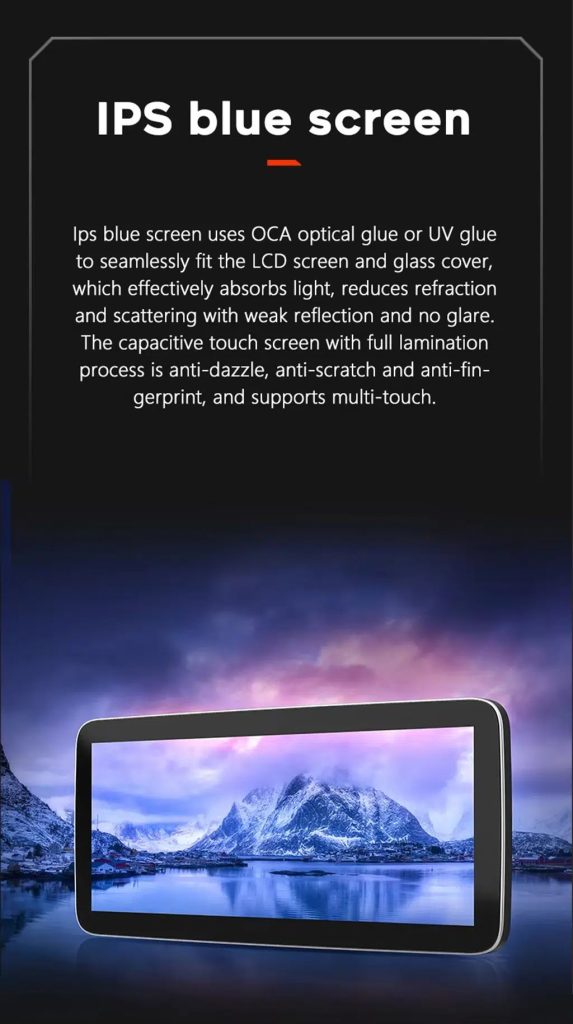
Understand the IPS blue screen display direction

The display construction direction supports a clearer and more comfortable in-car touch experience for daily map, media and menu use.

Audi Q7 Android screen IPS blue screen capacitive touch display

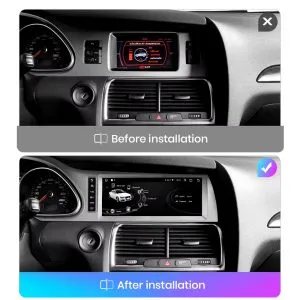
Review the product gallery before-and-after reference

This gallery view gives another quick reference for the original Q7 display before installation and the wider Android interface after installation.

Audi Q7 original screen before and 10.25 Android screen after installation gallery reference

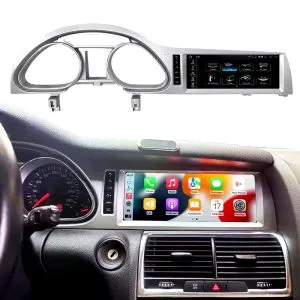
Confirm another installed dashboard angle

This gallery view shows the unit installed in the Q7 dashboard with a modern interface, helping buyers compare the final visual balance.

Audi Q7 10.25 Android screen installed dashboard gallery reference

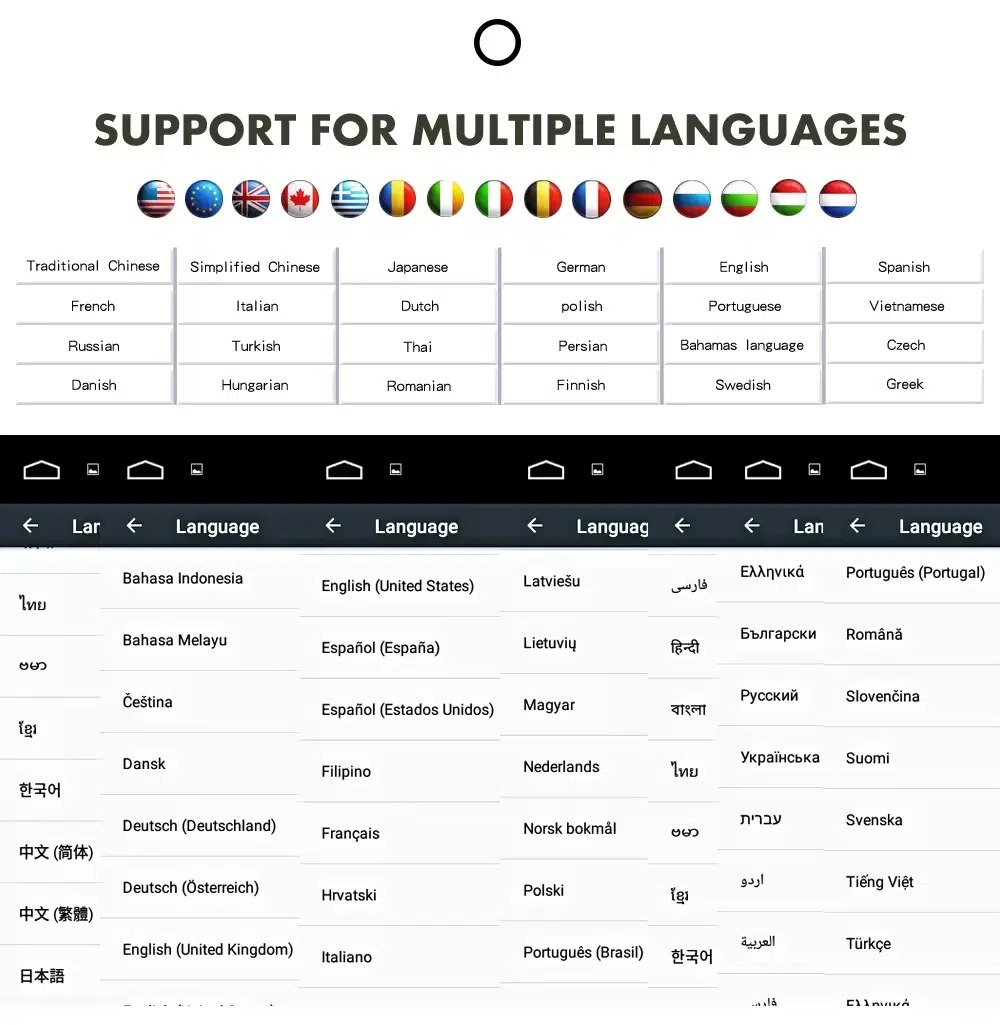
ใช้ส่วนติดต่อ Android ในหลายภาษา

Multiple language support helps international owners and installers use the Android interface in a familiar language. Final availability depends on firmware and app settings.

Audi Q7 Android screen multiple language interface support

Common interface languages include English, German, French, Spanish, Italian, Portuguese, Dutch, Russian, Arabic, Japanese and Chinese, depending on firmware and app settings.

การติดตั้ง

Installation Route for the Audi Q7 10.25 Android Screen Upgrade

รีวิวรถยนต์

Submit the year, dashboard photos, steering position and original audio-system details.

การจับคู่การกำหนดค่า

iKAGOO checks the frame, harness, CAN decoder, amplifier and fiber-optic requirements.

Pre-Shipment Setup

The Android unit and matching accessories are prepared for the confirmed vehicle configuration.

การสนับสนุนการติดตั้ง

Guidance is available for wiring, configuration and supported-function testing.

Main work required

  • Confirm dashboard year route, CD panel, MMI system and steering side before shipment.
  • Check whether the car has Bose, external amplifier or MOST fiber optic.
  • Remove the original screen area and required dashboard trim carefully.
  • Connect the matched power harness, CAN decoder, LVDS/video route and audio adapter.
  • Install fiber-optic decoder when confirmed necessary.
  • Connect GPS, USB, camera, microphone and WiFi/4G accessories according to selected configuration.
  • Power on before final reassembly.
  • Test original menu switching, CarPlay, Android Auto, audio, steering-wheel controls, cameras, Bluetooth, GPS and sleep/wake behavior.

Stop installation and contact iKAGOO if this happens

  • The screen frame does not match the dashboard opening.
  • รูปร่างของตัวเชื่อมต่อหรือการจัดวางขาไม่ตรงกับชุดสายไฟที่ให้มาอย่างชัดเจน.
  • The car has Bose / MOST fiber optic but no confirmed decoder route.
  • No sound comes from the speakers after power-on testing.
  • The original MMI menu cannot be accessed after connection.
  • A fiber-optic cable is bent sharply, crushed or left disconnected.
  • ขาต่อเชื่อมงอ หลวม หรือเสียหาย.
  • ฟิวส์ขาดซ้ำแล้วซ้ำอีก หรือมีความร้อน กลิ่น หรือควันผิดปกติปรากฏขึ้น.
  • การติดตั้งจะต้องตัดสายไฟหลักของโรงงาน.
แพ็กเกจ

What Is Normally Included

Android Display

Vehicle-specific display assembly with the selected Android hardware configuration.

Wiring Harness

Power, signal and integration wiring selected according to the confirmed vehicle.

CAN Decoder

Compatible decoder for supported steering controls and vehicle-information integration.

GPS Antenna

External GPS antenna for supported Android navigation functions.

USB Connections

USB extension inputs for compatible media, accessories and software updates.

Optional Adapters

Fiber-optic decoder, camera interface, AMI cable or other adapters when confirmed as necessary.

Package contents vary by selected version and confirmed vehicle configuration. The final order details should be checked before dispatch.

Shipping & Support

การจัดส่ง, การรับประกัน และการสนับสนุนหลังการขาย

การเตรียมคำสั่งซื้อ

การเตรียมคำสั่งซื้อตามปกติจะใช้เวลา 1–3 วันทำการ หลังจากที่การตรวจสอบการกำหนดค่าของยานพาหนะของคุณเสร็จสิ้นแล้ว.

ติดตามการจัดส่งทั่วโลก

การจัดส่งระหว่างประเทศสามารถติดตามได้ ระยะเวลาการจัดส่งโดยประมาณขึ้นอยู่กับปลายทาง การตรวจปล่อยศุลกากร และวิธีการจัดส่งที่เลือกในขั้นตอนการชำระเงิน.

การรับประกันฮาร์ดแวร์ของ 12-month

ปัญหาฮาร์ดแวร์ที่มีสิทธิ์ได้รับการแก้ไขจะอยู่ภายใต้การรับประกันแบบจำกัดของ iKAGOO ความเสียหายที่เกิดจากการต่อสายไฟไม่ถูกต้อง การใช้งานผิดวิธี การรั่วซึมของน้ำ หรือการดัดแปลงโดยไม่ได้รับอนุญาต จะไม่ได้รับการคุ้มครองตามปกติ.

Vehicle-specific products require accurate vehicle information before shipment. If iKAGOO confirmed compatibility before purchase, your information was accurate, and no reasonable installation solution is available after supported troubleshooting, the current published return and refund policy applies.

นโยบายการคืนสินค้าและการคืนเงิน · นโยบายการรับประกัน · นโยบายการจัดส่ง

คำถามที่พบบ่อย

Audi Q7 10.25 Android Screen Upgrade FAQ

Is this Audi Q7 10.25 Android screen upgrade for every Q7 from 2006 to 2015?
No, not automatically. Compatibility depends on dashboard structure, CD/MMI panel, steering side, amplifier, MOST fiber optic, camera system and connector layout. Vehicle photos must be checked before shipment.
Does this product support 2005 Audi Q7?
Yes, some Q7 4L routes may match 2005–2009 vehicles, but the main product direction is 2006–2015. If your vehicle is 2005 or the market-year is unclear, send dashboard and CD/MMI panel photos before ordering.
รองรับ CarPlay และ Android Auto แบบไร้สายหรือไม่?
Yes, supported configurations provide wireless Apple CarPlay and Android Auto for compatible smartphones. Connection behavior depends on the phone, firmware and selected hardware version.
Will the original Audi MMI menu still work?
Yes, supported original Audi menu access can be retained through the matched system-switching route, but the original MMI system and connector route must be confirmed first.
Will Bose or the factory amplifier still work?
Yes, it can work when the correct audio route is prepared. Some Bose, external amplifier or MOST fiber-optic systems may require a compatible decoder.
Does every Audi Q7 need a fiber optic decoder?
No, not every vehicle needs one. The requirement depends on the original amplifier and MOST fiber-optic audio configuration, not only the model year.
Can the original rear camera be retained?
Yes, retention may be possible with the correct video interface or decoder. The original camera format must be checked before ordering.
Does it work with left-hand-drive and right-hand-drive Q7 vehicles?
Yes, compatible routes may be available for both steering positions, but the frame and button orientation must be confirmed from dashboard photographs.
การติดตั้งเป็นแบบเสียบแล้วใช้ได้เลยหรือไม่?
Yes, the matched harness is designed for clean connection, but installation is still Level 3 — Advanced DIY because Audi MMI, amplifier, MOST fiber optic, camera and CANBUS functions must be checked and tested carefully.
ฉันควรส่งอะไรไปก่อนการสั่งซื้อ?
Yes, send your vehicle year, LHD/RHD position, original dashboard photo, original screen photo, CD/MMI panel photo, amplifier details, connector photos if requested, and whether you need Bose/MOST, rear camera or 360 camera support.
Final Step

ทำให้ Audi Q7 4L ของคุณดูทันสมัยอีกครั้ง

Choose this Audi Q7 10.25 Android screen upgrade if you want a factory-style display route, wireless CarPlay, Android Auto, GPS navigation, DSP audio and iKAGOO configuration matching for your dashboard, MMI and audio system.

Related Q7 upgrade: Audi Q7 แผงหน้าปัดดิจิทัล

5.00

อ้างอิงจากรีวิว 2
2
0
0
0
0

2 รีวิวสำหรับ Audi Q7 10.25 Android Screen Upgrade 2006–2015 wireless CarPlay

  1. ไบรอัน กัลลาเกอร์

    คะแนนรวม
    คุ้มค่าเงิน

    อัปเกรดครั้งใหญ่สุด ๆ สำหรับ Q7 2013 ของฉัน! หน้าจอขนาด 10.25 นิ้วคมชัดและทำให้ภายในดูทันสมัยอย่างสิ้นเชิง Apple CarPlay ไร้สายเชื่อมต่อได้อย่างไร้ที่ติภายใน 5 วินาทีหลังจากสตาร์ทรถ ยังคงฟังก์ชัน MMI จากโรงงานทั้งหมดได้อย่างสมบูรณ์แบบ แนะนำอย่างยิ่งสำหรับใครก็ตามที่ต้องการนำ Audi รุ่นเก่าของตนเข้าสู่ยุคปัจจุบัน!

    มีประโยชน์หรือไม่?
  2. ไบรอัน กัลลาเกอร์

    คะแนนรวม
    คุ้มค่าเงิน

    หน้าจอดูเหมือนอุปกรณ์ OEM และการประกอบเข้ากับตัวรถพอดีมาก คุณภาพเสียงผ่าน AUX ยอดเยี่ยม การติดตั้งส่วนใหญ่เป็นแบบ plug-and-play ใช้เวลาประมาณ 2 ชั่วโมงพร้อมเครื่องมือถอดชิ้นส่วนตกแต่ง ลดหนึ่งดาวเพราะเส้นบอกระยะของกล้องถอยหลังจำเป็นต้องปรับเทียบในเมนูการตั้งค่าจากโรงงาน แต่ฝ่ายสนับสนุนแนะนำขั้นตอนให้อย่างรวดเร็ว.

    มีประโยชน์หรือไม่?
เขียนรีวิว
ความเข้ากันได้ของ iKAGOO กับรถยนต์, การจัดส่งระหว่างประเทศ, การรับประกัน และการสนับสนุนลูกค้า
ฝ่ายสนับสนุนลูกค้า iKAGOO

ความเข้ากันได้ การจัดส่ง และการสนับสนุน

ข้อมูลที่ชัดเจนเกี่ยวกับความเข้ากันได้ของรถยนต์ การเตรียมคำสั่งซื้อ การจัดส่งระหว่างประเทศ การรับประกัน การคืนสินค้า และการสนับสนุนหลังการขาย.

การตรวจสอบความเข้ากันได้ ข้อมูลรถยนต์จะถูกตรวจสอบก่อนจัดส่ง.
การประมวลผลคำสั่งซื้อ ปกติ 1–3 วันทำการ ก่อนการจัดส่ง.
12-Month การรับประกัน การรับประกันฮาร์ดแวร์แบบจำกัดสำหรับข้อบกพร่องที่เข้าเงื่อนไข.
การติดตามการจัดส่ง ข้อมูลการติดตามจะถูกส่งให้หลังจากสินค้าถูกส่งออกไปแล้ว.
ขั้นตอนการสั่งซื้อเฉพาะรถยนต์

เราตรวจสอบรายละเอียดก่อนที่คำสั่งซื้อของคุณจะออกจากเรา

อุปกรณ์อิเล็กทรอนิกส์เฉพาะรถยนต์ต้องใช้เวอร์ชันที่ถูกต้อง การเดินสายไฟและการกำหนดค่า กระบวนการของเราถูกออกแบบมาเพื่อลด ปัญหาความเข้ากันได้และการติดตั้งที่หลีกเลี่ยงได้.

ก่อนการชำระเงิน

การตรวจสอบความเข้ากันได้เบื้องต้น

อาจมีการตรวจสอบรุ่นรถ ปี ระบบเดิม และข้อมูลการกำหนดค่าที่เกี่ยวข้อง ก่อนการซื้อเพื่อลดความเสี่ยง ในการเลือกรุ่นที่ผิด.

หลังการชำระเงิน

การตรวจสอบความเข้ากันได้และการกำหนดค่าขั้นสุดท้าย

ก่อนการจัดส่ง คำสั่งซื้อจะถูกตรวจสอบกับข้อมูลรถที่ยืนยันแล้ว เพื่อให้สามารถเตรียมรุ่น การกำหนดค่า และส่วนประกอบเฉพาะรถที่จำเป็นได้.

หลังการชำระเงิน เรามุ่งมั่นทำให้ถูกต้องตั้งแต่ครั้งแรก
ดูกระบวนการสั่งซื้อทั้งหมด กระบวนการทั้งหมด
01 รับคำสั่งซื้อแล้ว คำสั่งซื้อ
02 การตรวจสอบความเข้ากันได้ขั้นสุดท้าย ตรวจสอบ
03 ทดสอบและเตรียมพร้อม ทดสอบ
04 แพ็คและจัดส่ง จัดส่ง
05 การติดตามและการสนับสนุน การสนับสนุน

เป้าหมายของเราคือทำให้คำสั่งซื้อของคุณถูกต้องก่อนที่สินค้าจะออกจากเรา. เราตรวจสอบความเข้ากันได้ เตรียมการตั้งค่าที่ถูกต้อง และจะติดต่อ คุณเฉพาะเมื่อมีบางอย่างที่ยังต้องยืนยัน.

คำถามเกี่ยวกับการจัดส่ง การคืนสินค้า การรับประกัน และคำสั่งซื้อ

สรุปสาระสำคัญของเงื่อนไขหลักที่ใช้กับ คำสั่งซื้อเฉพาะรถ iKAGOO.

01

คำสั่งซื้อจัดส่งจากที่ไหน และใช้เวลาจัดส่งนานเท่าใด?

คำสั่งซื้อ iKAGOO ส่วนใหญ่จะถูกจัดส่งจากสถานที่เตรียมสินค้าของเราในประเทศจีน หลังจากตรวจสอบการกำหนดค่าผลิตภัณฑ์และข้อมูลรถยนต์แล้ว.

การดำเนินการตามคำสั่งซื้อตามปกติใช้เวลาประมาณ 1–3 วันทำการ.\r\n เวลาในการจัดส่งโดยประมาณหลังจากสินค้าถูกจัดส่งโดยทั่วไปคือ:

  • สหรัฐอเมริกาและแคนาดา: ประมาณ 5–9 วันทำการ
  • สหภาพยุโรป: ประมาณ 7–15 วันทำการ
  • สหราชอาณาจักรและออสเตรเลีย: ประมาณ 7–10 วันทำการ
  • ภูมิภาคอื่นที่รองรับ: ประมาณ 7–20 วันทำการ

การผ่านพิธีการศุลกากร วันหยุด สภาพอากาศ ความล่าช้าของผู้ให้บริการขนส่ง และ\r\n การจัดส่งไปยังพื้นที่ห่างไกลอาจส่งผลต่อการประมาณการเหล่านี้.

02

ฉันจะต้องชำระภาษีมูลค่าเพิ่ม อากรนำเข้า หรือค่าธรรมเนียมศุลกากรหรือไม่?

การจัดส่งระหว่างประเทศมาตรฐานโดยปกติไม่รวมภาษีมูลค่าเพิ่มของประเทศปลายทาง อากรนำเข้า ค่าธรรมเนียมนายหน้า หรือ\r\n ค่าธรรมเนียมการผ่านพิธีการศุลกากร.

สำหรับจุดหมายปลายทางในสหภาพยุโรปที่เข้าเงื่อนไข, อาจมีบริการจัดส่งแบบ DDP ให้เลือกใช้. ค่าธรรมเนียมที่เกี่ยวข้องกับการนำเข้าจะรวมอยู่เฉพาะเมื่อเลือก DDP ที่ชำระเงินหรือได้รับการยืนยันเป็นลายลักษณ์อักษรจาก iKAGOO ก่อนจัดส่ง.

เมื่อไม่ได้เลือก DDP ค่าธรรมเนียมที่เรียกเก็บโดยศุลกากรท้องถิ่น หรือผู้ให้บริการจัดส่งมักเป็นความรับผิดชอบของผู้รับ.

03

ฉันสามารถขอจัดส่งแบบด่วนได้หรือไม่ และจะติดตามพัสดุได้อย่างไร

อาจมีบริการจัดส่งแบบด่วนหรือแบบเร่งด่วนสำหรับสินค้า และจุดหมายปลายทางที่เลือก ความพร้อม ผู้ให้บริการ และ ค่าใช้จ่ายเพิ่มเติมใด ๆ จะได้รับการยืนยันก่อนจัดส่ง.

ทั้งนี้ขึ้นอยู่กับเส้นทางและประเภทสินค้า iKAGOO อาจใช้ DHL, FedEx, UPS, EMS, 4PX หรือผู้ให้บริการโลจิสติกส์ที่ติดตามได้รายอื่น.

หลังจากจัดส่ง หมายเลขติดตามหรือลิงก์ติดตาม มักจะถูกส่งไปยังอีเมลที่ใช้สำหรับคำสั่งซื้อ การอัปเดตการติดตามอาจใช้เวลาหลายวันทำการจึงจะแสดง ในระหว่างการโอนย้ายระหว่างผู้ให้บริการระหว่างประเทศ.

04

นโยบายการคืนสินค้าและการคืนเงินคืออะไร?

สิทธิ์ในการคืนสินค้าขึ้นอยู่กับเหตุผลในการคืน สภาพสินค้า สถานะการติดตั้ง หลักฐานประกอบ และว่าการคืนนั้นได้รับการอนุมัติจาก iKAGOO หรือไม่.

สำหรับการคืนสินค้าที่ไม่มีความบกพร่องและได้รับอนุมัติ โดยปกติสินค้าต้องไม่ถูกใช้งาน ไม่ถูกติดตั้ง ครบถ้วน และอยู่ในสภาพที่พร้อมจำหน่ายต่อ โดยทั่วไปลูกค้าจะเป็นผู้รับผิดชอบค่าจัดส่งสำหรับการคืนที่ได้รับอนุมัติ.

ค่าจัดส่งเดิม DDP VAT อากรศุลกากร และค่าใช้จ่ายด้านโลจิสติกส์อื่น ๆ โดยทั่วไปไม่สามารถขอคืนเงินได้ เว้นแต่กฎหมายกำหนดไว้หรือ iKAGOO ยืนยันเป็นอย่างอื่น.

ห้ามส่งสินค้าคืนก่อนที่คุณจะได้รับที่อยู่สำหรับการส่งคืนที่ได้รับการอนุมัติและคำแนะนำการคืนสินค้าจาก iKAGOO.

05

จะเกิดอะไรขึ้นถ้ายังไม่สามารถติดตั้งสินค้าได้หลังจากการตรวจสอบความเข้ากันได้

การคุ้มครองเพิ่มเติมอาจมีผลใช้บังคับเมื่อ iKAGOO ได้ตรวจสอบความเข้ากันได้กับรถยนต์ ลูกค้าได้ให้ข้อมูลรถยนต์ที่ถูกต้อง และได้ดำเนินการตามขั้นตอนการติดตั้งและการวินิจฉัยที่สมเหตุสมผล.

หาก iKAGOO ยืนยันว่าไม่มีแนวทางแก้ไขทางเทคนิคที่สมเหตุสมผล และปัญหาดังกล่าวได้ถูกรายงานภายใน 7 วันปฏิทินนับจากวันที่ส่งมอบ, ลูกค้าอาจมีสิทธิ์ได้รับการคืนเงินตามราคาสินค้า โดยไม่จำเป็นต้องส่งคืนสินค้า.

ค่าจัดส่งเดิม DDP VAT อากรศุลกากร และค่าใช้จ่ายอื่น ๆ จากบุคคลที่สาม ไม่รวมอยู่ในการคืนเงินตามราคาสินค้านี้.

06

มีการรับประกันแบบใดบ้าง และการเปิดผลิตภัณฑ์จะทำให้การรับประกันสิ้นสุดลงหรือไม่

ผลิตภัณฑ์ที่เข้าเกณฑ์รวมถึง รับประกันฮาร์ดแวร์แบบจำกัด 12 เดือน ครอบคลุมข้อบกพร่องจากการผลิตที่ได้รับการยืนยันและการขัดข้องของฮาร์ดแวร์ที่เข้าเกณฑ์ ภายใต้การใช้งานปกติ.

ทั้งนี้ขึ้นอยู่กับปัญหาที่ได้รับการยืนยัน การสนับสนุนอาจรวมถึงการวินิจฉัยจากระยะไกล การช่วยเหลือด้านการตั้งค่า ชิ้นส่วนทดแทน การซ่อมแซม การเปลี่ยนสินค้า การคืนเงินบางส่วนหรือคืนเงินเต็มจำนวน.

การตรวจสอบหรือการตรวจสอบโดยบุคคลที่สามไม่ได้ทำให้ การรับประกันทั้งหมดสิ้นสุดลงโดยอัตโนมัติ อย่างไรก็ตาม ความเสียหายที่เกิดจาก การซ่อมแซมโดยไม่ได้รับอนุญาต การดัดแปลงที่ไม่ถูกต้อง วงจรขาด การประกอบกลับอย่างไม่ถูกต้อง การเดินสายไฟผิด การกระแทก น้ำเข้า หรือการใช้ในทางที่ผิดโดยปกติไม่ได้รับความคุ้มครอง.

ติดต่อ iKAGOO ก่อนถอดชิ้นส่วน ดัดแปลง หรือซ่อมแซม ผลิตภัณฑ์ เพื่อให้สามารถให้ขั้นตอนการวินิจฉัยที่ถูกต้องได้.

07

หากคำสั่งซื้อของฉันมาถึงในสภาพเสียหายหรือมีชิ้นส่วนที่ขาดหายไป?

ติดต่อ iKAGOO ภายใน 7 วันปฏิทินนับจากวันที่ส่งมอบ และเก็บบรรจุภัณฑ์เดิม ป้ายจัดส่ง อุปกรณ์เสริม และผลิตภัณฑ์ไว้.

กรุณาให้ภาพถ่ายหรือวิดีโอที่ชัดเจนแสดง:

  • กล่องบรรจุภัณฑ์ภายนอกและฉลากการจัดส่ง
  • ความเสียหายของบรรจุภัณฑ์ที่มองเห็นได้
  • สินค้าและพื้นที่ที่ได้รับผลกระทบ
  • ได้รับอุปกรณ์เสริมและสายไฟทั้งหมดครบถ้วน

หลังจากการตรวจสอบ iKAGOO อาจจัดส่งชิ้นส่วนที่ขาดหายไป เปลี่ยนสินค้า ซ่อมแซม คืนเงิน หรือหาทางออกที่เหมาะสมอื่น ๆ.

08

หากฉันสั่งรุ่นผิดหรือต้องการเปลี่ยนแปลงคำสั่งซื้อต้องทำอย่างไร?

ติดต่อ iKAGOO โดยเร็วที่สุดและก่อนการติดตั้ง สำหรับการเปลี่ยนแปลงที่อยู่ การกำหนดค่ารถยนต์หรือผลิตภัณฑ์ โปรดติดต่อ เราภายใน 12 ชั่วโมงหลังจากสั่งซื้อ.

การเปลี่ยนหรือคืนสินค้าอาจได้รับการอนุมัติเมื่อผลิตภัณฑ์ที่เลือกผิด ยังไม่ถูกใช้งาน ยังไม่ถูกติดตั้ง ครบสมบูรณ์ และ เหมาะสำหรับการขายต่อ โดยปกติลูกค้าจะต้องรับผิดชอบ ค่าจัดส่งและส่วนต่างราคาที่เกี่ยวข้อง.

ผลิตภัณฑ์เฉพาะรุ่นรถอาจเข้าสู่กระบวนการจัดหา การเขียนโปรแกรม การทดสอบ หรือการกำหนดค่าหลังการชำระเงินไม่นาน เมื่อการเตรียมการ หรือการจัดส่งเริ่มต้นแล้ว การยกเลิกอาจไม่สามารถทำได้อีกต่อไป หรืออาจหักค่าใช้จ่ายที่เกิดขึ้นแล้วอย่างสมเหตุสมผล.

09

ในแพ็กเกจมีอะไรบ้าง?

เนื้อหาในแพ็คเกจอาจแตกต่างกันไปตามผลิตภัณฑ์ รุ่นรถ และระบบโรงงาน และการกำหนดค่าที่เลือก.

ทั้งนี้ขึ้นอยู่กับผลิตภัณฑ์ แพ็คเกจอาจมีส่วนประกอบหลักได้แก่ ตัวอุปกรณ์ ชุดสายไฟเฉพาะรุ่นรถ อินเทอร์เฟซ CANBUS อะแดปเตอร์ สาย USB เสาอากาศ ไมโครโฟน อุปกรณ์ยึดติด หรืออุปกรณ์ติดตั้งอื่น ๆ ที่จำเป็น.

ดูรูปผลิตภัณฑ์ ข้อมูลจำเพาะ และการยืนยันคำสั่งซื้อ เพื่อทราบเนื้อหาที่แน่นอนของคำสั่งซื้อของคุณ.

10

ฉันจะติดต่อ iKAGOO เพื่อขอรับการสนับสนุนด้านเทคนิคหรือหลังการขายได้อย่างไร

คุณสามารถติดต่อ iKAGOO ผ่านฟอร์มติดต่อบนเว็บไซต์ WhatsApp หรือช่องทางสนับสนุนอื่น ๆ ที่มีให้ เวลาตอบกลับ โดยทั่วไปอยู่ภายใน 24 ชั่วโมงทำการ.

เพื่อการวินิจฉัยทางเทคนิคที่เร็วขึ้น โปรดระบุหมายเลขคำสั่งซื้อ, รุ่นและปีของรถ, รูปถ่ายระบบจากโรงงานที่เกี่ยวข้อง, รูปผลิตภัณฑ์ และวิดีโอที่ชัดเจนซึ่งแสดงปัญหา.

ติดต่อฝ่ายสนับสนุน iKAGOO →

11

การชำระเงินปลอดภัยหรือไม่ และมีตัวเลือกการผ่อนชำระหรือไม่

การชำระเงินจะดำเนินการผ่านวิธีการชำระเงินที่ปลอดภัยซึ่งแสดงระหว่างการชำระเงิน.

ตัวเลือกบัตร กระเป๋าเงิน และการผ่อนชำระที่มีอาจแตกต่างกันไปตามประเทศ สกุลเงิน ผู้ให้บริการชำระเงิน และคุณสมบัติของลูกค้า.

บริการผ่อนชำระ รวมถึงตัวเลือกที่นำเสนอโดย PayPal หรือผู้ให้บริการชำระเงินรายอื่น ยังคงขึ้นอยู่กับความพร้อมในภูมิภาคและข้อกำหนดการอนุมัติของผู้ให้บริการนั้น.

นโยบาย iKAGOO ฉบับสมบูรณ์ โปรดตรวจสอบหน้านโยบายที่เผยแพร่เพื่ออ่านข้อกำหนดและเงื่อนไขฉบับสมบูรณ์.

ส่วนนี้เป็นคู่มือสรุปสำหรับลูกค้า หน้านโยบายฉบับสมบูรณ์ที่เผยแพร่ ใบยืนยันคำสั่งซื้อ และกฎหมายคุ้มครองผู้บริโภคที่เกี่ยวข้องจะมีผลบังคับก่อน หากข้อความใดแตกต่างกัน.

© 2026 iKAGOO. สงวนสิทธิ์ทุกอย่าง.
ดำเนินการโดย บริษัท เซินเจิ้น โอ๊ค เบย์ อิเล็กทรอนิกส์ เทคโนโลยี จำกัด.

การชำระเงินที่ปลอดภัย · ได้รับการปกป้องด้วย SSL