ธีม XStore
Menu Categories
Sale 47%
  • การติดตั้งหน้าปัดดิจิทัล VW Golf Mk7: Passat B8 และ Arteon
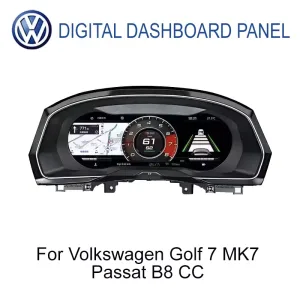
  • แผงหน้าปัดดิจิทัล Volkswagen สำหรับ Golf 7 Passat B8 CC ขนาด 12.3 นิ้ว IPS LCD มุมมองด้านหน้า
  • กอล์ฟ 7
  • ปาซาต B8
  • แผงหน้าปัดดิจิทัล Volkswagen สำหรับ Golf 7 Passat B8 CC แสดงอินเตอร์เฟซหน้าจอ IPS LCD ขนาด 12.3 นิ้ว
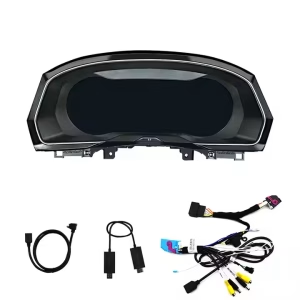
  • อุปกรณ์เสริมของแผงหน้าปัดดิจิทัล Volkswagen สำหรับ Golf 7 Passat B8 CC รวมถึงชุดสายไฟและขายึด
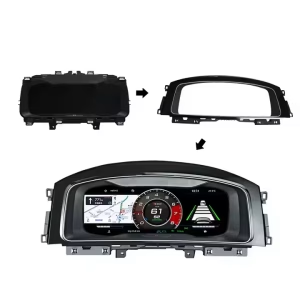
  • กรอบติดตั้งสำหรับหน้าปัดดิจิทัล Volkswagen Golf 7 Passat B8 CC ขนาดหน้าจอ 12.3 นิ้ว
  • ภาพระยะใกล้ของแผงหน้าปัดดิจิทัล Volkswagen สำหรับ Golf 7 Passat B8 CC แสดงหน้าจอ IPS LCD ขนาด 12.3 นิ้ว และคุณภาพการผลิต
  • S6cbc90ebb0684b45b3d834f533091510r
  • S2e1af3478ae24e65bd0b46c84d8a289ej

VW Golf Mk7 แผงหน้าปัดดิจิทัล 2013-2020 ขนาด 12.3 นิ้ว LCD ติดตั้งเพิ่มเติม

แบรนด์:
(1 บทวิจารณ์จากลูกค้า)

ราคาเดิมคือ: $785.00.ราคาปัจจุบันคือ: $418.00.

ปลอดภาษี เฉพาะสหภาพยุโรปและสหรัฐอเมริกา
รายละเอียด
ปลอดภัยโดย เพย์พาล
บริการชำระภาษีล่วงหน้า DDP

เราจัดการภาษีมูลค่าเพิ่มและภาษีศุลกากรทั้งหมด ประมาณการการประหยัด: $120–$280.

สหรัฐอเมริกา (48 รัฐ)ออสเตรียเบลเยียมบัลแกเรียโครเอเชียไซปรัสเช็กเกียเดนมาร์กเอสโตเนียฟินแลนด์ฝรั่งเศสเยอรมนีกรีซฮังการีไอร์แลนด์อิตาลีลัตเวียลิทัวเนียลักเซมเบิร์กมอลตาเนเธอร์แลนด์โปแลนด์โปรตุเกสโรมาเนียสโลวาเกียสโลวีเนียสเปนสวีเดน
หรือ

มีคำถามหรือไม่?

รู้สึกอิสระที่จะ ติดต่อเรา

🔥 ลูกค้าใหม่รับส่วนลด $10 สำหรับการสั่งซื้อครั้งแรก.

ซื้อสินค้า 1 รับส่วนลด $10.00 สำหรับสินค้า
และ ทุกชิ้น
ซื้อสินค้า 2 รับส่วนลด $45.00 สำหรับสินค้า
และ ทุกชิ้น
ชำระเงินอย่างปลอดภัยด้วย Paypal ชำระเงินอย่างปลอดภัยด้วยวีซ่า ชำระเงินอย่างปลอดภัยด้วยมาสเตอร์การ์ด ชำระเงินอย่างปลอดภัยด้วย JCB ชำระเงินอย่างปลอดภัยด้วย American Express ชำระเงินอย่างปลอดภัยด้วย Alipay ชำระเงินอย่างปลอดภัยด้วย Google Pay ชำระเงินอย่างปลอดภัยด้วย Klarna ชำระเงินอย่างปลอดภัยด้วย DISCOVER ชำระเงินอย่างปลอดภัยด้วย Apple Pay
รับประกันการชำระเงินที่ปลอดภัยและมั่นคง
มากกว่าแค่ฮาร์ดแวร์

คุณไม่ได้ซื้อเพียงอุปกรณ์ฮาร์ดแวร์เท่านั้น

คุณยังได้เลือกบริการตรวจสอบความเข้ากันได้ คำแนะนำในการติดตั้ง การรับประกันอุปกรณ์ฮาร์ดแวร์เป็นระยะเวลา 12 เดือน และช่องทางการสนับสนุนระยะยาวสำหรับช่วงเวลาที่คุณคาดว่าจะใช้ผลิตภัณฑ์นี้.

อุปกรณ์ฮาร์ดแวร์นั้นเป็นเพียงจุดเริ่มต้นเท่านั้น. หากมีคำถามเกี่ยวกับซอฟต์แวร์ ชิ้นส่วน หรือการซ่อมแซมในภายหลัง คำสั่งซื้อ iKAGOO เดิมของคุณจะยังคงเป็นจุดเริ่มต้นสำหรับการสนับสนุน.
ระบบการสนับสนุนระยะยาวทำงานอย่างไร
VW Golf 7 / Mk7 / Mk7.5 Digital Cockpit Upgrade

VW Golf Mk7 Digital Cluster Built for a Cleaner Volkswagen Driver Display

The VW Golf Mk7 Digital Cluster upgrades the factory instrument area into a 12.3-inch LCD cockpit display for supported Golf 7, Golf Mk7 and Golf Mk7.5 vehicles. It keeps the driver-focused Volkswagen dashboard character while giving you clearer speed, RPM, warning, trip and vehicle information. Before shipment, iKAGOO checks your vehicle year, dashboard layout, LHD/RHD position and connector photos to prepare the correct version.

12.3"IPS LCD display
1920×720Wide driver view
LinuxFast cluster boot
ระดับ 3Advanced DIY path
VW Golf Mk7 Digital Cluster before and after dashboard upgrade
จอ LCD ขนาด 12.3 นิ้วWider cockpit display
Fast BootLinux instrument system
Wheel ControlsRetained after matching
ข้อมูลรถSpeed, RPM, warnings
Matched InterfaceVehicle-specific route
ไม่มีการตัดสายไฟFor supported installs
Upgrade Result

Make the Golf Mk7 Cabin Feel Newer Without Losing the Volkswagen Layout

This is not just a replacement screen. The upgrade changes the driver’s main information zone, where speed, RPM, warning status and driving data are checked every day.

More modern dashboard feeling The cluster becomes the visual center of the cockpit instead of an old analog-style panel.
Cleaner daily driving information Speed, RPM, fuel, warning and supported data are easier to read at a glance.
Prepared around your exact car iKAGOO checks year, dashboard, LHD/RHD and connector details before shipment.
VW Golf Mk7 12.3 inch digital cluster display upgrade
คำตอบอย่างรวดเร็ว

What This VW Golf Mk7 Digital Cluster Does

The VW Golf Mk7 Digital Cluster is a Linux-based 12.3-inch LCD instrument cluster retrofit for supported Volkswagen Golf 7 / Mk7 / Mk7.5 vehicles and selected MQB models after version confirmation. It upgrades the factory driver display area with clearer digital speed, RPM, driving data, warning information, theme styles and supported vehicle data. Original steering-wheel controls and vehicle information continue through the matched vehicle interface after correct installation. For map, camera or CarPlay-related screen display, the actual support route depends on the paired system and confirmed configuration, so iKAGOO checks your vehicle and connection path before shipment.

Fitment Checked Before Shipment

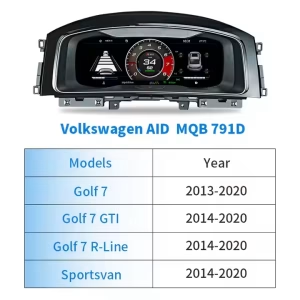
Golf 7, Golf Mk7, Golf Mk7.5, GTI and R models can differ by market year, dashboard trim, LHD/RHD layout and original cluster version. iKAGOO does not prepare the order by badge name alone.

Dedicated Cluster, Not a Generic Tablet

This is a dedicated instrument cluster upgrade, not a universal Android screen placed behind the steering wheel. The Linux system is used for fast startup and stable display behavior.

ไม่มีการตัดสายไฟโดยเจตนา

For supported vehicles, the installation route is based on matched wiring and vehicle interface connection. Previous aftermarket modifications or unusual connectors should be shown to iKAGOO before installation.

Product View

Real Display, Housing and Interface Details

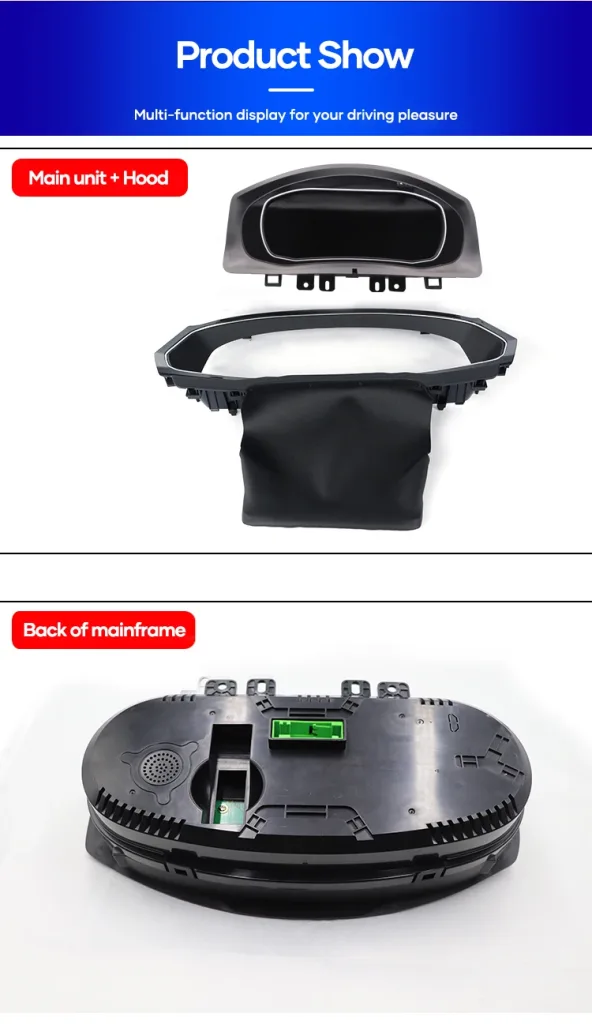
These product views help you understand how the VW Golf Mk7 Digital Cluster changes the driver display, how the housing fits the dashboard area and why the wiring route must be matched before shipment.

แสดงDriver view
HousingDashboard fit
HarnessMatched route

Before-and-After Cockpit Change

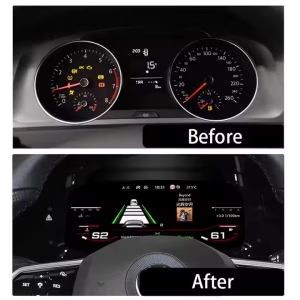
The old analog-style view is replaced by a wider digital layout that makes driving data easier to read. For daily commuting, long trips and night driving, the cabin feels more current without changing the basic Volkswagen dashboard position.

Golf 7 digital dashboard before and after LCD cluster retrofit

Vehicle-Specific Wiring and Interface Preparation

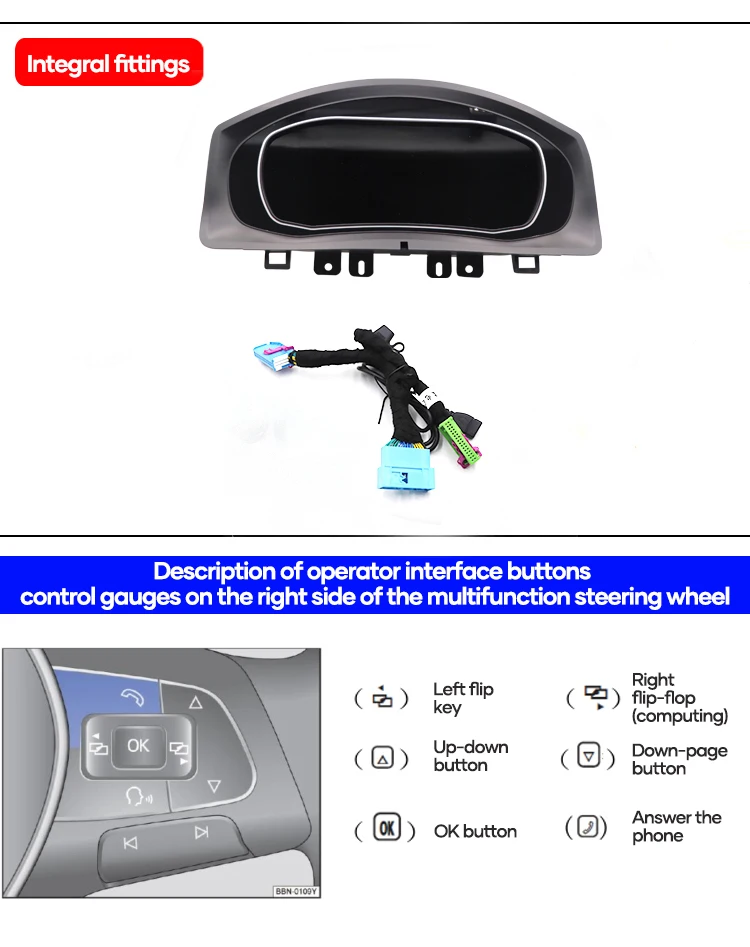
The cluster is supplied with vehicle-specific wiring and related interface parts for supported installations. The correct harness reduces wrong-connection risk and helps the unit communicate with the car.

VW Golf Mk7 Digital Cluster wiring harness and interface parts

Steering-Wheel Controls Continue to Feel Familiar

The original multifunction steering-wheel control logic is retained after correct connection and setup. That keeps daily operation familiar for changing pages, confirming selections and using supported cluster menus.

VW Golf Mk7 digital cluster steering wheel control support

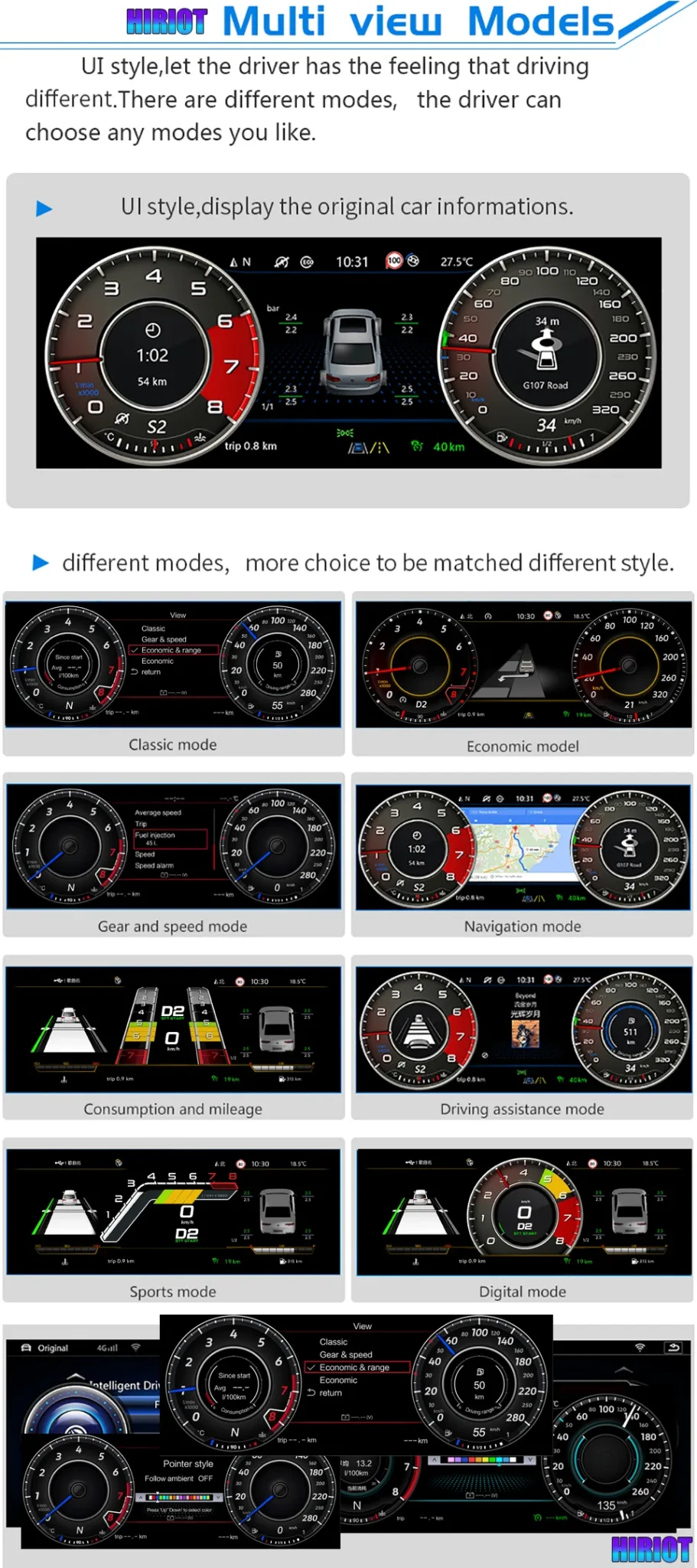
Multiple Display Themes for Daily Driving

Different dial and screen layouts let you choose a display style that fits normal commuting, sport driving or navigation-focused use. The cleaner display helps the cabin feel more premium for both the driver and passengers.

VW Golf 7 digital cluster multiple display themes and navigation mode

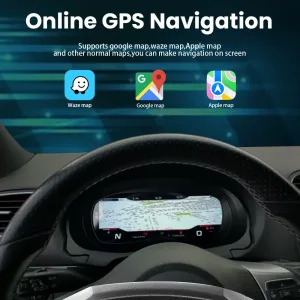
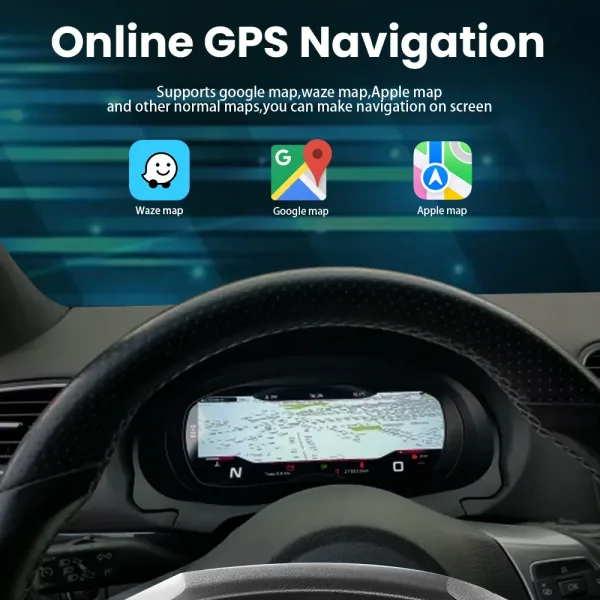
Navigation Display Path When Correctly Configured

Navigation display can be useful when the cluster is configured with the correct input and paired system route. iKAGOO should confirm the navigation, HDMI or screen-projection route for your exact configuration before shipment.

VW Golf 7 digital cluster navigation display configuration route

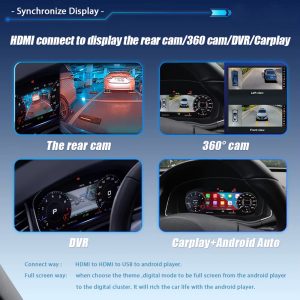
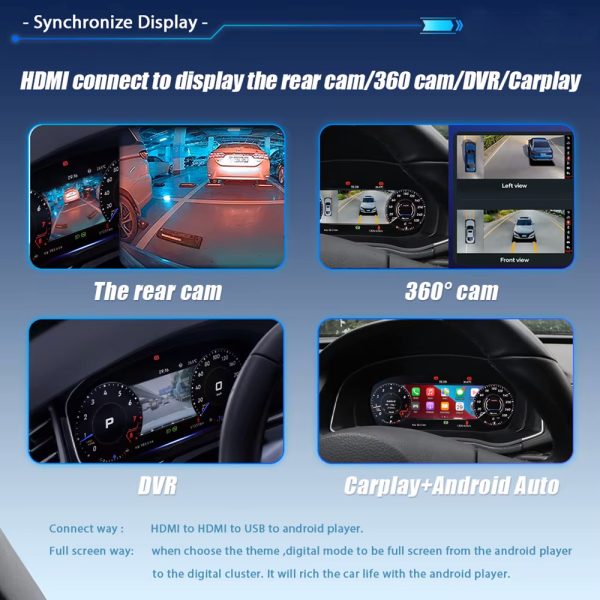
CarPlay, Camera and Screen Input Support Route

Some display functions depend on the paired Android player, HDMI input path or supported screen projection configuration. The cluster itself is a dedicated Linux instrument display, so the route should be confirmed before shipment.

VW Golf Mk7 digital cluster CarPlay camera and HDMI display support route

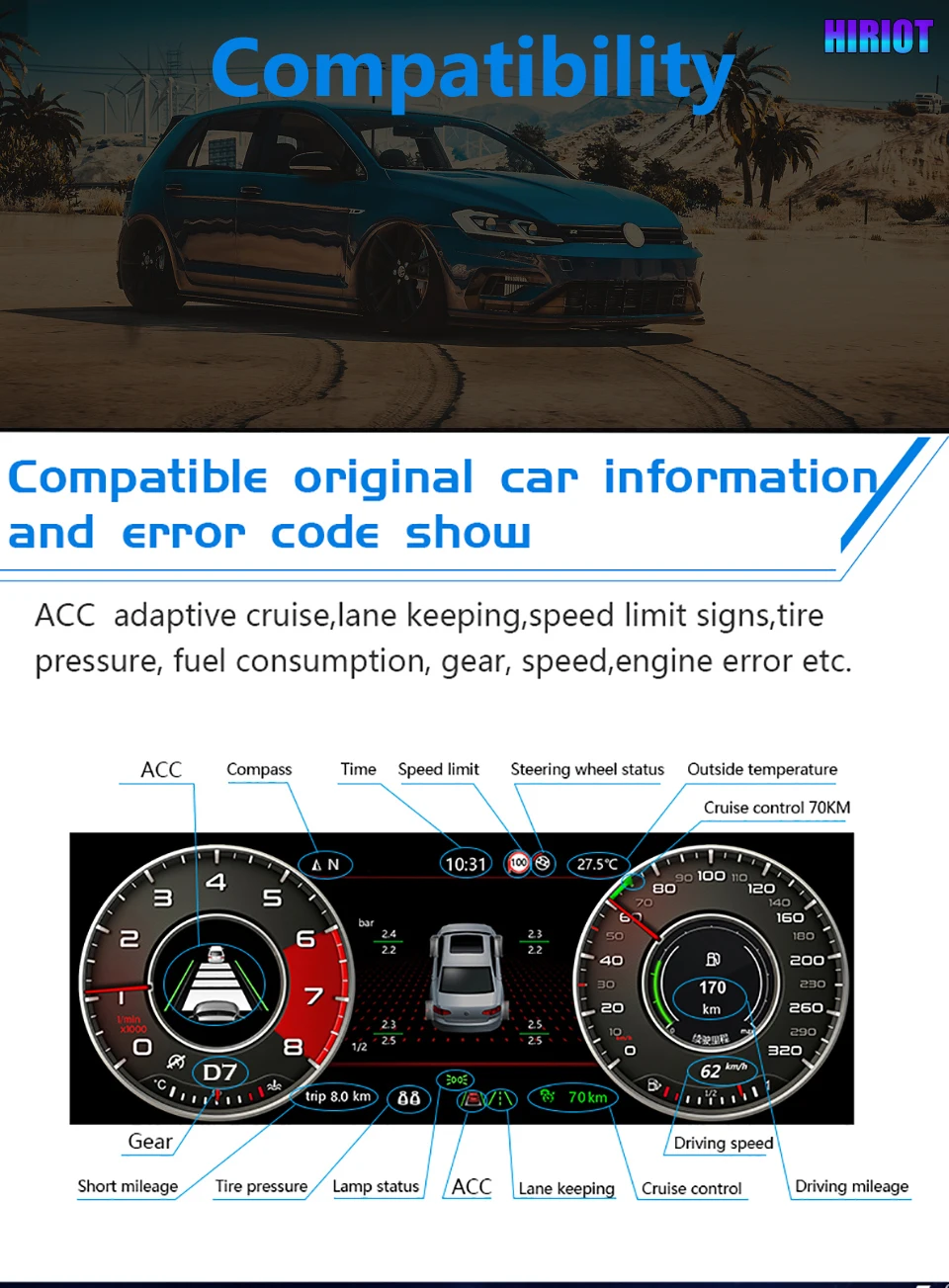
Vehicle Data and Warning Information Retained

The upgrade is designed to continue showing supported original vehicle information through the matched interface. This includes speed, gear, fuel-related data, warning indicators and other supported vehicle signals after correct installation.

VW Golf Mk7 digital instrument cluster retained vehicle data and warning information

Physical Housing and Interface Build

The rear connector area and fitted structure matter because the instrument cluster must sit correctly inside the driver-side dashboard position. iKAGOO uses your vehicle information to prepare the correct version.

VW Golf Mk7 digital instrument cluster housing and rear connector view
ข้อมูลจำเพาะของสินค้า

Key Configuration for the VW Golf Mk7 Digital Cluster

These are the practical specifications that matter before ordering: screen size, vehicle direction, system type, wiring route and retained vehicle functions.

12.3"แอลซีดี
Linuxระบบ
วายบี-116SKU
ประเภทสินค้าDigital Instrument Cluster / LCD Cluster Retrofit
Main Vehicle DirectionVW Golf 7 / Golf Mk7 / Golf Mk7.5
Model-Year DirectionGolf 7 2013–2020; market years require confirmation
Also ConsideredPassat B8 / Arteon after dashboard and connector review
ระบบระบบปฏิบัติการลินุกซ์
แสดง12.3-inch IPS LCD, 1920×720
Boot BehaviorFast startup, designed for dedicated cluster use
การควบคุมOriginal steering-wheel control support after matching
ข้อมูลรถSupported speed, RPM, gear, fuel, trip and warnings
Wiring RouteMatched harness route for supported vehicles
SKUวายบี-116
Best BuyerGolf Mk7 owner who wants an OEM-style digital cockpit
VW Golf Mk7 แผงหน้าปัดดิจิทัล Golf 7 Virtual Cockpit Retrofit 12.3-inch LCD Cluster MQB Digital Instrument Upgrade Linux Digital Dashboard
ฟังก์ชันของโรงงานยังคงอยู่

ฟังก์ชันการทำงานของรถเดิมที่รองรับหลังจากการจับคู่ที่ถูกต้อง

This cluster upgrade is built around the original vehicle communication route. The exact function behavior depends on your vehicle year, original cluster, connector, LHD/RHD layout, factory system and any previous modifications.

ปุ่มควบคุมบนพวงมาลัย

Supported multifunction steering-wheel controls continue to operate the cluster after correct connection and configuration.

ข้อมูลรถ

Supported speed, RPM, gear, fuel, mileage and driving information continue through the matched vehicle interface.

ข้อมูลคำเตือน

Supported warning indicators and vehicle status information continue to appear through the cluster communication route.

Display Input Route

Camera, 360-view, CarPlay or map display routes depend on the paired system and confirmed configuration path.

การประเมินผลิตภัณฑ์ iKAGOO

สามข้อควรตรวจสอบก่อนตัดสินใจซื้อ

These iKAGOO standards explain upgrade value, factory-function retention and the right installation path for this VW Golf Mk7 Digital Cluster.

92อัปเกรด
95ความเข้ากันได้
L3Install Path
iKAGOO มาตรฐาน

ความจำเป็นในการอัปเกรด

92/100
กรณีการอัปเกรดที่แข็งแกร่ง
Low ValueStrong Value

This score explains why the upgrade makes sense for daily use, not only whether the dashboard looks modern.

Driver visibility
Cabin modernization
Ownership value
  • The instrument cluster is the driver’s most-used display area.
  • The 12.3-inch LCD gives clearer digital driving information.
  • It is more complete than a basic CarPlay-only module because it changes the driver cockpit display.
อ่านมาตรฐานความจำเป็นในการอัปเกรด iKAGOO
iKAGOO มาตรฐาน

ความเข้ากันได้ของยานพาหนะเดิม

95/100
Strong Function Retention
Generic Fitเฉพาะสำหรับยานพาหนะ

A score of 95/100 does not mean that 5% of factory functions are lost. It explains the matching route, control retention and vehicle-specific preparation.

ความต่อเนื่องของฟังก์ชันโรงงาน
ความต่อเนื่องของการควบคุมแบบดั้งเดิม
Vehicle data integration
ความสอดคล้องของสถาปัตยกรรมทางกายภาพ
Factory-style interaction
การผสานรวมฮาร์ดแวร์
  • Supported vehicle data and warnings continue through the matched route.
  • Steering-wheel controls continue through the supported control path.
  • Matched wiring reduces wrong-connection risk before international shipment.
อ่านมาตรฐานความเข้ากันได้ของยานพาหนะต้นฉบับของ iKAGOO
iKAGOO มาตรฐาน

ระดับความง่ายในการติดตั้ง

ระดับ 3
DIY ขั้นสูง
พื้นฐานผู้เชี่ยวชาญ
L1 L2 L3 L4 L5

This level is suitable for experienced DIY installers or an automotive electronics installer.

Trim removal care
Harness connection
การทดสอบฟังก์ชัน
  • Requires careful trim and cluster removal.
  • Requires matched wiring connection and vehicle-interface setup.
  • No intentional cutting of supported factory wiring is planned for supported installations.
อ่านมาตรฐานระดับความง่ายในการติดตั้ง iKAGOO
ทำไมต้องซื้อจาก iKAGOO

Correct Version Preparation Matters More Than a Cheap Listing Photo

Digital clusters are not selected by model name alone. iKAGOO prepares the version around vehicle year, dashboard layout, factory cluster, connector, LHD/RHD position and your requested display route.

Vehicle Details Checked

You send the model year, dashboard photo, current instrument cluster photo, steering wheel photo and connector details when needed. This helps iKAGOO prepare the correct screen and interface path.

Harness and Interface Prepared

The matched wiring route is important for steering controls, vehicle data and supported warning information. The goal is a cleaner connection path without intentionally cutting supported factory wiring.

การสนับสนุนหลังการชำระเงิน

After the order, iKAGOO can review setup issues, wiring photos, videos, version information and function behavior. Cases beyond normal setup can enter engineer-level judgment.

หลังจากที่คุณสั่งซื้อ

How iKAGOO Supports This Upgrade After Payment

The order process is built to reduce wrong-version risk, prepare the correct vehicle-specific parts and give your installer a usable support route if the vehicle has a special configuration.

ขั้นตอนที่ 1

Order Record Created

Your order number becomes the reference for vehicle review, packing, delivery and support.

ขั้นตอนที่ 2

รีวิวรถยนต์

iKAGOO checks your model year, dashboard layout, LHD/RHD position and current cluster information.

ขั้นตอนที่ 3

Correct Version Prepared

The screen, harness, interface and configuration route are prepared according to the vehicle information.

ขั้นตอนที่ 4

รูปภาพสินค้าเมื่อมีการร้องขอ

If requested before packing, you can ask to see actual visible parts prepared for your order.

ขั้นตอนที่ 5

การบรรจุและการจัดส่ง

After confirmation, the order is packed and dispatched with tracked international delivery.

ขั้นตอนที่ 6

การติดตามผล

Tracking may update through international and local carriers. iKAGOO can request logistics updates if needed.

ขั้นตอนที่ 7

การสนับสนุนการติดตั้ง

If your installer needs help, iKAGOO may request photos, videos, wiring status and function test results.

ขั้นตอนที่ 8

การส่งต่อวิศวกร

Cases beyond normal setup can be escalated with useful evidence for technical judgment.

ขั้นตอนที่ 9

Software or Settings Path

If settings, firmware or configuration guidance is involved, iKAGOO coordinates the suitable technical route after confirmation.

ขั้นตอนที่ 10

Cable or Accessory Issue

If a confirmed cable or accessory problem appears, iKAGOO helps arrange the approved solution or replacement route.

ขั้นตอนที่ 11

Hardware Compatibility Case

If confirmed hardware incompatibility remains after checks, iKAGOO follows the applicable order and return policy for the device itself.

ขั้นตอนที่ 12

After It Works

You can still contact iKAGOO for applicable maintenance, setup, update or troubleshooting guidance.

เปรียบเทียบตัวเลือกการอัปเกรดของคุณ

Why This Route Makes More Sense Than a Generic Dashboard Fix

The right choice depends on whether you only want the old display repaired, a phone connection added, or a real driver-display upgrade.

Repair the Old Cluster

Repair may keep the car original, but it does not modernize the cockpit or add a wider digital driver information layout. It can be reasonable for collectors, but less attractive for daily-use upgrades.

Cheap Universal Screen

A universal product may look cheaper at first, but it often creates fitment, wiring and support uncertainty. The risk is higher when the product is selected only from a photo instead of vehicle details.

iKAGOO VW Golf Mk7 Digital Cluster

This route focuses on a vehicle-specific instrument display, matched wiring, retained controls and pre-shipment fitment review. It is the better direction for owners who want a cleaner Golf Mk7 cockpit upgrade with support after purchase.

ข้อมูลยานพาหนะที่ต้องการ

ก่อนการจัดส่ง

  • รุ่นรถและปีรถ
  • Golf 7 / Mk7 / Mk7.5 / GTI / R identification
  • LHD or RHD position
  • Dashboard and current cluster photos
  • รูปภาพของตัวต่อ หากมีคำขอ

ก่อนการติดตั้ง

  • Check all visible connectors
  • Confirm the matched harness route
  • Test steering-wheel controls before final assembly
  • Test warning information and vehicle data
  • Stop if any plug shape is not correct

หลังการติดตั้ง

  • Test speed, RPM, fuel and gear display
  • Test warning indicators
  • Test theme switching and cluster menus
  • Check navigation or input route if configured
  • Send video to iKAGOO if support is needed
Shipping, Warranty and Policy Links

Order Protection and Support References

These links help buyers verify how iKAGOO handles compatibility, installation preparation, warranty coverage, returns and long-term support before ordering.

ความเข้ากันได้และการติดตั้ง

Review how iKAGOO checks vehicle details, installation conditions and supported retrofit routes before shipment.

Read Compatibility and Installation

Refunds and Returns

Review the return route, confirmed compatibility cases and order-protection conditions before installation.

Read Refund and Returns
คำถามที่พบบ่อย

คำถามที่พบบ่อย

These answers are written for Golf Mk7 owners who want to avoid wrong-version ordering, unclear installation routes and unsupported function expectations.

Will this VW Golf Mk7 Digital Cluster fit my exact car?

It depends. The main direction is Golf 7 / Golf Mk7 / Golf Mk7.5, but final fitment depends on your vehicle year, dashboard layout, LHD/RHD position, original cluster and connector route. Send clear photos before shipment so iKAGOO can prepare the correct version.

Is this only for Golf Mk7, or also for Passat B8 and Arteon?

It depends. Golf Mk7 is the primary page direction, while Passat B8 and Arteon should be handled as confirmed MQB-related applications. iKAGOO checks dashboard structure and connector information before treating those vehicles as supported for your order.

ปุ่มควบคุมบนพวงมาลัยเดิมจะยังใช้งานได้อยู่หรือไม่?

Yes, after correct matching and connection. Supported multifunction steering-wheel controls continue through the matched vehicle interface. Final behavior should be tested before the dashboard is fully reassembled.

Will vehicle data and warning information still show?

Yes, supported vehicle data and warning information continue through the cluster communication route after correct installation. This includes core driving information such as speed, RPM, gear, fuel-related data and supported warning status.

Does it support map navigation or CarPlay display?

It depends. The cluster is a dedicated Linux instrument display and does not run Android apps by itself. Map, CarPlay, Android Auto, camera or 360-view display depends on the paired system, HDMI or screen-projection route and the confirmed configuration.

ฉันจำเป็นต้องตัดสายไฟจากโรงงานหรือไม่?

No, supported installations are prepared around a matched wiring route without intentional cutting of supported factory wiring. If your vehicle has previous aftermarket wiring, damaged plugs or non-standard connectors, stop and contact iKAGOO before continuing.

เหมาะสำหรับการติดตั้งด้วยตนเองหรือไม่?

It depends. The iKAGOO Installation Ease Level is Level 3 — Advanced DIY. It is suitable for experienced DIY installers or an automotive electronics installer who can remove trim carefully, connect the matched harness and complete full function testing.

Does it require ODIS or dealer coding?

It depends on the vehicle and configuration. Many supported functions work through the matched cluster and interface route, but special configurations may need setup guidance. iKAGOO reviews your vehicle details so the correct support path is prepared before shipment.

ฉันควรส่งอะไรก่อนการจัดส่ง?

Send the vehicle model, model year, dashboard photo, current instrument cluster photo, steering-wheel photo, LHD/RHD information and connector photos if requested. These details help iKAGOO prepare the correct version instead of relying only on the vehicle badge name.

ทำไมต้องซื้อจาก iKAGOO แทนที่จะซื้อเครื่องทั่วไปที่ถูกกว่า?

Because the real risk is not only price; it is ordering the wrong version, receiving the wrong harness or having no support after installation starts. iKAGOO provides vehicle review, version preparation, tracked delivery and practical installation support for this VW Golf Mk7 Digital Cluster upgrade.

ขอรูปถ่ายสินค้าจริงก่อนบรรจุได้ไหม?

Yes, if requested before packing. You can ask iKAGOO to show visible prepared parts, harnesses or related accessories before dispatch. This helps you and your installer feel more confident before international shipping begins.

หากผู้ติดตั้งของฉันพบปัญหาเกี่ยวกับสายเคเบิลหรือการตั้งค่าล่ะ?

Contact iKAGOO with clear photos, videos, connector status and a description of the function that is not working. iKAGOO uses that information to check wiring, settings, CANBUS route, cluster version and whether engineer-level review is needed.

Final Buying Note

Choose This Upgrade If You Want a Real Driver-Cockpit Change

The VW Golf Mk7 Digital Cluster is for owners who want the instrument area to feel newer, clearer and more useful every day. It is strongest when the buyer provides accurate vehicle information, iKAGOO prepares the correct version, and the installer completes full function testing before final assembly.

5.00

อ้างอิงจากรีวิว 1
1
0
0
0
0

1 รีวิวสำหรับ VW Golf Mk7 Digital Cluster 2013-2020 12.3-inch LCD Retrofit

  1. เจมส์.ปาร์คเกอร์

    คะแนนรวม
    คุ้มค่าเงิน

    ติดตั้งชุดหน้าปัดดิจิทัล Ikagoo ในรถ Golf 7 ปี 2015 ของฉัน การติดตั้งทำได้ง่ายมาก และหน้าจอแสดงผลดูทันสมัย การเชื่อมต่อ CarPlay แบบไร้สายทำงานได้อย่างราบรื่น และธีมที่ปรับแต่งได้เพิ่มความเป็นส่วนตัว โดยรวมแล้วเป็นการอัปเกรดที่คุ้มค่า.

    มีประโยชน์หรือไม่?
เขียนรีวิว
iKAGOO การจัดส่ง, การรับประกัน, การคืนสินค้า และการสนับสนุนลูกค้า
ฝ่ายสนับสนุนลูกค้า iKAGOO

การจัดส่ง, การรับประกัน และการคืนสินค้า

ข้อมูลที่ชัดเจนเกี่ยวกับการประมวลผลคำสั่งซื้อ การจัดส่งระหว่างประเทศ ผลิตภัณฑ์เฉพาะรุ่น การรับประกัน การคืนสินค้า และการจัดส่งที่เสียหาย.

การดำเนินการสั่งซื้อ ปกติ 1–3 วันทำการ ก่อนการจัดส่ง.
การจัดส่งระหว่างประเทศ โดยปกติ 5–20 วันทำการหลังจากส่งสินค้า ขึ้นอยู่กับปลายทาง.
การรับประกันฮาร์ดแวร์ รับประกันสินค้า 12 เดือน สำหรับข้อบกพร่องจากการผลิตที่เข้าเงื่อนไข.
การสนับสนุนเฉพาะสำหรับยานพาหนะ ให้บริการช่วยเหลือเกี่ยวกับความเข้ากันได้, การต่อสายไฟ และการตั้งค่า.

คำถามที่พบบ่อย

คำตอบเหล่านี้ให้สรุปที่เป็นประโยชน์ในทางปฏิบัติ หน้าของนโยบายฉบับสมบูรณ์ที่เชื่อมโยงไว้ด้านล่าง ใช้กับทุกคำสั่งซื้อ.

01

คำสั่งซื้อถูกจัดส่งจากที่ไหน และใช้เวลาในการจัดส่งนานเท่าใด?

คำสั่งซื้อส่วนใหญ่ของ iKAGOO จะถูกจัดส่งจากสถานที่จัดจำหน่ายของเราในประเทศจีน หลังจากที่การกำหนดค่าผลิตภัณฑ์และข้อมูลยานพาหนะได้รับการตรวจสอบแล้ว การดำเนินการตามคำสั่งซื้อปกติใช้เวลาประมาณ 1–3 วันทำการ.

เวลาที่คาดว่าจะจัดส่งหลังจากส่งสินค้าคือ:

  • สหรัฐอเมริกาและแคนาดา: ประมาณ 5–9 วันทำการ
  • สหภาพยุโรป: ประมาณ 7–15 วันทำการ
  • สหราชอาณาจักรและออสเตรเลีย: ประมาณ 7–10 วันทำการ
  • ภูมิภาคอื่นที่รองรับ: ประมาณ 7–20 วันทำการ

การประมาณการส่งมอบอาจได้รับผลกระทบจากการผ่านศุลกากร, วันหยุดท้องถิ่น, การส่งมอบในพื้นที่ห่างไกล, สภาพอากาศ หรือการล่าช้าของผู้ขนส่ง.

02

ฉันจะต้องจ่ายภาษีนำเข้า, ภาษีมูลค่าเพิ่ม หรือค่าธรรมเนียมศุลกากรหรือไม่?

การจัดส่งระหว่างประเทศมาตรฐานโดยปกติไม่รวมภาษีมูลค่าเพิ่มของประเทศปลายทาง ภาษีนำเข้า ค่าธรรมเนียมนายหน้า หรือค่าธรรมเนียมการผ่านศุลกากร.

สำหรับจุดหมายปลายทางในสหภาพยุโรปที่มีสิทธิ์, ตัวเลือก บริการจัดส่งแบบ DDP อาจมีให้บริการ. ค่าธรรมเนียมที่เกี่ยวข้องกับการนำเข้า จะรวมอยู่เฉพาะเมื่อเลือก DDP ที่หน้าชำระเงินหรือยืนยันโดย iKAGOO เป็นลายลักษณ์อักษรก่อนการจัดส่ง.

เมื่อไม่เลือก DDP ผู้รับจะต้องรับผิดชอบค่าใช้จ่ายใด ๆ ที่ถูกเรียกเก็บโดยศุลกากรท้องถิ่นหรือผู้ให้บริการจัดส่ง.

03

ฉันสามารถขอการจัดส่งแบบด่วนได้ไหม?

การจัดส่งด่วนหรือการจัดส่งแบบเร่งด่วนอาจมีให้บริการสำหรับสินค้าที่เลือกและ จุดหมายปลายทางบางแห่ง ความพร้อมให้บริการ, ผู้ให้บริการขนส่ง และค่าใช้จ่ายเพิ่มเติมจะได้รับการยืนยันก่อน การจัดส่ง.

ขึ้นอยู่กับจุดหมายปลายทางและประเภทของสินค้า iKAGOO อาจใช้บริการขนส่งเช่น DHL, FedEx, UPS, EMS, 4PX หรือผู้ให้บริการขนส่งที่สามารถติดตามได้อื่น ๆ.

04

ฉันจะติดตามการจัดส่งของฉันได้อย่างไร?

หลังจากคำสั่งซื้อได้ถูกจัดส่งแล้ว หมายเลขติดตามหรือลิงก์ติดตาม จะถูกส่งไปยังที่อยู่อีเมลที่ใช้ในการสั่งซื้อโดยปกติ.

การติดตามการอัปเดตอาจใช้เวลาหลายวันทำการในการปรากฏขึ้นขณะที่พัสดุ กำลังถูกโอนย้ายระหว่างผู้ให้บริการขนส่งระหว่างประเทศและผู้ให้บริการขนส่งภายในประเทศ.

05

นโยบายการคืนสินค้าและการคืนเงินของ iKAGOO คืออะไร?

สิทธิ์ในการคืนสินค้าขึ้นอยู่กับเหตุผลในการคืนสินค้า, สภาพของสินค้า, สถานะการติดตั้ง, หลักฐานที่จัดเตรียมไว้ และว่าการคืนสินค้าได้รับการอนุมัติ จาก iKAGOO หรือไม่.

สำหรับการคืนสินค้าที่ไม่มีข้อบกพร่อง สินค้าจะต้องอยู่ในสภาพปกติ ไม่เคยใช้งาน ไม่เคยติดตั้ง ครบถ้วนสมบูรณ์ และเหมาะสมสำหรับการจำหน่ายต่อ โดยทั่วไปลูกค้าจะต้องรับผิดชอบ ค่าจัดส่งคืนที่ได้รับการอนุมัติ.

ค่าขนส่งเดิม, ค่าบริการ DDP, ภาษีมูลค่าเพิ่ม, ภาษีศุลกากร และค่าใช้จ่ายด้านลอจิสติกส์อื่น ๆ โดยทั่วไปไม่สามารถขอคืนได้ เว้นแต่กฎหมายที่เกี่ยวข้องกำหนดไว้หรือได้รับการยืนยัน เป็นอย่างอื่นโดย iKAGOO.

ห้ามส่งสินค้าคืนโดยไม่ได้มีที่อยู่สำหรับคืนสินค้าที่ได้รับการอนุมัติ และคำแนะนำในการคืนสินค้าจาก iKAGOO.

06

หาก iKAGOO ยืนยันความเข้ากันได้แต่ไม่สามารถติดตั้งผลิตภัณฑ์ได้ จะเกิดอะไรขึ้น?

การคุ้มครองเพิ่มเติมอาจใช้บังคับได้เมื่อ iKAGOO ยืนยันความเข้ากันได้ก่อนการซื้อ ลูกค้าให้ข้อมูลรถยนต์ที่ถูกต้อง และลูกค้า ร่วมมือกับขั้นตอนการติดตั้งและการวินิจฉัยที่สมเหตุสมผล.

หาก iKAGOO ยืนยันว่าไม่มีทางแก้ไขทางเทคนิคที่เหมาะสม และ ปัญหาได้รับการรายงานภายใน 7 วันปฏิทินนับจากวันที่ส่งมอบ, , ลูกค้าอาจมีสิทธิ์ได้รับเงินคืนสำหรับราคาสินค้าโดยไม่ต้อง ส่งคืนสินค้า.

การจัดส่งต้นทาง, DDP, ภาษีมูลค่าเพิ่ม, ภาษีศุลกากร และค่าใช้จ่ายของบุคคลที่สามอื่น ๆ ไม่รวมอยู่ในเงินคืนราคาสินค้านี้.

07

iKAGOO มีการรับประกันอะไรบ้าง?

ผลิตภัณฑ์ iKAGOO ที่มีสิทธิ์ได้แก่ รับประกันฮาร์ดแวร์แบบจำกัด 12 เดือน ครอบคลุมข้อบกพร่องที่ผ่านการตรวจสอบแล้ว และปัญหาฮาร์ดแวร์ที่เข้าเงื่อนไขภายใต้การใช้งานตามปกติ.

ขึ้นอยู่กับปัญหา, การแก้ไขอาจรวมถึงการวินิจฉัยระยะไกล, การช่วยเหลือการตั้งค่า, ชิ้นส่วนทดแทน, การซ่อมแซม, การเปลี่ยนสินค้า, การคืนเงินบางส่วน หรือ การคืนเงินเต็มจำนวน.

การรับประกันนี้ไม่ครอบคลุมความเสียหายที่เกิดจากการเดินสายไฟไม่ถูกต้อง, การดัดแปลงโดยไม่ได้รับอนุญาต, ความเสียหายที่เกิดโดยอุบัติเหตุ, การรั่วซึมของน้ำ, การกระแทก, การใช้ผิดวิธี, แรงดันไฟฟ้าไม่เหมาะสม, ข้อผิดพลาดในการติดตั้ง หรืออุปกรณ์ของบุคคลที่สามที่ไม่รองรับ.

08

การเปิดผลิตภัณฑ์จะยกเลิกการรับประกันโดยอัตโนมัติหรือไม่?

การตรวจสอบหรือการตรวจสอบโดยบุคคลที่สามจะไม่ยกเลิกการรับประกันทั้งหมดโดยอัตโนมัติ อย่างไรก็ตาม ความเสียหายที่เกิดจากการซ่อมแซมโดยไม่ได้รับอนุญาต การเปลี่ยนชิ้นส่วน การดัดแปลงที่ไม่ถูกต้อง วงจรที่ชำรุด หรือการประกอบกลับที่ไม่ถูกต้องจะไม่ได้รับการคุ้มครอง.

ติดต่อ iKAGOO ก่อนถอดหรือซ่อมแซมผลิตภัณฑ์ เพื่อให้สามารถให้ขั้นตอนการวินิจฉัยที่ถูกต้องได้.

09

หากคำสั่งซื้อของฉันมาถึงในสภาพเสียหายหรือมีชิ้นส่วนที่ขาดหายไป?

ติดต่อ iKAGOO ภายใน 7 วันปฏิทินนับจากวันที่ส่งมอบ และเก็บรักษา บรรจุภัณฑ์เดิม, ฉลากการจัดส่ง, อุปกรณ์เสริม และผลิตภัณฑ์.

กรุณาให้ภาพถ่ายหรือวิดีโอที่ชัดเจนแสดง:

  • กล่องบรรจุภัณฑ์ภายนอกและฉลากการจัดส่ง
  • บรรจุภัณฑ์ที่เสียหายที่มองเห็นได้
  • สินค้าและพื้นที่ที่ได้รับผลกระทบ
  • อุปกรณ์เสริมและสายไฟที่ได้รับทั้งหมด

หลังจากการตรวจสอบแล้ว iKAGOO อาจจัดส่งชิ้นส่วนที่ขาด, เปลี่ยน, ซ่อม, คืนเงิน หรือหาทางแก้ไขที่เหมาะสมอื่น ๆ ตามกรณีเฉพาะ.

10

หากฉันสั่งซื้อสินค้าผิด ฉันควรทำอย่างไร?

ติดต่อ iKAGOO ก่อนติดตั้งหรือใช้งานผลิตภัณฑ์ การเปลี่ยนหรือคืนสินค้าอาจ ได้รับการอนุมัติเมื่อสินค้ายังคงไม่ถูกใช้งาน ไม่ถูกติดตั้ง ครบถ้วนสมบูรณ์ และเหมาะสม สำหรับการขายต่อ.

ลูกค้าเป็นผู้รับผิดชอบค่าขนส่งและส่วนต่างของราคา ในกรณีที่เลือกสินค้า รุ่นรถ ปี หรือสเปกโรงงานไม่ถูกต้อง.

ไม่มีป้ายส่งคืนแบบชำระเงินล่วงหน้าให้โดยอัตโนมัติ.

11

ฉันสามารถแก้ไขหรือยกเลิกคำสั่งซื้อของฉันได้หรือไม่หลังจากชำระเงินแล้ว?

ติดต่อ iKAGOO โดยเร็วที่สุดเท่าที่เป็นไปได้, ควรภายใน 12 ชั่วโมงหลังจากสั่งซื้อ, เมื่อขอที่อยู่, การกำหนดค่าของยานพาหนะหรือการเปลี่ยนแปลงผลิตภัณฑ์.

การแก้ไขหรือการยกเลิกจะมีผลเมื่อได้รับการยืนยันจาก iKAGOO เท่านั้น ผลิตภัณฑ์เฉพาะสำหรับยานพาหนะอาจเข้าสู่กระบวนการจัดซื้อ, การโปรแกรม, การทดสอบ, การกำหนดค่า หรือการเตรียมการตามความต้องการได้ไม่นานหลังจากการชำระเงิน.

เมื่อการเตรียมการหรือการจัดส่งได้เริ่มต้นขึ้นแล้ว อาจไม่สามารถยกเลิกได้ หรืออาจมีการหักค่าใช้จ่ายที่เกิดขึ้นอย่างสมเหตุสมผล.

12

ในแพ็กเกจมีอะไรบ้าง?

เนื้อหาของแพ็กเกจอาจแตกต่างกันตามสินค้า, รุ่นรถยนต์, ระบบโรงงาน และตัวเลือกการกำหนดค่าที่เลือกไว้.

ขึ้นอยู่กับผลิตภัณฑ์ บรรจุภัณฑ์อาจประกอบด้วยอุปกรณ์หลัก สายไฟเฉพาะรถยนต์ อินเทอร์เฟซ CANBUS อะแดปเตอร์ สาย USB เสาอากาศ ไมโครโฟน อุปกรณ์ติดตั้ง และอุปกรณ์เสริมสำหรับการติดตั้งอื่นๆ.

โปรดดูที่หน้าผลิตภัณฑ์ที่เกี่ยวข้อง รูปภาพบรรจุภัณฑ์ และใบยืนยันการสั่งซื้อสำหรับ ส่วนประกอบที่รวมอยู่ทั้งหมดอย่างถูกต้อง.

13

ฉันจะติดต่อฝ่ายสนับสนุนของ iKAGOO ได้อย่างไร?

คุณสามารถติดต่อ iKAGOO ได้ผ่านแบบฟอร์มติดต่อ, อีเมล, WhatsApp หรือช่องทางสนับสนุนบนเว็บไซต์ที่มีให้บริการ เวลาตอบกลับโดยทั่วไปคือภายใน 24 ชั่วโมงทำการ.

เพื่อรับการสนับสนุนทางเทคนิคที่รวดเร็วขึ้น โปรดระบุหมายเลขคำสั่งซื้อ รุ่นรถ และปีของรถ รูปภาพระบบจากโรงงาน รูปภาพผลิตภัณฑ์ และวิดีโอที่ชัดเจนแสดงปัญหา.

เยี่ยมชม: iKAGOO ติดต่อและสนับสนุน

14

การชำระเงินปลอดภัยหรือไม่ และมีตัวเลือกการผ่อนชำระหรือไม่

การชำระเงินดำเนินการผ่านวิธีการชำระเงินที่ปลอดภัยซึ่งแสดงในระหว่าง การชำระเงิน ตัวเลือกบัตร กระเป๋าเงิน และการผ่อนชำระอาจแตกต่างกันไปตามประเทศ สกุลเงิน ผู้ให้บริการชำระเงิน และคุณสมบัติของลูกค้า.

บริการผ่อนชำระใด ๆ รวมถึงตัวเลือกที่เสนอโดย PayPal หรือผู้ให้บริการรายอื่น อยู่ภายใต้ความพร้อมให้บริการในภูมิภาคและกฎการอนุมัติของผู้ให้บริการนั้น.

อ่านนโยบาย iKAGOO อย่างละเอียด

กรุณาตรวจสอบหน้าข้อกำหนดนโยบายฉบับเต็มก่อนทำการสั่งซื้อ โดยเฉพาะสำหรับ ผลิตภัณฑ์ที่เฉพาะเจาะจงกับยานพาหนะ การจัดการภาษีระหว่างประเทศ และการคืนสินค้าที่เกี่ยวข้องกับการติดตั้ง.

คำถามที่พบบ่อยนี้เป็นคู่มือสำหรับลูกค้าที่สรุปไว้อย่างง่าย หน้าข้อกำหนดฉบับสมบูรณ์ที่เผยแพร่แล้ว ใบยืนยันการสั่งซื้อ และกฎหมายคุ้มครองผู้บริโภคที่เกี่ยวข้องจะมีผลเหนือกว่าหากมีข้อความใดแตกต่างกัน.

การติดตั้งหน้าปัดดิจิทัล VW Golf Mk7: Passat B8 และ Arteon VW Golf Mk7 Digital Cluster 20...

ราคาเดิมคือ: $785.00.ราคาปัจจุบันคือ: $418.00.

หยิบใส่ตะกร้า