ธีม XStore
Menu Categories
Sale 44%
  • ออดี้ เอ4 บี8 วีรัล ค็อกพิท
  • แผงหน้าปัดดิจิทัล Audi A4L ขนาด 12.3 นิ้ว พร้อมการอัปเกรด CarPlay
  • 奥迪A4
  • การติดตั้ง Audi A4L 12.3-inch แผงหน้าปัดดิจิทัล
  • S2e1af3478ae24e65bd0b46c84d8a289ej
  • 0X2
  • 0x4
  • 0x3
  • มุมมองรายละเอียดแผงหน้าปัด LCD Audi A6 A7 C7
  • ชุดหน้าปัด Audi

Audi A4 B8 Virtual Cockpit Digital Cluster 2013–2016 with CarPlay Map Sync

แบรนด์:
(3 บทวิจารณ์จากลูกค้า)

ราคาเดิมคือ: $780.00.ราคาปัจจุบันคือ: $438.00.

ปลอดภาษี เฉพาะสหภาพยุโรปและสหรัฐอเมริกา
รายละเอียด
ปลอดภัยโดย เพย์พาล
บริการชำระภาษีล่วงหน้า DDP

เราจัดการภาษีมูลค่าเพิ่มและภาษีศุลกากรทั้งหมด ประมาณการการประหยัด: $120–$280.

สหรัฐอเมริกา (48 รัฐ)ออสเตรียเบลเยียมบัลแกเรียโครเอเชียไซปรัสเช็กเกียเดนมาร์กเอสโตเนียฟินแลนด์ฝรั่งเศสเยอรมนีกรีซฮังการีไอร์แลนด์อิตาลีลัตเวียลิทัวเนียลักเซมเบิร์กมอลตาเนเธอร์แลนด์โปแลนด์โปรตุเกสโรมาเนียสโลวาเกียสโลวีเนียสเปนสวีเดน
หรือ

มีคำถามหรือไม่?

รู้สึกอิสระที่จะ ติดต่อเรา

🔥 ลูกค้าใหม่รับส่วนลด $35 สำหรับการสั่งซื้อครั้งแรก.

Buy 1 items get $35.00 OFF
on each product
Buy 2 items get $80.00 OFF
on each product
ชำระเงินอย่างปลอดภัยด้วย Paypal ชำระเงินอย่างปลอดภัยด้วยวีซ่า ชำระเงินอย่างปลอดภัยด้วยมาสเตอร์การ์ด ชำระเงินอย่างปลอดภัยด้วย JCB ชำระเงินอย่างปลอดภัยด้วย American Express ชำระเงินอย่างปลอดภัยด้วย Alipay ชำระเงินอย่างปลอดภัยด้วย Google Pay ชำระเงินอย่างปลอดภัยด้วย Klarna ชำระเงินอย่างปลอดภัยด้วย DISCOVER ชำระเงินอย่างปลอดภัยด้วย Apple Pay
รับประกันการชำระเงินที่ปลอดภัยและมั่นคง
การคุ้มครองผู้ซื้อ iKAGOO

การคุ้มครองการซื้อสำหรับสินค้าชิ้นนี้

การตรวจสอบความเข้ากันได้, การชำระเงินที่ปลอดภัย, การจัดส่งที่สามารถติดตามได้ และการสนับสนุนหลังการขายที่เป็นประโยชน์.

Audi A4 B8 / A4L / B8.5 2013–2016 Digital Instrument Cluster

Audi A4 B8 Virtual Cockpit with CarPlay / Android Auto Map Sync

Upgrade your Audi A4 B8, A4L or B8.5 driver display into a 12.3-inch virtual cockpit. The key value is not only a larger screen: it is CarPlay / Android Auto map information closer to the driver, online navigation in the instrument display route, Android player or controller linkage, factory speed / RPM / fuel / warning information, steering-wheel control support and iKAGOO fitment review before shipment.

CarPlay / Android Auto Display Route Phone projection, music, map and route information can be shown through the matched controller, Android player or compatible sync route.
Online Map Closer to the Driver Navigation guidance sits nearer to the driver’s sightline instead of staying only on the center screen.
Factory Driving Data Speed, RPM, fuel, trip data, warning information and vehicle status remain clear where the Audi data route supports it.
iKAGOO Checks Before Shipment Dashboard photo, original cluster photo, steering side, model year and sync requirement are reviewed before dispatch.
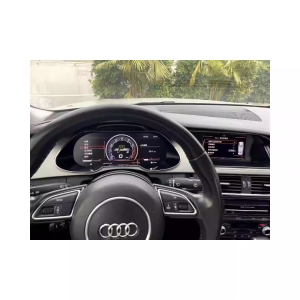
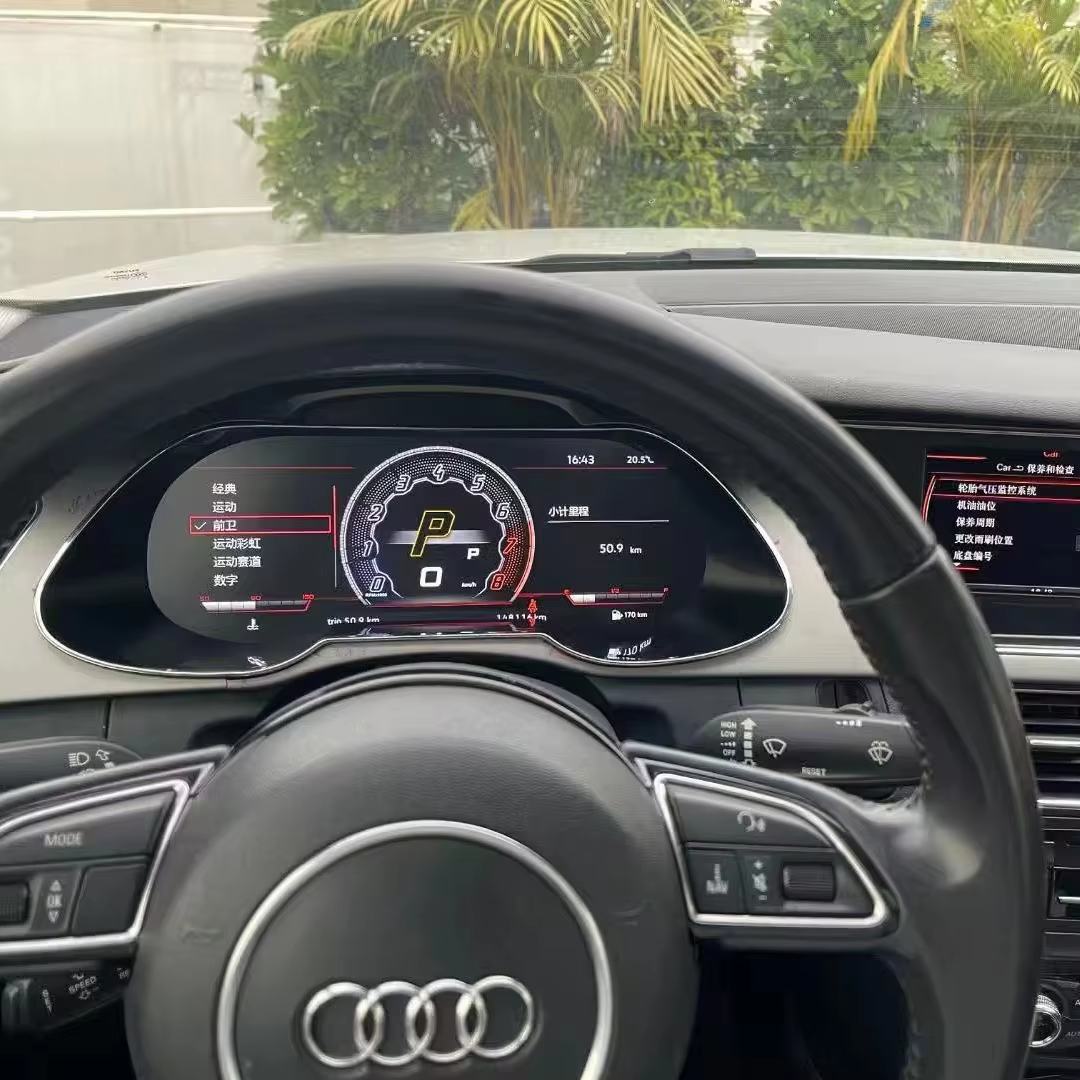
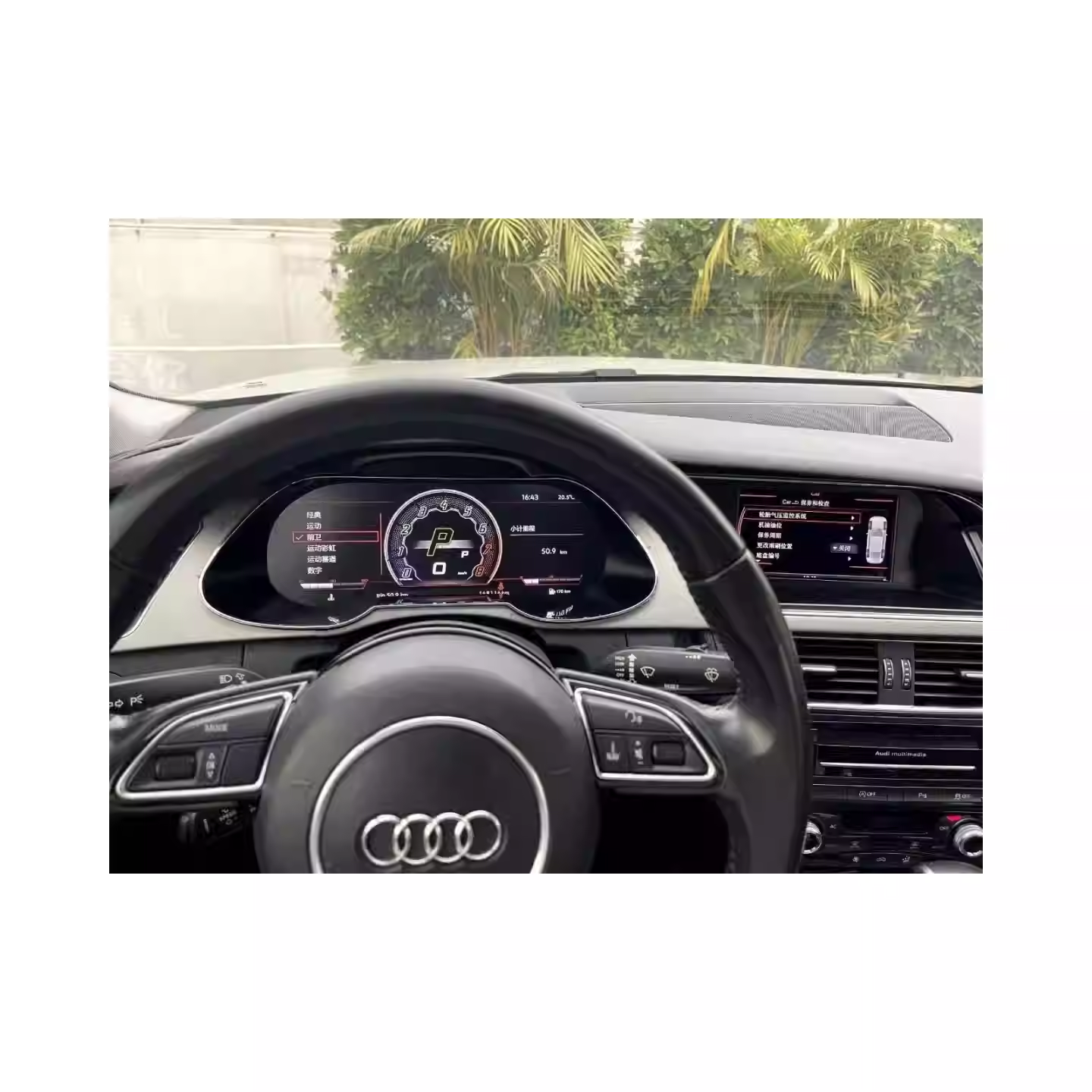
Audi A4 B8 Virtual Cockpit digital cluster installed driver display
Turn the older A4 B8 driver area into a cleaner digital cockpit, with map, phone projection and Audi driving data closer to where you already look.

Why This Upgrade Makes Sense for Audi A4 B8 Owners

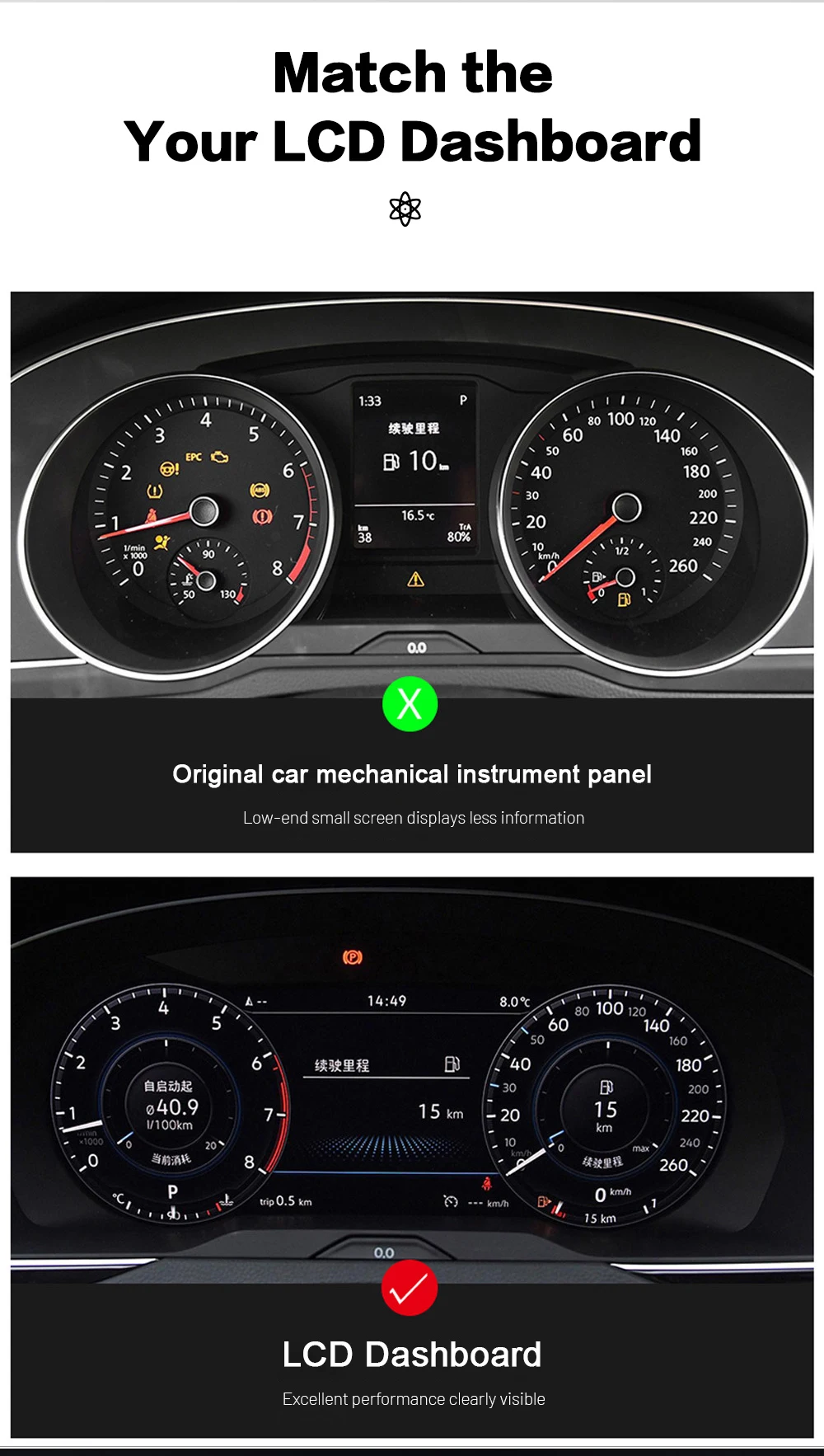
Modern Driver Display, Not Just a Bigger Screen

The Audi A4 B8 interior still has a strong factory layout, but the original instrument display feels older when you rely on phone navigation, CarPlay, Android Auto and digital driving information every day. This cluster gives the car a more current virtual cockpit direction without turning the dashboard into a universal tablet project.

Map Guidance in the Driver Display Route

When the matched controller or Android player route supports it, map and phone-projection information can sit closer to your normal driving sightline. This is the daily-use value: less jumping between the road, the center screen and the old instrument panel.

Factory Data Still Comes First

A digital cluster must still behave like an instrument cluster. Speed, RPM, fuel, gear, trip data, warning messages, maintenance reminders and steering-wheel control interaction are the core items iKAGOO wants confirmed before shipment.

CarPlay, Map and Factory Data in Real Use

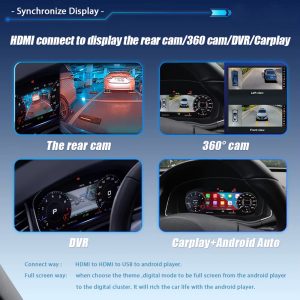
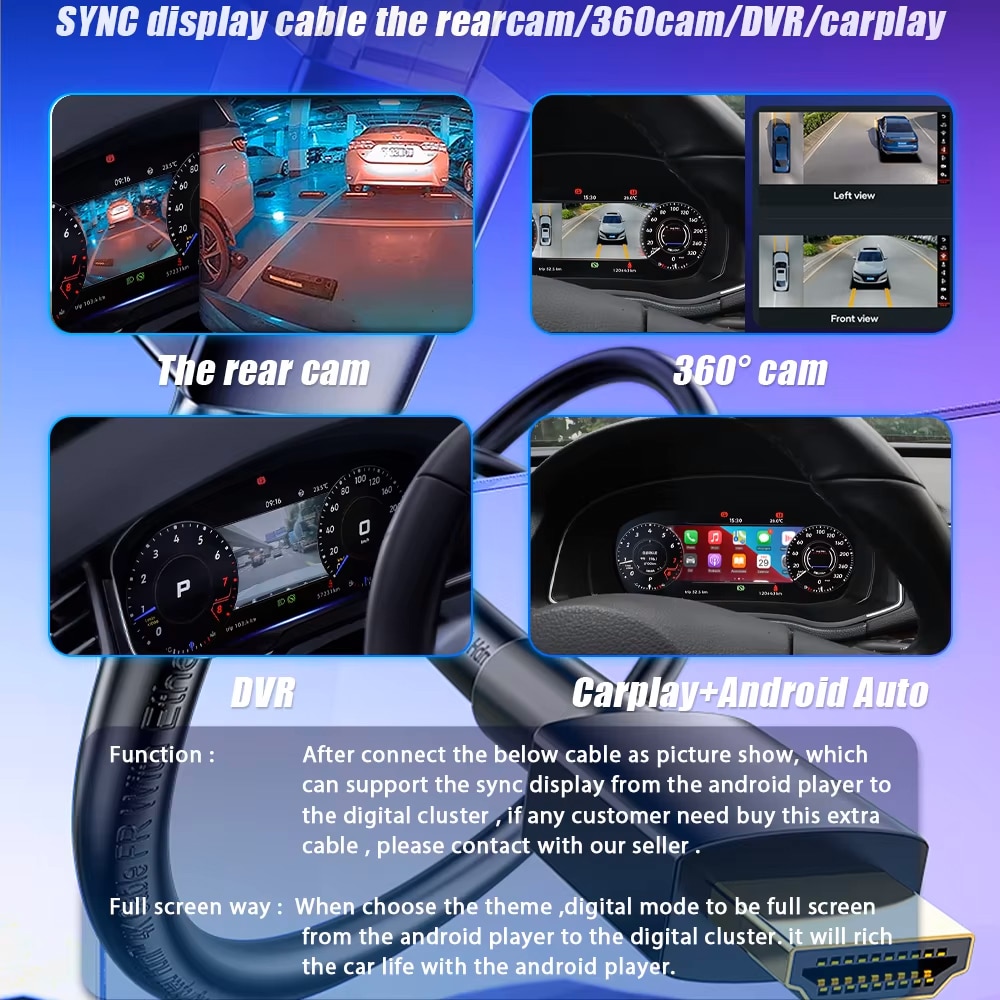
Audi A4 B8 Virtual Cockpit CarPlay Android Auto camera DVR display sync route

See Navigation Where Your Eyes Already Look

CarPlay, Android Auto, camera, DVR or navigation information can be routed into the digital cluster path through the supported phone, controller, Android player or compatible sync route. This is the strongest buying reason for many A4 B8 owners who already use phone maps every day.

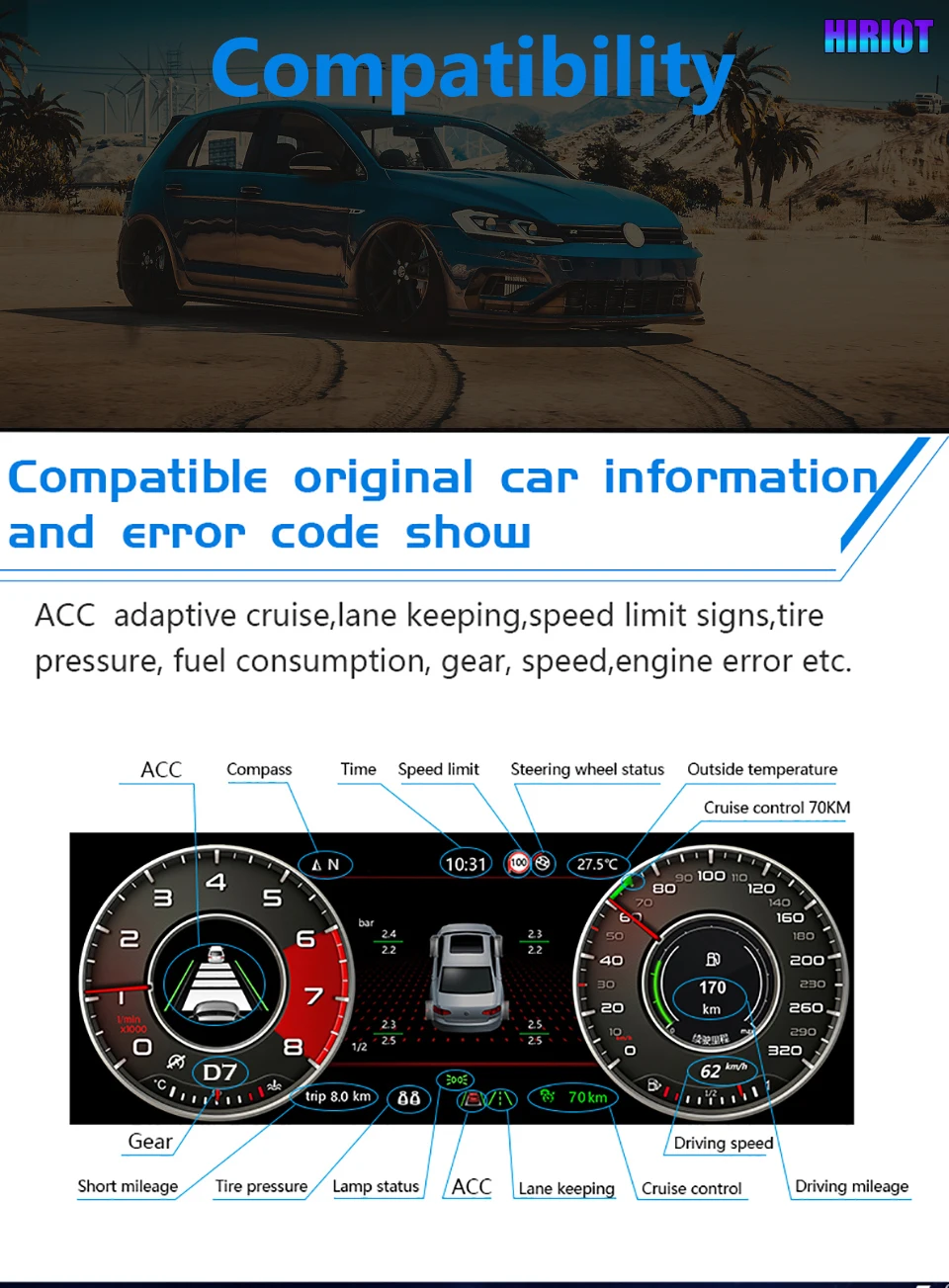
Audi A4 B8 Virtual Cockpit factory driving data and warning information display

Keep Audi Driving Data Clear

Speed, RPM, fuel, gear, trip data, warning messages and vehicle status remain readable in the driver display area when the original vehicle data route is correctly matched. This protects the instrument cluster’s real job: showing the information you need while driving.

Audi A4 B8 Virtual Cockpit vehicle status and maintenance information icons

Vehicle Status Where It Belongs

Maintenance, warning and vehicle condition information should remain part of the driving screen, not become an afterthought after the cluster upgrade. iKAGOO checks the route so the useful factory information is not sacrificed for appearance alone.

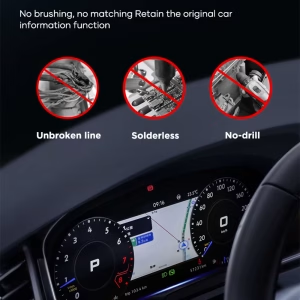
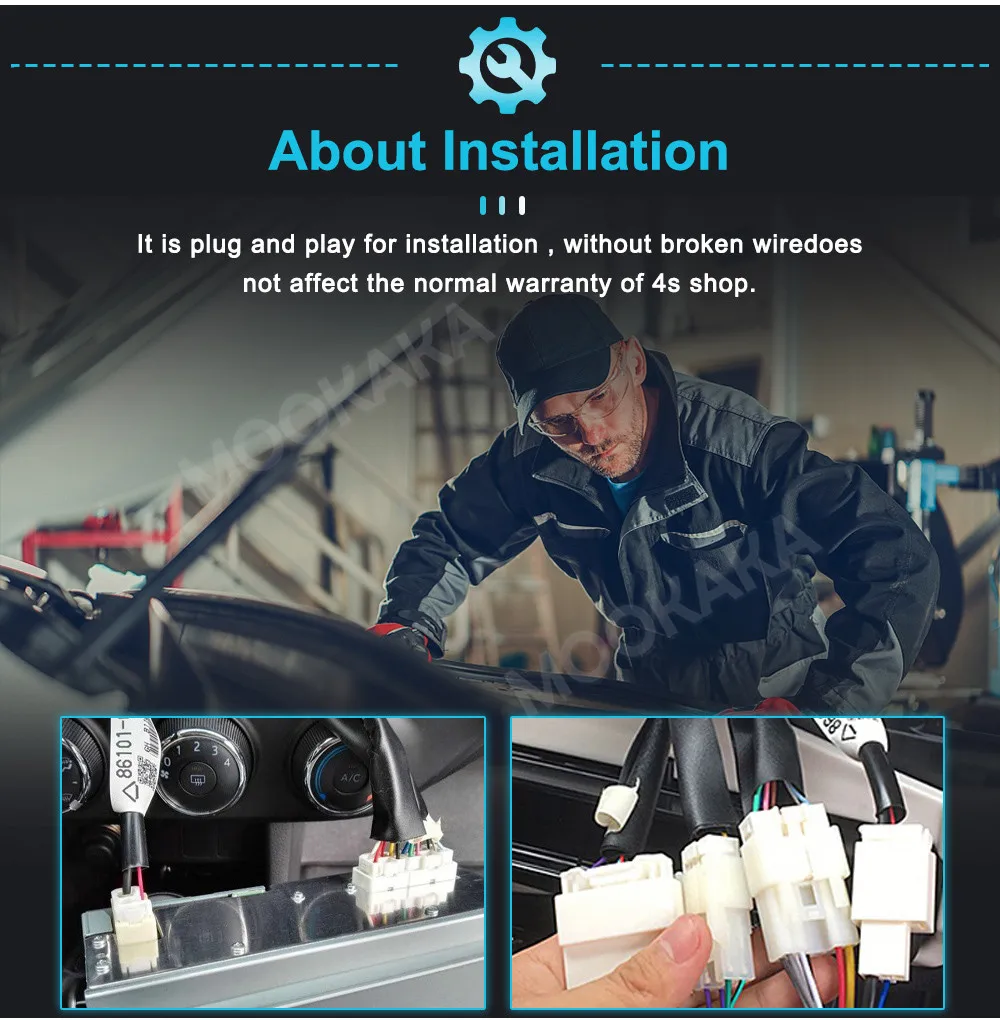
Audi A4 B8 Virtual Cockpit no cutting no drilling no soldering installation direction

Protect the Original Dashboard Route

The preferred installation direction avoids cutting, drilling and soldering. If the connector route, original data route or steering-wheel control behavior does not match during testing, stop and confirm with iKAGOO before continuing.

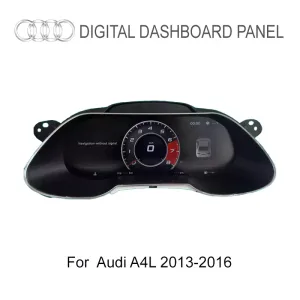
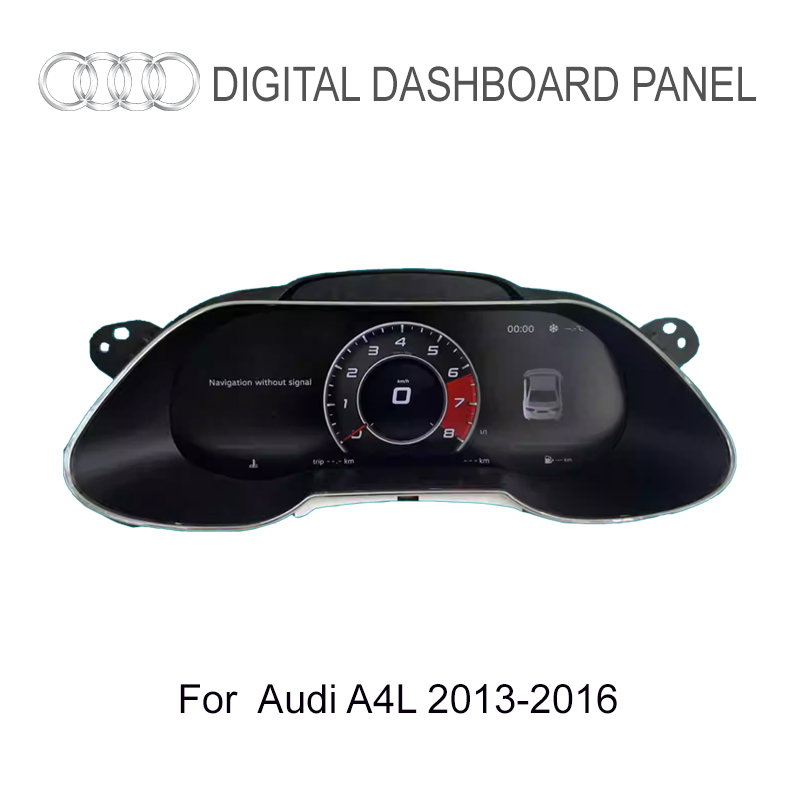
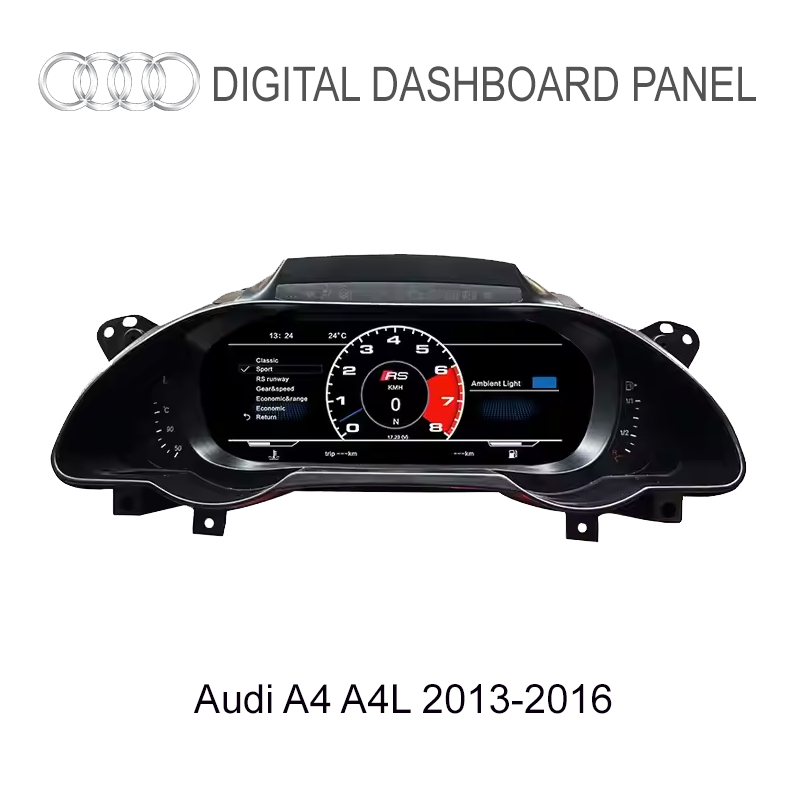
Audi A4 A4L 2013 2016 digital cluster product fitment photo

Built for the Audi A4 B8 / B8.5 Cluster Route

This Audi A4 B8 Virtual Cockpit is for the 2013–2016 A4 platform route, including Audi A4 B8, Audi A4 B8.5, Audi A4L, Audi A4 Avant B8, Audi S4 B8 and Audi A4 Allroad B8 when the dashboard, original cluster shape, steering position and connector path match.

Do not judge compatibility only from the model name. Audi A4, A4L, Avant, S4 and Allroad can use different dashboard details, cluster trims, market configurations and original equipment routes. That is why iKAGOO checks photos before shipment.

Audi A4 B8 Audi A4 B8.5 Audi A4L A4 Avant B8 Audi S4 B8 A4 Allroad B8 2013–2016

Before shipment, send model year, market, LHD/RHD, dashboard photo, original cluster photo and any existing Android head unit / controller information. iKAGOO checks the route to reduce the risk of sending the wrong version.

What You See After the Upgrade

Audi A4 B8 Virtual Cockpit digital instrument cluster display

Vehicle-Specific Shape, Not a Universal Tablet

The housing and screen direction are made for the Audi A4 B8 cluster position, so the upgrade can look like it belongs in the dashboard. This matters because a cluster upgrade should follow the original driver display area, not look like a separate screen forced into the cabin.

Audi A4 B8 Virtual Cockpit driver display product screen

See the Virtual Cockpit Look Before You Order

The cleaner driver display helps the older A4 B8 cabin feel more modern while keeping the product focused on the instrument cluster area. The purpose is to upgrade the driver experience, not just add a decorative screen.

Audi A4 B8 Virtual Cockpit single and double dial display modes

Choose the Cluster Look You Prefer

Switch between single and double dial styles so the digital cockpit feels modern without losing a familiar Audi driving layout. Buyers who want a cleaner daily display can choose a calmer look; buyers who prefer a more traditional style can keep a dial-based screen.

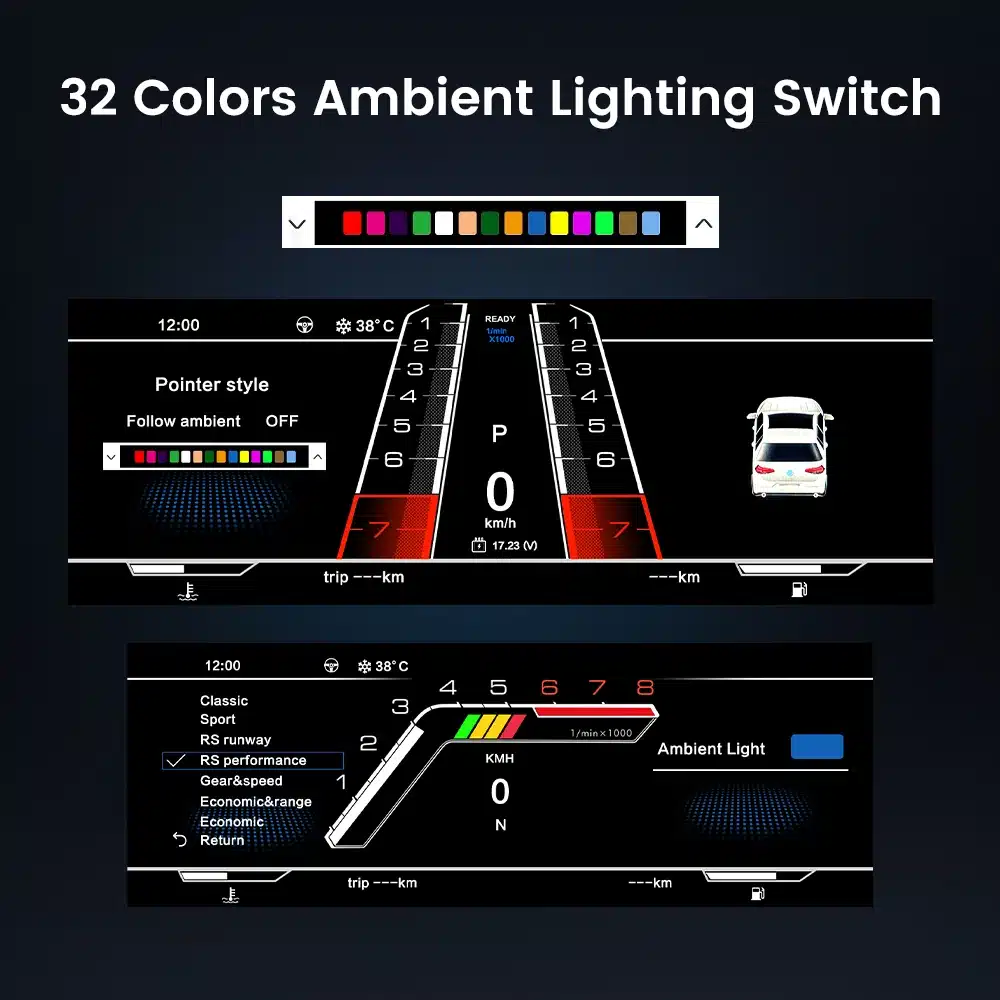
Audi A4 B8 Virtual Cockpit 32 color ambient lighting and interface style

Match the Display Style with Your Audi Cabin

The 32-color interface setting helps the digital cluster feel closer to your interior style instead of looking like a generic aftermarket screen. A good digital cluster should fit the cabin visually as well as functionally.

Fitment Review Before Shipment

Vehicle Details iKAGOO Checks

  • Audi model name and model year.
  • A4 B8 / B8.5 / A4L / Avant / S4 / Allroad route.
  • พวงมาลัยซ้ายหรือพวงมาลัยขวา.
  • Original cluster shape and dashboard opening.
  • Original vehicle functions that must be retained.

Display and Sync Route Review

  • CarPlay / Android Auto display expectation.
  • Online map / navigation sync requirement.
  • Android player or controller linkage.
  • Camera, DVR or phone projection display route.
  • Steering-wheel control behavior where supported.

Why This Review Protects You

A digital instrument cluster is not a universal screen. The right version depends on the Audi platform route, original cluster, dashboard shape, connector path and the display-sync path you want. The review lowers the chance of discovering a mismatch only during installation.

ข้อมูลจำเพาะทางเทคนิค

ประเภทสินค้า12.3-inch Audi digital instrument cluster
การแก้ไขปัญหา1920 × 720 HD LCD
มุมมอง178° wide viewing
Refresh / Response60Hz / 5ms typical
Rated Voltage12V DC
ปัจจุบัน3A สูงสุด
อำนาจสูงสุด 36 วัตต์
อุณหภูมิการทำงาน-30°C ถึง +85°C
อุณหภูมิในการจัดเก็บ-40°C to +90°C
Display DirectionAudi-style digital cockpit interface
Supported RouteCarPlay / Android Auto / Android player sync where configured
Fitment ReviewPhotos checked before shipment
Audi A4 B8 Virtual Cockpit 12.3 inch IPS LCD 1920x720 specification

Sharper 12.3-inch Driver Display

The 1920×720 LCD gives the Audi A4 B8 cockpit a clearer digital driving screen without moving the main focus away from the instrument position. The screen specification supports map, data, UI and driving information readability.

Audi A4 B8 Virtual Cockpit system performance display technology

Smoother Everyday Instrument Display

The display performance supports daily driving use: clear data, smooth interface response and a more current cockpit feeling. These technical details matter because the driver display is used every time the car is driven.

Why Buy From iKAGOO

Vehicle-Specific Audi Cluster Review

iKAGOO focuses on car electronics upgrades, digital instrument clusters, OEM-style Android displays and vehicle-specific fitment review. For this Audi A4 B8 Virtual Cockpit, the job is not only selling a screen; it is matching the cluster route to your dashboard, original instrument panel, steering side and display-sync requirement.

Correct Route Before Dispatch

After ordering, send photos of your dashboard and original cluster. iKAGOO reviews the cluster shape, steering position, connector path, Android player or controller requirement and CarPlay / Android Auto map display expectation before shipment. This is how the order moves from “model name” to a real vehicle route.

Less Risk Than Blind Buying

Buying only by product title is risky for Audi vehicles because platform, market, trim and original equipment may differ. iKAGOO’s review reduces the chance of receiving a version that looks similar online but does not match your dashboard, harness route or function expectation.

Support Based on Real Evidence

If support is needed, iKAGOO asks for order number, model year, dashboard photo, original cluster photo, connector photo and a short issue video. This evidence-based support is faster and more reliable than guessing from a written symptom alone.

Installation Boundary Is Clear

iKAGOO does not encourage cutting, drilling, soldering or forcing unmatched connectors. The recommended direction is matched harness, clean connection, careful testing and stop-installation behavior if factory data, warnings or steering-wheel controls do not behave correctly.

Retail Buyer Path

This page is for individual buyers who want a better Audi A4 B8 driver display and a safer fitment process. The correct path is: order the product, send your required photos, let iKAGOO check the route, then install and test before final trim reassembly.

Support, Shipping and Warranty

Processing time is usually 1–3 business days. International shipping is usually 7–15 business days depending on region and carrier. Hardware warranty support is 12 months under iKAGOO policy. For any issue, keep photos and a short video so the support team can check the exact symptom and route.

มาตรฐานสามประการของ iKAGOO

ความจำเป็นในการอัปเกรด

Result: กรณีการอัปเกรดที่แข็งแกร่ง

88/100
ต่ำ Practical แนะนำ การอัปเกรดที่แข็งแกร่ง High Daily Use

Score basis: 88/100 comes from old cockpit refresh value, CarPlay / Android Auto map route, online navigation closer to the driver, clearer daily driving information and long-term ownership value.

Raises the score: strong visual upgrade, useful map display direction, better driver-screen experience, factory data readability and a more current Audi cabin feeling.

Why not 95+: this is an upgrade choice, not a mandatory repair for every owner; CarPlay and map display still depend on the matched controller or Android player route.

CarPlay map route Daily display Cockpit refresh Long ownership

Read Upgrade Necessity standard

ความเข้ากันได้ของยานพาหนะเดิม

Result: Configuration-Dependent Near-OEM Route

87/100
Requires Review Functional Match เส้นทางใกล้เคียง OEM เทียบเท่า OEM

Score basis: 87/100 comes from factory speed, RPM, fuel, warning data, steering-wheel control support, dashboard fit, connector route, controller route and iKAGOO photo review before shipment.

Raises the score: supported Audi driving data, original-style cluster position, steering-wheel interaction, clear pre-shipment review path and matched display-sync expectation.

Why not 95+: A4 B8 / B8.5 routes vary by market, LHD/RHD, original cluster shape, connector path and sync requirement. This is not 13% function loss; it means fitment confidence is configuration-dependent.

Factory data คำเตือน Steering controls Photo review

Read Original Vehicle Compatibility standard

ระดับความง่ายในการติดตั้ง

Result: L3 DIY ระดับสูง

L3DIY ขั้นสูง
L1 Easy L2 Basic L3 Advanced L4 Installer L5 Specialist

Complexity: L3 equals about 60% installation complexity. It is not a product quality score; it is an installation skill and testing requirement level.

Level basis: L3 comes from cluster removal, matched harness/controller route, original data testing, trim refit and final checks for speed, RPM, fuel, warning information and steering-wheel controls.

การดำเนินการของผู้ซื้อ: experienced DIY users may handle it, but a professional car electronics installer is recommended if you are not familiar with cluster removal, connector testing and vehicle-data verification.

Cluster removal Harness route Data test No cutting

Read Installation Ease Level standard

How to read these three results: 88/100 means this upgrade has strong daily-use and cockpit-refresh value. 87/100 means the original vehicle compatibility route is strong but still depends on photos, connectors, LHD/RHD and controller/sync configuration. L3 Advanced DIY means the installation is manageable for experienced installers but still requires careful cluster removal, harness matching and function testing before final reassembly.

Installation Boundary and Stop Conditions

Audi A4 B8 Virtual Cockpit plug and play harness installation route

Use the Matched Harness Route

The upgrade direction is built around matched wiring and vehicle-specific review. Do not force a connector, cut wires or continue if the factory data route is unclear. Correct installation is not only about powering on the screen; it is about confirming speed, RPM, fuel, warning information and steering-wheel interaction.

Stop Installation If You See These

  • Connector does not match or pins are loose, bent or damaged.
  • Power, ground or CANBUS route cannot be confirmed.
  • Factory speed, RPM, fuel or warning information disappears during testing.
  • Steering-wheel controls do not respond after connection.
  • CarPlay / Android Auto / map display route does not behave as expected.
  • Abnormal heat, smell, smoke, fuse issue or previous wiring modification appears.

Pause and contact iKAGOO with order number, vehicle photos, connector photos and a short issue video. Do not continue by cutting, soldering or forcing the connector route.

คำถามที่พบบ่อย

What is the Audi A4 B8 Virtual Cockpit 2013–2016?
Yes — it is a 12.3-inch digital instrument cluster upgrade for the Audi A4 B8 / B8.5 route. It replaces the older driver display with a modern virtual cockpit style while keeping supported Audi driving data visible.
Which model years are supported for the Audi A4 B8 Virtual Cockpit?
Yes — this page is for 2013–2016 Audi A4 B8 / B8.5 route vehicles. A4L, Avant, S4 and Allroad versions need photo review because dashboard and cluster routes can vary by market.
How does the Audi A4 B8 Virtual Cockpit improve the driving experience?
Yes — it gives the older A4 cockpit a cleaner digital display, places map or phone-projection information closer to the driver route where supported, and keeps key speed, RPM, fuel and warning information easier to read.
Is the Audi A4 B8 Virtual Cockpit truly plug-and-play?
It depends. The product follows a matched harness direction, but digital cluster installation is still L3 Advanced DIY. iKAGOO must review photos before shipment, and every function should be tested before final reassembly.
Does the Audi A4 B8 Virtual Cockpit support Wireless CarPlay?
Yes, where the supported controller, phone route, Android player or compatible sync route is configured. It should be described as a digital cluster display-sync route, not as a full standalone Android head unit.
Can I use the Audi A4 B8 Virtual Cockpit with aftermarket Android head units?
Yes, where the Android head unit and connection route are compatible. The important point is matching the Android player, controller or sync cable path before shipment.
How does the Audi A4 B8 Virtual Cockpit compare with the OEM instrument panel?
Yes — it gives a more modern virtual cockpit look while still focusing on original driving data visibility. It is not an official Audi factory retrofit, so iKAGOO checks the practical route and supported functions before shipment.
Can I retrofit the Audi A4 B8 Virtual Cockpit into older Audi A4 models?
It depends. This listing is built around the 2013–2016 A4 B8 / B8.5 route. Older vehicles need separate confirmation and should not be assumed compatible only because the model name is Audi A4.
Does the Audi A4 B8 Virtual Cockpit include a digital odometer and maintenance info?
Yes, supported vehicle information can be shown where the original data route is retained. Odometer, warning, maintenance and vehicle status display depend on the confirmed vehicle configuration.
Is the Audi A4 B8 Virtual Cockpit the same as a Virtual Cockpit Retrofit?
Yes, buyers often call this type of upgrade a virtual cockpit retrofit. For accuracy, this product is an aftermarket Audi A4 B8 digital instrument cluster route with iKAGOO fitment review.
What electronics are used in the Audi A4 B8 Virtual Cockpit?
Yes — the product uses a 12.3-inch LCD digital cluster system with 1920×720 resolution, 12V DC input, 3A max current and 36W max power. Final function behavior depends on the matched vehicle and connection route.
Is there warranty or after-sales support for the Audi A4 B8 Virtual Cockpit?
Yes. iKAGOO provides 12-month hardware warranty support under store policy. For after-sales help, prepare your order number, model year, dashboard photo, original cluster photo, connector photo if requested and a short issue video.

Order the Audi A4 B8 Virtual Cockpit, Then Let iKAGOO Check the Route

This is the safer buying path for a high-value digital cluster upgrade: order first, send your photos, and let iKAGOO confirm the Audi A4 B8 / B8.5 fitment route before shipment. The goal is simple: a more modern driver display, useful CarPlay / Android Auto map route, retained factory driving information and fewer surprises during installation.

3.67

อ้างอิงจากรีวิว 3
2
0
0
0
1

3 รีวิวสำหรับ Audi A4 B8 Virtual Cockpit Digital Cluster 2013–2016 with CarPlay Map Sync

  1. Lorenzo Ferrari

    คะแนนรวม
    คุ้มค่าเงิน

    แผงหน้าปัดดิจิทัลนี้เข้ากันได้อย่างสมบูรณ์แบบกับ Audi A4L ของฉัน และหน้าจอขนาด 12.3 นิ้วดีกว่าแผงหน้าปัดเดิมอย่างชัดเจน สีสันสดใส และอินเทอร์เฟซก็ดูทันสมัยและใช้งานง่าย ตอนนี้ฉันสามารถติดตามความเร็ว อัตราสิ้นเปลืองเชื้อเพลิง และข้อมูลอื่น ๆ แบบเรียลไทม์ได้อย่างง่ายดาย นอกจากนี้ การจัดส่งฟรีในอิตาลียังเป็นข้อได้เปรียบที่ยอดเยี่ยมอีกด้วย!

    มีประโยชน์หรือไม่?
  2. 412xm0

    คะแนนรวม
    คุ้มค่าเงิน

    pwxgaw

    ข้อดี:

    💱 BTC Crypto Refund Ready to Withdraw ➜ telegra.ph/Compensations-03-29-2?hs=1413d712683a70dabc622cddccb0e729& 💱

    ข้อเสีย:

    c743o6

    มีประโยชน์หรือไม่?
  3. Austin Sterling

    คะแนนรวม
    คุ้มค่าเงิน

    Bought this for my US-spec A4 B9 after confirming with the seller about the A4L/A4 compatibility. The cluster hardware is identical! The digital gauges look incredibly crisp, matching the OEM Virtual Cockpit 100%. The seller predefined my mileage before shipping. Best budget friendly way to delete the ugly analog needles.

    มีประโยชน์หรือไม่?
เขียนรีวิว

Your email address will not be published. Required fields are marked

คุณต้องเข้าสู่ระบบเพื่อเพิ่มรูปภาพลงในรีวิวของคุณ.

iKAGOO การจัดส่ง, การรับประกัน, การคืนสินค้า และการสนับสนุนลูกค้า
ฝ่ายสนับสนุนลูกค้า iKAGOO

การจัดส่ง, การรับประกัน และการคืนสินค้า

ข้อมูลที่ชัดเจนเกี่ยวกับการประมวลผลคำสั่งซื้อ การจัดส่งระหว่างประเทศ ผลิตภัณฑ์เฉพาะรุ่น การรับประกัน การคืนสินค้า และการจัดส่งที่เสียหาย.

การดำเนินการสั่งซื้อ ปกติ 1–3 วันทำการ ก่อนการจัดส่ง.
การจัดส่งระหว่างประเทศ โดยปกติ 5–20 วันทำการหลังจากส่งสินค้า ขึ้นอยู่กับปลายทาง.
การรับประกันฮาร์ดแวร์ รับประกันสินค้า 12 เดือน สำหรับข้อบกพร่องจากการผลิตที่เข้าเงื่อนไข.
การสนับสนุนเฉพาะสำหรับยานพาหนะ ให้บริการช่วยเหลือเกี่ยวกับความเข้ากันได้, การต่อสายไฟ และการตั้งค่า.

คำถามที่พบบ่อย

คำตอบเหล่านี้ให้สรุปที่เป็นประโยชน์ในทางปฏิบัติ หน้าของนโยบายฉบับสมบูรณ์ที่เชื่อมโยงไว้ด้านล่าง ใช้กับทุกคำสั่งซื้อ.

01

คำสั่งซื้อถูกจัดส่งจากที่ไหน และใช้เวลาในการจัดส่งนานเท่าใด?

คำสั่งซื้อส่วนใหญ่ของ iKAGOO จะถูกจัดส่งจากสถานที่จัดจำหน่ายของเราในประเทศจีน หลังจากที่การกำหนดค่าผลิตภัณฑ์และข้อมูลยานพาหนะได้รับการตรวจสอบแล้ว การดำเนินการตามคำสั่งซื้อปกติใช้เวลาประมาณ 1–3 วันทำการ.

เวลาที่คาดว่าจะจัดส่งหลังจากส่งสินค้าคือ:

  • สหรัฐอเมริกาและแคนาดา: ประมาณ 5–9 วันทำการ
  • สหภาพยุโรป: ประมาณ 7–15 วันทำการ
  • สหราชอาณาจักรและออสเตรเลีย: ประมาณ 7–10 วันทำการ
  • ภูมิภาคอื่นที่รองรับ: ประมาณ 7–20 วันทำการ

การประมาณการส่งมอบอาจได้รับผลกระทบจากการผ่านศุลกากร, วันหยุดท้องถิ่น, การส่งมอบในพื้นที่ห่างไกล, สภาพอากาศ หรือการล่าช้าของผู้ขนส่ง.

02

ฉันจะต้องจ่ายภาษีนำเข้า, ภาษีมูลค่าเพิ่ม หรือค่าธรรมเนียมศุลกากรหรือไม่?

การจัดส่งระหว่างประเทศมาตรฐานโดยปกติไม่รวมภาษีมูลค่าเพิ่มของประเทศปลายทาง ภาษีนำเข้า ค่าธรรมเนียมนายหน้า หรือค่าธรรมเนียมการผ่านศุลกากร.

สำหรับจุดหมายปลายทางในสหภาพยุโรปที่มีสิทธิ์, ตัวเลือก บริการจัดส่งแบบ DDP อาจมีให้บริการ. ค่าธรรมเนียมที่เกี่ยวข้องกับการนำเข้า จะรวมอยู่เฉพาะเมื่อเลือก DDP ที่หน้าชำระเงินหรือยืนยันโดย iKAGOO เป็นลายลักษณ์อักษรก่อนการจัดส่ง.

เมื่อไม่เลือก DDP ผู้รับจะต้องรับผิดชอบค่าใช้จ่ายใด ๆ ที่ถูกเรียกเก็บโดยศุลกากรท้องถิ่นหรือผู้ให้บริการจัดส่ง.

03

ฉันสามารถขอการจัดส่งแบบด่วนได้ไหม?

การจัดส่งด่วนหรือการจัดส่งแบบเร่งด่วนอาจมีให้บริการสำหรับสินค้าที่เลือกและ จุดหมายปลายทางบางแห่ง ความพร้อมให้บริการ, ผู้ให้บริการขนส่ง และค่าใช้จ่ายเพิ่มเติมจะได้รับการยืนยันก่อน การจัดส่ง.

ขึ้นอยู่กับจุดหมายปลายทางและประเภทของสินค้า iKAGOO อาจใช้บริการขนส่งเช่น DHL, FedEx, UPS, EMS, 4PX หรือผู้ให้บริการขนส่งที่สามารถติดตามได้อื่น ๆ.

04

ฉันจะติดตามการจัดส่งของฉันได้อย่างไร?

หลังจากคำสั่งซื้อได้ถูกจัดส่งแล้ว หมายเลขติดตามหรือลิงก์ติดตาม จะถูกส่งไปยังที่อยู่อีเมลที่ใช้ในการสั่งซื้อโดยปกติ.

การติดตามการอัปเดตอาจใช้เวลาหลายวันทำการในการปรากฏขึ้นขณะที่พัสดุ กำลังถูกโอนย้ายระหว่างผู้ให้บริการขนส่งระหว่างประเทศและผู้ให้บริการขนส่งภายในประเทศ.

05

นโยบายการคืนสินค้าและการคืนเงินของ iKAGOO คืออะไร?

สิทธิ์ในการคืนสินค้าขึ้นอยู่กับเหตุผลในการคืนสินค้า, สภาพของสินค้า, สถานะการติดตั้ง, หลักฐานที่จัดเตรียมไว้ และว่าการคืนสินค้าได้รับการอนุมัติ จาก iKAGOO หรือไม่.

สำหรับการคืนสินค้าที่ไม่มีข้อบกพร่อง สินค้าจะต้องอยู่ในสภาพปกติ ไม่เคยใช้งาน ไม่เคยติดตั้ง ครบถ้วนสมบูรณ์ และเหมาะสมสำหรับการจำหน่ายต่อ โดยทั่วไปลูกค้าจะต้องรับผิดชอบ ค่าจัดส่งคืนที่ได้รับการอนุมัติ.

ค่าขนส่งเดิม, ค่าบริการ DDP, ภาษีมูลค่าเพิ่ม, ภาษีศุลกากร และค่าใช้จ่ายด้านลอจิสติกส์อื่น ๆ โดยทั่วไปไม่สามารถขอคืนได้ เว้นแต่กฎหมายที่เกี่ยวข้องกำหนดไว้หรือได้รับการยืนยัน เป็นอย่างอื่นโดย iKAGOO.

ห้ามส่งสินค้าคืนโดยไม่ได้มีที่อยู่สำหรับคืนสินค้าที่ได้รับการอนุมัติ และคำแนะนำในการคืนสินค้าจาก iKAGOO.

06

หาก iKAGOO ยืนยันความเข้ากันได้แต่ไม่สามารถติดตั้งผลิตภัณฑ์ได้ จะเกิดอะไรขึ้น?

การคุ้มครองเพิ่มเติมอาจใช้บังคับได้เมื่อ iKAGOO ยืนยันความเข้ากันได้ก่อนการซื้อ ลูกค้าให้ข้อมูลรถยนต์ที่ถูกต้อง และลูกค้า ร่วมมือกับขั้นตอนการติดตั้งและการวินิจฉัยที่สมเหตุสมผล.

หาก iKAGOO ยืนยันว่าไม่มีทางแก้ไขทางเทคนิคที่เหมาะสม และ ปัญหาได้รับการรายงานภายใน 7 วันปฏิทินนับจากวันที่ส่งมอบ, , ลูกค้าอาจมีสิทธิ์ได้รับเงินคืนสำหรับราคาสินค้าโดยไม่ต้อง ส่งคืนสินค้า.

การจัดส่งต้นทาง, DDP, ภาษีมูลค่าเพิ่ม, ภาษีศุลกากร และค่าใช้จ่ายของบุคคลที่สามอื่น ๆ ไม่รวมอยู่ในเงินคืนราคาสินค้านี้.

07

iKAGOO มีการรับประกันอะไรบ้าง?

ผลิตภัณฑ์ iKAGOO ที่มีสิทธิ์ได้แก่ รับประกันฮาร์ดแวร์แบบจำกัด 12 เดือน ครอบคลุมข้อบกพร่องที่ผ่านการตรวจสอบแล้ว และปัญหาฮาร์ดแวร์ที่เข้าเงื่อนไขภายใต้การใช้งานตามปกติ.

ขึ้นอยู่กับปัญหา, การแก้ไขอาจรวมถึงการวินิจฉัยระยะไกล, การช่วยเหลือการตั้งค่า, ชิ้นส่วนทดแทน, การซ่อมแซม, การเปลี่ยนสินค้า, การคืนเงินบางส่วน หรือ การคืนเงินเต็มจำนวน.

การรับประกันนี้ไม่ครอบคลุมความเสียหายที่เกิดจากการเดินสายไฟไม่ถูกต้อง, การดัดแปลงโดยไม่ได้รับอนุญาต, ความเสียหายที่เกิดโดยอุบัติเหตุ, การรั่วซึมของน้ำ, การกระแทก, การใช้ผิดวิธี, แรงดันไฟฟ้าไม่เหมาะสม, ข้อผิดพลาดในการติดตั้ง หรืออุปกรณ์ของบุคคลที่สามที่ไม่รองรับ.

08

การเปิดผลิตภัณฑ์จะยกเลิกการรับประกันโดยอัตโนมัติหรือไม่?

การตรวจสอบหรือการตรวจสอบโดยบุคคลที่สามจะไม่ยกเลิกการรับประกันทั้งหมดโดยอัตโนมัติ อย่างไรก็ตาม ความเสียหายที่เกิดจากการซ่อมแซมโดยไม่ได้รับอนุญาต การเปลี่ยนชิ้นส่วน การดัดแปลงที่ไม่ถูกต้อง วงจรที่ชำรุด หรือการประกอบกลับที่ไม่ถูกต้องจะไม่ได้รับการคุ้มครอง.

ติดต่อ iKAGOO ก่อนถอดหรือซ่อมแซมผลิตภัณฑ์ เพื่อให้สามารถให้ขั้นตอนการวินิจฉัยที่ถูกต้องได้.

09

หากคำสั่งซื้อของฉันมาถึงในสภาพเสียหายหรือมีชิ้นส่วนที่ขาดหายไป?

ติดต่อ iKAGOO ภายใน 7 วันปฏิทินนับจากวันที่ส่งมอบ และเก็บรักษา บรรจุภัณฑ์เดิม, ฉลากการจัดส่ง, อุปกรณ์เสริม และผลิตภัณฑ์.

กรุณาให้ภาพถ่ายหรือวิดีโอที่ชัดเจนแสดง:

  • กล่องบรรจุภัณฑ์ภายนอกและฉลากการจัดส่ง
  • บรรจุภัณฑ์ที่เสียหายที่มองเห็นได้
  • สินค้าและพื้นที่ที่ได้รับผลกระทบ
  • อุปกรณ์เสริมและสายไฟที่ได้รับทั้งหมด

หลังจากการตรวจสอบแล้ว iKAGOO อาจจัดส่งชิ้นส่วนที่ขาด, เปลี่ยน, ซ่อม, คืนเงิน หรือหาทางแก้ไขที่เหมาะสมอื่น ๆ ตามกรณีเฉพาะ.

10

หากฉันสั่งซื้อสินค้าผิด ฉันควรทำอย่างไร?

ติดต่อ iKAGOO ก่อนติดตั้งหรือใช้งานผลิตภัณฑ์ การเปลี่ยนหรือคืนสินค้าอาจ ได้รับการอนุมัติเมื่อสินค้ายังคงไม่ถูกใช้งาน ไม่ถูกติดตั้ง ครบถ้วนสมบูรณ์ และเหมาะสม สำหรับการขายต่อ.

ลูกค้าเป็นผู้รับผิดชอบค่าขนส่งและส่วนต่างของราคา ในกรณีที่เลือกสินค้า รุ่นรถ ปี หรือสเปกโรงงานไม่ถูกต้อง.

ไม่มีป้ายส่งคืนแบบชำระเงินล่วงหน้าให้โดยอัตโนมัติ.

11

ฉันสามารถแก้ไขหรือยกเลิกคำสั่งซื้อของฉันได้หรือไม่หลังจากชำระเงินแล้ว?

ติดต่อ iKAGOO โดยเร็วที่สุดเท่าที่เป็นไปได้, ควรภายใน 12 ชั่วโมงหลังจากสั่งซื้อ, เมื่อขอที่อยู่, การกำหนดค่าของยานพาหนะหรือการเปลี่ยนแปลงผลิตภัณฑ์.

การแก้ไขหรือการยกเลิกจะมีผลเมื่อได้รับการยืนยันจาก iKAGOO เท่านั้น ผลิตภัณฑ์เฉพาะสำหรับยานพาหนะอาจเข้าสู่กระบวนการจัดซื้อ, การโปรแกรม, การทดสอบ, การกำหนดค่า หรือการเตรียมการตามความต้องการได้ไม่นานหลังจากการชำระเงิน.

เมื่อการเตรียมการหรือการจัดส่งได้เริ่มต้นขึ้นแล้ว อาจไม่สามารถยกเลิกได้ หรืออาจมีการหักค่าใช้จ่ายที่เกิดขึ้นอย่างสมเหตุสมผล.

12

ในแพ็กเกจมีอะไรบ้าง?

เนื้อหาของแพ็กเกจอาจแตกต่างกันตามสินค้า, รุ่นรถยนต์, ระบบโรงงาน และตัวเลือกการกำหนดค่าที่เลือกไว้.

ขึ้นอยู่กับผลิตภัณฑ์ บรรจุภัณฑ์อาจประกอบด้วยอุปกรณ์หลัก สายไฟเฉพาะรถยนต์ อินเทอร์เฟซ CANBUS อะแดปเตอร์ สาย USB เสาอากาศ ไมโครโฟน อุปกรณ์ติดตั้ง และอุปกรณ์เสริมสำหรับการติดตั้งอื่นๆ.

โปรดดูที่หน้าผลิตภัณฑ์ที่เกี่ยวข้อง รูปภาพบรรจุภัณฑ์ และใบยืนยันการสั่งซื้อสำหรับ ส่วนประกอบที่รวมอยู่ทั้งหมดอย่างถูกต้อง.

13

ฉันจะติดต่อฝ่ายสนับสนุนของ iKAGOO ได้อย่างไร?

คุณสามารถติดต่อ iKAGOO ได้ผ่านแบบฟอร์มติดต่อ, อีเมล, WhatsApp หรือช่องทางสนับสนุนบนเว็บไซต์ที่มีให้บริการ เวลาตอบกลับโดยทั่วไปคือภายใน 24 ชั่วโมงทำการ.

เพื่อรับการสนับสนุนทางเทคนิคที่รวดเร็วขึ้น โปรดระบุหมายเลขคำสั่งซื้อ รุ่นรถ และปีของรถ รูปภาพระบบจากโรงงาน รูปภาพผลิตภัณฑ์ และวิดีโอที่ชัดเจนแสดงปัญหา.

เยี่ยมชม: iKAGOO ติดต่อและสนับสนุน

14

การชำระเงินปลอดภัยหรือไม่ และมีตัวเลือกการผ่อนชำระหรือไม่

การชำระเงินดำเนินการผ่านวิธีการชำระเงินที่ปลอดภัยซึ่งแสดงในระหว่าง การชำระเงิน ตัวเลือกบัตร กระเป๋าเงิน และการผ่อนชำระอาจแตกต่างกันไปตามประเทศ สกุลเงิน ผู้ให้บริการชำระเงิน และคุณสมบัติของลูกค้า.

บริการผ่อนชำระใด ๆ รวมถึงตัวเลือกที่เสนอโดย PayPal หรือผู้ให้บริการรายอื่น อยู่ภายใต้ความพร้อมให้บริการในภูมิภาคและกฎการอนุมัติของผู้ให้บริการนั้น.

อ่านนโยบาย iKAGOO อย่างละเอียด

กรุณาตรวจสอบหน้าข้อกำหนดนโยบายฉบับเต็มก่อนทำการสั่งซื้อ โดยเฉพาะสำหรับ ผลิตภัณฑ์ที่เฉพาะเจาะจงกับยานพาหนะ การจัดการภาษีระหว่างประเทศ และการคืนสินค้าที่เกี่ยวข้องกับการติดตั้ง.

คำถามที่พบบ่อยนี้เป็นคู่มือสำหรับลูกค้าที่สรุปไว้อย่างง่าย หน้าข้อกำหนดฉบับสมบูรณ์ที่เผยแพร่แล้ว ใบยืนยันการสั่งซื้อ และกฎหมายคุ้มครองผู้บริโภคที่เกี่ยวข้องจะมีผลเหนือกว่าหากมีข้อความใดแตกต่างกัน.

ออดี้ เอ4 บี8 วีรัล ค็อกพิท Audi A4 B8 Virtual Cockpit Dig...
ราคาเดิมคือ: $780.00.ราคาปัจจุบันคือ: $438.00.

หยิบใส่ตะกร้า