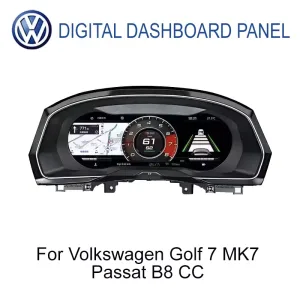
ชุดแผงหน้าปัดดิจิทัล VW Golf Mk7 ออกแบบมาเพื่อการแสดงผลที่สะอาดตาสำหรับผู้ขับขี่ Volkswagen
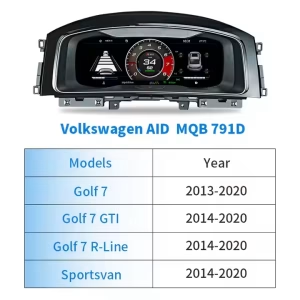
ชุดแผงหน้าปัดดิจิทัล VW Golf Mk7 อัปเกรดพื้นที่แผงหน้าปัดเดิมจากโรงงานเป็นจอแสดงผลค็อกพิต LCD ขนาด 12.3 นิ้ว สำหรับรถยนต์รุ่น Golf 7, Golf Mk7 และ Golf Mk7.5 ที่รองรับ ยังคงเอกลักษณ์ของแผงหน้าปัด Volkswagen ที่เน้นผู้ขับขี่ พร้อมให้ข้อมูลความเร็ว RPM คำเตือน การเดินทาง และข้อมูลรถยนต์ที่ชัดเจนยิ่งขึ้น ก่อนจัดส่ง iKAGOO จะตรวจสอบปีรถ รูปแบบแผงหน้าปัด ตำแหน่งพวงมาลัยซ้าย/ขวา (LHD/RHD) และภาพถ่ายขั้วต่อ เพื่อเตรียมเวอร์ชันที่ถูกต้องให้กับคุณ.
ทำให้ห้องโดยสาร Golf Mk7 รู้สึกใหม่ขึ้นโดยไม่สูญเสียเลย์เอาต์ของ Volkswagen
นี่ไม่ใช่แค่หน้าจอทดแทน การอัปเกรดนี้เปลี่ยนโซนข้อมูลหลักของผู้ขับขี่ ซึ่งเป็นที่ที่ตรวจสอบความเร็ว รอบเครื่อง สถานะเตือน และข้อมูลการขับขี่ทุกวัน.
VW Golf Mk7 Digital Cluster นี้ทำอะไรได้บ้าง
VW Golf Mk7 Digital Cluster คือชุดแปลงแผงหน้าปัดดิจิทัลแบบ LCD ขนาด 12.3 นิ้ว ที่ใช้ระบบ Linux สำหรับรถ Volkswagen Golf 7 / Mk7 / Mk7.5 ที่รองรับ และรุ่น MQB บางรุ่นหลังการยืนยันเวอร์ชัน ช่วยอัปเกรดพื้นที่แสดงผลฝั่งคนขับจากโรงงานให้แสดงความเร็วแบบดิจิทัล รอบเครื่องยนต์ ข้อมูลการขับขี่ ข้อมูลคำเตือน รูปแบบธีม และข้อมูลรถที่รองรับได้ชัดเจนยิ่งขึ้น ปุ่มควบคุมบนพวงมาลัยและข้อมูลรถแบบเดิมยังคงทำงานผ่านอินเทอร์เฟซยานพาหนะที่ตรงกันหลังการติดตั้งอย่างถูกต้อง สำหรับการแสดงผลแผนที่ กล้อง หรือจอที่เกี่ยวข้องกับ CarPlay เส้นทางการรองรับจริงขึ้นอยู่กับระบบที่จับคู่และการตั้งค่าที่ยืนยันแล้ว ดังนั้น iKAGOO จะตรวจสอบรถของคุณและเส้นทางการเชื่อมต่อก่อนจัดส่ง.
ตรวจสอบความพอดีก่อนจัดส่ง
Golf 7, Golf Mk7, Golf Mk7.5, GTI และ R อาจแตกต่างกันไปตามปีของแต่ละตลาด ขอบแดชบอร์ด รูปแบบพวงมาลัยซ้าย/ขวา และเวอร์ชันแผงหน้าปัดดั้งเดิม iKAGOO จะไม่จัดเตรียมคำสั่งซื้อโดยใช้เพียงชื่อรุ่นเท่านั้น.
แผงหน้าปัดเฉพาะรุ่น ไม่ใช่แท็บเล็ตทั่วไป
นี่คือการอัปเกรดชุดมาตรวัดเฉพาะ ไม่ใช่หน้าจอ Android ทั่วไปที่วางอยู่หลังพวงมาลัย ระบบ Linux ใช้เพื่อการเริ่มต้นที่รวดเร็วและการแสดงผลที่เสถียร.
ไม่มีการตัดสายไฟโดยเจตนา
สำหรับรถยนต์ที่รองรับ เส้นทางการติดตั้งจะขึ้นอยู่กับการเดินสายไฟที่ตรงกันและการเชื่อมต่ออินเทอร์เฟซของรถ การดัดแปลงภายหลังหรือขั้วต่อที่ผิดปกติ ควรแสดงให้ iKAGOO ดูก่อนการติดตั้ง.
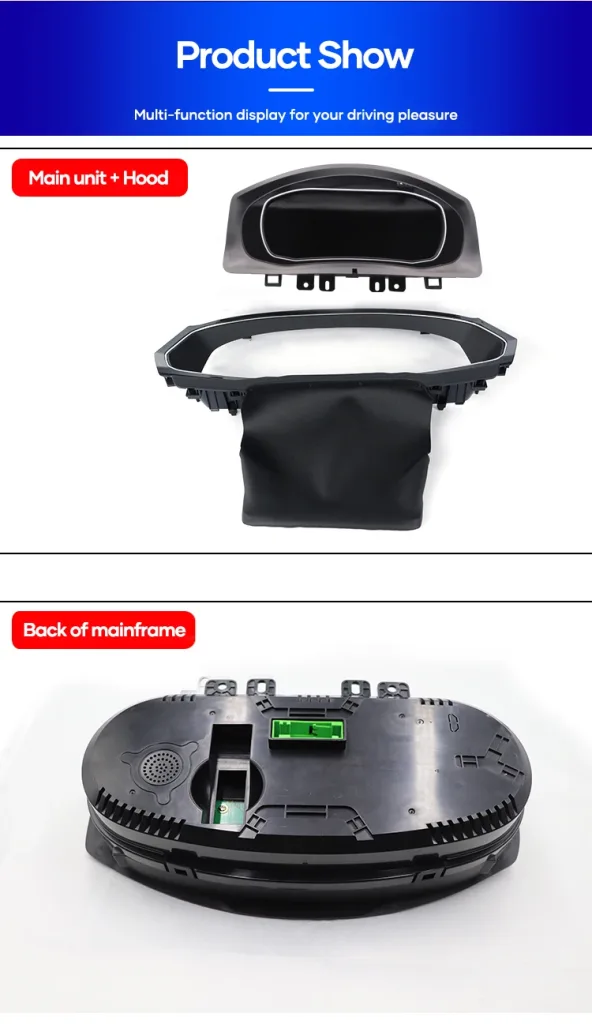
รายละเอียดจอแสดงผลจริง ตัวเรือน และอินเทอร์เฟซ
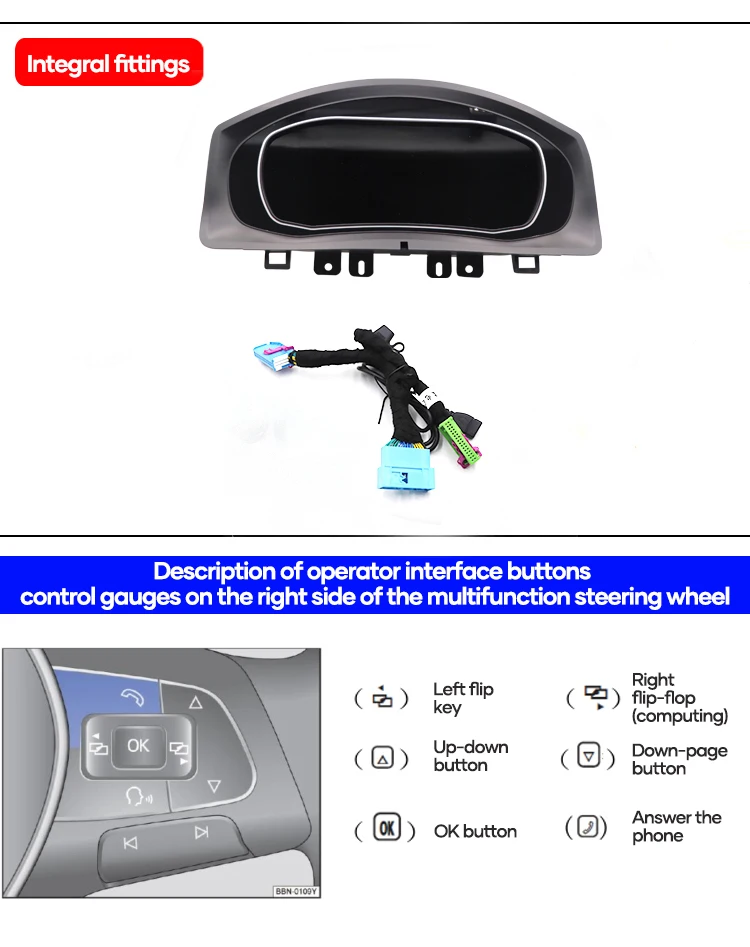
มุมมองผลิตภัณฑ์เหล่านี้ช่วยให้คุณเข้าใจว่าชุดมาตรวัดดิจิทัล VW Golf Mk7 เปลี่ยนจอแสดงผลสำหรับคนขับอย่างไร ตัวเรือนพอดีกับบริเวณแผงหน้าปัดอย่างไร และเหตุใดเส้นทางการเดินสายไฟจึงต้องตรงกันก่อนจัดส่ง.
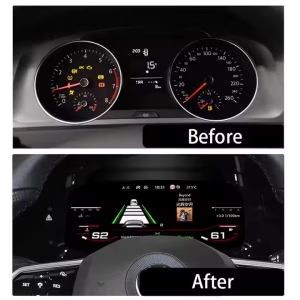
การเปลี่ยนแปลงค็อกพิตก่อนและหลัง
มุมมองแบบอะนาล็อกแบบเดิมถูกแทนที่ด้วยรูปแบบดิจิทัลที่กว้างขึ้น ซึ่งทำให้ข้อมูลการขับขี่อ่านง่ายขึ้น สำหรับการเดินทางประจำวัน การเดินทางไกล และการขับขี่กลางคืน ห้องโดยสารให้ความรู้สึกทันสมัยขึ้นโดยไม่เปลี่ยนตำแหน่งพื้นฐานของแผงหน้าปัด Volkswagen.
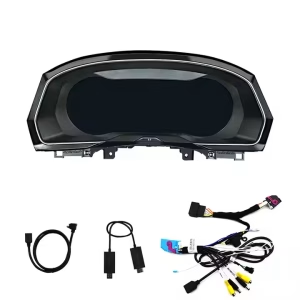
การเตรียมสายไฟและอินเทอร์เฟซเฉพาะยานพาหนะ
ชุดมาตรวัดมาพร้อมกับสายไฟเฉพาะยานพาหนะและชิ้นส่วนอินเทอร์เฟซที่เกี่ยวข้องสำหรับการติดตั้งที่รองรับ สายไฟที่ถูกต้องช่วยลดความเสี่ยงในการเชื่อมต่อผิดพลาดและช่วยให้อุปกรณ์สื่อสารกับรถยนต์ได้.
ปุ่มควบคุมบนพวงมาลัยยังคงให้ความรู้สึกคุ้นเคย
ตรรกะการควบคุมพวงมาลัยอเนกประสงค์แบบเดิมจะถูกคงไว้หลังจากการเชื่อมต่อและการตั้งค่าที่ถูกต้อง ซึ่งทำให้การใช้งานในชีวิตประจำวันยังคงคุ้นเคยสำหรับการเปลี่ยนหน้า การยืนยันตัวเลือก และการใช้เมนูของชุดมาตรวัดที่รองรับ.
ธีมจอแสดงผลหลายแบบสำหรับการขับขี่ในชีวิตประจำวัน
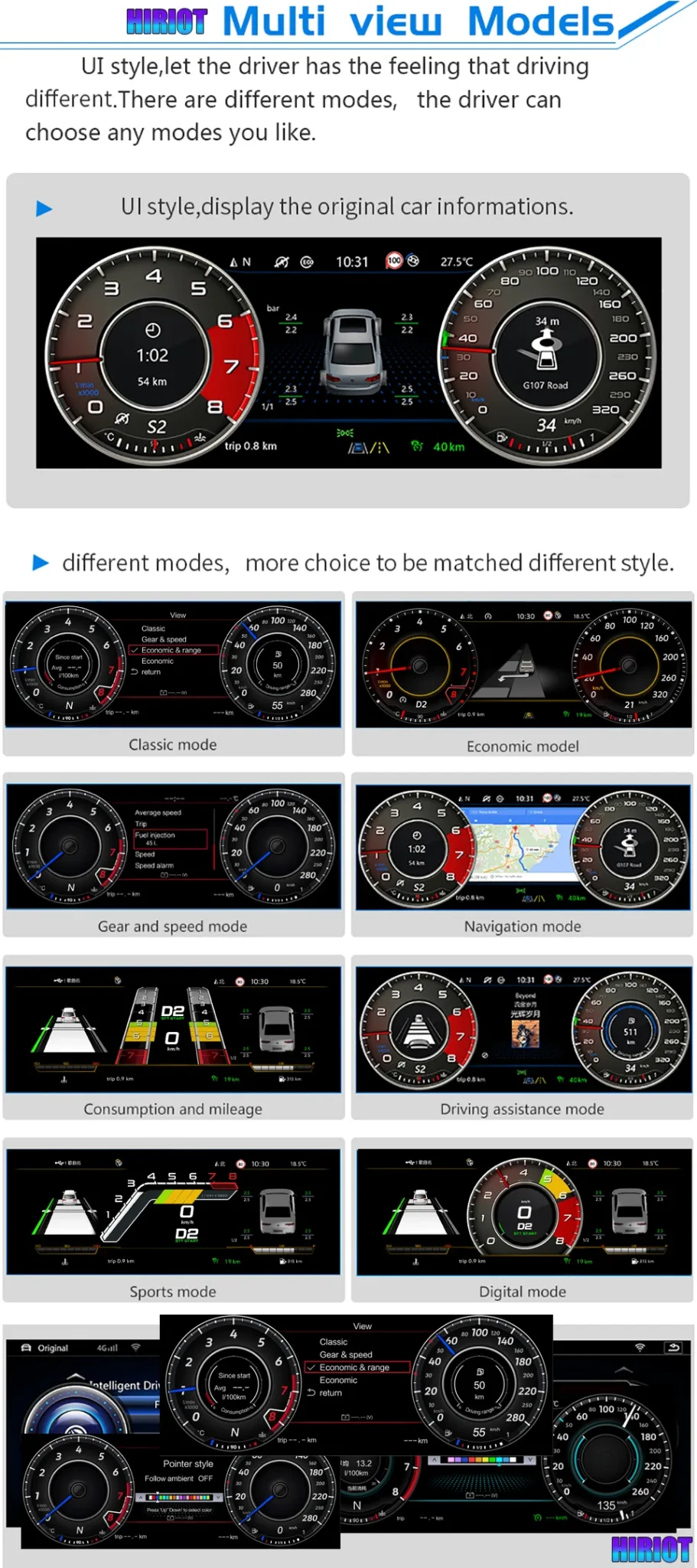
รูปแบบหน้าปัดและหน้าจอที่แตกต่างกันช่วยให้คุณเลือกสไตล์การแสดงผลที่เหมาะกับการเดินทางปกติ การขับขี่แบบสปอร์ต หรือการใช้งานที่เน้นการนำทาง จอแสดงผลที่สะอาดตาช่วยให้ห้องโดยสารดูพรีเมียมมากขึ้นสำหรับทั้งผู้ขับขี่และผู้โดยสาร.
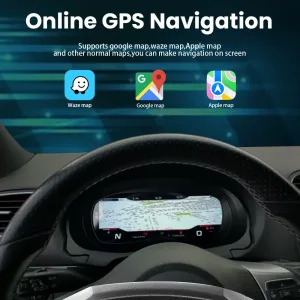
เส้นทางการแสดงผลการนำทางเมื่อตั้งค่าอย่างถูกต้อง
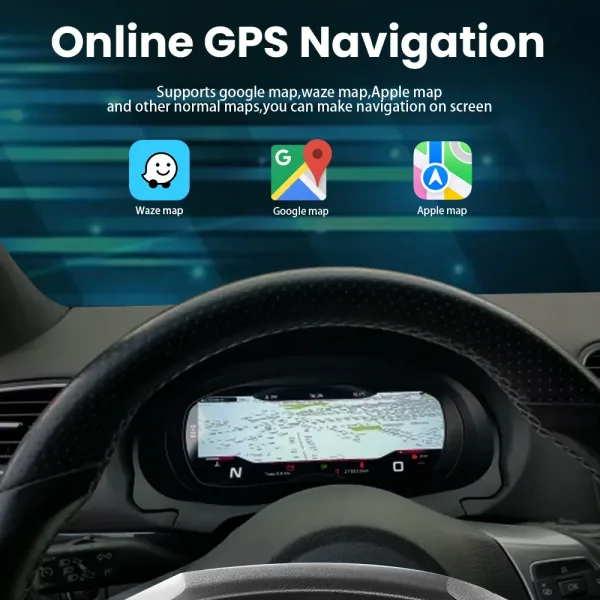
การแสดงผลการนำทางจะมีประโยชน์เมื่อชุดหน้าปัดได้รับการตั้งค่าด้วยอินพุตที่ถูกต้องและเส้นทางของระบบที่จับคู่กัน iKAGOO ควรยืนยันเส้นทางการนำทาง HDMI หรือการฉายหน้าจอสำหรับการกำหนดค่าที่แน่นอนของคุณก่อนจัดส่ง.
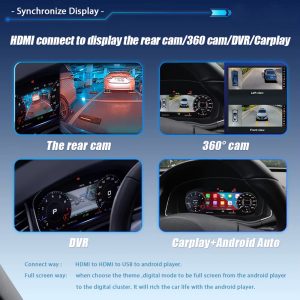
เส้นทางการรองรับอินพุต CarPlay กล้อง และหน้าจอ
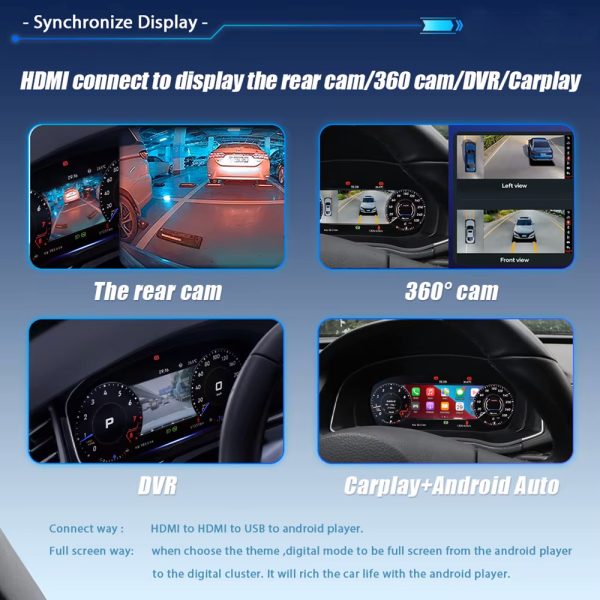
ฟังก์ชันการแสดงผลบางอย่างขึ้นอยู่กับเครื่องเล่น Android ที่จับคู่ เส้นทางอินพุต HDMI หรือการกำหนดค่าการฉายหน้าจอที่รองรับ ตัวชุดหน้าปัดเองเป็นจอแสดงผลเครื่องมือวัดเฉพาะบน Linux ดังนั้นจึงควรยืนยันเส้นทางก่อนจัดส่ง.
ข้อมูลรถยนต์และข้อมูลคำเตือนยังคงอยู่
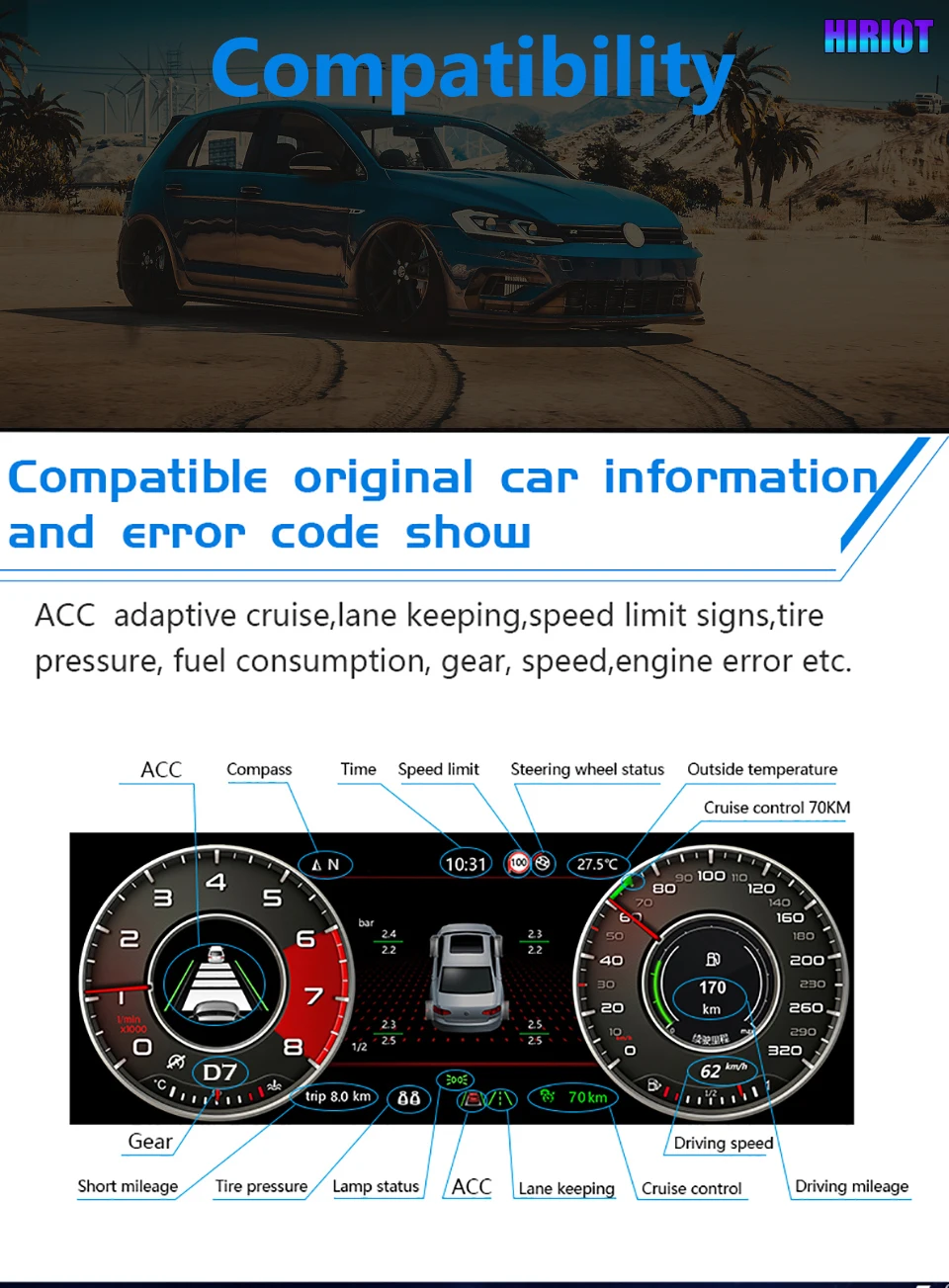
การอัปเกรดนี้ถูกออกแบบมาเพื่อแสดงข้อมูลรถยนต์ดั้งเดิมที่รองรับต่อไปผ่านอินเทอร์เฟซที่จับคู่ ซึ่งรวมถึงความเร็ว เกียร์ ข้อมูลที่เกี่ยวข้องกับน้ำมันเชื้อเพลิง ตัวบ่งชี้คำเตือน และสัญญาณรถยนต์อื่นๆ ที่รองรับหลังการติดตั้งอย่างถูกต้อง.
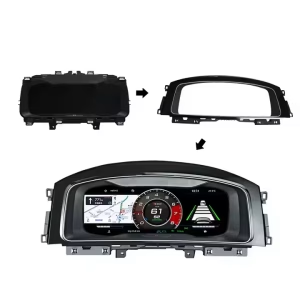
ตัวเรือนและการประกอบอินเทอร์เฟซ
บริเวณขั้วต่อด้านหลังและโครงสร้างที่ติดตั้งมีความสำคัญ เนื่องจากชุดแผงหน้าปัดต้องวางตำแหน่งให้ถูกต้องภายในแดชบอร์ดฝั่งคนขับ iKAGOO ใช้ข้อมูลรถยนต์ของคุณเพื่อเตรียมเวอร์ชันที่ถูกต้อง.
การกำหนดค่าหลักสำหรับชุดแผงหน้าปัดดิจิทัล VW Golf Mk7
ต่อไปนี้เป็นข้อมูลจำเพาะที่ใช้งานได้จริงซึ่งสำคัญก่อนสั่งซื้อ: ขนาดหน้าจอ, ทิศทางของรถ, ประเภทระบบ, เส้นทางการเดินสายไฟ และฟังก์ชันรถยนต์ที่คงไว้.
ฟังก์ชันการทำงานของรถเดิมที่รองรับหลังจากการจับคู่ที่ถูกต้อง
การอัปเกรดคลัสเตอร์นี้สร้างขึ้นจากเส้นทางการสื่อสารของรถยนต์เดิม พฤติกรรมฟังก์ชันที่แน่นอนขึ้นอยู่กับปีรถ คลัสเตอร์เดิม ขั้วต่อ การจัดวาง LHD/RHD ระบบโรงงาน และการปรับแต่งใดๆ ก่อนหน้านี้.
ปุ่มควบคุมบนพวงมาลัย
ปุ่มควบคุมมัลติฟังก์ชันบนพวงมาลัยที่รองรับยังคงใช้งานคลัสเตอร์ได้หลังการเชื่อมต่อและกำหนดค่าอย่างถูกต้อง.
ข้อมูลรถ
ความเร็ว รอบเครื่องยนต์ เกียร์ เชื้อเพลิง ระยะทาง และข้อมูลการขับขี่ที่รองรับยังคงแสดงผ่านอินเทอร์เฟซรถยนต์ที่ตรงกัน.

ข้อมูลคำเตือน
ไฟเตือนและข้อมูลสถานะรถยนต์ที่รองรับยังคงปรากฏผ่านเส้นทางการสื่อสารของคลัสเตอร์.
เส้นทางอินพุตจอแสดงผล
กล้อง, มุมมอง 360, CarPlay หรือเส้นทางแสดงแผนที่ขึ้นอยู่กับระบบที่จับคู่และเส้นทางการกำหนดค่าที่ยืนยันแล้ว.
สามข้อควรตรวจสอบก่อนตัดสินใจซื้อ
มาตรฐาน iKAGOO เหล่านี้อธิบายมูลค่าการอัปเกรด การรักษาฟังก์ชันจากโรงงาน และเส้นทางการติดตั้งที่ถูกต้องสำหรับคลัสเตอร์ดิจิทัล VW Golf Mk7 นี้.
ความจำเป็นในการอัปเกรด
This score explains why the upgrade makes sense for daily use, not only whether the dashboard looks modern.
- The instrument cluster is the driver’s most-used display area.
- The 12.3-inch LCD gives clearer digital driving information.
- It is more complete than a basic CarPlay-only module because it changes the driver cockpit display.
ความเข้ากันได้ของยานพาหนะเดิม
A score of 95/100 does not mean that 5% of factory functions are lost. It explains the matching route, control retention and vehicle-specific preparation.
- Supported vehicle data and warnings continue through the matched route.
- Steering-wheel controls continue through the supported control path.
- Matched wiring reduces wrong-connection risk before international shipment.
ระดับความง่ายในการติดตั้ง
This level is suitable for experienced DIY installers or an automotive electronics installer.
- Requires careful trim and cluster removal.
- Requires matched wiring connection and vehicle-interface setup.
- No intentional cutting of supported factory wiring is planned for supported installations.
Correct Version Preparation Matters More Than a Cheap Listing Photo
Digital clusters are not selected by model name alone. iKAGOO prepares the version around vehicle year, dashboard layout, factory cluster, connector, LHD/RHD position and your requested display route.
Vehicle Details Checked
You send the model year, dashboard photo, current instrument cluster photo, steering wheel photo and connector details when needed. This helps iKAGOO prepare the correct screen and interface path.
Harness and Interface Prepared
The matched wiring route is important for steering controls, vehicle data and supported warning information. The goal is a cleaner connection path without intentionally cutting supported factory wiring.
การสนับสนุนหลังการชำระเงิน
After the order, iKAGOO can review setup issues, wiring photos, videos, version information and function behavior. Cases beyond normal setup can enter engineer-level judgment.
How iKAGOO Supports This Upgrade After Payment
The order process is built to reduce wrong-version risk, prepare the correct vehicle-specific parts and give your installer a usable support route if the vehicle has a special configuration.
Order Record Created
Your order number becomes the reference for vehicle review, packing, delivery and support.
รีวิวรถยนต์
iKAGOO checks your model year, dashboard layout, LHD/RHD position and current cluster information.
เตรียมเวอร์ชันที่ถูกต้อง
The screen, harness, interface and configuration route are prepared according to the vehicle information.
รูปภาพสินค้าเมื่อมีการร้องขอ
If requested before packing, you can ask to see actual visible parts prepared for your order.
การบรรจุและการจัดส่ง
After confirmation, the order is packed and dispatched with tracked international delivery.
การติดตามผล
Tracking may update through international and local carriers. iKAGOO can request logistics updates if needed.
การสนับสนุนการติดตั้ง
If your installer needs help, iKAGOO may request photos, videos, wiring status and function test results.
การส่งต่อวิศวกร
Cases beyond normal setup can be escalated with useful evidence for technical judgment.
Software or Settings Path
If settings, firmware or configuration guidance is involved, iKAGOO coordinates the suitable technical route after confirmation.
ปัญหาสายเคเบิลหรืออุปกรณ์เสริม
If a confirmed cable or accessory problem appears, iKAGOO helps arrange the approved solution or replacement route.
Hardware Compatibility Case
If confirmed hardware incompatibility remains after checks, iKAGOO follows the applicable order and return policy for the device itself.
หลังจากที่มันทำงานได้
You can still contact iKAGOO for applicable maintenance, setup, update or troubleshooting guidance.
Why This Route Makes More Sense Than a Generic Dashboard Fix
The right choice depends on whether you only want the old display repaired, a phone connection added, or a real driver-display upgrade.
Repair the Old Cluster
Repair may keep the car original, but it does not modernize the cockpit or add a wider digital driver information layout. It can be reasonable for collectors, but less attractive for daily-use upgrades.
Cheap Universal Screen
A universal product may look cheaper at first, but it often creates fitment, wiring and support uncertainty. The risk is higher when the product is selected only from a photo instead of vehicle details.
iKAGOO VW Golf Mk7 Digital Cluster
This route focuses on a vehicle-specific instrument display, matched wiring, retained controls and pre-shipment fitment review. It is the better direction for owners who want a cleaner Golf Mk7 cockpit upgrade with support after purchase.
ก่อนการจัดส่ง
- รุ่นรถและปีรถ
- Golf 7 / Mk7 / Mk7.5 / GTI / R identification
- ตำแหน่งพวงมาลัยซ้ายหรือขวา
- Dashboard and current cluster photos
- รูปภาพของตัวต่อ หากมีคำขอ
ก่อนการติดตั้ง
- Check all visible connectors
- Confirm the matched harness route
- Test steering-wheel controls before final assembly
- Test warning information and vehicle data
- Stop if any plug shape is not correct
หลังการติดตั้ง
- Test speed, RPM, fuel and gear display
- Test warning indicators
- Test theme switching and cluster menus
- Check navigation or input route if configured
- Send video to iKAGOO if support is needed
Order Protection and Support References
These links help buyers verify how iKAGOO handles compatibility, installation preparation, warranty coverage, returns and long-term support before ordering.
ความเข้ากันได้และการติดตั้ง
Review how iKAGOO checks vehicle details, installation conditions and supported retrofit routes before shipment.
Read Compatibility and Installationนโยบายการรับประกัน
Check the warranty terms for eligible hardware, support process and order-number reference requirements.
อ่านนโยบายการรับประกันRefunds and Returns
Review the return route, confirmed compatibility cases and order-protection conditions before installation.
Read Refund and Returnsคำถามที่พบบ่อย
These answers are written for Golf Mk7 owners who want to avoid wrong-version ordering, unclear installation routes and unsupported function expectations.
Will this VW Golf Mk7 Digital Cluster fit my exact car?
It depends. The main direction is Golf 7 / Golf Mk7 / Golf Mk7.5, but final fitment depends on your vehicle year, dashboard layout, LHD/RHD position, original cluster and connector route. Send clear photos before shipment so iKAGOO can prepare the correct version.
Is this only for Golf Mk7, or also for Passat B8 and Arteon?
It depends. Golf Mk7 is the primary page direction, while Passat B8 and Arteon should be handled as confirmed MQB-related applications. iKAGOO checks dashboard structure and connector information before treating those vehicles as supported for your order.
ปุ่มควบคุมบนพวงมาลัยเดิมจะยังใช้งานได้อยู่หรือไม่?
Yes, after correct matching and connection. Supported multifunction steering-wheel controls continue through the matched vehicle interface. Final behavior should be tested before the dashboard is fully reassembled.
Will vehicle data and warning information still show?
Yes, supported vehicle data and warning information continue through the cluster communication route after correct installation. This includes core driving information such as speed, RPM, gear, fuel-related data and supported warning status.
Does it support map navigation or CarPlay display?
It depends. The cluster is a dedicated Linux instrument display and does not run Android apps by itself. Map, CarPlay, Android Auto, camera or 360-view display depends on the paired system, HDMI or screen-projection route and the confirmed configuration.
ฉันจำเป็นต้องตัดสายไฟจากโรงงานหรือไม่?
No, supported installations are prepared around a matched wiring route without intentional cutting of supported factory wiring. If your vehicle has previous aftermarket wiring, damaged plugs or non-standard connectors, stop and contact iKAGOO before continuing.
เหมาะสำหรับการติดตั้งด้วยตนเองหรือไม่?
It depends. The iKAGOO Installation Ease Level is Level 3 — Advanced DIY. It is suitable for experienced DIY installers or an automotive electronics installer who can remove trim carefully, connect the matched harness and complete full function testing.
Does it require ODIS or dealer coding?
It depends on the vehicle and configuration. Many supported functions work through the matched cluster and interface route, but special configurations may need setup guidance. iKAGOO reviews your vehicle details so the correct support path is prepared before shipment.
ฉันควรส่งอะไรก่อนการจัดส่ง?
Send the vehicle model, model year, dashboard photo, current instrument cluster photo, steering-wheel photo, LHD/RHD information and connector photos if requested. These details help iKAGOO prepare the correct version instead of relying only on the vehicle badge name.
ทำไมต้องซื้อจาก iKAGOO แทนที่จะซื้อเครื่องทั่วไปที่ถูกกว่า?
Because the real risk is not only price; it is ordering the wrong version, receiving the wrong harness or having no support after installation starts. iKAGOO provides vehicle review, version preparation, tracked delivery and practical installation support for this VW Golf Mk7 Digital Cluster upgrade.
ขอรูปถ่ายสินค้าจริงก่อนบรรจุได้ไหม?
Yes, if requested before packing. You can ask iKAGOO to show visible prepared parts, harnesses or related accessories before dispatch. This helps you and your installer feel more confident before international shipping begins.
หากผู้ติดตั้งของฉันพบปัญหาเกี่ยวกับสายเคเบิลหรือการตั้งค่าล่ะ?
Contact iKAGOO with clear photos, videos, connector status and a description of the function that is not working. iKAGOO uses that information to check wiring, settings, CANBUS route, cluster version and whether engineer-level review is needed.
Choose This Upgrade If You Want a Real Driver-Cockpit Change
The VW Golf Mk7 Digital Cluster is for owners who want the instrument area to feel newer, clearer and more useful every day. It is strongest when the buyer provides accurate vehicle information, iKAGOO prepares the correct version, and the installer completes full function testing before final assembly.


เจมส์.ปาร์คเกอร์ –
ติดตั้งชุดหน้าปัดดิจิทัล Ikagoo ในรถ Golf 7 ปี 2015 ของฉัน การติดตั้งทำได้ง่ายมาก และหน้าจอแสดงผลดูทันสมัย การเชื่อมต่อ CarPlay แบบไร้สายทำงานได้อย่างราบรื่น และธีมที่ปรับแต่งได้เพิ่มความเป็นส่วนตัว โดยรวมแล้วเป็นการอัปเกรดที่คุ้มค่า.