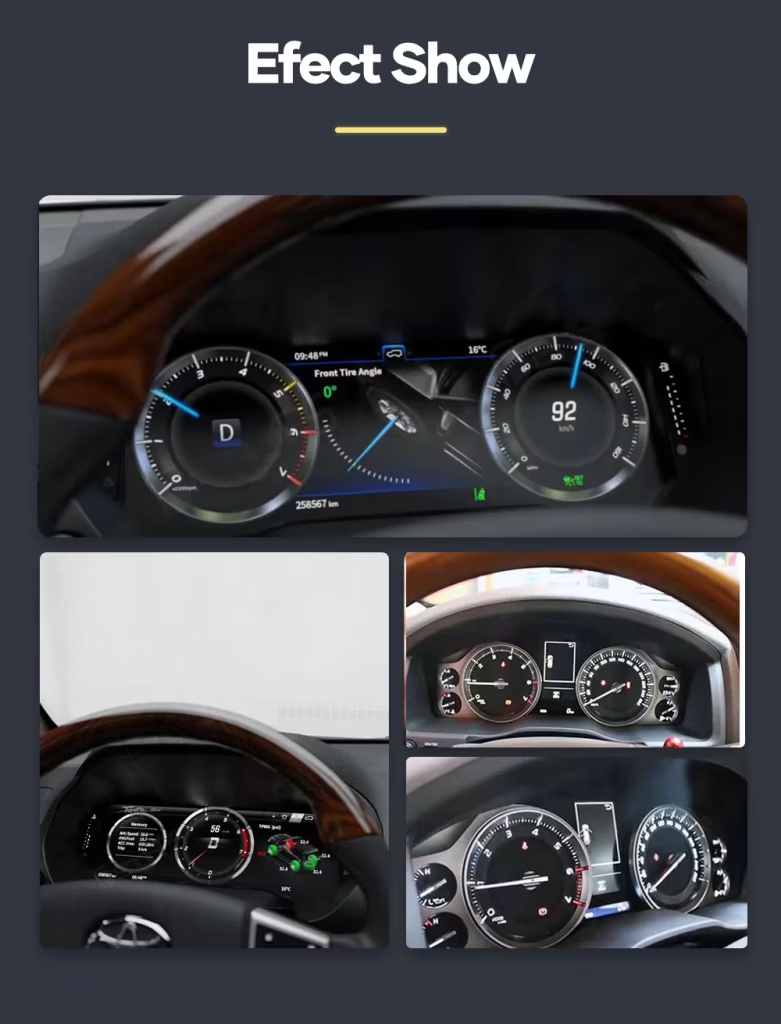
คลัสเตอร์ดิจิทัล Toyota Alphard 2015-2019 สำหรับหน้าจอแสดงผลการขับขี่ที่สะอาดและใหม่ขึ้น
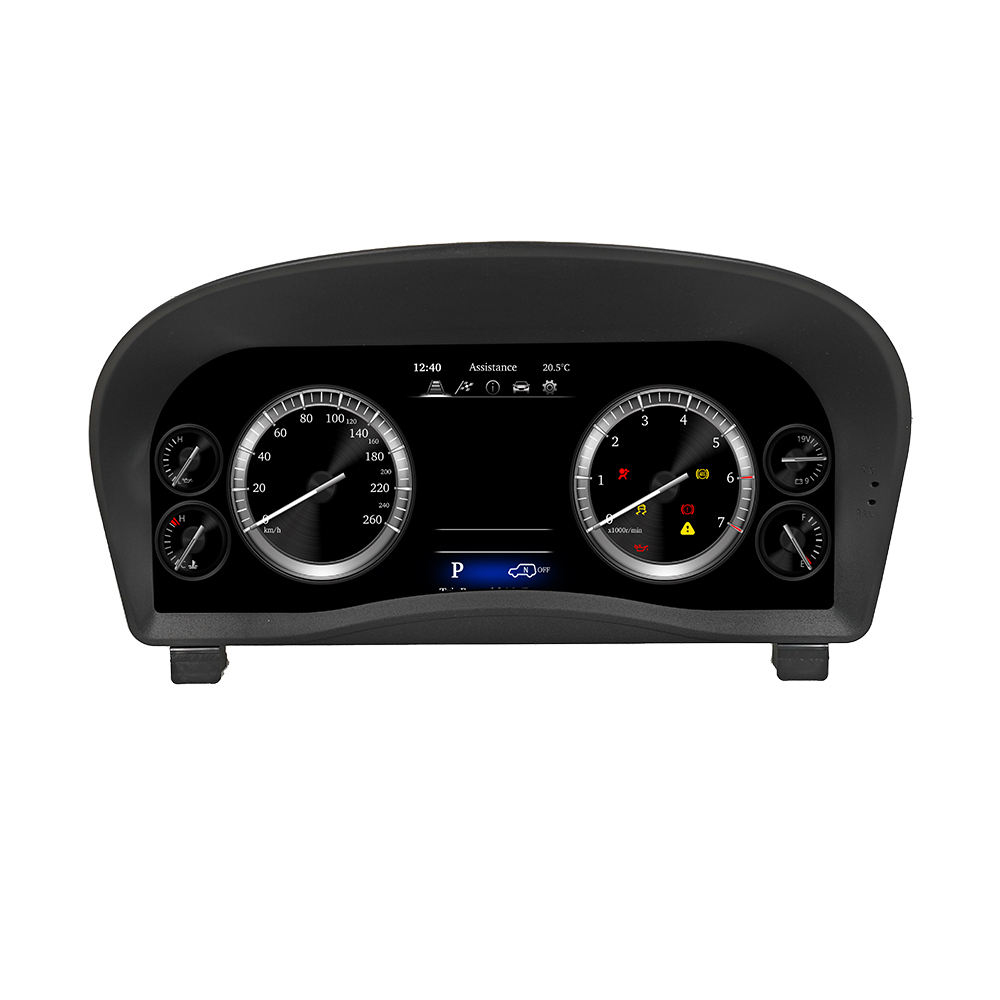
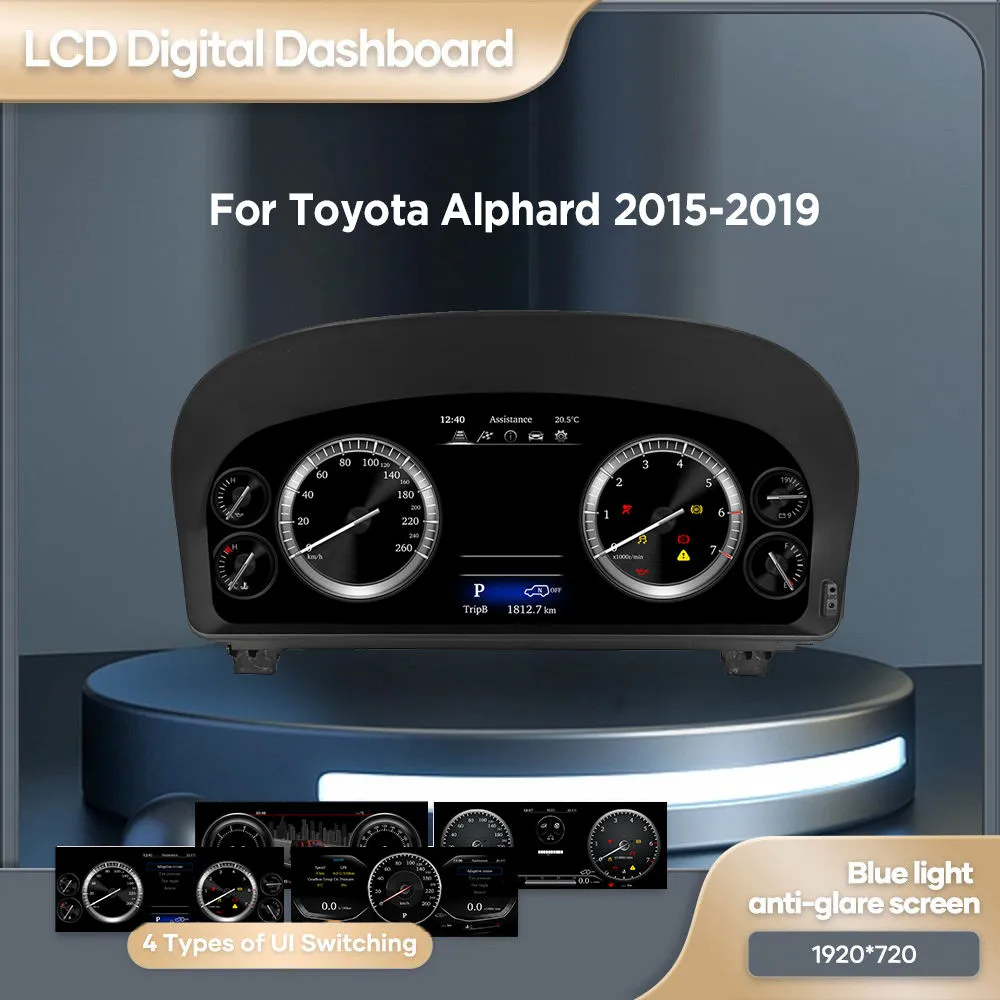
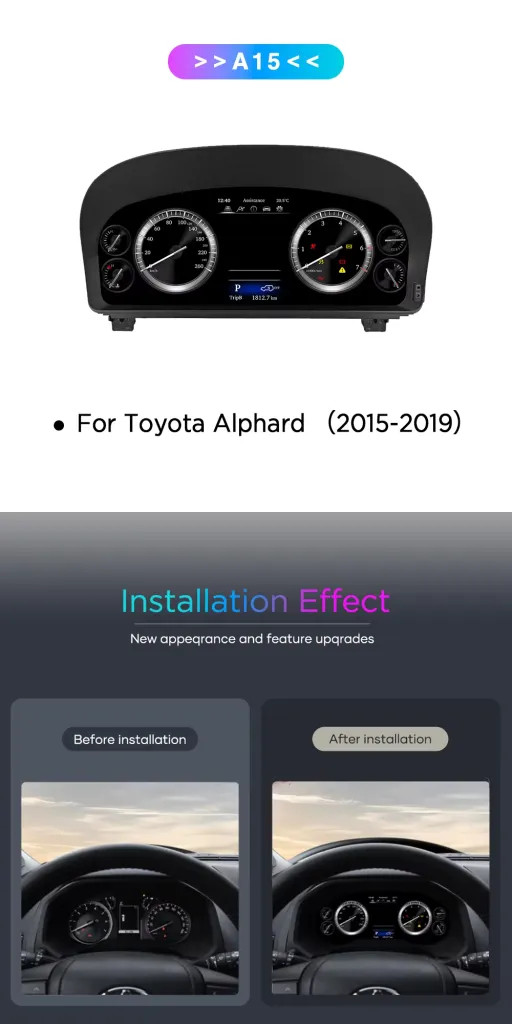
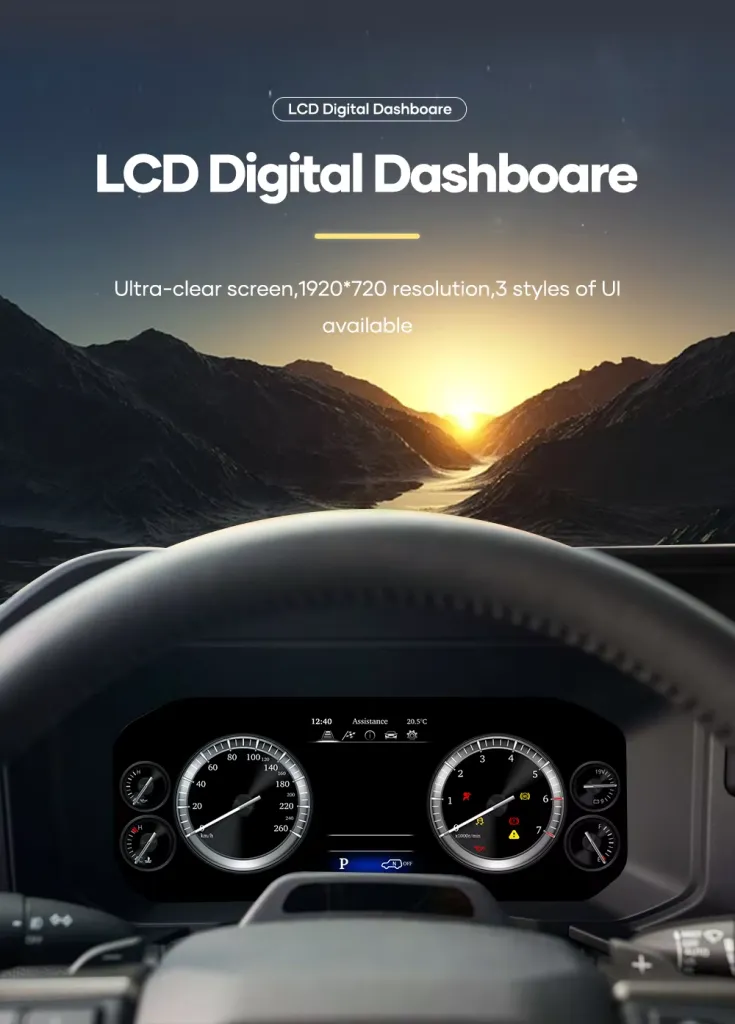
คลัสเตอร์ดิจิทัล Toyota Alphard 2015-2019 นี้ อัปเกรดพื้นที่มาตรวัดเดิมให้เป็นหน้าจอ Virtual Cockpit ขนาด 12.3 นิ้ว ความละเอียด 1920×720 ที่ใช้ระบบ Linux ออกแบบมาสำหรับเจ้าของรถที่ต้องการให้ห้องโดยสาร Alphard ดูทันสมัยขึ้น ในขณะเดียวกันก็ยังคงข้อมูลสำคัญของรถให้ชัดเจนและอ่านง่าย.
- หน้าจอขนาด 12.3 นิ้ว
- ความละเอียด 1920×720
- ระบบคลัสเตอร์เฉพาะที่ใช้ Linux
- ข้อมูลความเร็ว รอบเครื่องยนต์ น้ำมันเชื้อเพลิง และการแจ้งเตือน
- รองรับการควบคุมคลัสเตอร์จากพวงมาลัย
- การเชื่อมต่อชุดสายไฟเฉพาะ
- อัปเกรดค็อกพิตสไตล์ OEM
เพื่อเตรียมเวอร์ชันที่ถูกต้อง iKAGOO จะตรวจสอบปีรถ รูปภาพแผงหน้าปัด เค้าโครงคลัสเตอร์ดั้งเดิม และการกำหนดค่าตัวเชื่อมต่อก่อนจัดส่ง.
ทำให้ค็อกพิตของ Alphard กลับมาดูทันสมัยอีกครั้ง
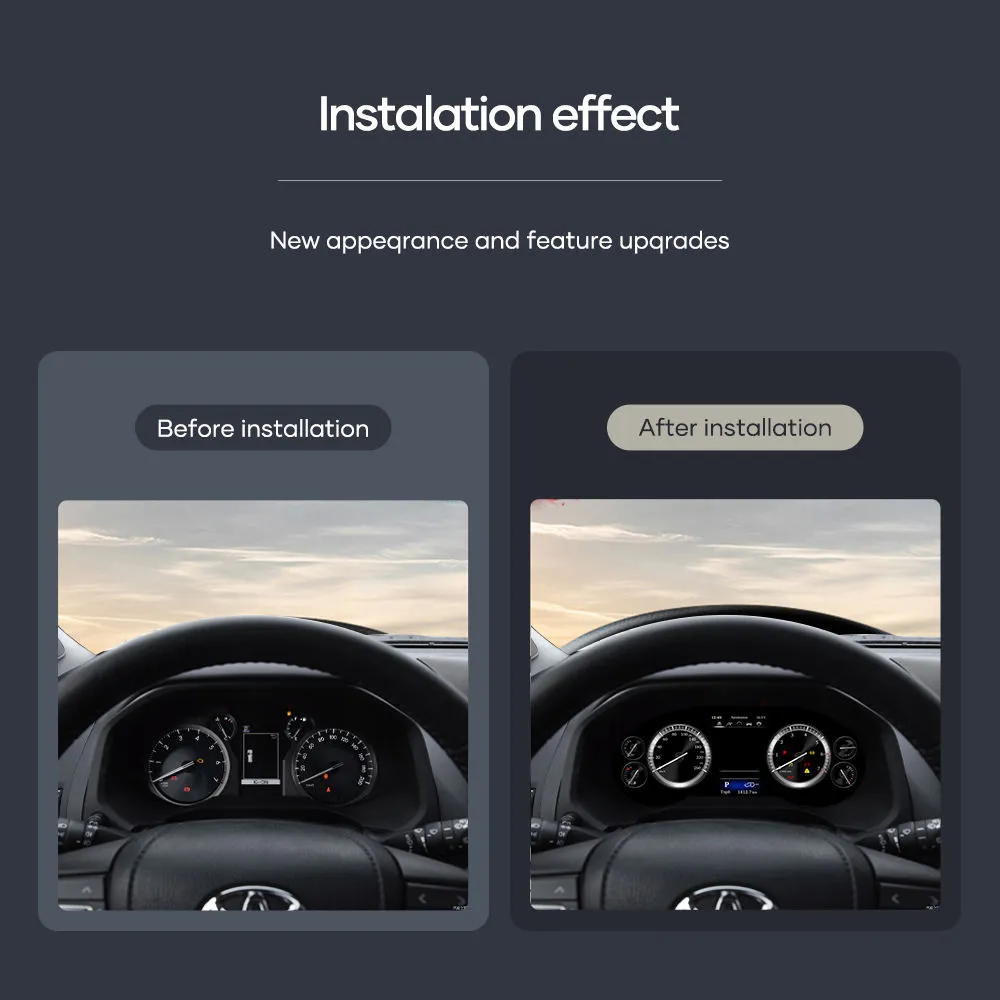
สิ่งแรกที่คุณเห็นในฐานะคนขับคือคลัสเตอร์มาตรวัด การอัปเกรดนี้ทำให้ Alphard ของคุณมีจอแสดงผลดิจิทัลที่กว้างและคมชัดขึ้น ขณะที่ยังคงแผงหน้าปัดให้ดูเรียบง่ายและใช้งานได้จริง.
การอัปเกรดคลัสเตอร์ดิจิทัล Alphard นี้ทำอะไร?
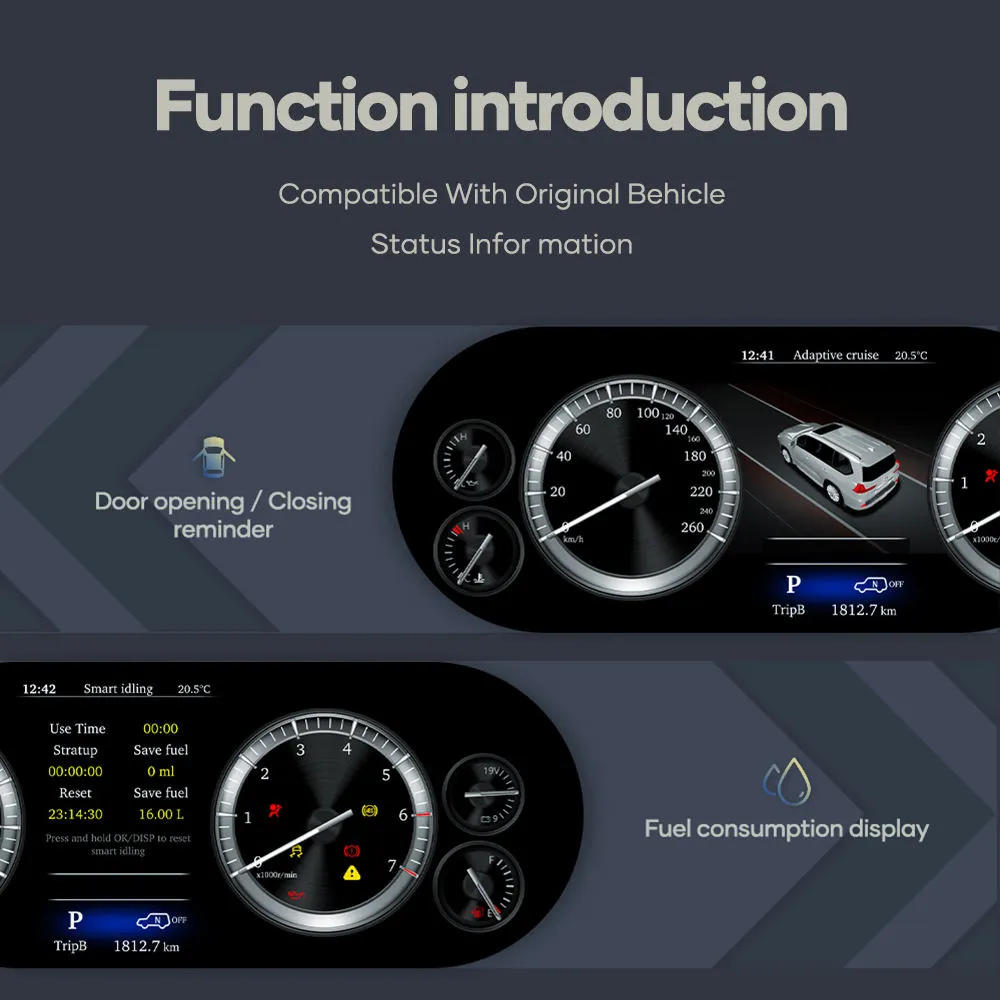
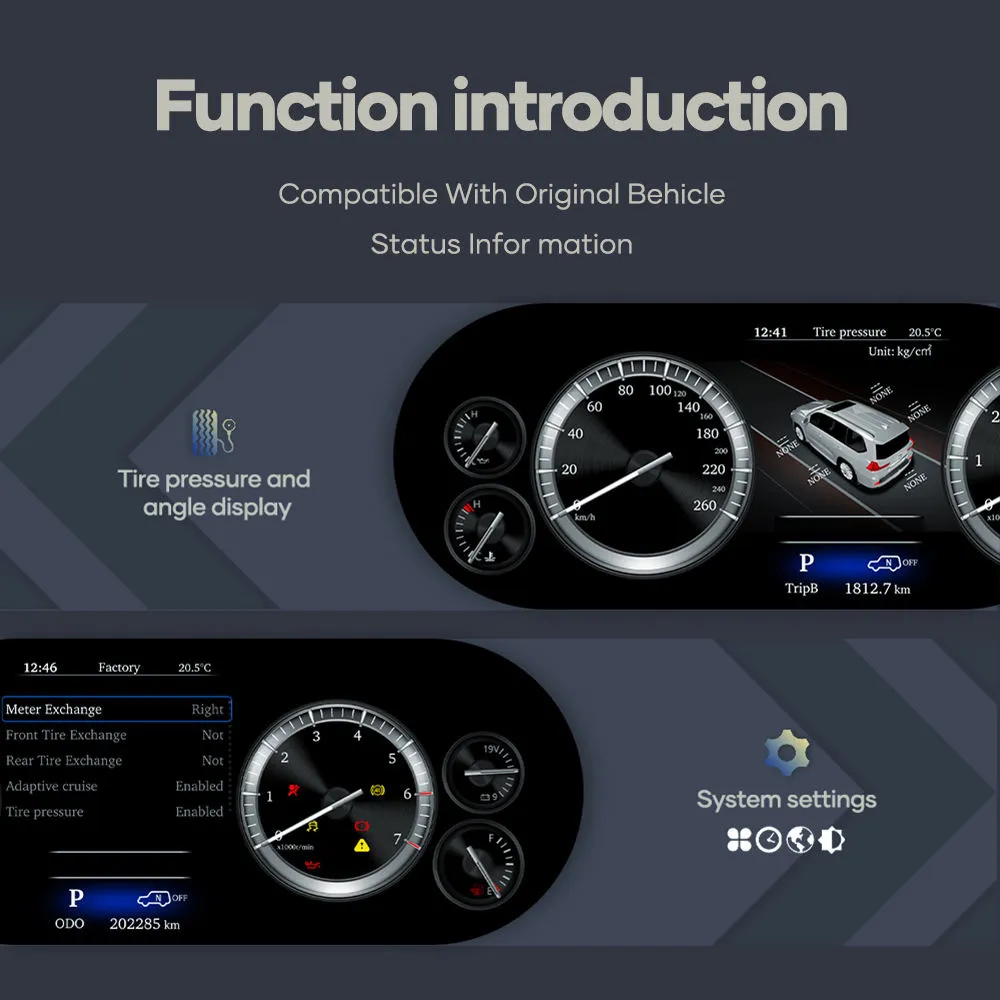
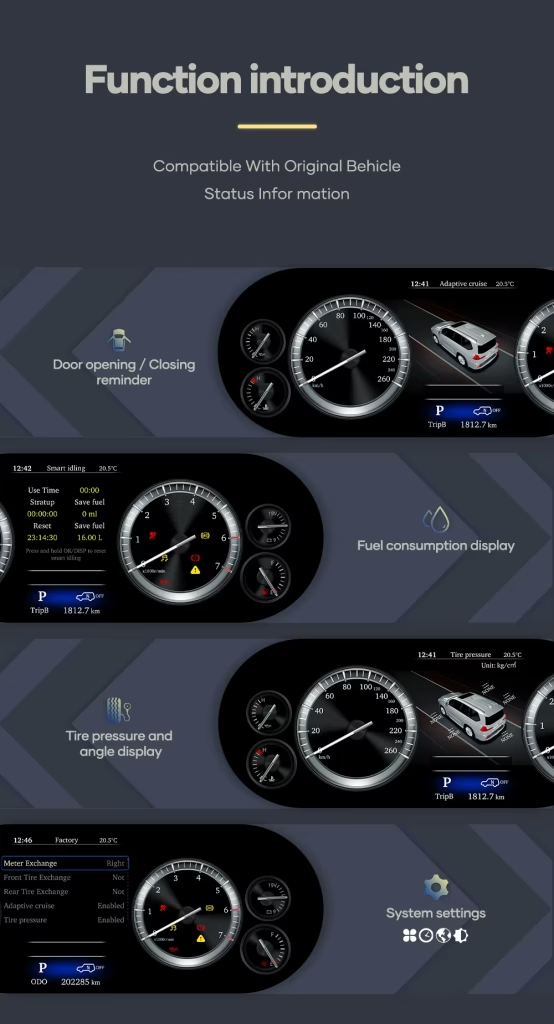
Toyota Alphard Digital Cluster 2015-2019 แทนที่รูปลักษณ์มาตรวัดโรงงานเดิมด้วยคลัสเตอร์เครื่องมือดิจิทัล Linux ขนาด 12.3-นิ้ว โดยแสดงข้อมูลการขับขี่ที่สำคัญ เช่น ความเร็ว รอบเครื่องยนต์ ระดับน้ำมัน อุณหภูมิน้ำหล่อเย็น ไฟเตือน และข้อมูลสถานะรถยนต์ ในรูปแบบค็อกพิตที่ทันสมัยมากขึ้น.
มันไม่ใช่ Android head unit และไม่ได้ออกแบบมาสำหรับติดตั้งแอปพลิเคชัน มันเป็นระบบจอแสดงผลเครื่องมือ Linux โดยเฉพาะสำหรับแผงหน้าปัด Toyota Alphard 2015–2019.
ทำไมเจ้าของ Alphard ถึงเลือกคลัสเตอร์แผงหน้าปัดดิจิทัลขนาด 12.3-นิ้วนี้
หน้าจอแสดงข้อมูลสำหรับผู้ขับขี่แบบทันสมัย
Alphard ของคุณเป็น MPV ระดับพรีเมียม แต่รูปแบบเกจจากโรงงานอาจทำให้พื้นที่คนขับดูเก่ากว่าส่วนอื่นๆ ของรถ การอัปเกรดชุดหน้าปัดดิจิทัล Toyota Alphard 30 Series นี้จะทำให้ภายในห้องโดยสารมีศูนย์กลางการมองเห็นที่ทันสมัยยิ่งขึ้น.
ข้อมูลรายวันที่ชัดเจน
จอแสดงผลขนาด 12.3 นิ้ว 1920×720 ช่วยให้สแกนข้อมูลการขับขี่ได้ง่ายขึ้น ความเร็ว รอบเครื่องยนต์ ระดับน้ำมัน อุณหภูมิน้ำหล่อเย็น และข้อมูลคำเตือนจะแสดงผ่านอินเทอร์เฟซเครื่องมือวัดโดยเฉพาะ.
การเตรียมการเฉพาะสำหรับยานพาหนะ
iKAGOO เตรียมหน้าจอ ชุดสายไฟ และอินเทอร์เฟซรถยนต์ที่เข้ากันตามปีรุ่นและรูปแบบหน้าปัดดั้งเดิมของคุณ ซึ่งจะช่วยลดโอกาสในการสั่งซื้อชุดหน้าปัดทดแทน Alphard ที่ไม่ถูกต้อง.
ฟังก์ชันเดิมของรถจะได้รับการสนับสนุนหลังการติดตั้งอย่างถูกต้อง
แสดงผลข้อมูลการขับขี่อย่างต่อเนื่อง
- รองรับการแสดงความเร็ว.
- รองรับการแสดงรอบเครื่องยนต์.
- รองรับการแสดงระดับน้ำมันเชื้อเพลิง.
- รองรับการแสดงอุณหภูมิน้ำหล่อเย็น.
- รองรับไฟเตือนสำคัญและข้อมูลสถานะของรถ.
การควบคุมและพฤติกรรมข้อมูล
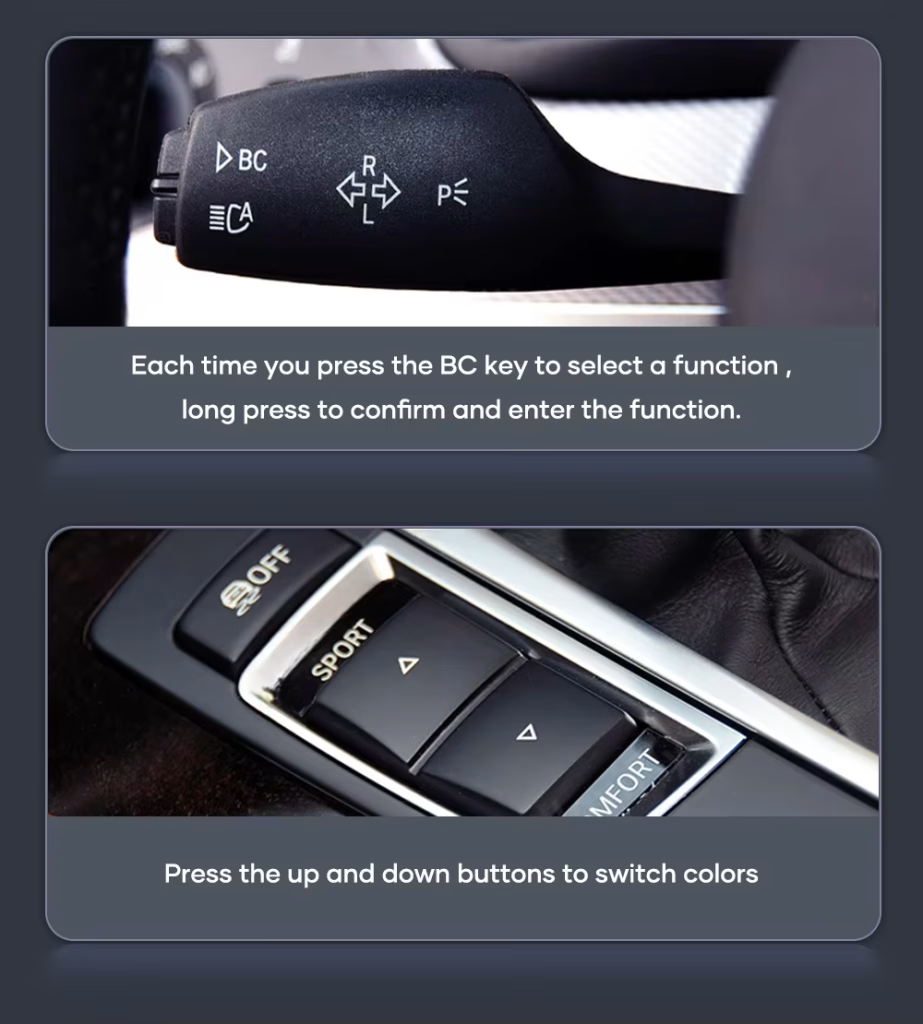
- ปุ่มบนพวงมาลัยจากโรงงานที่ใช้ควบคุมเมนูหน้าปัดยังคงทำงานได้ในกรณีส่วนใหญ่.
- ข้อมูลระยะทางและการเดินทางถูกออกแบบมาให้ซิงค์กับระบบของรถ.
- สามารถแสดงคำแนะนำการนำทางได้เมื่อเชื่อมต่อกับแหล่งนำทางที่เข้ากันได้ซึ่งรองรับการส่งออกคำสั่งไปยังหน้าปัด.
- ชุดสายไฟเฉพาะนี้ถูกออกแบบมาให้เชื่อมต่อได้โดยไม่ต้องตัดสายไฟโรงงานที่รองรับ.
การกำหนดค่าพิเศษจากโรงงาน การเดินสายไฟหลังการขายก่อนหน้า เวอร์ชันภูมิภาคที่ไม่ได้มาตรฐาน หรือขั้วต่อที่เสียหายอาจต้องมีคำแนะนำการเชื่อมต่อเพิ่มเติม กรุณาส่งรูปแผงหน้าปัดและหน้าปัดเดิมที่ชัดเจนก่อนสั่งซื้อ.
วิธีที่ iKAGOO เตรียมคำสั่งซื้อคลัสเตอร์ดิจิทัล Toyota Alphard ของคุณ
1. การตรวจสอบข้อมูลรถยนต์
เราตรวจสอบรุ่นปีของรถ Toyota Alphard, เวอร์ชันตลาด, รูปถ่ายแผงหน้าปัด และรูปแบบคลัสเตอร์เดิมของคุณ ซึ่งสำคัญเพราะรถ Alphard ที่นำเข้าอาจมีคำอธิบายที่แตกต่างกันไปตามภูมิภาค.
2. การจับคู่คลัสเตอร์และชุดสายไฟ
iKAGOO เตรียมจอแสดงผลขนาด 12.3 นิ้วที่ถูกต้อง ชุดสายไฟที่เข้ากัน และอินเทอร์เฟซรถยนต์ตามข้อมูลที่คุณให้ไว้.
3. การสนับสนุนการติดตั้งหลังการจัดส่ง
หลังการจัดส่ง คุณสามารถขอคำแนะนำเชิงปฏิบัติเกี่ยวกับการเชื่อมต่อและการกำหนดค่าสำหรับรุ่นผลิตภัณฑ์ที่ iKAGOO จัดหาให้.
สามการตรวจสอบ iKAGOO ที่ช่วยให้คุณตัดสินใจก่อนซื้อ
ความจำเป็นในการอัปเกรด iKAGOO
86/100กรณีการอัปเกรดที่แข็งแกร่ง. การอัปเกรดนี้เหมาะสมสำหรับเจ้าของ Alphard ที่วางแผนจะใช้รถคันนี้ต่อไปและต้องการให้พื้นที่คนขับใกล้เคียงกับประสบการณ์ MPV ระดับพรีเมียมมากขึ้น.
- รูปลักษณ์มาตรวัดจากโรงงานแบบเก่าได้รับการปรับปรุง.
- จอแสดงผลขนาด 12.3 นิ้วให้การเปลี่ยนแปลงในการใช้งานประจำวันที่ชัดเจนขึ้น.
- คลัสเตอร์ Linux ทำให้ฟังก์ชันมุ่งเน้นไปที่ข้อมูลการขับขี่.
วิธีการกำหนดผลลัพธ์นี้: ผลิตภัณฑ์นี้ได้รับการประเมินภายใต้กรอบความจำเป็นในการอัปเกรด iKAGOO ซึ่งพิจารณาสภาพระบบจากโรงงาน การปรับปรุงการใช้งานประจำวัน คุณค่าในการเป็นเจ้าของระยะยาว ทางเลือกอื่น และคุณค่าที่ใช้งานได้จริงของการอัปเกรด.
อ่านกรอบแนวคิด "ความจำเป็นในการอัปเกรด"iKAGOO ความเข้ากันได้ของยานพาหนะดั้งเดิม
88/100การผสานรวมสไตล์ OEM ในระดับสูง. คะแนนนี้สะท้อนคุณภาพการผสานรวมโดยรวมของเส้นทางการติดตั้งคลัสเตอร์ดิจิทัล Alphard นี้ ไม่ใช่เปอร์เซ็นต์ของฟังก์ชันจากโรงงานที่สูญเสียไป.
- รองรับการแสดงข้อมูลรถยนต์.
- รองรับการควบคุมคลัสเตอร์ผ่านพวงมาลัยในกรณีส่วนใหญ่.
- ใช้การเชื่อมต่อชุดสายไฟเฉพาะ.
วิธีการกำหนดผลลัพธ์นี้: ผลลัพธ์นี้อ้างอิงจากกรอบความเข้ากันได้กับรถยนต์เดิม iKAGOO โดยประเมินความต่อเนื่องของฟังก์ชัน การควบคุม ข้อมูลรถยนต์และคำเตือน โครงสร้างทางกายภาพ การโต้ตอบสไตล์โรงงาน และการผสานรวมการติดตั้ง.
อ่านกรอบความเข้ากันได้ระดับความง่ายในการติดตั้ง iKAGOO
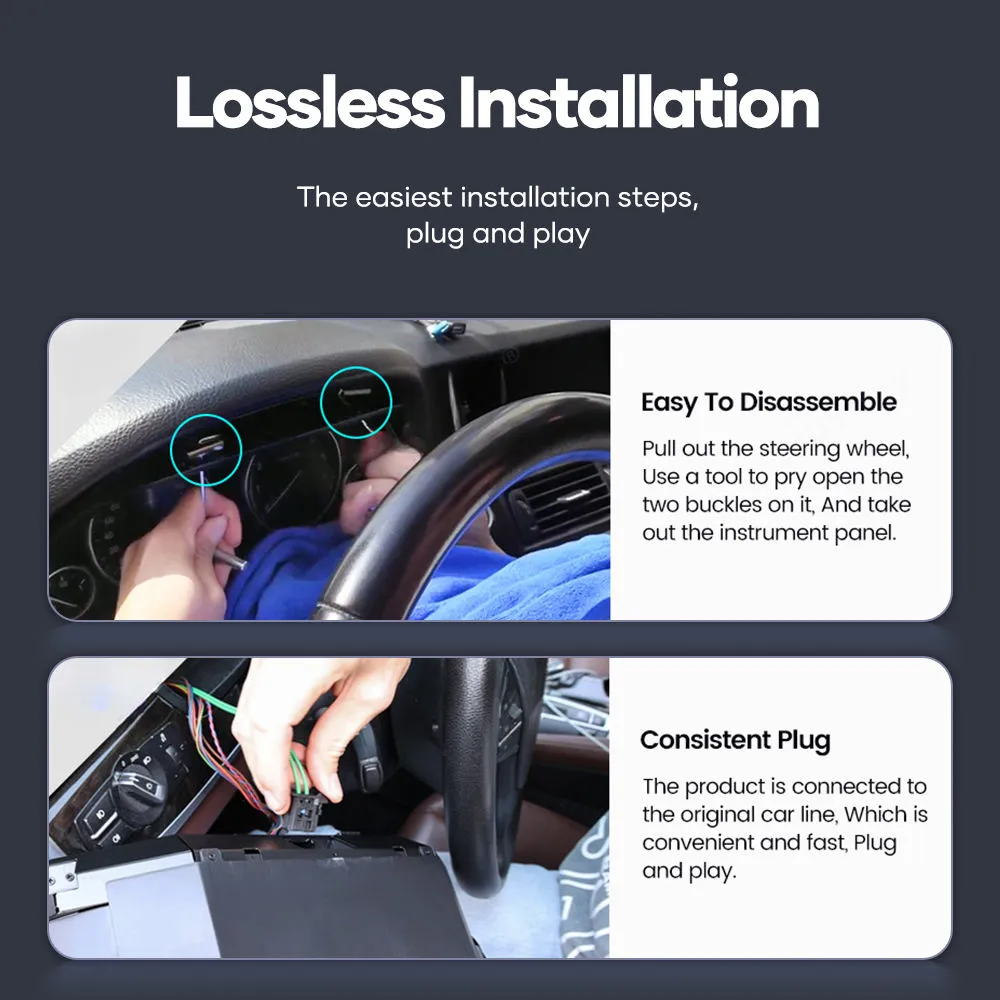
ระดับ 3งานประดิษฐ์ขั้นสูง. ระดับความง่ายในการติดตั้งนี้หมายความว่าการอัปเกรดเป็นไปได้จริงสำหรับผู้ติดตั้ง DIY ที่มีประสบการณ์หรือช่างติดตั้งอุปกรณ์อิเล็กทรอนิกส์ยานยนต์ ต้องมีการถอดแผงหน้าปัดอย่างระมัดระวัง การเชื่อมต่อชุดสายไฟที่เข้ากัน การตั้งค่า และการทดสอบฟังก์ชันทั้งหมดก่อนประกอบกลับขั้นสุดท้าย.
- ต้องเข้าถึงพื้นที่มาตรวัดเดิมอย่างระมัดระวัง.
- ต้องเชื่อมต่อชุดสายไฟและอินเทอร์เฟซรถยนต์ที่เข้ากันอย่างถูกต้อง.
- ควรทดสอบชั่วคราวให้เสร็จก่อนประกอบกลับครั้งสุดท้าย.
วิธีการกำหนดผลลัพธ์นี้: ระดับความง่ายในการติดตั้งนี้ช่วยให้ผู้ซื้อเข้าใจทักษะการติดตั้งที่จำเป็นก่อนสั่งซื้อ ไม่ได้หมายความว่าผลิตภัณฑ์มีคุณภาพต่ำหรือไม่เหมาะสำหรับการอัปเกรด.
อ่านกรอบระดับความง่ายในการติดตั้งทำไมคลัสเตอร์ดิจิทัล iKAGOO นี้จึงเป็นเส้นทางการอัปเกรดที่ดีกว่าสำหรับการเป็นเจ้าของ Alphard ระยะยาว
เก็บมาตรวัดจากโรงงานแบบเก่าไว้
ต้นทุนต่ำที่สุด แต่พื้นที่คนขับยังคงมีสไตล์ภาพแบบเก่า ไม่ได้ทำให้ห้องโดยสาร Alphard รู้สึกใหม่ขึ้นอย่างมีนัยสำคัญ.
- ไม่มีการปรับปรุงภาพให้ทันสมัย
- ไม่มีเลย์เอาต์ดิจิทัลที่กว้างขึ้น
- ดีที่สุดเฉพาะเมื่อคุณไม่สนใจรูปลักษณ์ของค็อกพิท
ซ่อมแซมชุดหน้าปัดเดิม
การซ่อมสามารถคืนการทำงานพื้นฐานได้ แต่มักจะกลับไปสู่ประสบการณ์การแสดงผลแบบเก่าเดิม.
- มีประโยชน์สำหรับการกู้คืนจากข้อขัดข้อง
- คุณค่าการอัปเกรดจำกัด
- ไม่มีรูปลักษณ์ค็อกพิทเสมือน
อะไหล่ OEM มือสอง
คลัสเตอร์เดิมมือสองอาจแก้ปัญหาฮาร์ดแวร์ได้ แต่การจับคู่ พฤติกรรมการแสดงเลขไมล์ และสภาพยังคงสร้างความไม่แน่นอนได้.
- ยังคงเป็นสไตล์การแสดงผลรุ่นเก่า
- สภาพขึ้นอยู่กับชุดผู้บริจาค
- อาจยังต้องมีการจัดการเฉพาะรถ
iKAGOO 12.3 Digital Cluster
นี่คือตัวเลือกที่แข็งแกร่งกว่าเมื่อคุณต้องการอัปเกรดภาพที่แท้จริง ประสบการณ์การแสดงผลที่ชัดเจนขึ้น และการเตรียมเฉพาะรถจาก iKAGOO.
- จอแสดงผลขนาด 12.3 นิ้ว 1920×720
- ระบบเครื่องมือวัดเฉพาะทาง Linux
- ข้อมูลยานพาหนะและการแสดงคำเตือน
- รองรับการควบคุมคลัสเตอร์ผ่านปุ่มบนพวงมาลัย
- การเตรียมชุดสายไฟที่เข้ากัน
บทสรุปการซื้อ
สำหรับเจ้าของที่ต้องการมากกว่าการซ่อมแซม หน้าจอแดชบอร์ดดิจิทัล iKAGOO Toyota Alphard 12.3 นิ้วนี้มอบการปรับปรุงที่แข็งแกร่งขึ้นในประสบการณ์การแสดงผลประจำวัน รูปลักษณ์ของห้องโดยสาร และคุณค่าในการเป็นเจ้าของในระยะยาว เป็นตัวเลือกที่เหมาะสมกว่าเมื่อคุณวางแผนที่จะใช้รถคันนี้ต่อไปและต้องการให้ห้องโดยสารรู้สึกใหม่ขึ้นอย่างมีความหมาย.
คำแนะนำเกี่ยวกับ Toyota Alphard 2015–2019 และชื่อตามภูมิภาค
ผลิตภัณฑ์นี้จัดเตรียมไว้สำหรับ Toyota Alphard 2015–2019 รุ่นเดียวกันนี้อาจถูกเรียกว่า Alphard 30 Series หรือ AH30 ในตลาดนำเข้าหลายแห่ง ผู้ซื้อบางรายยังเปรียบเทียบกับ Vellfire 30 Series เนื่องจาก Alphard และ Vellfire มีความเกี่ยวข้องกันอย่างใกล้ชิดในรุ่นนี้.
iKAGOO เตรียมเวอร์ชันที่ถูกต้องตามรุ่นรถ ปีรุ่น รูปแบบแดชบอร์ด คลัสเตอร์จากโรงงาน และการกำหนดค่าขั้วต่อ—ไม่ใช่เพียงชื่อป้ายรุ่นที่ใช้ในตลาดของคุณ.
| รุ่นหลัก | Toyota Alphard |
|---|---|
| ชื่อรุ่นที่ใช้กันทั่วไป | Alphard 30 Series / AH30 |
| ช่วงหน้าที่เกี่ยวข้อง | 2015–2019 Toyota Alphard |
| ข้อมูลอ้างอิงตามภูมิภาคที่เกี่ยวข้อง | รุ่นภายในประเทศญี่ปุ่น ฮ่องกง สิงคโปร์ มาเลเซีย ไทย จีน ไต้หวัน รัสเซีย ตะวันออกกลาง และตลาดนำเข้าที่ขับขี่พวงมาลัยขวาหรือซ้าย |
| ก่อนสั่งซื้อ | โปรดส่งปีรุ่น รูปถ่ายแดชบอร์ด รูปถ่ายคลัสเตอร์เดิม และรูปถ่ายขั้วต่อเมื่อมีการร้องขอ ซึ่งช่วยให้ iKAGOO เตรียมหน้าจอ ชุดสายไฟ และอินเทอร์เฟซรถได้อย่างถูกต้อง. |
ข้อมูลจำเพาะที่ยืนยันในปัจจุบัน
| ประเภทผลิตภัณฑ์ | ชุดมาตรวัดดิจิทัล / ชุดมาตรวัด LCD / การติดตั้งห้องนักบินเสมือนจริง |
|---|---|
| ความเข้ากันได้กับรถ | Toyota Alphard 2015–2019 |
| ขนาดหน้าจอ | 12.3 นิ้ว |
| การแก้ไขปัญหา | 1920×720 |
| ระบบปฏิบัติการ | ระบบแสดงผลเครื่องมือวัดเฉพาะทาง Linux |
| การติดตั้งแอป Android | ไม่ คลัสเตอร์นี้ไม่ใช่หัวหน่วย Android และไม่ได้ออกแบบมาสำหรับการติดตั้งแอป Android. |
| ข้อมูลรถที่รองรับ | ความเร็ว รอบเครื่องยนต์ ระดับน้ำมันเชื้อเพลิง อุณหภูมิน้ำหล่อเย็น ไฟเตือนสำคัญ และข้อมูลสถานะรถ |
| ปุ่มควบคุมบนพวงมาลัย | ปุ่มบนพวงมาลัยจากโรงงานที่เกี่ยวข้องกับการสลับการแสดงผลคลัสเตอร์และการควบคุมเมนูได้รับการรองรับในกรณีส่วนใหญ่หลังการติดตั้งที่ถูกต้อง. |
| พฤติกรรมการแสดงระยะทางและการเดินทาง | ออกแบบมาเพื่อซิงค์ข้อมูลระยะทางและการเดินทางกับระบบรถ พฤติกรรมจริงอาจขึ้นอยู่กับการกำหนดค่ารถที่แน่นอน. |
| คำแนะนำการนำทาง | รองรับเมื่อจับคู่กับแหล่งนำทางที่เข้ากันได้ซึ่งรองรับการส่งออกคำแนะนำไปยังคลัสเตอร์. |
| วิธีการเชื่อมต่อ | OEM-style connectors and dedicated harness route, typically without intentional wire cutting for supported wiring. |
| SKU | T1003-1 |
| Weight and package size | 2 kg; 46 × 33 × 25 cm |
See the Toyota Alphard digital cluster from different upgrade angles
A clearer driving display for daily Alphard use
The digital cluster helps the driver read core information more quickly while giving the dashboard a cleaner, newer look.
12.3-inch display area with a wider visual layout
The larger LCD layout gives the Alphard cockpit a stronger visual upgrade than simply repairing or replacing the old factory gauge unit.
OEM-style cluster interface for a premium MPV cabin
The goal is not to make the dashboard look aftermarket. The upgrade should feel controlled, clean and suitable for the Alphard’s luxury MPV interior.
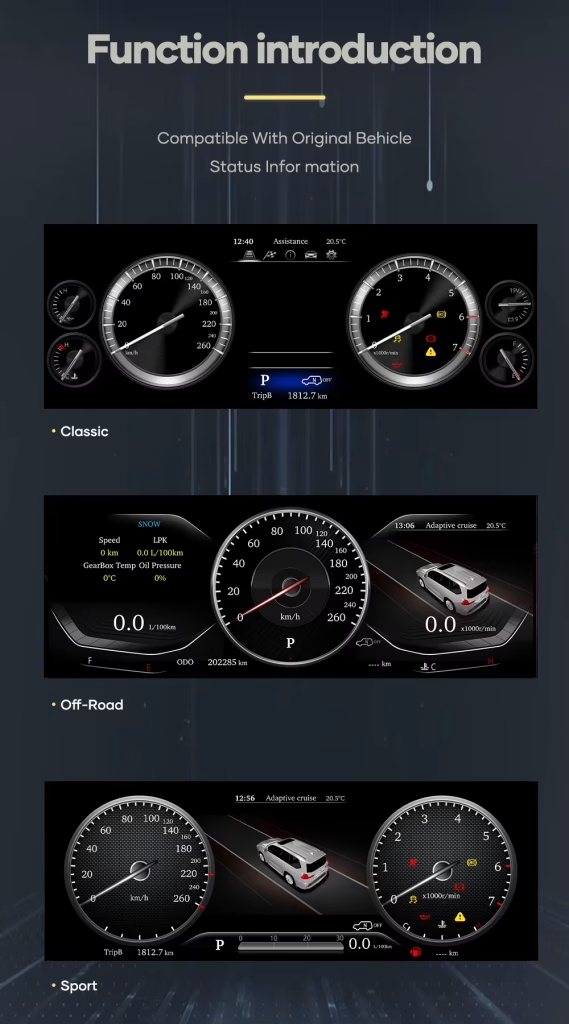
Multiple cluster layouts for different driving preferences
You can choose a display style that fits your own driving preference while keeping the cluster focused on vehicle information.
Vehicle-specific upgrade route for the Alphard dashboard
Correct physical matching matters. iKAGOO checks the vehicle year, original cluster layout and connector configuration before preparing the order.
Driver-focused screen design for quick information reading
The cluster is designed to keep speed, RPM and vehicle information in the driver’s natural viewing area.
Modern display style without turning the cluster into an app screen
This Linux cluster is dedicated to instrument display. It keeps the upgrade focused on driving data instead of unnecessary app functions.
Clear speedometer and vehicle information presentation
A high-resolution display helps reduce the dated feeling of the factory gauge area and improves the dashboard’s first impression.
Built for the Alphard owner who wants a premium cockpit result
The Alphard is often used as a family, executive or passenger vehicle. A cleaner driver display helps the whole cabin feel more current.
Matched display route for correct installation planning
The right cluster upgrade is not only about screen size. The order also needs the correct wiring route and vehicle interface preparation.
Useful for refreshing a luxury MPV that still drives well
If your Alphard still serves you well but the driver display feels old, this virtual cockpit retrofit gives a visible daily improvement.
A complete digital cluster upgrade instead of a small cosmetic change
This is the right direction when you want the Alphard driver area to feel newer, clearer and more aligned with a modern premium vehicle.
Installation Ease Level: Level 3 — Advanced DIY
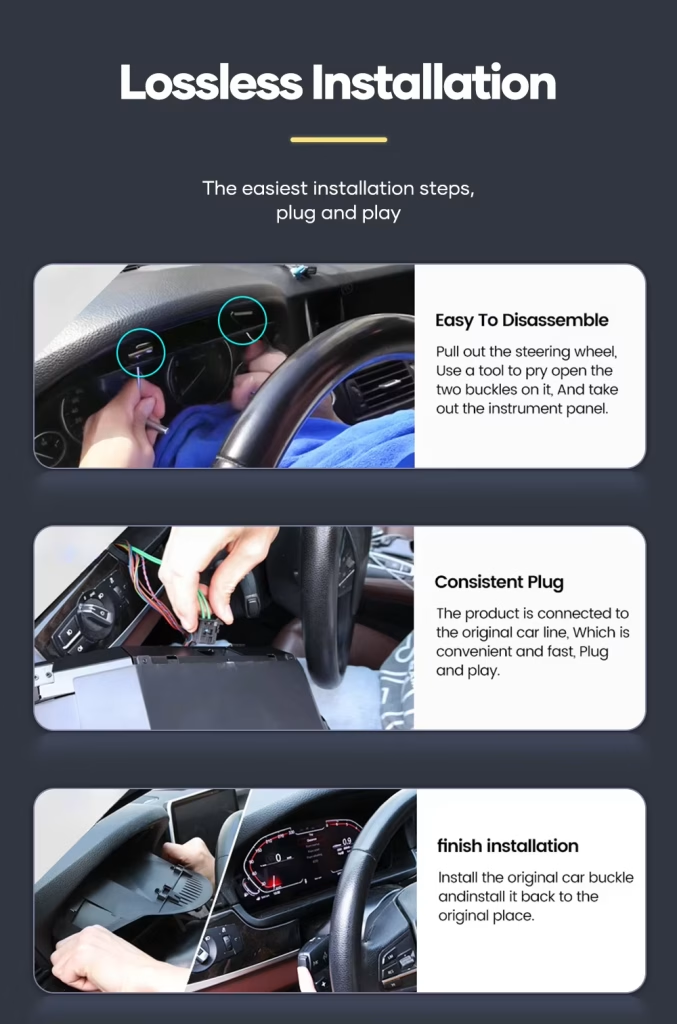
สิ่งที่การติดตั้งโดยปกติเกี่ยวข้อง
- Careful removal of the original instrument cluster area and related trim.
- Connection of the matched harness and vehicle interface.
- Cluster power-on and display testing before final reassembly.
- Checking speed, RPM, fuel level, temperature, warning information and steering-wheel cluster controls.
- Confirming mileage, trip behavior and sleep/power behavior after installation.
ใครควรเป็นผู้ติดตั้ง
This product is suitable for experienced DIY installers or an automotive electronics installer. The matched harness route helps reduce wiring modification, but correct disassembly, connector identification and function testing are still required.
Do not force connectors. Do not cut the factory main harness unless iKAGOO has provided a specific instruction for your confirmed vehicle route.
Stop installation and contact iKAGOO if any of these happen
- รูปทรงของตัวต่อหรือการจัดวางขาต่อนั้นไม่ตรงกันอย่างชัดเจน.
- ขาต่อเชื่อมงอ หลวม หรือเสียหาย.
- The supplied harness does not match the installation instruction for your vehicle.
- You smell abnormal heat, burning odor or see smoke.
- The fuse repeatedly blows.
- ไม่สามารถยืนยันได้ว่าเป็นการจ่ายไฟหรือสายดิน.
- The installation would require cutting the original main vehicle harness.
- Vehicle data, warning behavior or power behavior is abnormal after temporary testing.
Prepared for your vehicle, supported after delivery
Vehicle-specific configuration
iKAGOO checks your vehicle details before preparing the order so the screen, harness and interface route match your Alphard as closely as possible.
การป้องกันสายไฟในโรงงาน
The matched harness route is designed to connect to supported factory wiring without intentional wire cutting under normal matched conditions.
Original function support
We help you focus on the functions that matter after installation: driving data, warning information, mileage behavior and steering-wheel cluster controls.
Installation and configuration guidance
After delivery, iKAGOO can provide practical connection and configuration help for the supplied product route.
การรับประกันฮาร์ดแวร์ของ 12-month
Eligible manufacturing defects are covered by iKAGOO’s 12-month limited hardware warranty under the applicable policy.
Better than guessing from a low-price listing
A cheaper listing is not useful if the harness, vehicle interface or cluster route is wrong. iKAGOO prepares the order around your actual vehicle information.
Support that matters after your Alphard cluster arrives
การรับประกันฮาร์ดแวร์ของ 12-month
This product is covered by iKAGOO’s 12-month limited hardware warranty under the applicable policy. Keep your order details, vehicle photos and installation photos so support can review the situation clearly.
Configuration support after delivery
Vehicle-specific electronics need correct setup. If you meet a connection, display or vehicle-data issue during installation, contact iKAGOO with photos and a clear description before forcing any wiring change.
Toyota Alphard Digital Cluster 2015-2019 FAQ
Is this Toyota Alphard Digital Cluster compatible with 2015–2019 models?
Yes, this Toyota Alphard Digital Cluster is prepared for Toyota Alphard 2015–2019. Before shipment, provide your vehicle year, dashboard photo and original cluster photo so iKAGOO can prepare the correct version.
นี่คือหน่วยควบคุมหลักสำหรับ Android ใช่ไหม?
No, this is not an Android head unit. It runs on Linux as a dedicated instrument cluster system and is not designed for installing Android apps.
Does it support original steering wheel controls?
Yes, factory steering-wheel buttons related to cluster display switching and menu control are supported in most cases after correct installation and configuration.
Will the cluster show speed, RPM and vehicle warnings?
Yes, the cluster displays real-time vehicle information such as speed, RPM, fuel level, coolant temperature, key warning indicators and vehicle status information.
Will mileage and trip data sync after installation?
Yes, the Alphard Digital Cluster is designed to sync mileage and trip information with the vehicle system. Actual behavior can depend on the exact vehicle configuration, so provide your vehicle details before ordering.
Can it show navigation directions on the cluster?
Yes, navigation prompts can be shown when the cluster is paired with a compatible navigation source, such as an aftermarket head unit or CarPlay system route that supports cluster guidance output.
การติดตั้งจำเป็นต้องตัดสายหรือไม่?
No, the matched harness is designed to connect through OEM-style connectors for supported vehicles, typically without intentional wire cutting. Stop installation and contact iKAGOO if the connectors do not match.
เจ้าของครั้งแรกสามารถติดตั้งได้หรือไม่
No, first-time installers should use an experienced automotive electronics installer. This product is Level 3 — Advanced DIY, which means it needs careful dashboard disassembly, connector identification and full function testing before final reassembly.
รวมการรับประกันหรือไม่?
Yes, eligible hardware is covered by iKAGOO’s 12-month limited warranty under the applicable policy. Keep your order details, vehicle photos and installation photos for faster support.
Make your Toyota Alphard dashboard feel modern again
Choose this Toyota Alphard Digital Cluster 2015-2019 if you want a clear 12.3-inch Linux instrument display, a stronger premium cockpit look and iKAGOO support for vehicle-specific order preparation.
เซบัสเตียง แมร์ซิเย –
J’utilise mon Alphard pour le transport de personnes (VTC) à Paris. L’ancien compteur à aiguilles faisait un peu ‘vieillot’ pour un véhicule de ce standing. Ce compteur numérique change radicalement l’ambiance du poste de conduite. L’affichage est très fluide et les menus sont clairs. Ça donne vraiment l’impression d’être aux commandes d’un vaisseau spatial. Installation rapide et sans erreur au tableau de bord.