ธีม XStore

No products in the cart.

Menu Categories
สูงสุด 17%
  • BMW X3 G01 X4 G02 หน่วยควบคุมกลางระบบแอนดรอยด์ 2018–2021 พร้อมระบบ CarPlay แบบไร้สาย
  • BMW X3 X4 EVO หน่วยควบคุมกลางระบบแอนดรอยด์
  • BMW X3 X4 EVO หน่วยควบคุมกลางระบบแอนดรอยด์
  • BMW X3 X4 EVO หน่วยควบคุมกลางระบบแอนดรอยด์

BMW X3 G01 X4 G02 หน่วยควบคุมกลางระบบแอนดรอยด์ 2018–2021 พร้อมระบบ CarPlay แบบไร้สาย

แบรนด์:
(1 บทวิจารณ์จากลูกค้า)

จาก: $333.00

ปลอดภาษี เฉพาะสหภาพยุโรปและสหรัฐอเมริกา
รายละเอียด
ปลอดภัยโดย เพย์พาล
บริการชำระภาษีล่วงหน้า DDP

เราจัดการภาษีมูลค่าเพิ่มและภาษีศุลกากรทั้งหมด ประมาณการการประหยัด: $120–$280.

สหรัฐอเมริกา (48 รัฐ)ออสเตรียเบลเยียมบัลแกเรียโครเอเชียไซปรัสเช็กเกียเดนมาร์กเอสโตเนียฟินแลนด์ฝรั่งเศสเยอรมนีกรีซฮังการีไอร์แลนด์อิตาลีลัตเวียลิทัวเนียลักเซมเบิร์กมอลตาเนเธอร์แลนด์โปแลนด์โปรตุเกสโรมาเนียสโลวาเกียสโลวีเนียสเปนสวีเดน
หรือ

มีคำถามหรือไม่?

รู้สึกอิสระที่จะ ติดต่อเรา

ชำระเงินอย่างปลอดภัยด้วย Paypal ชำระเงินอย่างปลอดภัยด้วยวีซ่า ชำระเงินอย่างปลอดภัยด้วยมาสเตอร์การ์ด ชำระเงินอย่างปลอดภัยด้วย JCB ชำระเงินอย่างปลอดภัยด้วย American Express ชำระเงินอย่างปลอดภัยด้วย Alipay ชำระเงินอย่างปลอดภัยด้วย Google Pay ชำระเงินอย่างปลอดภัยด้วย Klarna ชำระเงินอย่างปลอดภัยด้วย DISCOVER ชำระเงินอย่างปลอดภัยด้วย Apple Pay
รับประกันการชำระเงินที่ปลอดภัยและมั่นคง
การคุ้มครองผู้ซื้อ iKAGOO

การคุ้มครองการซื้อสำหรับสินค้าชิ้นนี้

การตรวจสอบความเข้ากันได้, การชำระเงินที่ปลอดภัย, การจัดส่งที่สามารถติดตามได้ และการสนับสนุนหลังการขายที่เป็นประโยชน์.

BMW X3 G01 / BMW X4 G02 2018–2021

Upgrade the factory BMW display with a cleaner Android screen experience.

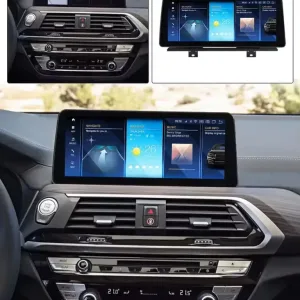
The BMW X3 G01 X4 G02 Android Screen Upgrade gives your 2018–2021 BMW a modern infotainment display with wireless CarPlay, Android Auto, Android apps and vehicle-specific wiring preparation. It is built for the center screen area, not for replacing the instrument cluster.

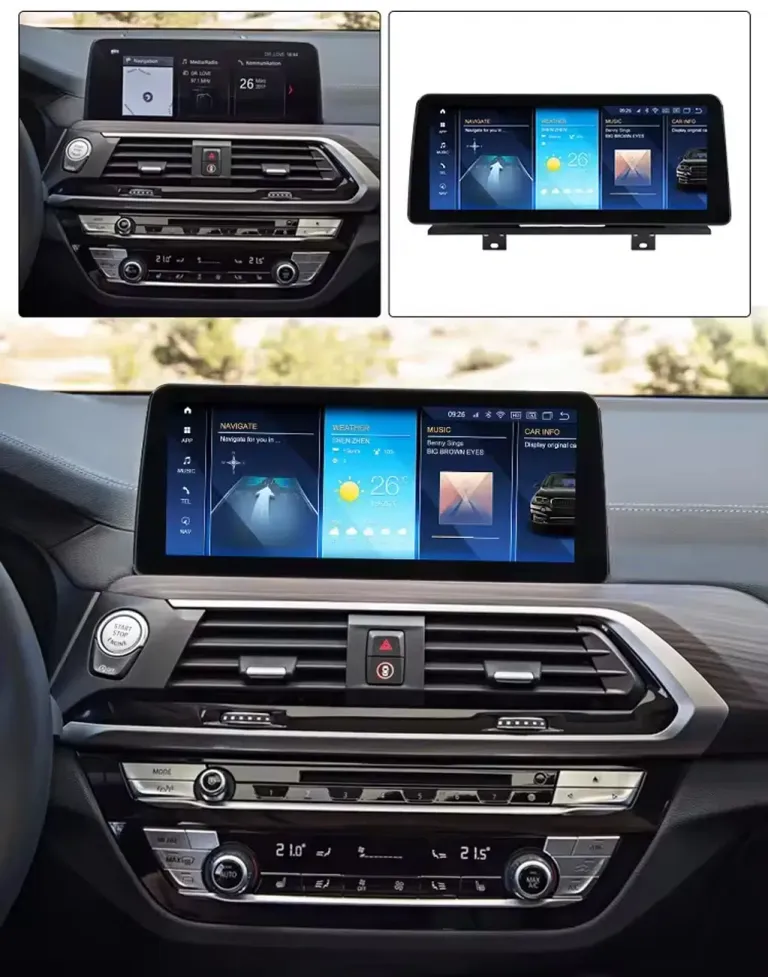
BMW X3 G01 X4 G02 Android Screen Upgrade installed dashboard view
Vehicle-Specific Android Head Unit

BMW X3 G01 X4 G02 Android Screen Upgrade 2018–2021 Head Unit with Wireless CarPlay

Choose this upgrade if you want a larger, more modern BMW-style display while keeping the cabin driver-focused and familiar. iKAGOO checks your model year, dashboard layout, LHD/RHD position, factory system screen and connector photos before shipment.

10.25 / 12.3 inch options ระบบ CarPlay แบบไร้สาย แอนดรอยด์ ออโต้ No intentional wire cutting

Correct product scope

ประเภทสินค้า: Android head unit / Android screen upgrade.

ยานพาหนะ: BMW X3 G01 and BMW X4 G02.

Years: 2018–2021, factory system confirmation required.

Main value: CarPlay, Android Auto, Android apps, larger display and matched vehicle wiring preparation.

คำตอบอย่างรวดเร็ว

Is this the correct screen upgrade for your BMW X3 or X4?

The BMW X3 G01 X4 G02 Android Screen Upgrade is a vehicle-specific Android display and stereo upgrade for 2018–2021 BMW X3 G01 and BMW X4 G02 models with compatible factory systems. It upgrades the factory screen experience with wireless Apple CarPlay, Android Auto, Android apps, navigation, Bluetooth, DSP audio functions and 4G-capable configurations. After correct connection and setup, supported factory functions such as steering-wheel controls, BMW-style control operation, factory audio output, reverse camera and parking information can continue to work through the matched vehicle interface. Before shipment, iKAGOO checks your model year, dashboard layout, steering position, factory system screen and connector photos to prepare the correct screen, harness and vehicle interface.

Will it fit my exact BMW?

It is intended for BMW X3 G01 and BMW X4 G02 2018–2021 models with compatible factory systems. iKAGOO still checks dashboard and system photos because BMW connector and regional equipment differences can affect the correct version.

Will original controls continue?

Supported steering-wheel controls and BMW-style control operation continue to work after correct wiring and vehicle-interface configuration. This keeps daily operation familiar instead of forcing touchscreen-only control.

Is this only a CarPlay box?

No. This is an Android head unit screen upgrade. It adds CarPlay and Android Auto, while also adding Android app use, display-size options and hardware configuration choices.

Do I need to cut wiring?

No intentional cutting of supported factory wiring is planned. The matched harness and vehicle interface should be connected first, then all controls, audio, camera and parking functions should be tested before final assembly.

Core Buyer Benefits

What this upgrade changes in daily driving

This upgrade is strongest when you want both modern phone projection and a more capable Android display platform, not only a hidden interface box.

1

Modern navigation without losing BMW cockpit logic

Wireless CarPlay and Android Auto make Google Maps, Apple Maps, Waze, calls and music easier to use on the road. Your BMW keeps a driver-oriented screen position, so the upgrade feels integrated instead of looking like a temporary tablet.

2

10.25 inch or 12.3 inch screen choice

Choose the display size that suits your dashboard and preference. The larger option is stronger for navigation and split-screen use, while the 10.25 inch option keeps a more restrained factory-like appearance.

3

4GB/64GB or 8+128GB configuration

The 4GB/64GB version suits normal CarPlay, Android Auto and navigation use. The 8+128GB version gives more room for apps and smoother multitasking if you use the Android side frequently.

ฟังก์ชันของโรงงานยังคงอยู่

Original vehicle functions supported after correct installation

Supported steering-wheel buttons continue to work after correct CANBUS or vehicle-interface configuration.

BMW-style control operation remains familiar where supported by the matched interface.

Factory reverse camera and supported parking information are retained after correct connection and setup.

Factory audio output remains supported through the matched BMW interface and selected configuration.

Special factory audio systems, non-standard cameras, previous aftermarket modifications or uncommon regional configurations may require additional connection instructions. Please provide the requested vehicle information when ordering so iKAGOO can prepare the correct version.

Product Media Story

BMW-style screen upgrade, not a universal dashboard tablet

Each image is placed with the buying value first, so the customer understands why the part matters before looking at the hardware.

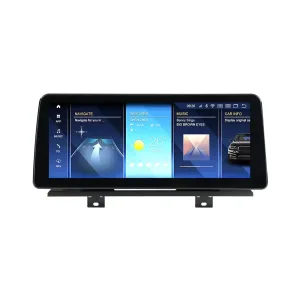
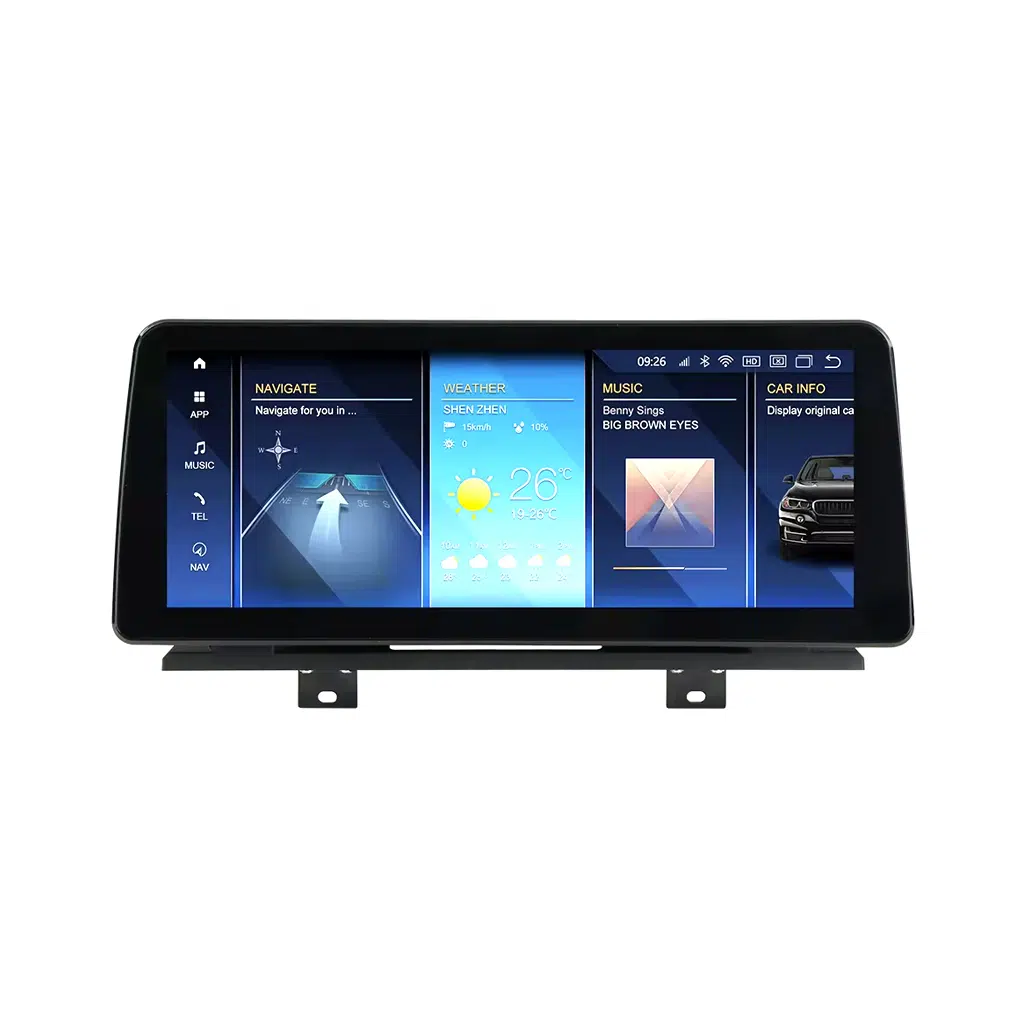
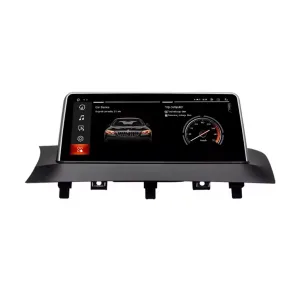
Vehicle-specific shape for the G01 and G02 dashboard

The screen is built to sit in the original display area, helping your BMW X3 or X4 keep a clean dashboard layout. This matters because a poor universal screen can look disconnected from the cabin and reduce long-term ownership satisfaction.

BMW X3 G01 X4 G02 Android head unit front screen product view

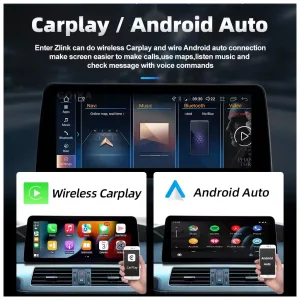
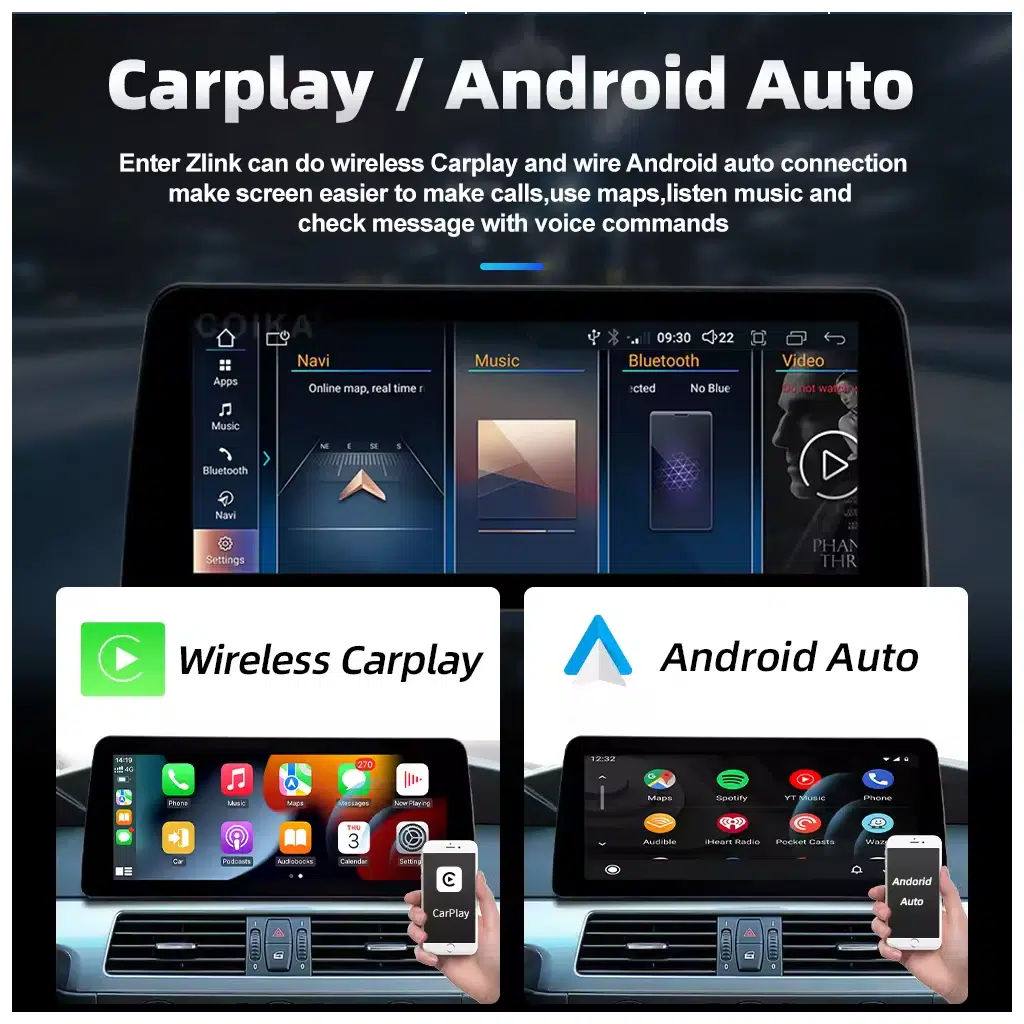
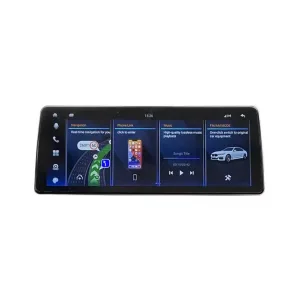
Wireless CarPlay and Android Auto for daily navigation

Use maps, calls, voice commands and music more naturally than on the older factory interface. For commuting, business driving and long trips, the larger display makes route guidance easier to read.

BMW X3 G01 X4 G02 Android Screen Upgrade with wireless CarPlay and Android Auto

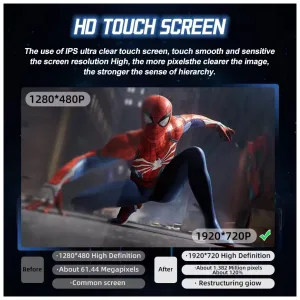
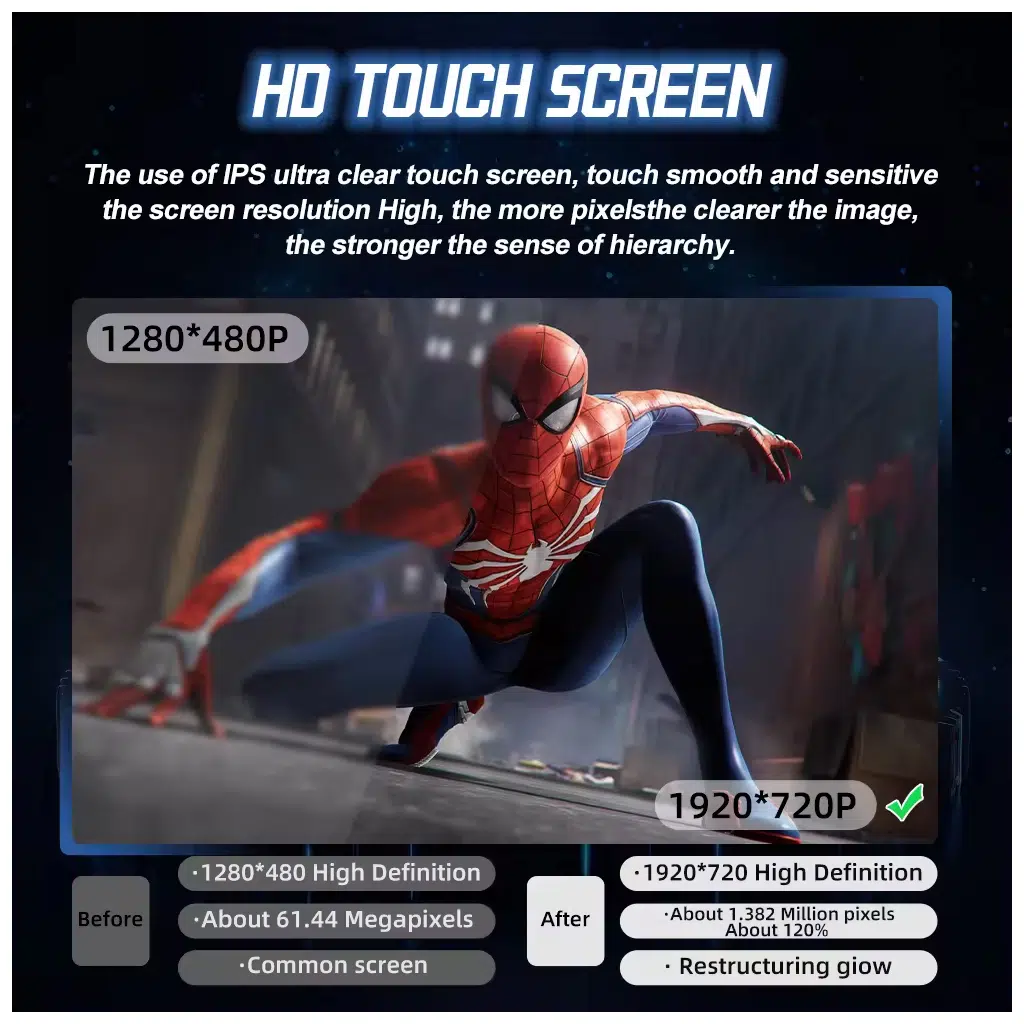
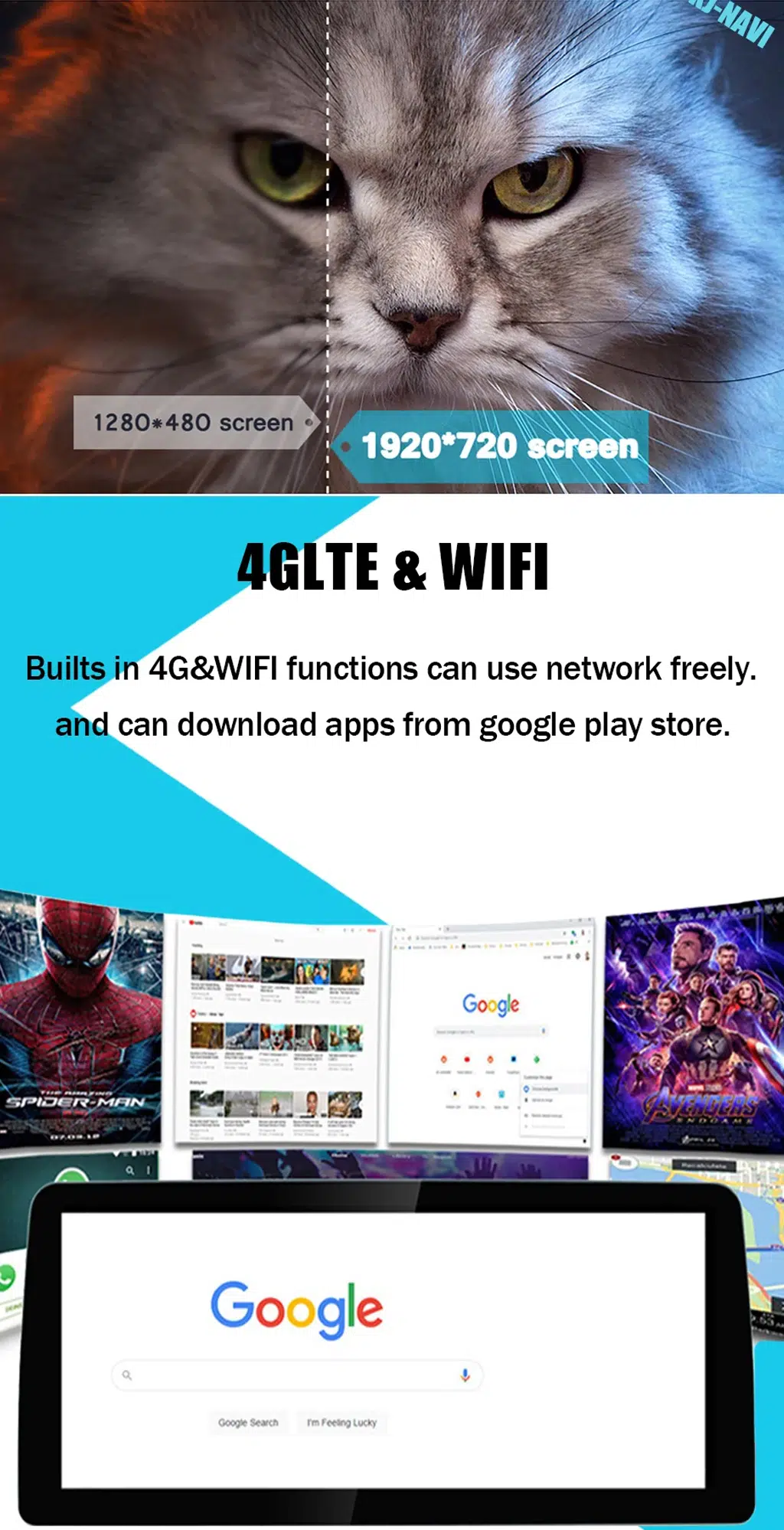
Higher display clarity for maps, apps and split-screen use

A clearer high-resolution screen gives navigation and media apps more room to breathe. This is not only a specification upgrade; it reduces glance effort and makes the cockpit feel newer during daily use.

BMW Android screen high resolution display comparison for maps and apps

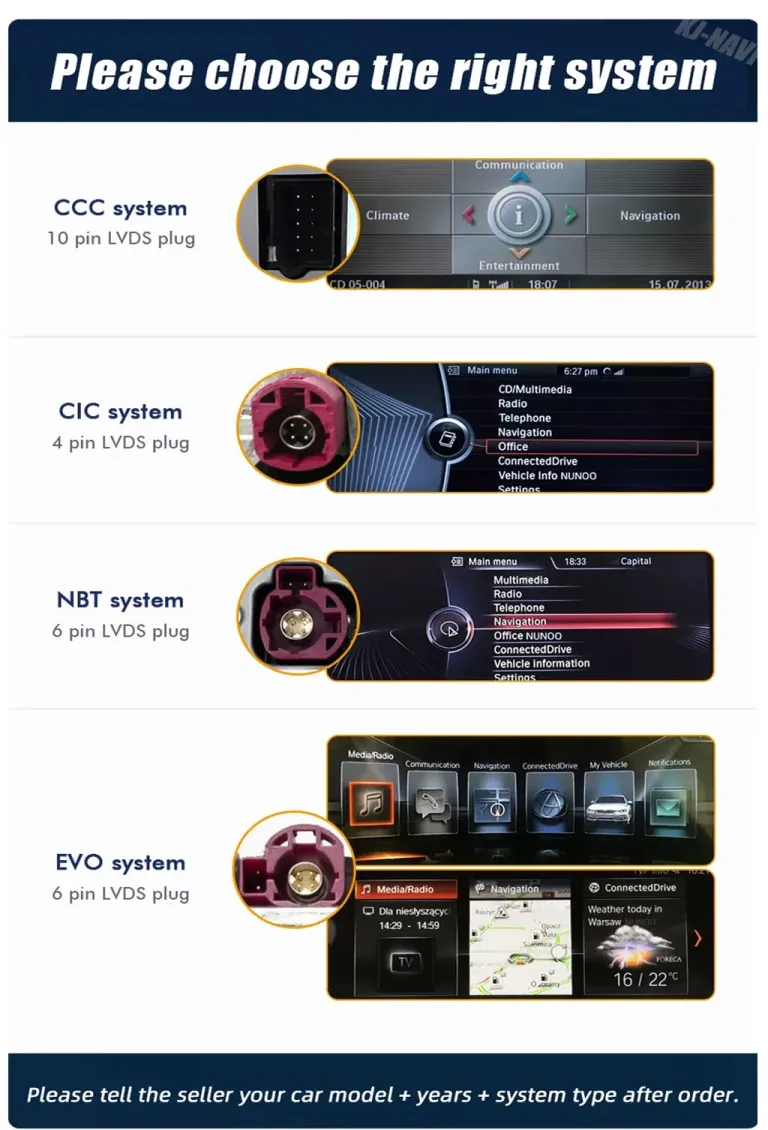
Choose the correct BMW factory system before shipment

BMW vehicles can look similar but use different factory screen systems and LVDS connectors. iKAGOO asks for system and connector information before shipment to reduce wrong-version risk.

BMW factory system identification guide for Android screen upgrade

4G, Wi-Fi and app use make the Android side more useful

With supported configurations, 4G and Wi-Fi connectivity allow online maps, media apps and software-based functions to be used more flexibly. This gives older BMW infotainment hardware a more current daily-use experience.

BMW Android head unit 4G WiFi and app use display
ก่อนการจัดส่ง

Vehicle information needed to prepare the correct version

This vehicle may be sold under different model names in different markets. iKAGOO prepares the correct version according to the vehicle generation, model year, dashboard layout, factory system and connector configuration, not only the badge name.

1

BMW X3 G01 or BMW X4 G02 model year and market region.

2

Dashboard photo showing the original screen and center trim shape.

3

Factory system photo showing the original BMW interface.

4

Connector or LVDS photo if available, especially if the vehicle was modified before.

การซื้อคุณค่า

Why this upgrade is worth buying

For many 2018–2021 BMW X3 G01 and X4 G02 owners, the original screen still works but feels limited for current phone-based driving. This Android screen upgrade changes the part of the cabin you use every day: maps, calls, music, reverse view, app access and display readability.

Compared with only adding a CarPlay module, this upgrade also changes the display platform. Compared with replacing a used factory unit, it gives you a more modern interface while keeping a BMW-style dashboard position.

Correct Expectation

What this product is not

This is not a digital instrument cluster and not a virtual cockpit product. It upgrades the center infotainment display and head unit experience.

That distinction prevents wrong expectations and wrong purchases. The correct selling point is a BMW X3 G01 X4 G02 Android Screen Upgrade with CarPlay, Android Auto and vehicle-specific preparation.

ทำไมต้องซื้อจาก iKAGOO?

Prepared for the vehicle, not just the product photo

A cheaper generic screen can look attractive, but a wrong system version, wrong screen size or wrong harness can cost more time than it saves.

A

Vehicle-specific matching

iKAGOO checks your BMW model, year, dashboard layout, steering position and factory system before shipment. This reduces the risk of ordering a screen that looks right online but does not match the vehicle.

B

Harness and vehicle-interface preparation

The correct screen, harness and vehicle interface matter for steering-wheel controls, camera display, parking information and audio output. Matching these parts is more important than only comparing screen size.

C

การป้องกันสายไฟในโรงงาน

The matched harness approach is designed to connect without intentionally cutting supported factory wiring. If connectors do not match, installation should stop and iKAGOO support should be contacted.

D

Installation and setup support

iKAGOO can help with connection checks, basic configuration direction and function testing for supported hardware. This matters because CANBUS, camera and audio settings may require correct setup.

E

การรับประกันฮาร์ดแวร์ของ 12-month

Eligible hardware is covered by iKAGOO’s 12-month hardware warranty. Keep your order information, installation photos and issue videos ready if after-sales support is needed.

F

Better buying decision

This page explains fitment, factory function retention, installation planning, shipping options and after-order support before the customer selects the configuration.

iKAGOO Buying Evaluation

Three purchase indicators with score comparison

These scores help buyers compare the upgrade against keeping the factory system, installing only a CarPlay module or choosing a generic Android screen.

ความจำเป็นในการอัปเกรด iKAGOO

91/100
กรณีการอัปเกรดที่แข็งแกร่ง
ระบบจากโรงงาน
46
CarPlay box
68
iKAGOO screen
91
  • Wireless CarPlay and Android Auto improve daily navigation and calls.
  • 10.25 inch / 12.3 inch options improve screen usability.
  • Android app support adds value beyond a CarPlay-only box.
  • Vehicle-specific preparation reduces wrong-version risk.
Read the iKAGOO Upgrade Necessity Standard

iKAGOO ความเข้ากันได้ของยานพาหนะดั้งเดิม

90/100
Strong Factory Function Retention
Generic screen
64
CarPlay box
78
iKAGOO match
90
  • Factory Function Continuity 25%: supported BMW functions continue through the matched interface.
  • Original Control Continuity 15%: steering-wheel and BMW-style control operation supported.
  • Vehicle Data & Warning Integration 20%: supported parking and vehicle information depend on correct setup.
  • Physical Architecture Match 15%: screen shape is prepared for G01/G02 dashboard architecture.
  • Factory-Style UI & Interaction Match 15%: BMW-style screen position and interaction logic retained.
  • Installation & Hardware Integration 10%: matched harness approach protects supported factory wiring.

A score of 90/100 does not mean that 10% of factory functions are lost. It means the upgrade has strong original-vehicle integration potential when the correct system, harness, vehicle interface and installation steps are used.

Read the iKAGOO Original Vehicle Compatibility Standard

iKAGOO Installation Ease Level

ระดับ 3
DIY ขั้นสูง
CarPlay box
L2–L3
Android screen
L3
Deep dual system
L4
  • Suitable for experienced DIY installers or an automotive electronics installer.
  • Requires careful trim removal, screen replacement and matched wiring connection.
  • CANBUS or vehicle-interface configuration and full function testing are required.
  • No intentional cutting of supported factory wiring.
Read the iKAGOO Installation Ease Level Standard
Compare Your Upgrade Options

Choose based on the problem you want to solve

For BMW X3 G01 and X4 G02 owners, the best choice depends on whether you only want phone projection or a more complete display upgrade.

เก็บระบบโรงงานไว้

What it solves: No installation work and no new hardware cost.

What it does not solve: Older interface, limited app use and weaker modern navigation experience.

เหมาะสำหรับ: Owners who rarely use navigation or phone projection.

Buying conclusion: Lowest effort, but no real cabin modernization.

Used OEM repair path

What it solves: Keeps factory hardware style and may fix a failed original unit.

What it does not solve: Usually does not add a full Android platform, larger screen choice or modern app flexibility.

เหมาะสำหรับ: Owners who want a stock repair path.

Buying conclusion: Good for restoration, weaker for daily digital usability.

CarPlay-only module

What it solves: Adds phone projection while keeping the original display hardware.

What it does not solve: It does not deliver the same Android app platform or screen-size upgrade.

เหมาะสำหรับ: Owners who want minimal hardware change.

Buying conclusion: Useful, but less complete than a full screen upgrade.

iKAGOO BMW X3 G01 X4 G02 Android Screen Upgrade

What it solves: Adds wireless CarPlay, Android Auto, Android apps, larger display options and vehicle-specific preparation.

What it does not solve: It still requires correct vehicle information and careful installation.

เหมาะสำหรับ: Owners who want a modern BMW screen experience with lower wrong-version risk.

Buying conclusion: Best balanced choice for daily usability, display upgrade and vehicle-specific fitment.

Purchase conclusion

For most 2018–2021 BMW X3 G01 and X4 G02 owners comparing a screen upgrade, this iKAGOO Android head unit is the stronger choice when you want both smartphone projection and a more capable display platform.

สั่งซื้อเวอร์ชันที่ถูกต้อง
ข้อมูลจำเพาะของสินค้า

BMW X3 G01 / X4 G02 Android head unit details

Select the version according to your BMW system, display preference and app-use habits.

ประเภทผลิตภัณฑ์Vehicle-specific Android Head Unit / Android Screen Upgrade
ยานพาหนะที่รองรับBMW X3 G01 and BMW X4 G02
ปีที่รองรับ2018–2021
ระบบจากโรงงานEVO / NBT EVO system confirmation required before shipment
ขนาดหน้าจอ10.25 inch or 12.3 inch
ตัวเลือกหน่วยความจำ4GB/64GB 8-core CP/DSP/4G or 8+128GB 8-core
การผสานการทำงานกับสมาร์ทโฟนระบบไร้สาย Apple CarPlay และ Android Auto
การเชื่อมต่อBluetooth, Wi-Fi and 4G-capable configuration support
เสียงDSP audio function available according to selected configuration
การรองรับกล้องFactory reverse camera retained after correct connection where supported
Wiring approachMatched harness connection without intentional cutting of supported factory wiring
Instrument cluster functionNot included
Installation and Testing

Installation work that should be planned

  • Remove the factory screen and related dashboard trim carefully.
  • Connect the vehicle-specific wiring harness and screen cable.
  • Connect CANBUS or vehicle-interface components where supplied.
  • Route USB, GPS antenna and microphone wiring if included in your configuration.
  • Configure the BMW system protocol and display settings where needed.
  • Test CarPlay, Android Auto, Bluetooth, audio, camera, parking information and steering-wheel controls before final reassembly.
Pause and Contact iKAGOO

Stop before damage if something does not match

  • The connector shape or pin layout clearly does not match.
  • A pin is bent, damaged or loose.
  • The harness differs from the installation guidance.
  • There is abnormal heat, smell or smoke.
  • A fuse repeatedly blows.
  • Power or ground cannot be confirmed.
  • Installation would require cutting the factory main harness.
  • Camera, audio, CANBUS or parking functions behave abnormally and cannot be explained.
After Ordering Support Workflow

What happens after you place the order

For a BMW Android screen upgrade, after-order support must be clear. iKAGOO does not simply ship a screen and leave the buyer guessing.

1

Order and configuration review

After the order is received, iKAGOO checks the selected screen size, memory option, vehicle model, model year and shipping option. If key information is missing, we request it before preparing the order.

2

Vehicle photo confirmation

You may be asked to send a dashboard photo, original BMW system screen photo, steering position photo and connector photo if available. This helps match the screen, harness and vehicle interface more accurately.

3

Screen, harness and interface preparation

Before shipment, the order is prepared around the confirmed vehicle information. This step is important for steering-wheel controls, camera display, parking information and audio output.

4

DDP or standard shipping check

If a DDP tax-prepaid option is available and selected at checkout, import duty and VAT handling follows that selected service. If standard shipping is selected, destination customs or tax handling may still apply according to local rules.

5

Pre-installation checklist

Before powering the unit, confirm the harness path, screen cable, connector position, antenna routing, USB position and microphone routing. If a connector does not match, stop and contact iKAGOO before forcing any plug.

6

Installation-time guidance

During installation, iKAGOO can help review connection photos, basic settings and function symptoms for supported hardware. Clear photos and short videos make troubleshooting faster than text-only descriptions.

7

Post-installation function testing

After the screen powers on, test CarPlay, Android Auto, Bluetooth, Wi-Fi, audio output, steering-wheel buttons, camera display, parking information and sleep/wake behavior before reinstalling all trim.

8

Issue handling and warranty path

If a problem appears, provide your order number, installation photos, short issue video, connector photos and product label if requested. iKAGOO will guide configuration checks, connection checks or warranty handling according to the applicable policy.

Support documents and policies

For warranty and after-sales rules, read the นโยบายการรับประกัน iKAGOO. For return conditions and reporting periods, read the นโยบายการคืนเงินและการคืนสินค้า. For more Android screen upgrade background, visit the iKAGOO Android Car Stereo guide.

คำถามที่พบบ่อย

BMW X3 G01 / X4 G02 Android screen FAQ

Will this fit my exact 2018–2021 BMW X3 or X4?

Yes, if your vehicle is a supported BMW X3 G01 or BMW X4 G02 with the correct factory system. iKAGOO still checks your dashboard and system photos before shipment because model year, market region and connector details can affect the correct version.

Does this BMW X3 G01 X4 G02 Android Screen Upgrade support Wireless CarPlay and Android Auto?

Yes. The unit supports wireless Apple CarPlay and Android Auto, so you can use navigation, calls, voice commands and music from your phone on the upgraded BMW display.

Will my original steering-wheel controls still work?

Yes, supported steering-wheel controls continue to work after correct wiring and CANBUS or vehicle-interface configuration. This is why iKAGOO checks the factory system and prepares the correct harness before shipment.

Will the factory camera and parking sensors continue to work?

Yes, supported factory reverse camera and parking information can continue to work after correct connection and setup. Special camera systems or previous aftermarket modifications should be reported before shipment.

Do I need to cut the factory wiring?

No. The matched harness approach is designed to connect without intentionally cutting supported factory wiring. Stop installation and contact iKAGOO if the connector does not match or if cutting the factory main harness seems necessary.

Is it suitable for DIY installation?

It depends. The Installation Ease Level is Level 3 — Advanced DIY, which is suitable for experienced DIY installers or automotive electronics installers. First-time DIY buyers should consider professional help because trim removal, wiring, CANBUS setup and function testing must be done carefully.

ฉันควรส่งอะไรก่อนการจัดส่ง?

Send your BMW model, year, market region, LHD/RHD position, dashboard photo, factory system photo and connector photo if available. This helps iKAGOO prepare the correct screen, wiring harness and vehicle interface for your order.

What if my BMW has a special factory audio system?

It depends. Special factory audio systems may need additional connection instructions or confirmation before shipment. Tell iKAGOO about premium audio, amplifier equipment or previous aftermarket changes when ordering.

Why buy from iKAGOO instead of a cheaper generic unit?

Because the cheapest screen is not always the correct screen. iKAGOO focuses on vehicle-specific preparation, correct harness matching, factory function retention and after-sales installation support, which helps reduce wrong-version and wrong-connection risk.

What happens if my connector or factory system is different?

It depends. Do not force the installation if the connector or system is different from the supplied version. Contact iKAGOO with clear photos so the issue can be checked before any wiring damage occurs.

Final Buying Step

Confirm your BMW system, choose your screen size and order the correct version.

This upgrade is strongest for 2018–2021 BMW X3 G01 and BMW X4 G02 owners who want wireless CarPlay, Android Auto, Android app usability and a cleaner BMW-style display upgrade. Send your vehicle details when ordering so iKAGOO can prepare the correct version.

5.00

อ้างอิงจากรีวิว 1
1
0
0
0
0

1 รีวิวสำหรับ BMW X3 G01 X4 G02 Android Head Unit 2018–2021 with Wireless CarPlay

  1. Mathieu Laurent

    คะแนนรวม
    คุ้มค่าเงิน

    J’utilise souvent mon X3 pour des déplacements professionnels. CarPlay facilite les appels, les messages vocaux et la navigation sans manipuler constamment le téléphone. Le grand écran permet de lire rapidement les prochaines directions. Après avoir réglé le microphone et le volume des appels, la qualité est devenue tout à fait correcte.

    ข้อดี:

    CarPlay facilite les appels, les messages vocaux et la navigation sans manipuler constamment le téléphone

    มีประโยชน์หรือไม่?
เขียนรีวิว

Your email address will not be published. Required fields are marked

คุณต้องเข้าสู่ระบบเพื่อเพิ่มรูปภาพลงในรีวิวของคุณ.

iKAGOO การจัดส่ง, การรับประกัน, การคืนสินค้า และการสนับสนุนลูกค้า
ฝ่ายสนับสนุนลูกค้า iKAGOO

การจัดส่ง, การรับประกัน และการคืนสินค้า

ข้อมูลที่ชัดเจนเกี่ยวกับการประมวลผลคำสั่งซื้อ การจัดส่งระหว่างประเทศ ผลิตภัณฑ์เฉพาะรุ่น การรับประกัน การคืนสินค้า และการจัดส่งที่เสียหาย.

การดำเนินการสั่งซื้อ ปกติ 1–3 วันทำการ ก่อนการจัดส่ง.
การจัดส่งระหว่างประเทศ โดยปกติ 5–20 วันทำการหลังจากส่งสินค้า ขึ้นอยู่กับปลายทาง.
การรับประกันฮาร์ดแวร์ รับประกันสินค้า 12 เดือน สำหรับข้อบกพร่องจากการผลิตที่เข้าเงื่อนไข.
การสนับสนุนเฉพาะสำหรับยานพาหนะ ให้บริการช่วยเหลือเกี่ยวกับความเข้ากันได้, การต่อสายไฟ และการตั้งค่า.

คำถามที่พบบ่อย

คำตอบเหล่านี้ให้สรุปที่เป็นประโยชน์ในทางปฏิบัติ หน้าของนโยบายฉบับสมบูรณ์ที่เชื่อมโยงไว้ด้านล่าง ใช้กับทุกคำสั่งซื้อ.

01

คำสั่งซื้อถูกจัดส่งจากที่ไหน และใช้เวลาในการจัดส่งนานเท่าใด?

คำสั่งซื้อส่วนใหญ่ของ iKAGOO จะถูกจัดส่งจากสถานที่จัดจำหน่ายของเราในประเทศจีน หลังจากที่การกำหนดค่าผลิตภัณฑ์และข้อมูลยานพาหนะได้รับการตรวจสอบแล้ว การดำเนินการตามคำสั่งซื้อปกติใช้เวลาประมาณ 1–3 วันทำการ.

เวลาที่คาดว่าจะจัดส่งหลังจากส่งสินค้าคือ:

  • สหรัฐอเมริกาและแคนาดา: ประมาณ 5–9 วันทำการ
  • สหภาพยุโรป: ประมาณ 7–15 วันทำการ
  • สหราชอาณาจักรและออสเตรเลีย: ประมาณ 7–10 วันทำการ
  • ภูมิภาคอื่นที่รองรับ: ประมาณ 7–20 วันทำการ

การประมาณการส่งมอบอาจได้รับผลกระทบจากการผ่านศุลกากร, วันหยุดท้องถิ่น, การส่งมอบในพื้นที่ห่างไกล, สภาพอากาศ หรือการล่าช้าของผู้ขนส่ง.

02

ฉันจะต้องจ่ายภาษีนำเข้า, ภาษีมูลค่าเพิ่ม หรือค่าธรรมเนียมศุลกากรหรือไม่?

การจัดส่งระหว่างประเทศมาตรฐานโดยปกติไม่รวมภาษีมูลค่าเพิ่มของประเทศปลายทาง ภาษีนำเข้า ค่าธรรมเนียมนายหน้า หรือค่าธรรมเนียมการผ่านศุลกากร.

สำหรับจุดหมายปลายทางในสหภาพยุโรปที่มีสิทธิ์, ตัวเลือก บริการจัดส่งแบบ DDP อาจมีให้บริการ. ค่าธรรมเนียมที่เกี่ยวข้องกับการนำเข้า จะรวมอยู่เฉพาะเมื่อเลือก DDP ที่หน้าชำระเงินหรือยืนยันโดย iKAGOO เป็นลายลักษณ์อักษรก่อนการจัดส่ง.

เมื่อไม่เลือก DDP ผู้รับจะต้องรับผิดชอบค่าใช้จ่ายใด ๆ ที่ถูกเรียกเก็บโดยศุลกากรท้องถิ่นหรือผู้ให้บริการจัดส่ง.

03

ฉันสามารถขอการจัดส่งแบบด่วนได้ไหม?

การจัดส่งด่วนหรือการจัดส่งแบบเร่งด่วนอาจมีให้บริการสำหรับสินค้าที่เลือกและ จุดหมายปลายทางบางแห่ง ความพร้อมให้บริการ, ผู้ให้บริการขนส่ง และค่าใช้จ่ายเพิ่มเติมจะได้รับการยืนยันก่อน การจัดส่ง.

ขึ้นอยู่กับจุดหมายปลายทางและประเภทของสินค้า iKAGOO อาจใช้บริการขนส่งเช่น DHL, FedEx, UPS, EMS, 4PX หรือผู้ให้บริการขนส่งที่สามารถติดตามได้อื่น ๆ.

04

ฉันจะติดตามการจัดส่งของฉันได้อย่างไร?

หลังจากคำสั่งซื้อได้ถูกจัดส่งแล้ว หมายเลขติดตามหรือลิงก์ติดตาม จะถูกส่งไปยังที่อยู่อีเมลที่ใช้ในการสั่งซื้อโดยปกติ.

การติดตามการอัปเดตอาจใช้เวลาหลายวันทำการในการปรากฏขึ้นขณะที่พัสดุ กำลังถูกโอนย้ายระหว่างผู้ให้บริการขนส่งระหว่างประเทศและผู้ให้บริการขนส่งภายในประเทศ.

05

นโยบายการคืนสินค้าและการคืนเงินของ iKAGOO คืออะไร?

สิทธิ์ในการคืนสินค้าขึ้นอยู่กับเหตุผลในการคืนสินค้า, สภาพของสินค้า, สถานะการติดตั้ง, หลักฐานที่จัดเตรียมไว้ และว่าการคืนสินค้าได้รับการอนุมัติ จาก iKAGOO หรือไม่.

สำหรับการคืนสินค้าที่ไม่มีข้อบกพร่อง สินค้าจะต้องอยู่ในสภาพปกติ ไม่เคยใช้งาน ไม่เคยติดตั้ง ครบถ้วนสมบูรณ์ และเหมาะสมสำหรับการจำหน่ายต่อ โดยทั่วไปลูกค้าจะต้องรับผิดชอบ ค่าจัดส่งคืนที่ได้รับการอนุมัติ.

ค่าขนส่งเดิม, ค่าบริการ DDP, ภาษีมูลค่าเพิ่ม, ภาษีศุลกากร และค่าใช้จ่ายด้านลอจิสติกส์อื่น ๆ โดยทั่วไปไม่สามารถขอคืนได้ เว้นแต่กฎหมายที่เกี่ยวข้องกำหนดไว้หรือได้รับการยืนยัน เป็นอย่างอื่นโดย iKAGOO.

ห้ามส่งสินค้าคืนโดยไม่ได้มีที่อยู่สำหรับคืนสินค้าที่ได้รับการอนุมัติ และคำแนะนำในการคืนสินค้าจาก iKAGOO.

06

หาก iKAGOO ยืนยันความเข้ากันได้แต่ไม่สามารถติดตั้งผลิตภัณฑ์ได้ จะเกิดอะไรขึ้น?

การคุ้มครองเพิ่มเติมอาจใช้บังคับได้เมื่อ iKAGOO ยืนยันความเข้ากันได้ก่อนการซื้อ ลูกค้าให้ข้อมูลรถยนต์ที่ถูกต้อง และลูกค้า ร่วมมือกับขั้นตอนการติดตั้งและการวินิจฉัยที่สมเหตุสมผล.

หาก iKAGOO ยืนยันว่าไม่มีทางแก้ไขทางเทคนิคที่เหมาะสม และ ปัญหาได้รับการรายงานภายใน 7 วันปฏิทินนับจากวันที่ส่งมอบ, , ลูกค้าอาจมีสิทธิ์ได้รับเงินคืนสำหรับราคาสินค้าโดยไม่ต้อง ส่งคืนสินค้า.

การจัดส่งต้นทาง, DDP, ภาษีมูลค่าเพิ่ม, ภาษีศุลกากร และค่าใช้จ่ายของบุคคลที่สามอื่น ๆ ไม่รวมอยู่ในเงินคืนราคาสินค้านี้.

07

iKAGOO มีการรับประกันอะไรบ้าง?

ผลิตภัณฑ์ iKAGOO ที่มีสิทธิ์ได้แก่ รับประกันฮาร์ดแวร์แบบจำกัด 12 เดือน ครอบคลุมข้อบกพร่องที่ผ่านการตรวจสอบแล้ว และปัญหาฮาร์ดแวร์ที่เข้าเงื่อนไขภายใต้การใช้งานตามปกติ.

ขึ้นอยู่กับปัญหา, การแก้ไขอาจรวมถึงการวินิจฉัยระยะไกล, การช่วยเหลือการตั้งค่า, ชิ้นส่วนทดแทน, การซ่อมแซม, การเปลี่ยนสินค้า, การคืนเงินบางส่วน หรือ การคืนเงินเต็มจำนวน.

การรับประกันนี้ไม่ครอบคลุมความเสียหายที่เกิดจากการเดินสายไฟไม่ถูกต้อง, การดัดแปลงโดยไม่ได้รับอนุญาต, ความเสียหายที่เกิดโดยอุบัติเหตุ, การรั่วซึมของน้ำ, การกระแทก, การใช้ผิดวิธี, แรงดันไฟฟ้าไม่เหมาะสม, ข้อผิดพลาดในการติดตั้ง หรืออุปกรณ์ของบุคคลที่สามที่ไม่รองรับ.

08

การเปิดผลิตภัณฑ์จะยกเลิกการรับประกันโดยอัตโนมัติหรือไม่?

การตรวจสอบหรือการตรวจสอบโดยบุคคลที่สามจะไม่ยกเลิกการรับประกันทั้งหมดโดยอัตโนมัติ อย่างไรก็ตาม ความเสียหายที่เกิดจากการซ่อมแซมโดยไม่ได้รับอนุญาต การเปลี่ยนชิ้นส่วน การดัดแปลงที่ไม่ถูกต้อง วงจรที่ชำรุด หรือการประกอบกลับที่ไม่ถูกต้องจะไม่ได้รับการคุ้มครอง.

ติดต่อ iKAGOO ก่อนถอดหรือซ่อมแซมผลิตภัณฑ์ เพื่อให้สามารถให้ขั้นตอนการวินิจฉัยที่ถูกต้องได้.

09

หากคำสั่งซื้อของฉันมาถึงในสภาพเสียหายหรือมีชิ้นส่วนที่ขาดหายไป?

ติดต่อ iKAGOO ภายใน 7 วันปฏิทินนับจากวันที่ส่งมอบ และเก็บรักษา บรรจุภัณฑ์เดิม, ฉลากการจัดส่ง, อุปกรณ์เสริม และผลิตภัณฑ์.

กรุณาให้ภาพถ่ายหรือวิดีโอที่ชัดเจนแสดง:

  • กล่องบรรจุภัณฑ์ภายนอกและฉลากการจัดส่ง
  • บรรจุภัณฑ์ที่เสียหายที่มองเห็นได้
  • สินค้าและพื้นที่ที่ได้รับผลกระทบ
  • อุปกรณ์เสริมและสายไฟที่ได้รับทั้งหมด

หลังจากการตรวจสอบแล้ว iKAGOO อาจจัดส่งชิ้นส่วนที่ขาด, เปลี่ยน, ซ่อม, คืนเงิน หรือหาทางแก้ไขที่เหมาะสมอื่น ๆ ตามกรณีเฉพาะ.

10

หากฉันสั่งซื้อสินค้าผิด ฉันควรทำอย่างไร?

ติดต่อ iKAGOO ก่อนติดตั้งหรือใช้งานผลิตภัณฑ์ การเปลี่ยนหรือคืนสินค้าอาจ ได้รับการอนุมัติเมื่อสินค้ายังคงไม่ถูกใช้งาน ไม่ถูกติดตั้ง ครบถ้วนสมบูรณ์ และเหมาะสม สำหรับการขายต่อ.

ลูกค้าเป็นผู้รับผิดชอบค่าขนส่งและส่วนต่างของราคา ในกรณีที่เลือกสินค้า รุ่นรถ ปี หรือสเปกโรงงานไม่ถูกต้อง.

ไม่มีป้ายส่งคืนแบบชำระเงินล่วงหน้าให้โดยอัตโนมัติ.

11

ฉันสามารถแก้ไขหรือยกเลิกคำสั่งซื้อของฉันได้หรือไม่หลังจากชำระเงินแล้ว?

ติดต่อ iKAGOO โดยเร็วที่สุดเท่าที่เป็นไปได้, ควรภายใน 12 ชั่วโมงหลังจากสั่งซื้อ, เมื่อขอที่อยู่, การกำหนดค่าของยานพาหนะหรือการเปลี่ยนแปลงผลิตภัณฑ์.

การแก้ไขหรือการยกเลิกจะมีผลเมื่อได้รับการยืนยันจาก iKAGOO เท่านั้น ผลิตภัณฑ์เฉพาะสำหรับยานพาหนะอาจเข้าสู่กระบวนการจัดซื้อ, การโปรแกรม, การทดสอบ, การกำหนดค่า หรือการเตรียมการตามความต้องการได้ไม่นานหลังจากการชำระเงิน.

เมื่อการเตรียมการหรือการจัดส่งได้เริ่มต้นขึ้นแล้ว อาจไม่สามารถยกเลิกได้ หรืออาจมีการหักค่าใช้จ่ายที่เกิดขึ้นอย่างสมเหตุสมผล.

12

ในแพ็กเกจมีอะไรบ้าง?

เนื้อหาของแพ็กเกจอาจแตกต่างกันตามสินค้า, รุ่นรถยนต์, ระบบโรงงาน และตัวเลือกการกำหนดค่าที่เลือกไว้.

ขึ้นอยู่กับผลิตภัณฑ์ บรรจุภัณฑ์อาจประกอบด้วยอุปกรณ์หลัก สายไฟเฉพาะรถยนต์ อินเทอร์เฟซ CANBUS อะแดปเตอร์ สาย USB เสาอากาศ ไมโครโฟน อุปกรณ์ติดตั้ง และอุปกรณ์เสริมสำหรับการติดตั้งอื่นๆ.

โปรดดูที่หน้าผลิตภัณฑ์ที่เกี่ยวข้อง รูปภาพบรรจุภัณฑ์ และใบยืนยันการสั่งซื้อสำหรับ ส่วนประกอบที่รวมอยู่ทั้งหมดอย่างถูกต้อง.

13

ฉันจะติดต่อฝ่ายสนับสนุนของ iKAGOO ได้อย่างไร?

คุณสามารถติดต่อ iKAGOO ได้ผ่านแบบฟอร์มติดต่อ, อีเมล, WhatsApp หรือช่องทางสนับสนุนบนเว็บไซต์ที่มีให้บริการ เวลาตอบกลับโดยทั่วไปคือภายใน 24 ชั่วโมงทำการ.

เพื่อรับการสนับสนุนทางเทคนิคที่รวดเร็วขึ้น โปรดระบุหมายเลขคำสั่งซื้อ รุ่นรถ และปีของรถ รูปภาพระบบจากโรงงาน รูปภาพผลิตภัณฑ์ และวิดีโอที่ชัดเจนแสดงปัญหา.

เยี่ยมชม: iKAGOO ติดต่อและสนับสนุน

14

การชำระเงินปลอดภัยหรือไม่ และมีตัวเลือกการผ่อนชำระหรือไม่

การชำระเงินดำเนินการผ่านวิธีการชำระเงินที่ปลอดภัยซึ่งแสดงในระหว่าง การชำระเงิน ตัวเลือกบัตร กระเป๋าเงิน และการผ่อนชำระอาจแตกต่างกันไปตามประเทศ สกุลเงิน ผู้ให้บริการชำระเงิน และคุณสมบัติของลูกค้า.

บริการผ่อนชำระใด ๆ รวมถึงตัวเลือกที่เสนอโดย PayPal หรือผู้ให้บริการรายอื่น อยู่ภายใต้ความพร้อมให้บริการในภูมิภาคและกฎการอนุมัติของผู้ให้บริการนั้น.

อ่านนโยบาย iKAGOO อย่างละเอียด

กรุณาตรวจสอบหน้าข้อกำหนดนโยบายฉบับเต็มก่อนทำการสั่งซื้อ โดยเฉพาะสำหรับ ผลิตภัณฑ์ที่เฉพาะเจาะจงกับยานพาหนะ การจัดการภาษีระหว่างประเทศ และการคืนสินค้าที่เกี่ยวข้องกับการติดตั้ง.

คำถามที่พบบ่อยนี้เป็นคู่มือสำหรับลูกค้าที่สรุปไว้อย่างง่าย หน้าข้อกำหนดฉบับสมบูรณ์ที่เผยแพร่แล้ว ใบยืนยันการสั่งซื้อ และกฎหมายคุ้มครองผู้บริโภคที่เกี่ยวข้องจะมีผลเหนือกว่าหากมีข้อความใดแตกต่างกัน.