


คำถามที่พบบ่อยเกี่ยวกับมาตรวัดดิจิทัล: 24 คำถามสำคัญที่ผู้ซื้อถามก่อนสั่งซื้อ
สิ่งนี้ คำถามที่พบบ่อยเกี่ยวกับ Digital Instrument Cluster ตอบคำถามที่ผู้ซื้อถามซ้ำๆ ก่อนเปลี่ยนแผงหน้าปัดจากโรงงาน ได้รับการออกแบบสำหรับผู้ซื้อที่กำลังศึกษาข้อมูลเกี่ยวกับ digital cluster เฉพาะรุ่นรถในแพลตฟอร์มที่รองรับ ได้แก่ Audi, Volkswagen, BMW, Mercedes-Benz, Toyota, Lexus, Ford, Land Rover, Porsche, Nissan, Volvo และอื่นๆ.
จุดประสงค์ไม่ใช่เพื่อโน้มน้าวคุณว่า digital cluster ทุกรุ่นสามารถติดตั้งได้กับรถทุกคัน มันตรงกันข้าม: iKAGOO ต้องการให้ระบุความแตกต่างที่สำคัญ ก่อนการติดตั้ง—เวอร์ชันรถ สถาปัตยกรรมแผงหน้าปัดเดิม ฟังก์ชันที่คงไว้ ข้อมูลเลขไมล์และความปลอดภัย เส้นทาง PCB การเขียนโค้ด การสื่อสาร CANBUS การเชื่อมต่อ CarPlay หรือระบบนำทาง และข้อกำหนดในการติดตั้ง.
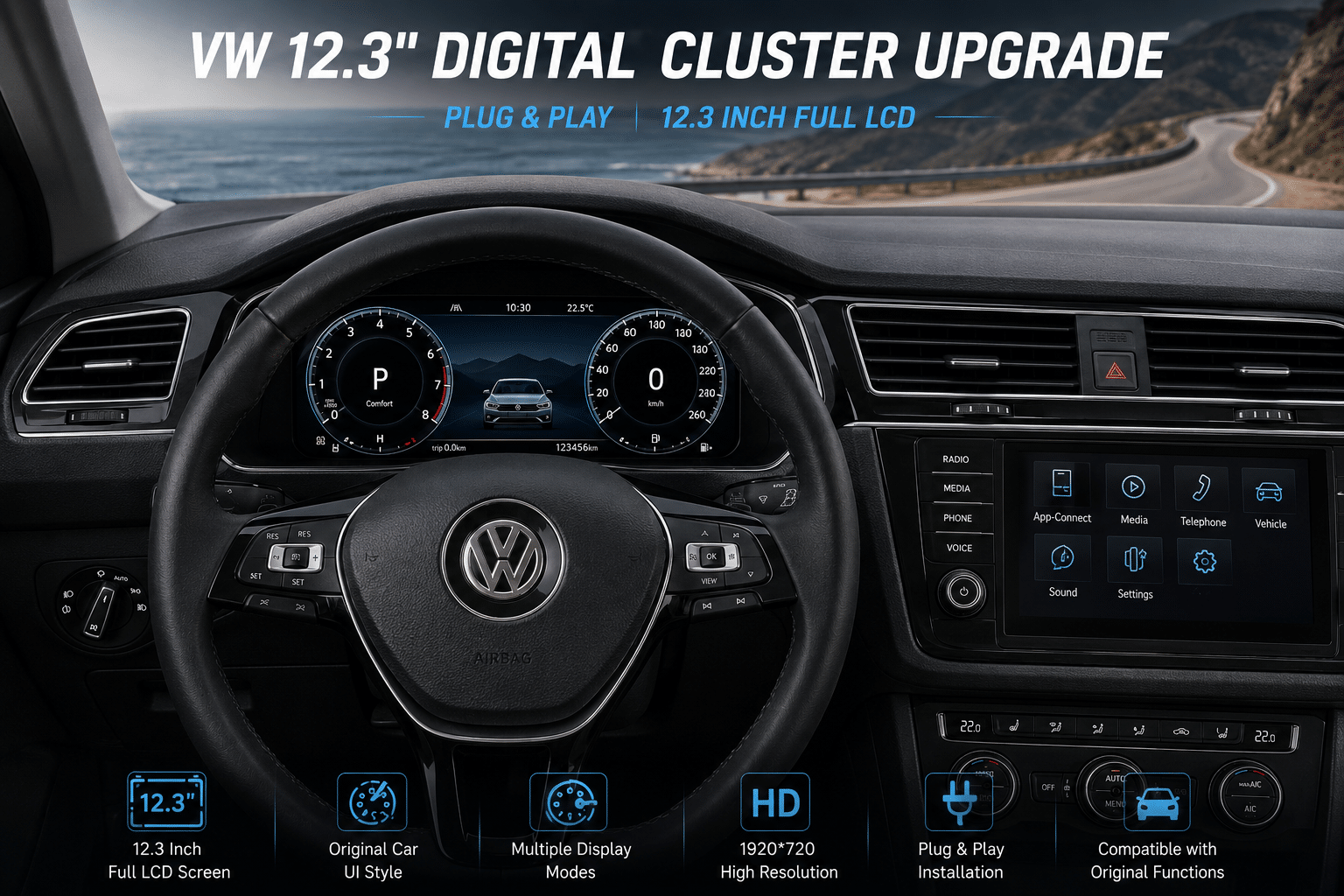
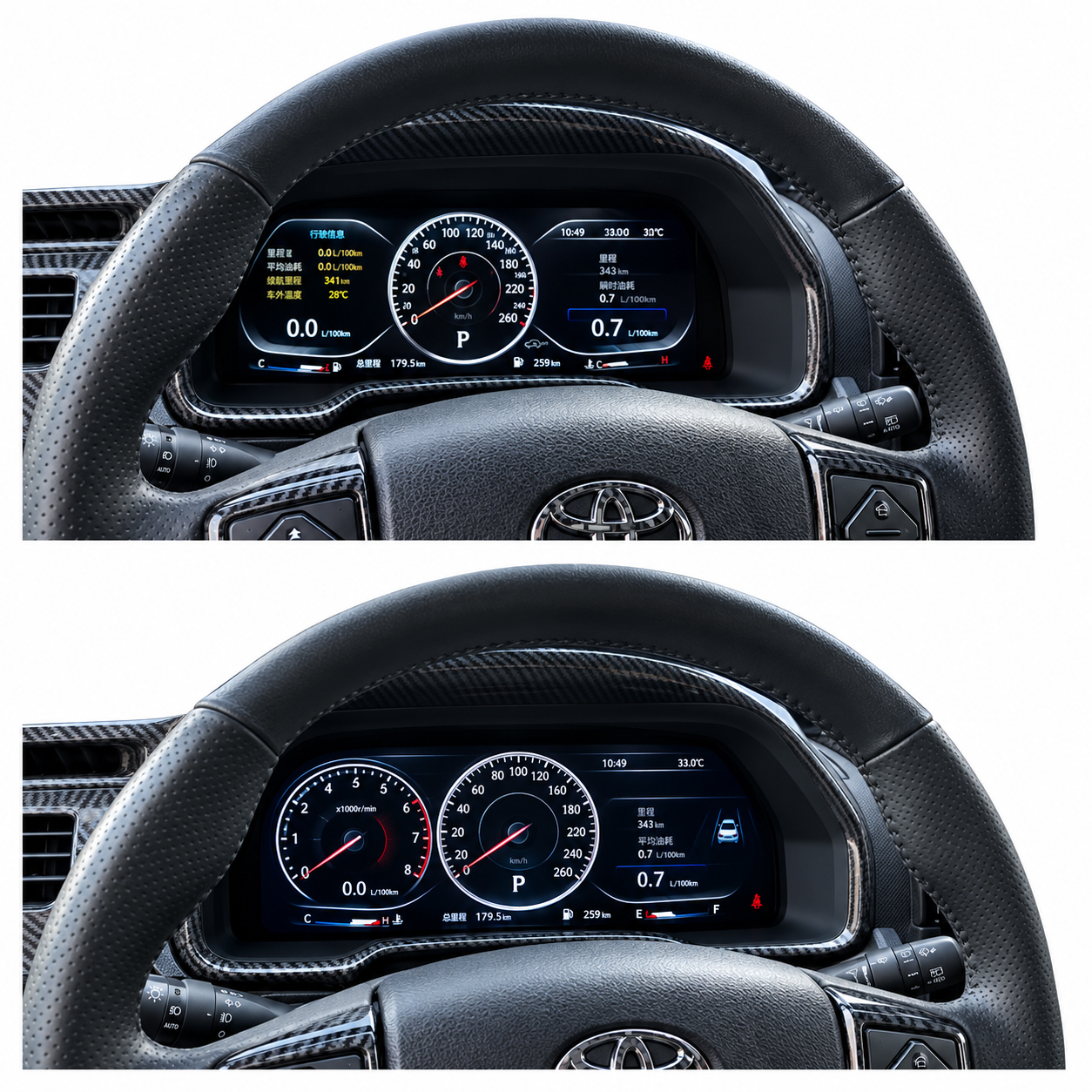
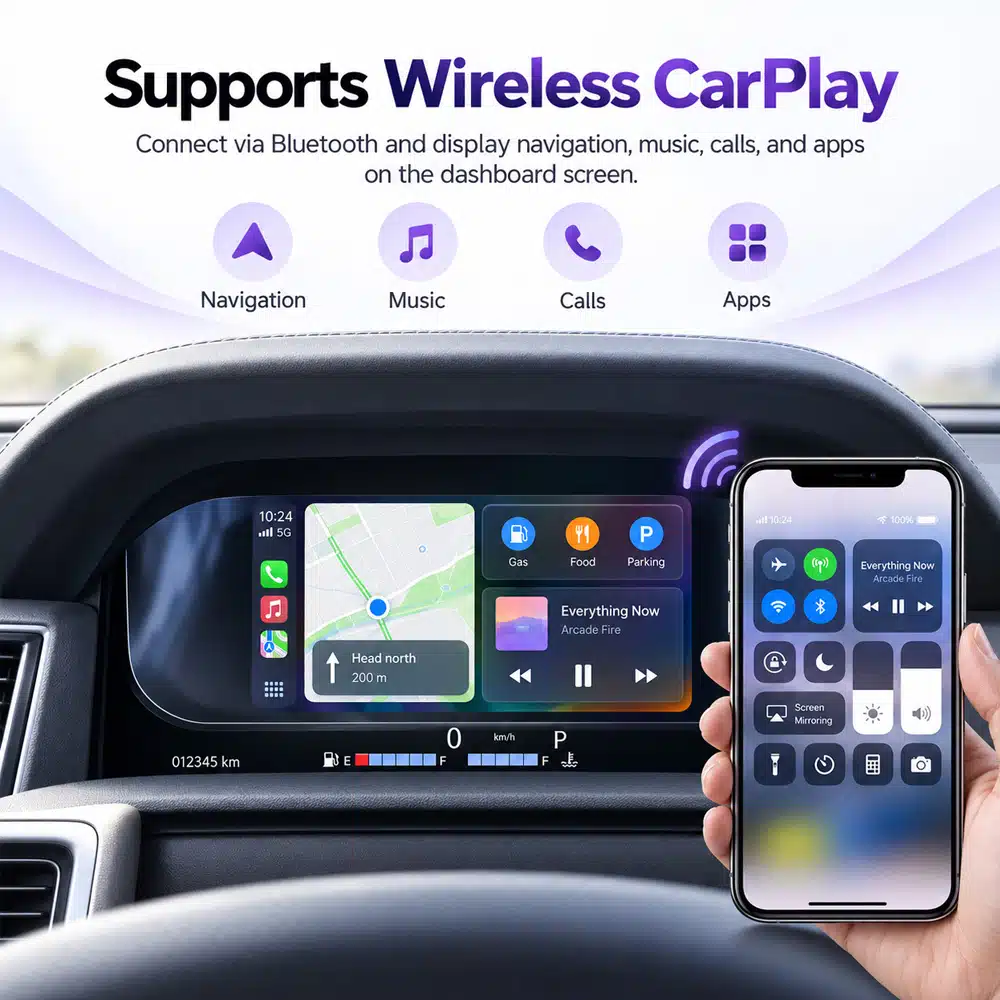
คำถามที่พบบ่อยเกี่ยวกับ Digital Instrument Cluster: iKAGOO เข้าถึงการตัดสินใจซื้ออย่างไร
iKAGOO ไม่ได้มอง digital cluster เป็นเพียงหน้าจอ LCD ทั่วไป ผลิตภัณฑ์นี้อยู่ภายในระบบอิเล็กทรอนิกส์ของรถที่มีอยู่ ดังนั้นความพอดี ข้อมูล ระบบควบคุมเดิม และการติดตั้งจึงต้องพิจารณาร่วมกัน.
iKAGOO เชื่อว่าการดัดแปลงที่ประสบความสำเร็จไม่ได้วัดจากรายการสเปกที่ยาวที่สุด แต่วัดจากว่าได้เลือกรุ่นผลิตภัณฑ์ที่ถูกต้อง ฟังก์ชันเดิมของรถที่จำเป็นยังใช้งานได้จริง เข้าใจเส้นทางการติดตั้ง และผู้ซื้อยังมีช่องทางสนับสนุนหลังการจัดส่ง.
คำถามที่พบบ่อยเกี่ยวกับ Digital Instrument Cluster ตามข้อกังวลของผู้ซื้อ
ใช้หน้านี้เป็นศูนย์กลางการตัดสินใจซื้อ แต่ละส่วนจะตอบคำถามเร่งด่วนก่อน แล้วลิงก์ไปยังคู่มือ iKAGOO ที่ละเอียดขึ้นเมื่อต้องการข้อมูลเพิ่มเติม.
คำถามที่พบบ่อยเกี่ยวกับ Digital Instrument Cluster: ความพอดีกับรุ่นรถและความเข้ากันได้
ความเข้ากันได้เป็นด่านแรกในเส้นทางการซื้อ คำถามที่ถูกต้องไม่ใช่แค่ “อันนี้ใส่กับรถ 2015 ได้ไหม?” แต่เป็น “เส้นทางสินค้านี้ตรงกับสถาปัตยกรรมมาตรวัดที่ติดตั้งจริงในรถคันนี้หรือไม่?”
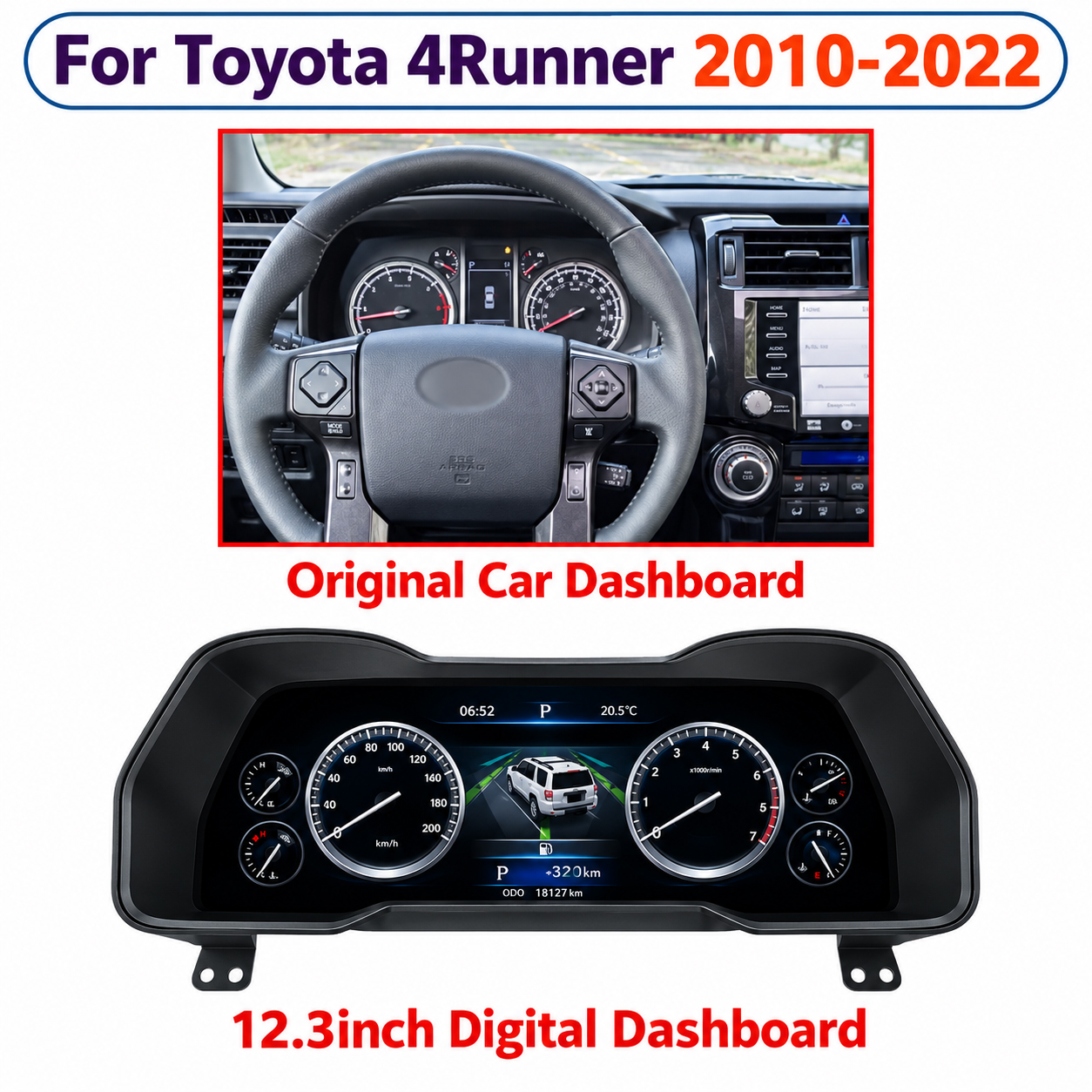
ทำไม iKAGOO จึงขอมาตรวัดและแดชบอร์ดเดิม
รถสองคันอาจใช้ชื่อรุ่นเดียวกันแต่ยังใช้รูปทรงมาตรวัด ขอบตกแต่ง ขั้วต่อ การจัดวางพวงมาลัย หรืออิเล็กทรอนิกส์ภายในที่ต่างกัน ภาพแดชบอร์ดเดิมที่ชัดเจนมักให้ข้อมูลที่รายการปีแบบทั่วไปให้ไม่ได้.
ดังนั้น iKAGOO จึงใช้การกำหนดค่าที่มองเห็นได้ของรถร่วมกับรุ่นและปี เมื่อจำเป็นอาจตรวจสอบข้อมูลเพิ่มเติม เช่น ชนิดเชื้อเพลิง ฉลากมาตรวัด ระบบเดิม หรือการดัดแปลงแดชบอร์ดก่อนหน้า.
ฉันจะรู้ได้อย่างไรว่ามาตรวัดดิจิทัลจะใส่กับรถของฉันได้?
ยืนยันยี่ห้อ รุ่น ปีผลิต รุ่นเจเนอเรชันของรถหากทราบ ด้านพวงมาลัย และลักษณะของมาตรวัดเดิม.
สินค้าที่เลือกควรตรงกับเส้นทางแดชบอร์ดทางกายภาพและการกำหนดค่าอิเล็กทรอนิกส์ที่รถคันนั้นต้องการ หากสินค้าต้องใช้ PCB แผ่นยึด บัซเซอร์ ตัวถอดรหัส หรือชิ้นส่วนเดิมอื่นที่ต้องเก็บไว้ ส่วนนั้นก็เป็นส่วนหนึ่งของความเข้ากันได้ด้วย.
รุ่นและปีของรถเพียงพอที่จะยืนยันความเข้ากันได้หรือไม่?
ไม่ เพียงพอ เจเนอเรชันเดียวกันอาจมีการเปลี่ยนแปลง facelift ชนิดมาตรวัดต่างกัน เครื่องยนต์ต่างกัน เวอร์ชันภูมิภาค หรือการเปลี่ยนแปลงอุปกรณ์ที่ซ่อนอยู่.
สิ่งนี้สำคัญเป็นพิเศษใกล้ช่วงเปลี่ยนปีผลิต iKAGOO ไม่แนะนำให้ขยายปีที่สินค้ารองรับเพียงเพราะแดชบอร์ดรุ่นก่อนหรือหลังดูคล้ายกัน.
ฉันควรส่งภาพและข้อมูลรถอะไรบ้าง?
เริ่มจากรุ่นและปีผลิตที่แน่นอน การกำหนดค่าพวงมาลัยซ้ายหรือขวา ภาพมาตรวัดเดิมที่เปิดเครื่องชัดเจน และภาพแดชบอร์ดมุมกว้างที่แสดงขอบตกแต่งโดยรอบ.
หากเกี่ยวข้องกับการผสานรวมมัลติมีเดียหรือการนำทางข้ามหน้าจอ ควรระบุระบบศูนย์กลางเดิมด้วย ควรขอภาพฉลากด้านหลังหรือขั้วต่อเฉพาะเมื่อจำเป็นจริง ๆ เท่านั้น.
พวงมาลัยซ้ายหรือขวาสำคัญไหม?
อาจสำคัญ สินค้าบางรายการใช้ระบบอิเล็กทรอนิกส์เดียวกันทั้งรถพวงมาลัยซ้ายและขวา ขณะที่บางรายการอาจใช้ตัวเรือน ขอบตกแต่ง การติดตั้ง หรือการกำหนดค่าเฉพาะรถที่ต่างกัน.
ดังนั้นด้านพวงมาลัยควรถือเป็นส่วนหนึ่งของความเข้ากันได้ ไม่ใช่หมายเหตุการจัดส่งที่เพิ่มหลังจากเลือกสินค้าแล้ว.
คำถามที่พบบ่อยเกี่ยวกับมาตรวัดดิจิทัล: ฟังก์ชัน OEM และคำเตือนของรถ
iKAGOO ไม่ถือว่า “หน้าจอเปิดติด” เพียงพอ การอัปเกรดมาตรวัดที่สำเร็จควรคงข้อมูลรถและตัวควบคุมที่รองรับให้ใช้งานได้จริงหลังการติดตั้ง.
“รักษาฟังก์ชันเดิมไว้” ควรเป็นข้อความที่ทดสอบได้
ข้อความทั่วไปเช่น “ฟังก์ชัน OEM 100%” หรือ “99% ที่คงไว้” อาจซ่อนความแตกต่างที่สำคัญ iKAGOO แยกการประเมินออกเป็นความต่อเนื่องของฟังก์ชันเดิม ความต่อเนื่องของการควบคุมเดิม ข้อมูลรถและคำเตือน การผสานทางกายภาพ พฤติกรรม UI และคุณภาพการติดตั้ง.
สิ่งนี้ทำให้ง่ายต่อการระบุฟังก์ชันสำคัญที่ขาดหายไป แทนที่จะซ่อนไว้ในเปอร์เซ็นต์การตลาดแบบกว้างๆ.
ฟังก์ชันเดิมของรถฉันยังทำงานอยู่หรือไม่?
มาตรวัดเฉพาะรถที่จับคู่อย่างเหมาะสมควรให้ข้อมูลการขับขี่ที่รองรับซึ่งจำเป็นสำหรับการใช้งานปกติต่อไป ฟังก์ชันทั่วไปอาจรวมถึงความเร็ว รอบเครื่อง เชื้อเพลิง อุณหภูมิน้ำหล่อเย็น ตำแหน่งเกียร์ การจัดการระยะทาง ข้อมูลประตู และข้อมูลคำเตือน.
รายการที่แน่นอนขึ้นอยู่กับรถและผลิตภัณฑ์ iKAGOO ไม่แนะนำให้ใช้ข้อความฟังก์ชันที่คงไว้แบบกว้างๆ เพียงข้อความเดียวกับทุกมาตรวัดในร้าน.
ไฟเตือนเดิมยังคงใช้งานได้อยู่ไหม?
คำเตือนที่รองรับควรยังคงชัดเจนและใช้งานได้หลังติดตั้งและกำหนดค่ามาตรวัดที่ถูกต้อง กราฟิกหรือตำแหน่งอาจดูแตกต่างจากมาตรวัดอนาล็อกเดิม.
คำเตือนพิเศษเช่น AHC, VSC/TRAC, 4LO, ล็อกเฟืองท้าย, TPMS, ข้อมูลดีเซล, AdBlue หรือตัวบ่งชี้ระบบช่วยเหลือขั้นสูงต้องตรวจสอบเป็นรายบุคคลในกรณีที่เกี่ยวข้อง.
ปุ่มควบคุมบนพวงมาลัยยังใช้งานได้อยู่หรือไม่?
เส้นทางมาตรวัดที่รองรับหลายเส้นทางยังคงการโต้ตอบผ่านพวงมาลัยเดิมไว้ อย่างไรก็ตาม การกำหนดปุ่มและเส้นทางเมนูอาจแตกต่างระหว่างมาตรวัดจากโรงงานและอินเทอร์เฟซดิจิทัลที่อัปเกรด.
“รองรับการควบคุมผ่านพวงมาลัย” จึงควรหมายถึงมากกว่าช่องทำเครื่องหมาย คำถามที่มีประโยชน์คือปุ่มใดควบคุมฟังก์ชันใดบนรถจริง.
ถ้ารถของฉันมีฟังก์ชันพิเศษจากโรงงานล่ะ?
ให้ถือสิ่งเหล่านี้เป็นข้อกำหนดความเข้ากันได้เฉพาะราย ตัวอย่างได้แก่ การแสดงระบบถุงลมช่วงล่าง ข้อมูลการขับขี่แบบออฟโรด สถานะล็อกเฟืองท้าย TPMS คำเตือนดีเซล AdBlue ฟังก์ชันช่วยเหลือขั้นสูง และข้อมูลบริการเฉพาะรุ่น.
ผลิตภัณฑ์บางตัวรองรับฟังก์ชันเหล่านี้ บางตัวไม่รองรับ iKAGOO ชอบข้อจำกัดที่ชัดเจนมากกว่าการกล่าวอ้างแบบสากลที่เกินจริง.
คำถามที่พบบ่อยเกี่ยวกับมาตรวัดดิจิทัล: ระยะทาง VIN และข้อมูลรถเดิม
คำถามเหล่านี้ต้องระมัดระวัง เพราะข้อมูลระยะทาง ตัวตน และความปลอดภัยไม่ได้ถูกจัดเก็บหรือประมวลผลในลักษณะเดียวกันทุกแพลตฟอร์มรถ.
จอ LCD เป็นเพียงชั้นที่มองเห็นได้
สิ่งที่ผู้ขับขี่เห็นคืออินเทอร์เฟซใหม่ ภายใต้สิ่งนั้น รถอาจยังพึ่งพาอิเล็กทรอนิกส์เดิม การสื่อสาร CANBUS ข้อมูล PCB ที่คงไว้ หรือการกำหนดค่าเพิ่มเติม.
นี่คือเหตุผลที่ iKAGOO แยก “การอัปเกรดจอแสดงผล” ออกจาก “ตัวตนของรถ” การเปลี่ยนสิ่งที่ผู้ขับขี่เห็นไม่ได้หมายความโดยอัตโนมัติว่าทุกฟังก์ชันตัวตนหรือความปลอดภัยถูกเปลี่ยนในลักษณะเดียวกัน.
ระยะทางเดิมของฉันจะคงอยู่หลังการอัปเกรดหรือไม่?
อาจคงอยู่ได้ แต่ไม่มีวิธีสากล เส้นทางการดัดแปลงบางแบบยังใช้อิเล็กทรอนิกส์ของมาตรวัดเดิมหรือข้อมูลรถเดิม ขณะที่สถาปัตยกรรมอื่นอาจต้องกำหนดค่าหรือเขียนโปรแกรม.
การคงอยู่ของระยะทางจึงควรได้รับการยืนยันสำหรับรถและเส้นทางมาตรวัดที่แน่นอน แทนที่จะสันนิษฐานจากรุ่นอื่น.
การเปลี่ยนมาตรวัดจะเปลี่ยน VIN ของฉันหรือไม่?
การเปลี่ยนจอแสดงผลที่มองเห็นไม่ได้หมายความโดยอัตโนมัติว่า VIN จะเปลี่ยน คำตอบขึ้นอยู่กับว่าโมดูลเดิมใดยังทำงานอยู่ และตัวตนของรถถูกจัดการที่ใด.
ในเส้นทางที่คง PCB ของมาตรวัดเดิม ข้อมูลตัวตนที่จัดการโดยบอร์ดนั้นยังคงเชื่อมโยงกับอิเล็กทรอนิกส์เดิม สถาปัตยกรรมอื่นอาจใช้วิธีที่แตกต่างกัน.
อิมโมบิไลเซอร์จะยังทำงานหลังเปลี่ยนมาตรวัดหรือไม่?
ขึ้นอยู่กับการออกแบบระบบความปลอดภัยของรถ ในบางแพลตฟอร์ม อิเล็กทรอนิกส์ของมาตรวัดเดิมเชื่อมโยงอย่างใกล้ชิดกับตรรกะความปลอดภัยหรืออิมโมบิไลเซอร์.
นี่เป็นเหตุผลหนึ่งที่โซลูชันมาตรวัดดิจิทัลบางแบบคง PCB เดิมไว้ แทนที่จะเปลี่ยนตัวตนอิเล็กทรอนิกส์ทั้งหมดของมาตรวัดเดิม.
Will CANBUS vehicle data still display correctly?
A correct digital cluster must do more than switch on. It must receive and interpret the supported vehicle information required for normal driving.
Speed, RPM, fuel, temperature, gear, doors and warning states are examples of information that may depend on CANBUS communication or the retained original electronics.
Digital Instrument Cluster FAQ: PCB Transfer, Coding and Wiring
PCB transfer is one of the areas buyers often misunderstand. On the correct platform, retaining an original board can be part of the engineering solution rather than a compromise.
Why iKAGOO Looks Behind the Screen
The front display tells you how the product looks. The rear housing, PCB strategy, connectors, decoder and wiring tell you how the product actually becomes part of the vehicle.
Two 12.3-inch clusters can have completely different installation requirements. This is why iKAGOO does not use screen size as the primary compatibility rule.
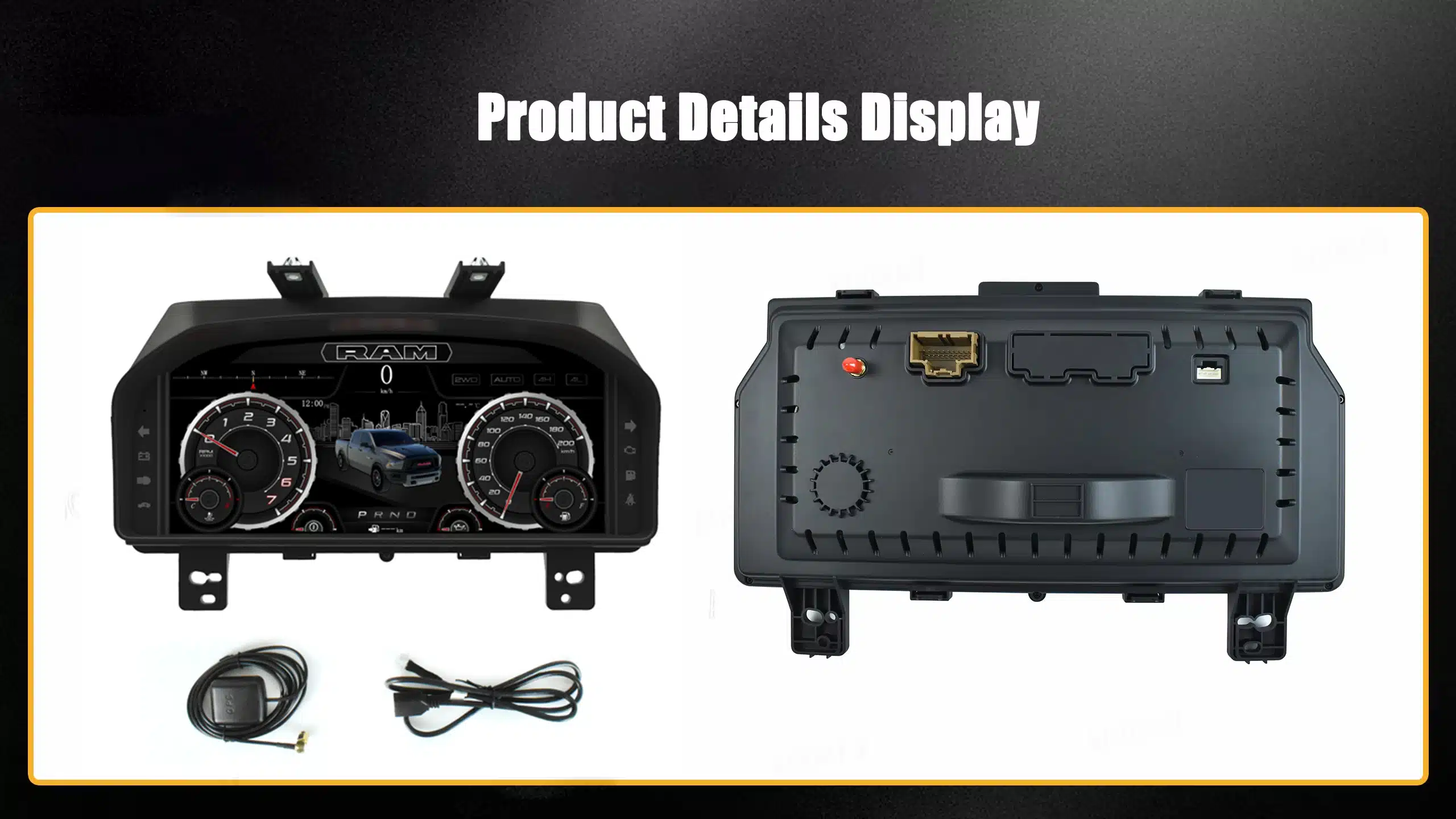
Why do some digital clusters require the original PCB?
Because the original board may continue handling vehicle identity, security logic, warnings, mileage or CANBUS data that the vehicle expects from the factory instrument.
The retrofit display can modernize the visual interface while the original electronics continue performing their vehicle-specific role.
Does a digital instrument cluster require coding or programming?
Some do; others do not. The answer depends on whether the route uses the original PCB, a vehicle-specific CAN interface, independent electronics or an OEM-style replacement method.
Configuration and coding are also different things. A product may require menu configuration without requiring dealer-style immobilizer coding.
Is a digital instrument cluster really plug and play?
“Plug and play” should mean the product uses a vehicle-matched connection route without intentionally cutting the original main harness.
It can still involve dashboard removal, bracket or trim transfer, PCB transfer, adapter installation, product configuration and final function testing.
ฉันจำเป็นต้องตัดสายไฟจากโรงงานหรือไม่
Many iKAGOO vehicle-specific cluster routes are designed around matched connectors, harnesses and interfaces rather than intentionally cutting the original main wiring harness.
However, the exact product installation guide takes priority. iKAGOO does not recommend turning “no cutting” into a universal statement for every unrelated cluster design.
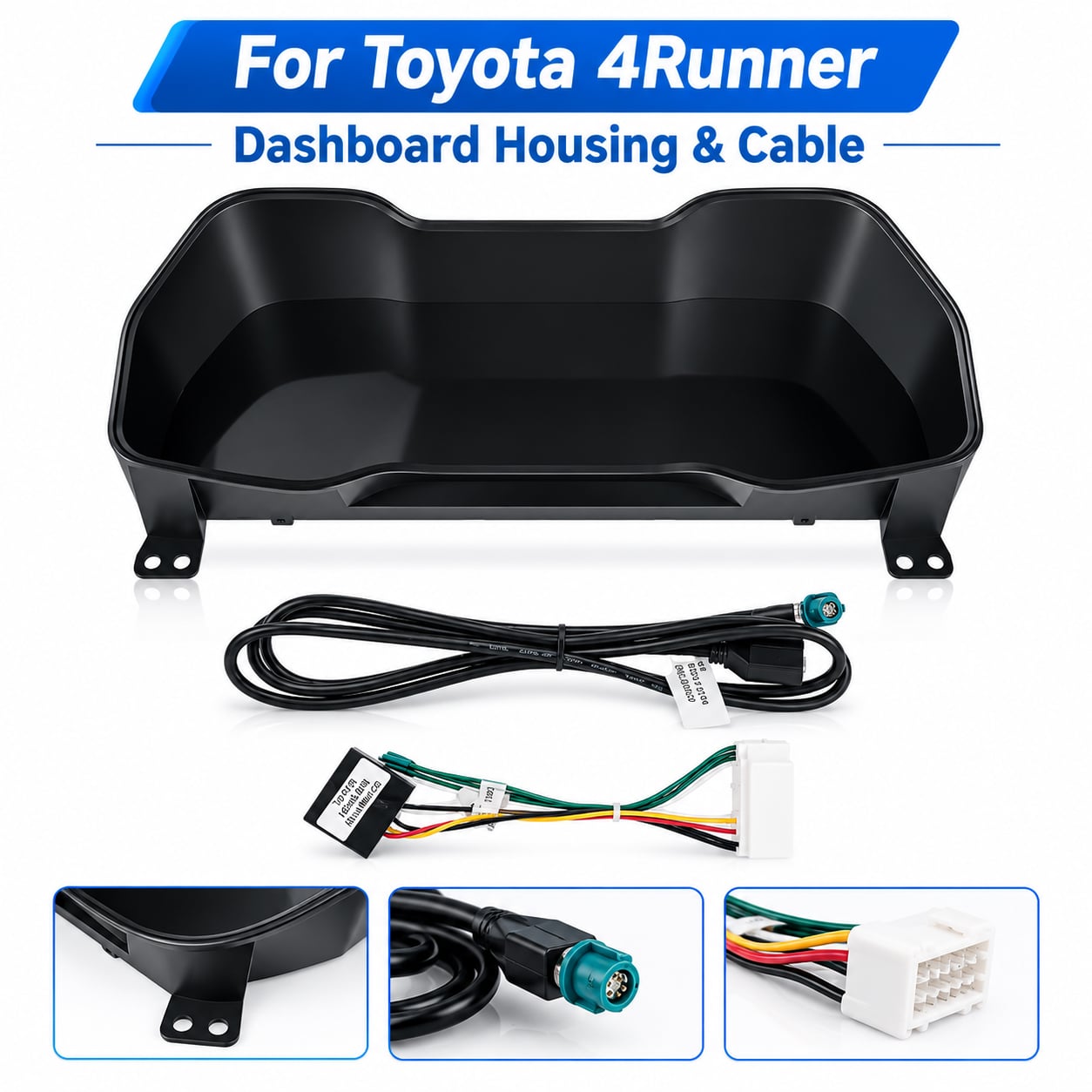
Compatibility Includes the Hardware Around the Screen
Housing dimensions, harnesses, connectors, brackets and interface hardware are part of the complete product route. A correct LCD size with the wrong connection architecture is still the wrong product.
Digital Instrument Cluster FAQ: CarPlay, Android Auto and Navigation Sync
This is one of the most common causes of misunderstanding because “CarPlay”, “navigation” and “map displayed in the cluster” are three different technical statements.
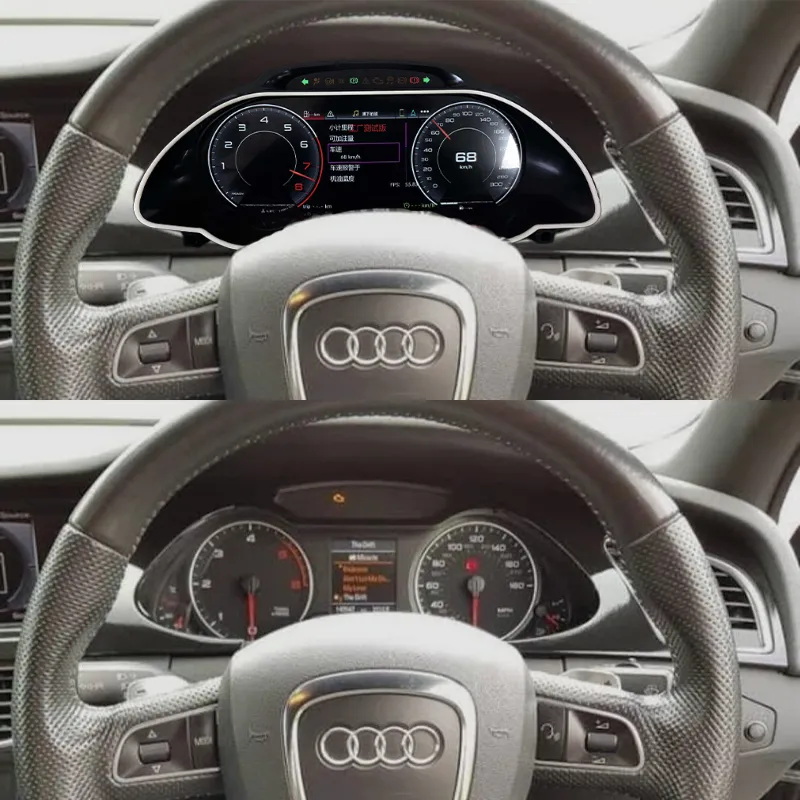
The Center Screen and Instrument Cluster Are Separate Systems
A vehicle can have CarPlay on the center Android screen while the digital instrument cluster has no CarPlay function at all. In another vehicle, a supported HDMI or synchronization route can send selected navigation content to the cluster.
iKAGOO therefore checks where CarPlay runs, what output the center system provides, what input the cluster accepts and whether the selected combination supports the expected cross-screen result.
Does every digital instrument cluster support Apple CarPlay?
No. Some clusters include a supported phone-projection function, some receive navigation information from an external source, and other clusters do not support CarPlay at all.
The feature must be confirmed on the actual product route. iKAGOO does not use “digital screen” and “CarPlay screen” as interchangeable terms.
Can Google Maps or Waze display on the digital cluster?
Only where the selected route supports a compatible navigation source and display method. Depending on the hardware, this can involve HDMI output, a converter or synchronization module, USB communication or another supported connection.
The exact route must be confirmed because different head units can offer different outputs even when both run Android or CarPlay.
Can the digital cluster work with an aftermarket Android head unit?
Sometimes. The Android unit must provide an output or data route that matches what the digital cluster can receive.
iKAGOO reviews a dual-screen upgrade as one vehicle system rather than assuming that two independently compatible screens will automatically communicate with each other.
Can I switch MPH / km/h, language or display themes?
Many digital clusters provide configurable units, languages or display styles, but these functions vary by product family and software version.
For example, the corresponding Toyota 4Runner 2010–2022 iKAGOO cluster route supports MPH ↔ km/h switching as a normal menu function. That does not imply every unrelated cluster uses the same interface.
Digital Instrument Cluster FAQ: Installation Difficulty and Final Verification
iKAGOO considers installation part of the product decision. A product can be compatible and still require a professional installer if PCB transfer, coding or complex dashboard work is involved.
Remote Compatibility Review + Real Installation Verification
Pre-order photos help identify the correct product route. The installer then verifies actual connectors, previous wiring changes, hidden equipment and final function behavior while the dashboard remains open.
iKAGOO recommends completing functional checks before reinstalling every piece of trim. This makes troubleshooting substantially easier if something needs adjustment.
Can I install a digital instrument cluster myself?
It depends on the vehicle and installation route. A confident DIY owner may be able to install a straightforward matched-harness cluster when a verified guide exists.
PCB transfer, coding, calibration, delicate dashboard disassembly or unfamiliar automotive electronics increase the risk. In those cases iKAGOO recommends an experienced automotive-electronics installer.
ควรทดสอบอะไรบ้างก่อนปิดแดชบอร์ด?
- Normal ignition startup and shutdown
- ความเร็วและรอบต่อนาที
- ระดับเชื้อเพลิงและอุณหภูมิของน้ำหล่อเย็น
- Gear display
- Mileage behavior
- Door and seat-belt information
- Required warning indicators
- ปุ่มควบคุมบนพวงมาลัย
- MPH / km/h or language settings where supported
- Navigation / projection features where included
- Any special function specifically confirmed before purchase
What should I do if something does not work after installation?
Do not repeatedly change wiring or install unknown firmware. First document the actual symptom.
- Photograph all relevant connections.
- Record a short video showing the problem.
- Confirm the product and software version.
- Identify whether the problem concerns display, CAN data, controls, navigation or settings.
- Contact iKAGOO support with the evidence.
What does iKAGOO verify before shipping my cluster?
When the product requires confirmation, iKAGOO reviews the information relevant to that route before the order is released for shipment.
Depending on the product, this can include vehicle model and year, original cluster, dashboard structure, LHD/RHD configuration, product version, required harness or retained components and important factory functions.
The goal is not to claim that remote review can see every hidden vehicle modification. The goal is to identify preventable mismatches before installation begins.
Digital Instrument Cluster FAQ: What Real iKAGOO Buyer Questions Teach Us
These cases are not used to limit the article to a few vehicle brands. They show why the same 24 questions matter across different supported vehicle platforms.
2013 Jetta GLI MK6
The important buyer question was not screen resolution. The concerns were mileage, VIN, immobilizer behavior and original vehicle data.
In the confirmed YB-110 route, the original instrument PCB remains in use so the factory board continues handling the vehicle logic assigned to it.
iKAGOO lesson: explain what the retained PCB does instead of treating PCB transfer as automatically good or bad.
2013 Audi A5 B8.5 / MMI 3G+
The purchase decision involved the digital cluster, Android center display, original MMI environment and the required route for CarPlay / Waze-related synchronization.
The important distinction was whether CarPlay existed on the center screen versus whether supported map content could actually reach the cluster.
iKAGOO lesson: evaluate the whole cockpit route—not two screens independently.
Land Cruiser 100 / Lexus LX470
Similar-looking dashboards across a vehicle family do not justify automatically extending a product's supported production years.
The exact vehicle year and original dashboard remain necessary because different versions can require different cluster routes.
iKAGOO lesson: real fitment boundaries are more valuable than a wider SEO year range.
F-150 / SVT Raptor 2009–2014
A large digital display does not automatically mean CarPlay or navigation synchronization is part of the product.
If the cluster route does not support those functions, iKAGOO should describe its actual instrument and vehicle-data capabilities instead.
iKAGOO lesson: an accurate limitation creates more trust than an inflated feature list.
4Runner 2010–2022
The corresponding cluster supports MPH ↔ km/h switching as a basic menu function, but the cluster itself should not be described as a CarPlay product.
Units, UI themes, phone projection and map synchronization are separate specification items.
iKAGOO lesson: verify every important function separately.
Discovery 4 / Supported Applications
The supported cluster route focuses on vehicle information, steering-wheel control and supported warning data.
CarPlay should not be added to the product description when the cluster does not provide that function.
iKAGOO lesson: correct vehicle integration is more important than copying functions from another product family.
Digital Instrument Cluster FAQ: What iKAGOO Needs to Check Your Vehicle
Buyers do not need to understand automotive CANBUS engineering. The useful part is providing enough accurate evidence for the product route to be narrowed correctly.
Digital Instrument Cluster FAQ: Continue the iKAGOO Buying Journey
This page answers the high-level buyer questions. The following iKAGOO resources provide the deeper evidence instead of duplicating the same content on every article.
Digital Instrument Cluster FAQ: Why iKAGOO Focuses on Certainty Instead of the Lowest Price
The hardware price is only one part of a retrofit. The wrong version, missing vehicle functions, unclear firmware or unsupported installation can transfer the technical risk to the buyer.
iKAGOO is not trying to be the cheapest source for a generic LCD instrument panel. The value proposition is a more defined vehicle-specific route: identify the correct product, explain the important functional boundaries, provide installation guidance where available and maintain a support path connected to the original order.
Digital Instrument Cluster FAQ Answered — Now Match the Cluster to Your Actual Vehicle
Start from your vehicle, not from screen size. Prepare the exact model and production year, LHD/RHD configuration, original cluster photo, complete dashboard photo and the factory functions that matter most to you.
iKAGOO can then help narrow the correct vehicle-specific route before installation. If the configuration cannot be confirmed from the available evidence, the safer answer is to continue reviewing it rather than pretending compatibility is certain.
Vehicle-specific confirmation takes priority over general examples in this Digital Instrument Cluster FAQ. Images illustrate real iKAGOO product and installation principles but do not transfer compatibility from one vehicle platform to another.




Add comment
คุณต้องเข้าสู่ระบบ เพื่อจะพิมพ์ความเห็น