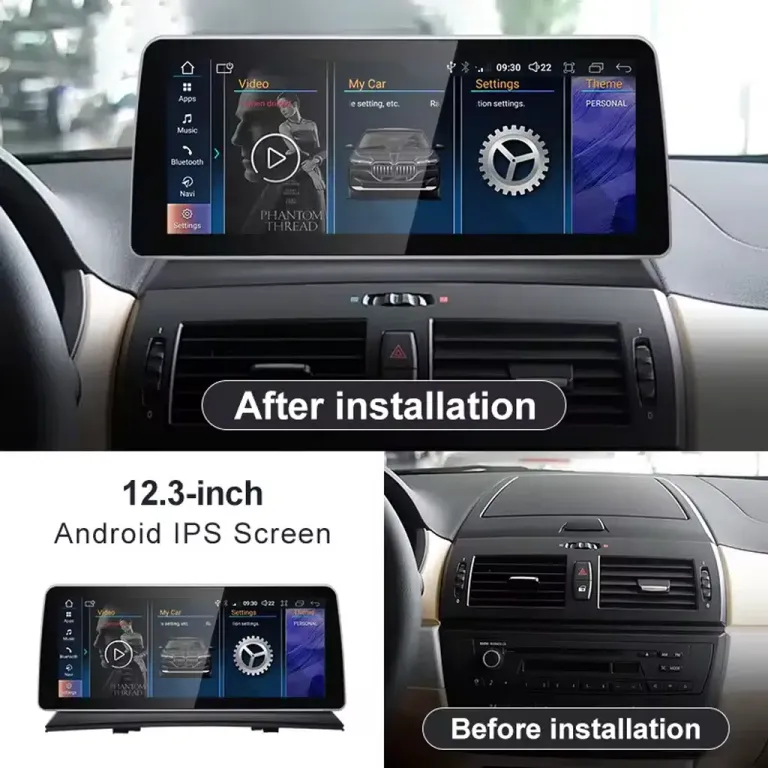
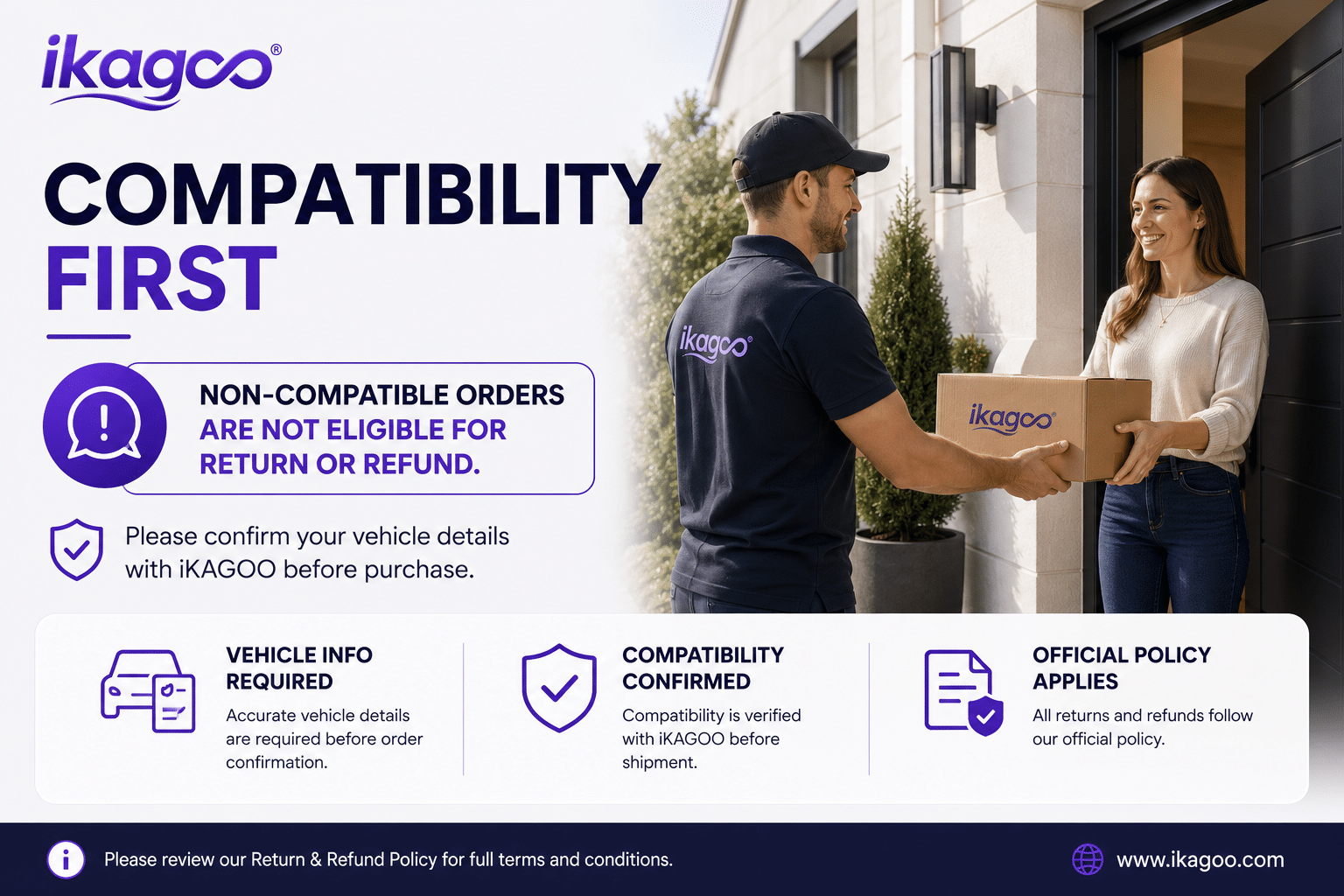
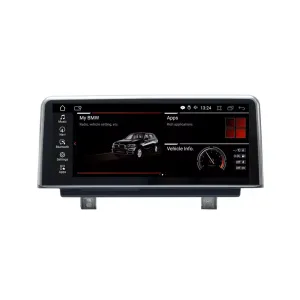
ดูการเปลี่ยนแปลงแดชบอร์ดก่อนตัดสินใจ
จอ Android สำหรับ BMW X3 E83 ช่วยให้แดชบอร์ดรุ่นเก่ามีอินเทอร์เฟซที่กว้างขึ้นและใช้งานง่ายขึ้นในชีวิตประจำวัน สำหรับการนำทาง การโทรศัพท์ เพลง และการเชื่อมต่อหน้าจอเฉพาะรุ่นรถ คุณค่าไม่ได้มีเพียงจอที่ใหญ่ขึ้น แต่ยังเป็นการอัปเกรดห้องโดยสารที่ดูสะอาดตา พร้อมคงรูปแบบแดชบอร์ดของ BMW ไว้อย่างเป็นเอกลักษณ์.
จอ Android สำหรับ BMW X3 E83 รองรับ CIC/CCC, CarPlay และ Android Auto
อัปเกรดนี้ออกแบบมาสำหรับเจ้าของ BMW X3 E83 ที่ต้องการการเชื่อมต่อโทรศัพท์สมัยใหม่โดยไม่ต้องเปลี่ยนห้องโดยสารให้ดูเหมือนการติดตั้งแท็บเล็ตทั่วๆ ไป คุณสามารถเลือกหน้าจอขนาด 10.25 นิ้วหรือ 12.3 นิ้ว เลือกตัวเลือกระบบ CCC หรือ CIC ที่ถูกต้อง และให้ iKAGOO เตรียมหน้าจอ ชุดสายไฟ และอินเทอร์เฟซรถที่เข้ากันก่อนจัดส่ง.
Android Head Unit สำหรับ BMW X3 E83 นี้คืออะไร?
Android Head Unit สำหรับ BMW X3 E83 นี้เป็นระบบอินโฟเทนเมนต์และหน้าจอที่ออกแบบมาเฉพาะสำหรับรถ BMW X3 E83 ตามรุ่นปี 2006–2011 ที่ระบุ โดยอัปเกรดประสบการณ์จากหน้าจอโรงงาน วิทยุ หรือพื้นที่เก็บของรุ่นเก่า ให้เป็นจอแสดงผลขนาด 10.25 นิ้วหรือ 12.3 นิ้ว รองรับ CarPlay, Android Auto, ระบบนำทาง GPS, บลูทูธ, Wi-Fi และแอปพลิเคชัน Android ขึ้นอยู่กับตัวเลือกที่เลือก ฟังก์ชันเดิมที่รองรับ เช่น ปุ่มควบคุมบนพวงมาลัย เส้นทางสัญญาณเสียงจากโรงงาน การสื่อสารกับอินเทอร์เฟซรถ ระบบช่วยจอด หรือสัญญาณกล้อง จะยังคงทำงานได้เมื่อเลือกเวอร์ชันที่ถูกต้องและติดตั้งอย่างถูกต้อง ก่อนจัดส่ง iKAGOO จะตรวจสอบรุ่นปี รูปแบบแผงหน้าปัด ตำแหน่ง LHD/RHD ตัวเลือกระบบโรงงาน และรูปถ่ายขั้วต่อ ซึ่งช่วยให้เราเตรียมหน้าจอ ชุดสายไฟ และอินเทอร์เฟซรถที่ถูกต้องสำหรับคำสั่งซื้อของคุณ แทนที่จะให้คุณเลือกจากรูปภาพสินค้าเพียงอย่างเดียว.
สิ่งที่คุณต้องรู้ก่อนสั่งซื้อ
ความพอดีขึ้นอยู่กับมากกว่าชื่อรุ่น
รถของคุณอาจเรียกว่า BMW X3 ในทุกตลาด แต่การอัปเกรดที่ถูกต้องยังคงขึ้นอยู่กับเจเนอเรชัน E83 ปีรุ่น โครงสร้างแผงหน้าปัด ระบบ CCC/CIC และประเภทขั้วต่อ iKAGOO ตรวจสอบรายละเอียดเหล่านั้นก่อนจัดเตรียมคำสั่งซื้อ.
ฟังก์ชันดั้งเดิมได้รับการปกป้องในจุดที่รองรับ
ระบบควบคุมบนพวงมาลัย เส้นทางสัญญาณเสียง สัญญาณอินพุตกล้อง และสัญญาณอินเทอร์เฟซรถยนต์ที่รองรับจะยังคงทำงานอยู่หลังการเชื่อมต่อและการตั้งค่าที่ถูกต้อง ระบบเสียงพิเศษหรือการดัดแปลงที่ไม่ได้มาจากโรงงานก่อนหน้านี้ควรแจ้งให้ทราบก่อนจัดส่ง.
นี่ไม่ใช่จอสากลทั่วไป
การอัปเกรดจอ Android สำหรับ BMW X3 E83 นี้ใช้จอ ชุดสายไฟ และการเตรียมอินเทอร์เฟซที่เฉพาะสำหรับรถรุ่นนี้ เป้าหมายคือการอัปเกรดแผงหน้าปัดสไตล์ BMW ที่ดูเรียบร้อยกว่า ไม่ใช่จอทั่วไปที่ความพอดีไม่ชัดเจน.
ไม่มีการตัดสายไฟโรงงานที่รองรับโดยเจตนา
วิธีการติดตั้งมาตรฐานใช้ชุดสายไฟและอินเทอร์เฟซยานพาหนะที่ตรงกัน หากรูปทรงขั้วต่อไม่ตรงกันหรืองานจำเป็นต้องตัดชุดสายไฟหลักจากโรงงาน ให้หยุดการติดตั้งและติดต่อ iKAGOO.
เหตุใดการอัปเกรดนี้จึงช่วยปรับปรุงการขับขี่ในชีวิตประจำวัน
CarPlay และ Android Auto ที่ทันสมัย
Wireless CarPlay และ Android Auto ให้คุณมีวิธีที่ทันสมัยกว่าในการใช้ระบบนำทาง สายโทรศัพท์ เพลง และคำสั่งเสียง สำหรับ X3 E83 รุ่นเก่า นี่คือการอัปเกรดที่ใช้งานทุกวัน ซึ่งทำให้ Waze, Google Maps, Apple Maps, Spotify และการโทรศัพท์ใช้งานจากแดชบอร์ดได้ง่ายขึ้น.
ตัวเลือกหน้าจอ 10.25 นิ้ว หรือ 12.3 นิ้ว
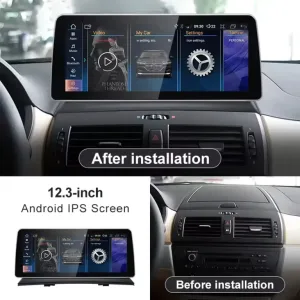
ตัวเลือกขนาด 10.25 นิ้วให้การอัปเกรดที่ดูเรียบง่ายกว่า ในขณะที่ตัวเลือกขนาด 12.3 นิ้วให้พื้นผิวหน้าจอที่ทันสมัยและกว้างขึ้น เลือกตามความชอบแดชบอร์ด มองเห็นขณะขับขี่ และความต้องการให้ห้องโดยสารดูอัปเดตมากน้อยเพียงใด.
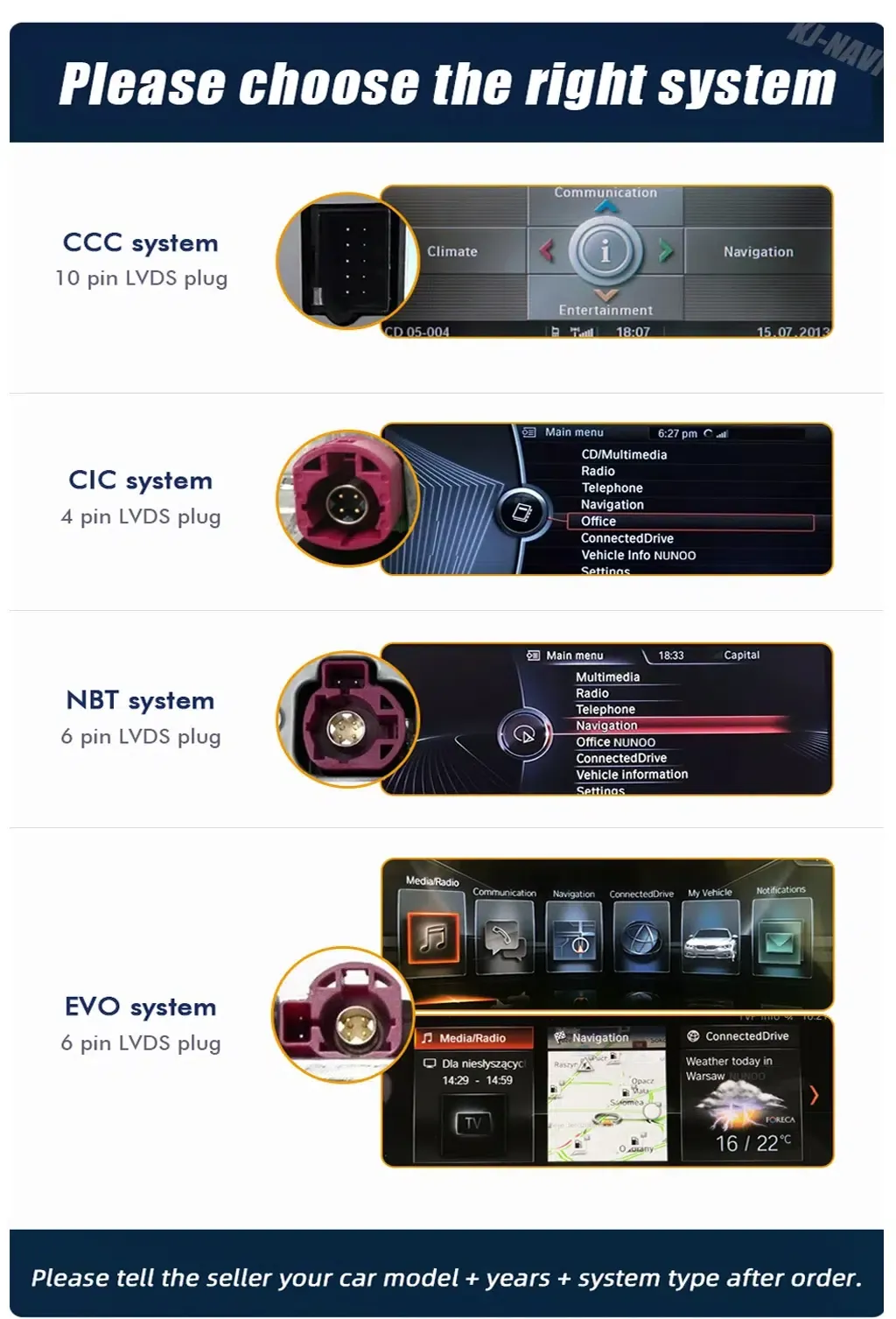
การจับคู่ระบบ CCC/CIC
การอัปเกรดหน้าจอ BMW X3 E83 ขึ้นอยู่กับระบบเดิมและรูปแบบขั้วต่อเป็นอย่างมาก iKAGOO ขอให้เลือก CCC หรือ CIC และสามารถใช้รูปภาพแผงหน้าปัดและขั้วต่อเพื่อลดความเสี่ยงในการเลือกเวอร์ชันผิดก่อนจัดส่ง.
การผสานรวมภายในห้องโดยสาร BMW ที่ดูสะอาดตา
ทิศทางการอัปเกรดนั้นเรียบง่ายและเข้ากับ BMW: หน้าจอกว้าง อินเทอร์เฟซที่สะอาดตา และการเชื่อมต่อโทรศัพท์ที่ใช้งานได้จริง ช่วยปรับปรุงภายในห้องโดยสารแบบเดิมโดยไม่ใช้รูปลักษณ์แท็บเล็ตสากลที่ฉูดฉาดซึ่งขัดกับการออกแบบแผงหน้าปัด E83.
ฟังก์ชันจากโรงงานยังคงอยู่หลังจากการจับคู่ที่ถูกต้อง
ด้วยรุ่นรถที่ถูกต้อง ชุดสายไฟที่เข้ากัน และการกำหนดค่าที่เหมาะสม BMW X3 E83 Android Head Unit ถูกออกแบบมาเพื่อรักษาฟังก์ชันดั้งเดิมที่สำคัญสำหรับการใช้งานในชีวิตประจำวัน.
ปุ่มควบคุมบนพวงมาลัย
ปุ่มบนพวงมาลัยที่รองรับยังคงทำงานได้หลังจากเชื่อมต่อและกำหนดค่าอินเทอร์เฟซของรถอย่างถูกต้อง ดังนั้นการใช้งานทั่วไปจึงยังคงรู้สึกคุ้นเคย.
เส้นทางเสียงจากโรงงาน
ระบบถูกเตรียมไว้ตามเส้นทางการเชื่อมต่อเสียง BMW ที่ตรงกัน โปรดแจ้ง iKAGOO ก่อนจัดส่ง หากรถ X3 ของคุณมีระบบเสียงพิเศษหรือมีการเดินสายไฟภายหลัง (aftermarket) มาก่อน.
กล้องโรงงานหรือจอแสดงผลการจอดรถ
การรองรับกล้องและการจอดรถขึ้นอยู่กับการกำหนดค่ารถเดิมและประเภทการเชื่อมต่อ ส่งรูปภาพที่ชัดเจนเพื่อให้สามารถเตรียมการตั้งค่าที่ถูกต้องก่อนจัดส่ง.
CANBUS และอินเทอร์เฟซยานพาหนะ
อินเทอร์เฟซยานพาหนะที่เข้ากันช่วยให้สัญญาณยานพาหนะที่รองรับสื่อสารกับจอแอนดรอยด์หลังการติดตั้ง รวมถึงฟังก์ชันการควบคุมและการกำหนดค่าที่รองรับ.
หมายเหตุการกำหนดค่าพิเศษ
กล้องที่ไม่ได้มาตรฐาน การดัดแปลงจากภายนอกก่อนหน้านี้ ระบบเสียงเฉพาะภูมิภาคที่ผิดปกติ หรือขั้วต่อจากโรงงานที่เสียหายอาจต้องมีคำแนะนำการเชื่อมต่อเพิ่มเติม โปรดระบุข้อมูลยานพาหนะที่ร้องขอเมื่อสั่งซื้อ เพื่อให้ iKAGOO สามารถเตรียมเวอร์ชันที่ถูกต้องได้.
ภาพสินค้าปัจจุบันและรายละเอียดการซื้อ
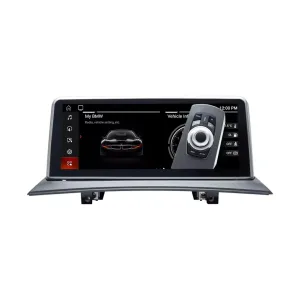
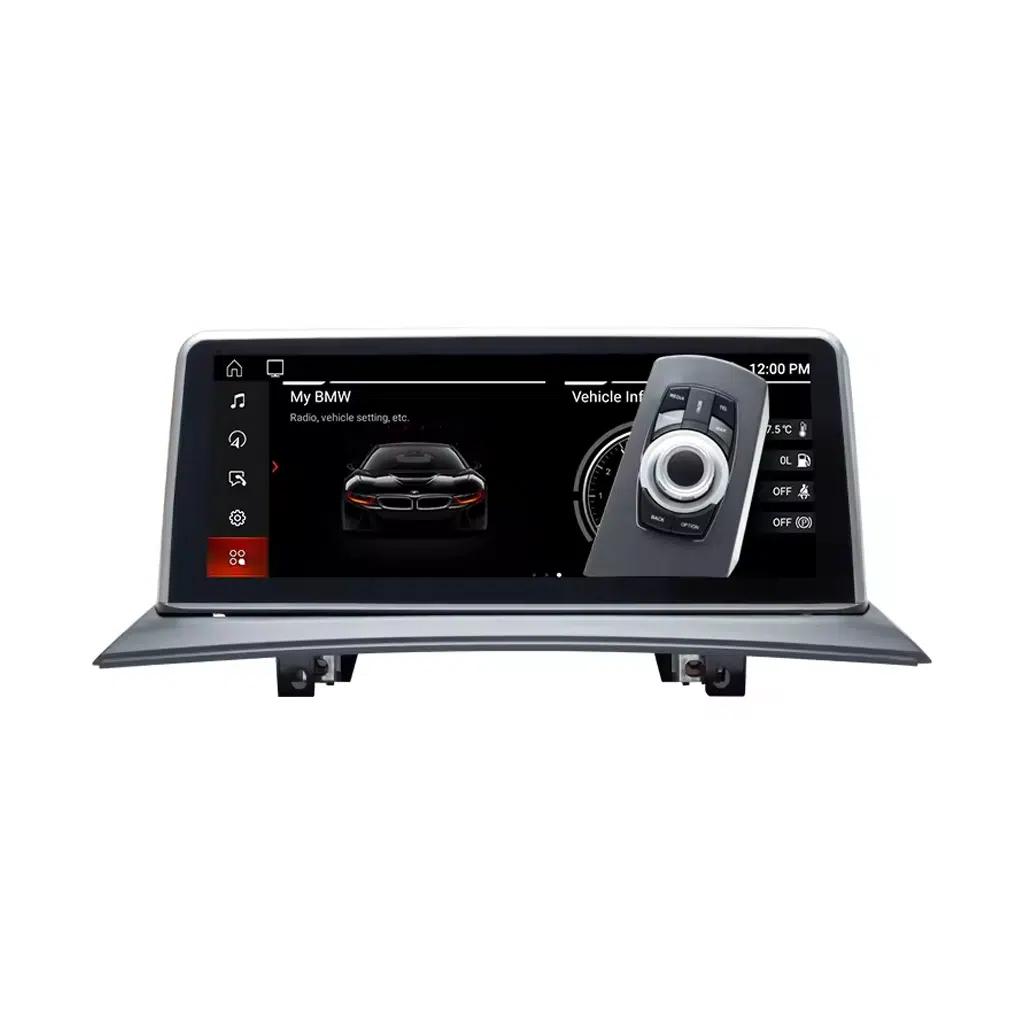
จอแสดงผลด้านหน้าแบบ BMW เพื่อการอัปเกรดที่ดูสะอาดตา
จอแสดงผลด้านหน้าทำให้ X3 รุ่นเก่าของคุณมีอินเทอร์เฟซที่ทันสมัยยิ่งขึ้นสำหรับแผนที่ สื่อ และฟังก์ชันโทรศัพท์ ในขณะที่ยังคงการออกแบบแผงหน้าปัดที่ควบคุมและคุ้นเคย.
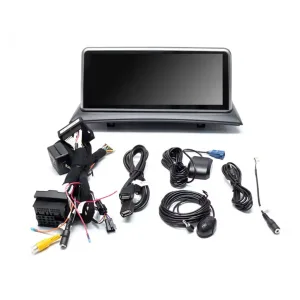
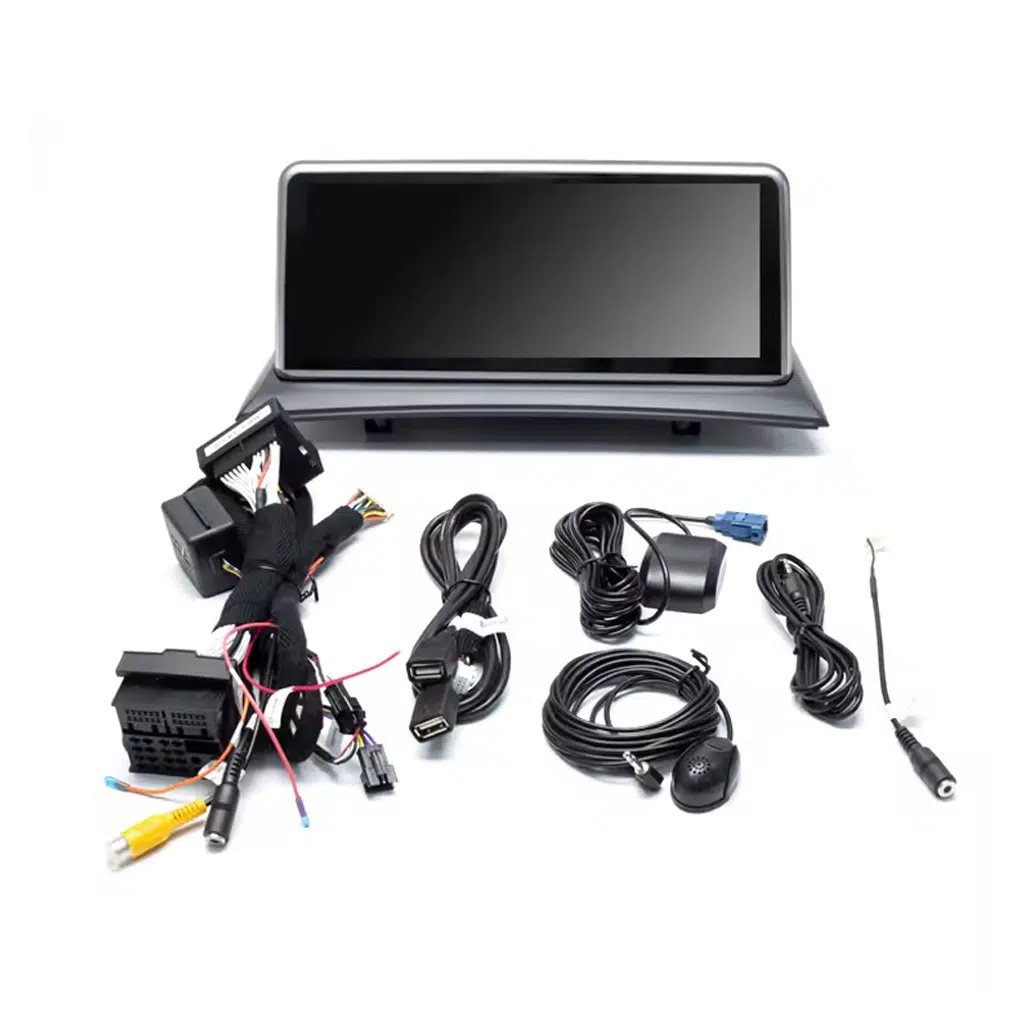
ชุดสายไฟและอุปกรณ์เสริมที่เข้ากันช่วยลดความเสี่ยงในการเชื่อมต่อผิดพลาด
สายไฟและอุปกรณ์ที่รวมมาช่วยให้หน้าจอเชื่อมต่อด้วยแนวทางเฉพาะของรถรุ่นนั้นๆ แทนที่จะบังคับใช้วิธีเดินสายแบบสากล.
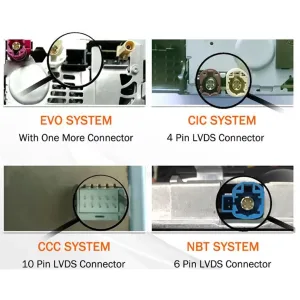
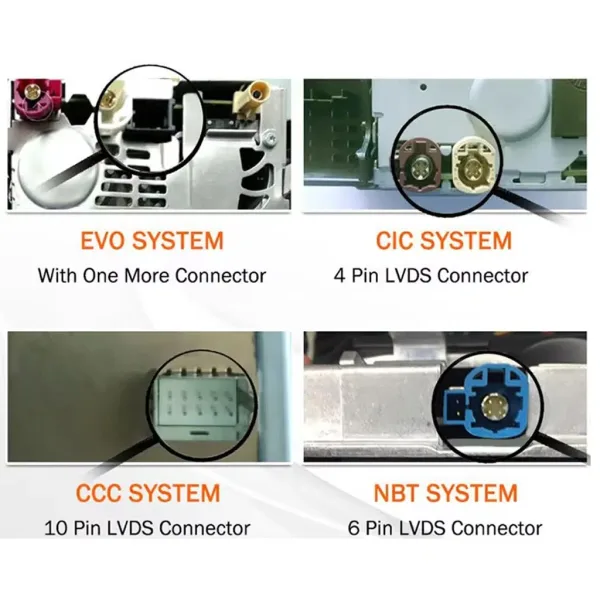
การระบุขั้วต่อช่วยให้คุณหลีกเลี่ยงรุ่นที่ไม่ถูกต้อง
ระบบ BMW อาจดูคล้ายกันจากที่นั่งคนขับ รูปถ่ายขั้วต่อช่วย iKAGOO ยืนยันการเตรียม CCC หรือ CIC ที่ถูกต้องก่อนจัดส่ง.
เลือก CCC หรือ CIC พร้อมหลักฐานจากระบบจริง
หน้านี้ใช้ตัวเลือก CCC และ CIC ส่งรูปถ่ายที่ชัดเจนของระบบเดิมและบริเวณขั้วต่อ เพื่อให้เตรียมจอแสดงผลและชุดสายไฟที่ถูกต้องได้.
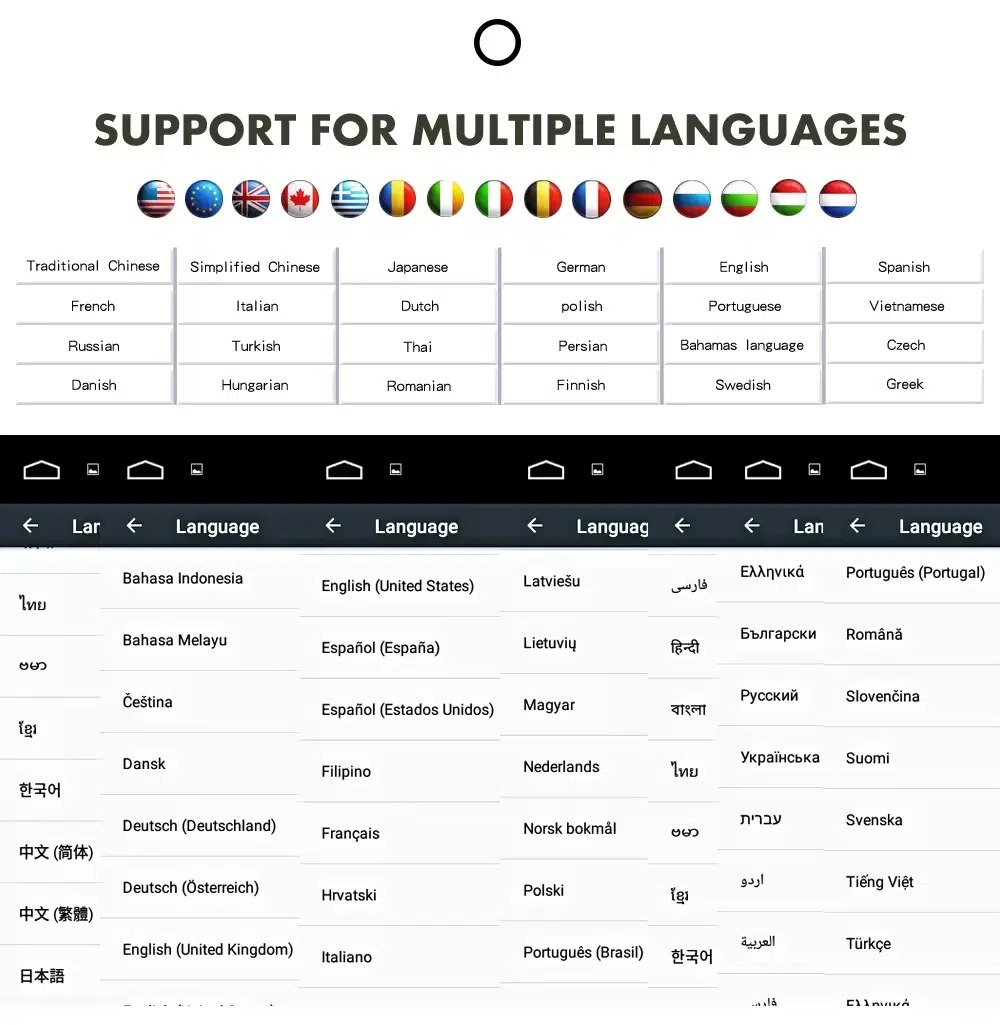
อินเทอร์เฟซหลายภาษาสำหรับเจ้าของรถต่างประเทศ
อินเทอร์เฟซ Android รองรับหลายภาษา ช่วยให้เจ้าของรถในสหรัฐอเมริกา ยุโรป สหราชอาณาจักร ออสเตรเลีย นิวซีแลนด์ และตลาดอื่นๆ ใช้เมนูระบบได้สะดวกยิ่งขึ้น.
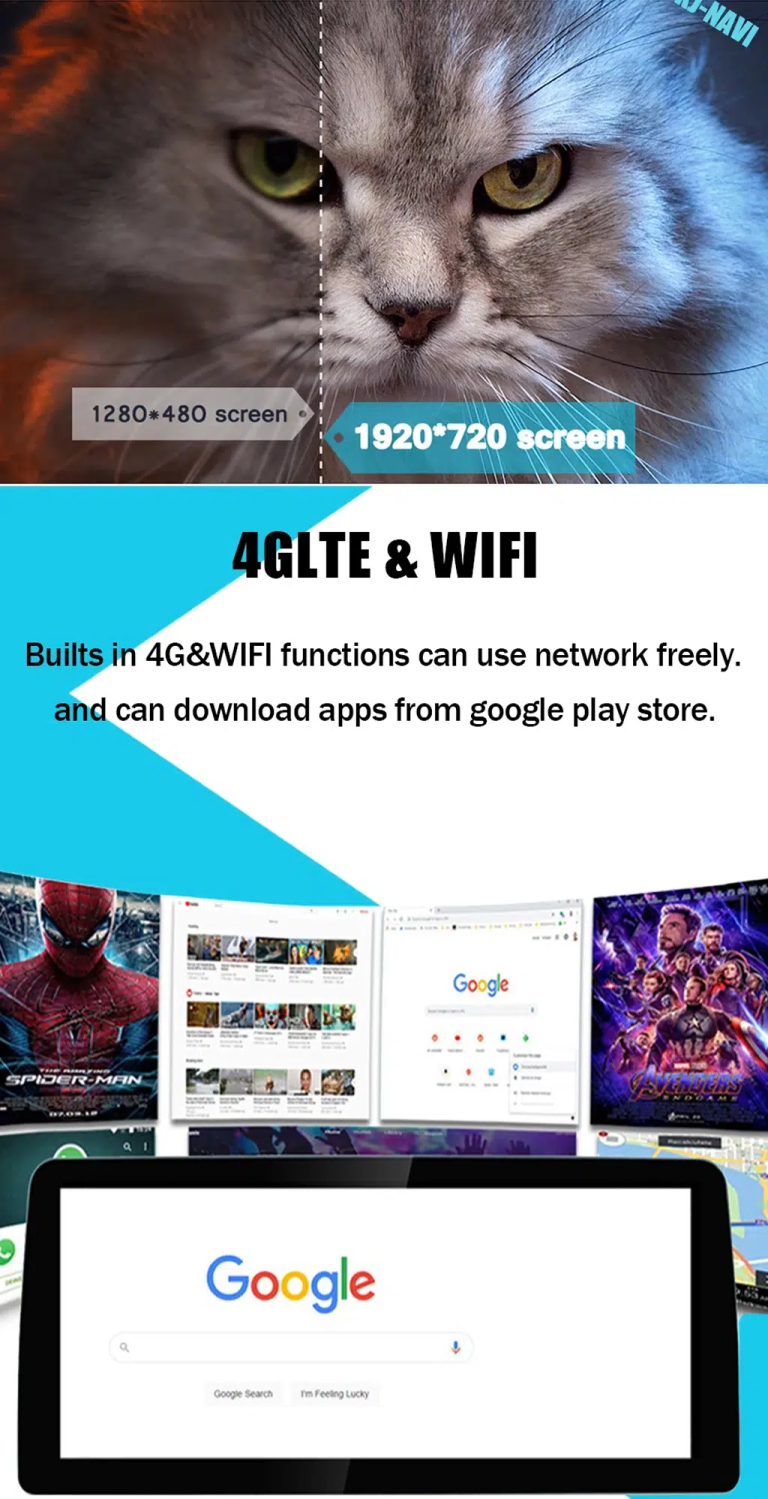
รองรับ Wi-Fi และ 4G ตามการกำหนดค่า
การกำหนดค่าที่เลือกสนับสนุนฟังก์ชัน Wi-Fi และ 4G ให้คุณใช้งานแอป การนำทาง และสื่อได้ยืดหยุ่นมากขึ้นเมื่อเลือกเวอร์ชันที่ถูกต้อง.
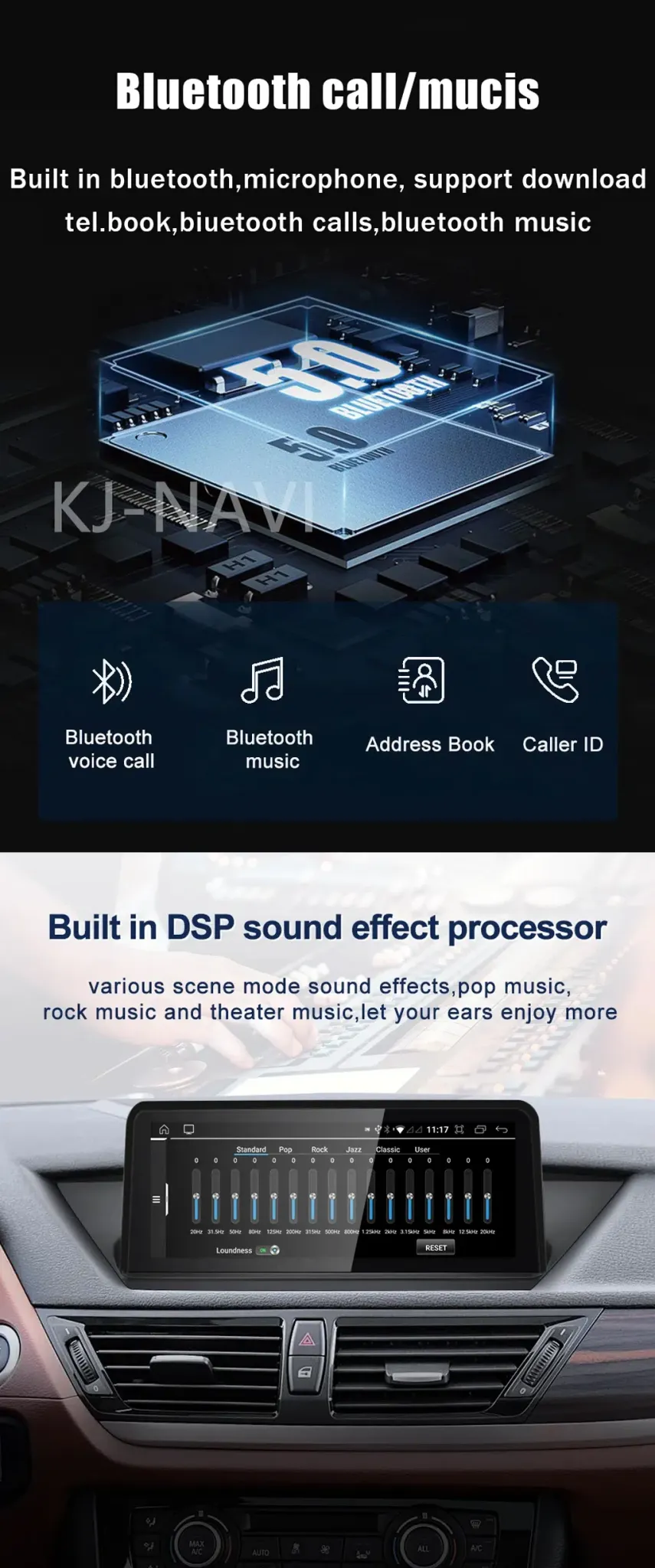
รองรับ Bluetooth และ DSP เพื่อการใช้งานเสียงในชีวิตประจำวันที่ดีขึ้น
การโทรผ่านบลูทูธ เพลงผ่านบลูทูธ และการรองรับ DSP ในการกำหนดค่าที่เลือก ช่วยปรับปรุงการใช้งานเสียงในชีวิตประจำวันให้ทันสมัย โดยไม่ต้องพึ่งพาอินเทอร์เฟซโรงงานเก่าเพียงอย่างเดียว.
ยืนยันเวอร์ชันที่ถูกต้องก่อนจัดส่ง
ส่งปีรุ่น ตำแหน่งพวงมาลัยซ้าย/ขวา รูปแดชบอร์ด รูประบบโรงงาน และรูปขั้วต่อ iKAGOO ใช้รายละเอียดเหล่านี้เพื่อเตรียมเวอร์ชัน Android Head Unit ที่ถูกต้องสำหรับ BMW X3 E83 รวมถึงหน้าจอ ชุดสายไฟ และอินเทอร์เฟซรถยนต์.
มีประโยชน์มากกว่าการรักษาระบบเก่าให้ยังทำงานได้เพียงอย่างเดียว
การนำทางในชีวิตประจำวันที่ดีขึ้น
อินเทอร์เฟซ X3 E83 แบบเก่าไม่ได้ออกแบบมาสำหรับการนำทางบนโทรศัพท์สมัยใหม่ การอัปเกรดนี้ให้พื้นที่หน้าจอที่ใหญ่ขึ้นสำหรับ CarPlay, Android Auto และการนำทางบน Android.
การผสานรวมโทรศัพท์ที่เรียบร้อยยิ่งขึ้น
คุณสามารถจัดการการโทร เพลง และฟังก์ชันเสียงจากอินเทอร์เฟซแดชบอร์ดที่ทันสมัยมากขึ้น แทนที่จะพึ่งพาลอจิกจากโรงงานที่ล้าสมัยหรือที่วางโทรศัพท์เพียงอย่างเดียว.
มูลค่าการถือครองระยะยาว
สำหรับเจ้าของที่ยังใช้ X3 E83 การอัปเกรดเป็นจอ Android ที่เหมาะสมช่วยเพิ่มความสะดวกสบายในชีวิตประจำวัน ซึ่งอะไหล่ทดแทน OEM มือสองไม่สามารถให้ได้.
ลดความเสี่ยงในการเลือกเวอร์ชันผิด
iKAGOO เตรียมคำสั่งซื้อตามข้อมูลระบบและรถยนต์จริงของคุณ ซึ่งเชื่อถือได้มากกว่าการเลือกโดยใช้ชื่อรุ่นหรือรูปภาพสินค้าเพียงอย่างเดียว.
การเตรียมเฉพาะรถยนต์สำคัญกว่าราคาที่ตั้งไว้ต่ำ
การเตรียมการตั้งค่าเฉพาะสำหรับยานพาหนะ
iKAGOO ตรวจสอบรายละเอียดรถของคุณก่อนจัดส่ง ซึ่งช่วยลดความเสี่ยงในการเลือกจอที่ดูคล้ายกันแต่ไม่ตรงกับระบบหรือรูปแบบขั้วต่อของคุณ.
การจับคู่หน้าจอ สายไฟ และอินเทอร์เฟซอย่างถูกต้อง
ขนาดหน้าจอ ชุดสายไฟ และอินเทอร์เฟซรถยนต์ถูกเตรียมตามการกำหนดค่า CCC หรือ CIC ที่คุณเลือก ซึ่งเป็นส่วนที่ลิสต์สินค้าทั่วไปหลายรายการไม่ได้อธิบายชัดเจน.
Original Vehicle Function Integration
Supported steering-wheel controls, audio path, parking support and camera input are considered during preparation. The goal is to modernize daily use while protecting the functions you still need.
การป้องกันสายไฟในโรงงาน
The standard approach avoids intentional cutting of supported factory wiring. If the connector or harness does not match, the correct action is to pause and confirm before forcing the installation.
การติดตั้งและการสนับสนุนการกำหนดค่า
iKAGOO can help with wiring questions, system selection, function testing and setup issues after delivery. This matters when your vehicle has special audio, camera or previous aftermarket modifications.
12-Month การรับประกันฮาร์ดแวร์
Eligible hardware issues are covered under iKAGOO’s 12-month limited hardware warranty. Review the published policy for coverage conditions, exclusions and support process.
ข้อมูลที่จำเป็นก่อนการจัดส่ง
รายละเอียดของยานพาหนะ
- BMW X3 E83 model year shown on your registration.
- ตำแหน่งพวงมาลัยซ้ายหรือพวงมาลัยขวา.
- Country or region where the vehicle is used.
- Any previous aftermarket radio, screen or camera modification.
Photos to Send
- Full dashboard photo from the driver seat.
- Factory screen or storage-box area photo.
- Factory system menu photo if available.
- Connector photos when you are unsure between CCC and CIC.
ทำไมรายละเอียดเหล่านี้จึงมีความสำคัญ
BMW X3 E83 vehicles can differ by system, connector, screen area, audio path and previous modifications. These details help iKAGOO prepare the correct BMW X3 E83 Android Head Unit version before shipment, instead of sending a generic screen and leaving the installer to solve fitment later.
Three Standards for This Upgrade
ความจำเป็นในการอัปเกรด iKAGOO
This score means the upgrade has strong daily-use value for owners who want modern phone connectivity, navigation and a cleaner screen experience in an older X3 E83.
- Old factory navigation and phone integration feel dated.
- CarPlay and Android Auto add real daily driving value.
- 10.25-inch and 12.3-inch choices give visible cabin improvement.
- Useful for long-term owners who want more than an OEM repair.
iKAGOO ความเข้ากันได้ของยานพาหนะดั้งเดิม
A score of 90/100 does not mean that 10% of factory functions are lost. It means the upgrade has strong original-function continuity when the correct version is selected and installed correctly.
ระดับความง่ายในการติดตั้ง iKAGOO
This BMW X3 E83 Android Head Unit is suitable for experienced DIY installers or an automotive electronics installer. It requires careful trim removal, matched wiring connection, CCC/CIC system selection, CANBUS or vehicle-interface configuration and full function testing.
- No intentional cutting of supported factory wiring during standard installation.
- Test steering-wheel controls, audio, camera, parking display and sleep behavior before final assembly.
- Pause the installation if connectors do not match or previous wiring modifications are found.
Choose the Option That Actually Solves the Old X3 Problem
คงไว้ซึ่งระบบโรงงาน
Lowest change, but old navigation, limited phone integration and aging display usability remain. This works only if you are satisfied with the original experience.
Used OEM Unit
May preserve factory appearance, but it does not add modern CarPlay, Android Auto or app-based navigation. It also depends on finding the correct used part.
โมดูลสำหรับ CarPlay เท่านั้น
Useful for simple phone mirroring, but less flexible than a full Android screen upgrade when you also want Android apps, larger display choice and broader media use.
หน้าจอแอนดรอยด์ทั่วไป
Can be cheaper, but fitment, wiring, system choice, audio path and support may be unclear. Small connector differences can decide whether the installation works cleanly.
iKAGOO BMW X3 E83 Android Head Unit
This is the stronger option for buyers who want CarPlay, Android Auto, screen-size choice, CCC/CIC selection, vehicle-specific preparation and practical support after delivery.
BMW X3 E83 Names, Years and Factory System Differences
This vehicle is generally sold globally as BMW X3, but the correct product version is not decided by badge name alone. iKAGOO prepares the correct version according to the vehicle generation, model year, dashboard layout, factory CCC/CIC system and connector configuration.
การกำหนดค่าผลิตภัณฑ์ปัจจุบัน
What the Installation Set Is Prepared to Support
Core Hardware
The package is prepared around the selected screen size and system option. The main display, screen panel and vehicle-specific connection set are matched according to order configuration.
Wiring and Interface
Matched wiring harnesses and the required vehicle interface help the Android head unit communicate with supported BMW X3 E83 functions after correct installation.
Common Accessories
Depending on configuration, the set may include USB cable, GPS antenna, microphone, camera or AUX-related connection accessories and installation wiring.
Before Final Assembly
Test audio, CarPlay, Android Auto, steering-wheel controls, reverse camera or parking display, Wi-Fi, Bluetooth and sleep behavior before closing the dashboard trim.
Level 3 — Advanced DIY Installation Process
Main Work Steps
- Remove dashboard trim carefully.
- Remove the factory screen, radio or storage-box area as applicable.
- เชื่อมต่อชุดสายไฟที่เข้าคู่กันและอินเทอร์เฟซรถยนต์.
- Route GPS, USB and microphone cables where needed.
- Connect camera, audio and auxiliary inputs when applicable.
- Configure the correct CCC or CIC system option.
- Test steering-wheel controls, audio, camera, parking display and sleep behavior.
Stop and Contact iKAGOO If
- รูปร่างของตัวเชื่อมต่อไม่ตรงกันอย่างชัดเจน.
- Pins are bent, damaged or loose.
- The harness does not match the instructions.
- คุณสังเกตเห็นความร้อน กลิ่น หรือควันที่ผิดปกติ.
- ฟิวส์ขาดซ้ำแล้วซ้ำเล่า.
- ไม่สามารถยืนยันได้ว่าเป็นการจ่ายไฟหรือสายดิน.
- The job would require cutting the factory main harness.
- Camera, CANBUS, audio or amplifier behavior is abnormal and cannot be explained.
Practical Support After You Order
การประมวลผลคำสั่งซื้อ
Vehicle-specific preparation normally takes 1–3 business days before dispatch. This preparation step helps reduce wrong-version risk before the product leaves the warehouse.
การติดตามการจัดส่งทั่วโลก
Orders are shipped with tracking. Delivery time depends on destination, carrier, customs processing and selected shipping method.
12-Month การรับประกันฮาร์ดแวร์
Eligible manufacturing defects and hardware failures are covered under the published iKAGOO warranty policy. Warranty handling depends on the issue, evidence and policy terms.
การติดตั้งและการสนับสนุนการกำหนดค่า
Support can help with configuration, wiring questions, function testing and practical installation issues. Provide order number, vehicle details, photos and a clear issue video when requesting help.
BMW X3 E83 Android Head Unit FAQ
Will this BMW X3 E83 Android Head Unit fit my exact model year?
ขึ้นอยู่กับ. This product is listed for BMW X3 E83 2006–2011. Because production year, registration year and regional configuration can differ, send your dashboard photo, factory system photo and connector information before shipment.
How do I choose between CCC and CIC?
ขึ้นอยู่กับ. Choose the option that matches your original BMW system and connector type. If you are unsure, send photos of the original screen/menu and connector area so iKAGOO can help identify the correct direction.
รองรับ Apple CarPlay และ Android Auto หรือไม่?
ใช่. This upgrade is designed to support CarPlay and Android Auto according to the selected configuration. These functions are the main reason many X3 E83 owners choose this upgrade instead of only repairing the old factory screen.
ปุ่มควบคุมบนพวงมาลัยเดิมของฉันจะยังใช้งานได้อยู่หรือไม่?
Yes, when correctly matched and installed. Supported steering-wheel controls continue to work through the matched vehicle interface. Function testing should be completed before final dashboard reassembly.
กล้องติดรถยนต์หรือเซ็นเซอร์จอดรถจะยังคงทำงานอยู่หรือไม่?
ขึ้นอยู่กับ. Camera and parking display support depend on your original configuration and connection type. Send vehicle photos and tell iKAGOO whether your car has factory camera, PDC or an aftermarket camera before shipment.
ฉันจำเป็นต้องตัดสายไฟจากโรงงานหรือไม่?
No, not in the standard supported installation approach. The matched harness is designed to connect without intentionally cutting supported factory wiring. If cutting the factory main harness seems necessary, stop and contact iKAGOO first.
สิ่งนี้เหมาะสำหรับการติดตั้งด้วยตัวเองหรือไม่?
ขึ้นอยู่กับ. The iKAGOO Installation Ease Level is Level 3 — Advanced DIY. It is suitable for experienced DIY installers or an automotive electronics installer who can remove trim carefully, connect the correct harness and test all functions.
ฉันควรส่งอะไรก่อนการจัดส่ง?
Send clear vehicle information. Include model year, LHD/RHD position, dashboard photo, factory system photo, connector photo, screen or storage-box area photo and whether the car has factory camera, PDC or special audio equipment.
หากรถยนต์ของฉันมีระบบเสียงจากโรงงานแบบพิเศษ จะเป็นอย่างไร?
ขึ้นอยู่กับ. Special audio systems may need additional connection instructions or configuration. Tell iKAGOO your audio setup before shipment so the correct interface guidance can be prepared.
ทำไมต้องซื้อจาก iKAGOO แทนที่จะซื้อเครื่องทั่วไปที่ถูกกว่า?
Because fitment matters. A lower-priced generic screen may not clearly match your dashboard, CCC/CIC system, connector, audio path or support needs. iKAGOO focuses on preparing the correct BMW X3 E83 Android Head Unit version before shipment and supporting the setup after delivery.
จะเกิดอะไรขึ้นหากตัวเชื่อมต่อหรือระบบจากโรงงานของฉันแตกต่างออกไป?
Stop before forcing the installation. Do not cut, repin or force connectors. Take clear photos of the connector, harness and dashboard area, then contact iKAGOO so the situation can be checked before damage happens.
Helpful Pages Before You Order
Use these pages to understand iKAGOO’s upgrade standards, compatibility process and after-sales policy before placing an order for a vehicle-specific Android head unit.
Ready to Upgrade Your BMW X3 E83?
Choose the correct screen size, memory option and CCC/CIC system selection. If you are not sure, send your vehicle photos first so iKAGOO can help reduce wrong-version risk before shipment.


มาร์ค แดเนียลส์ –
รถ X3 ปี 2008 ของฉันไม่มีระบบนำทาง มีแค่ช่องเก็บของบนแผงหน้าปัดเท่านั้น ฉันรู้สึกกังวลเกี่ยวกับการตัดแผงหน้าปัดเพื่อให้พอดีกับตัวควบคุม iDrive แต่แม่แบบที่ให้มาทำให้มันง่ายมาก หน้าจอวางพอดีกับตำแหน่งที่เคยเป็นช่องเก็บของ มันทำให้ภายในดูทันสมัยขึ้นอย่างสิ้นเชิง การเชื่อมต่อ CarPlay แบบไร้สายก็ทำได้ทันที หากคุณมีรุ่นพื้นฐานที่ไม่มีหน้าจอ นี่คือการอัปเกรดที่ดีที่สุดที่คุณสามารถทำได้.