


ความเร็วดิจิทัลและรอบต่อนาทีชัดเจน
มาตรวัดดิจิทัลและกราฟิกขนาดใหญ่ทำให้ข้อมูลความเร็วและเครื่องยนต์ ง่ายต่อการรับรู้โดยไม่ต้องพึ่งพาหน้าจอข้อมูลตรงกลางขนาดเล็ก.

| น้ำหนัก | 8 กก. |
|---|---|
| ขนาด | 48 × 38 × 28 เซนติเมตร |
| รถสนับสนุน | 2015-2018 สำหรับ Toyota Highlander, 2018-2019 สำหรับ Toyota Highlander |
| ความเข้ากันได้ของผลิตภัณฑ์ | พร้อมใช้งานทันที |
| แหล่งกำเนิดสินค้า | ไม่ใช่สินค้าของแท้ |


$780.00 ราคาเดิมคือ: $780.00.$680.00ราคาปัจจุบันคือ: $680.00.

เราจะจัดการภาษีมูลค่าเพิ่ม (VAT) และภาษีนำเข้าที่บังคับใช้สำหรับคำสั่งซื้อจากสหภาพยุโรป (EU) และสหรัฐอเมริกา (USA) ที่ตรงตามเงื่อนไข การประหยัดที่คาดการณ์: $120–$280 .
ค่าส่งเป็นค่าใช้จ่ายแยกต่างหาก. ค่าจัดส่งที่แม่นยำจะถูกคำนวณตามจุดหมายปลายทาง และแสดงในตะกร้าสินค้าของคุณก่อนการชำระเงิน.
ค่าจัดส่งสุดท้ายจะยืนยันจากที่อยู่จัดส่งของคุณที่หน้าชำระเงิน.
การตรวจสอบความเข้ากันได้, การคุ้มครองความเข้ากันได้แบบครบถ้วน, การรับประกันอุปกรณ์ฮาร์ดแวร์เป็นระยะเวลา 12 เดือน และการสนับสนุนอย่างต่อเนื่องหลังการติดตั้ง.
 การคุ้มครองการคืนเงินเต็มจำนวน
การรับประกันความเข้ากันได้
ยืนยันแล้วว่าไม่เหมาะกับรถของคุณ? คุณจะได้รับเงินคืนเต็มจำนวน.
→
การคุ้มครองการคืนเงินเต็มจำนวน
การรับประกันความเข้ากันได้
ยืนยันแล้วว่าไม่เหมาะกับรถของคุณ? คุณจะได้รับเงินคืนเต็มจำนวน.
→
 12-Month การรับประกันฮาร์ดแวร์
การรับประกันอุปกรณ์ฮาร์ดแวร์มีให้ในช่วง 12 เดือนแรก.
→
บริการหลังการขายในระยะยาว
การให้คำแนะนำเกี่ยวกับซอฟต์แวร์ การสนับสนุนชิ้นส่วน และการประสานงานการซ่อมแซม จะยังคงเชื่อมโยงกับคำสั่งซื้อเดิมของคุณ.
→
12-Month การรับประกันฮาร์ดแวร์
การรับประกันอุปกรณ์ฮาร์ดแวร์มีให้ในช่วง 12 เดือนแรก.
→
บริการหลังการขายในระยะยาว
การให้คำแนะนำเกี่ยวกับซอฟต์แวร์ การสนับสนุนชิ้นส่วน และการประสานงานการซ่อมแซม จะยังคงเชื่อมโยงกับคำสั่งซื้อเดิมของคุณ.
→
เป้าหมายของเราคือทำให้คำสั่งซื้อของคุณถูกต้องก่อนที่สินค้าจะออกจากเรา. เราตรวจสอบความเข้ากันได้ เตรียมการตั้งค่าที่ถูกต้อง และจะติดต่อคุณเฉพาะเมื่อมีสิ่งที่ต้องยืนยันเท่านั้น.
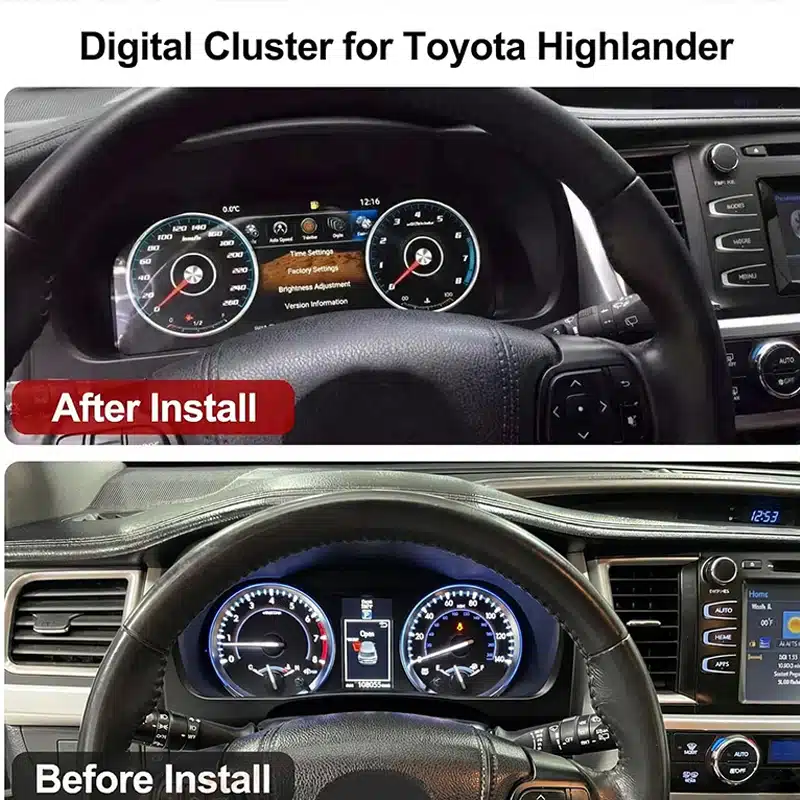
iKAGOO การอัปเกรดห้องโดยสารดิจิทัลเฉพาะรุ่นรถ
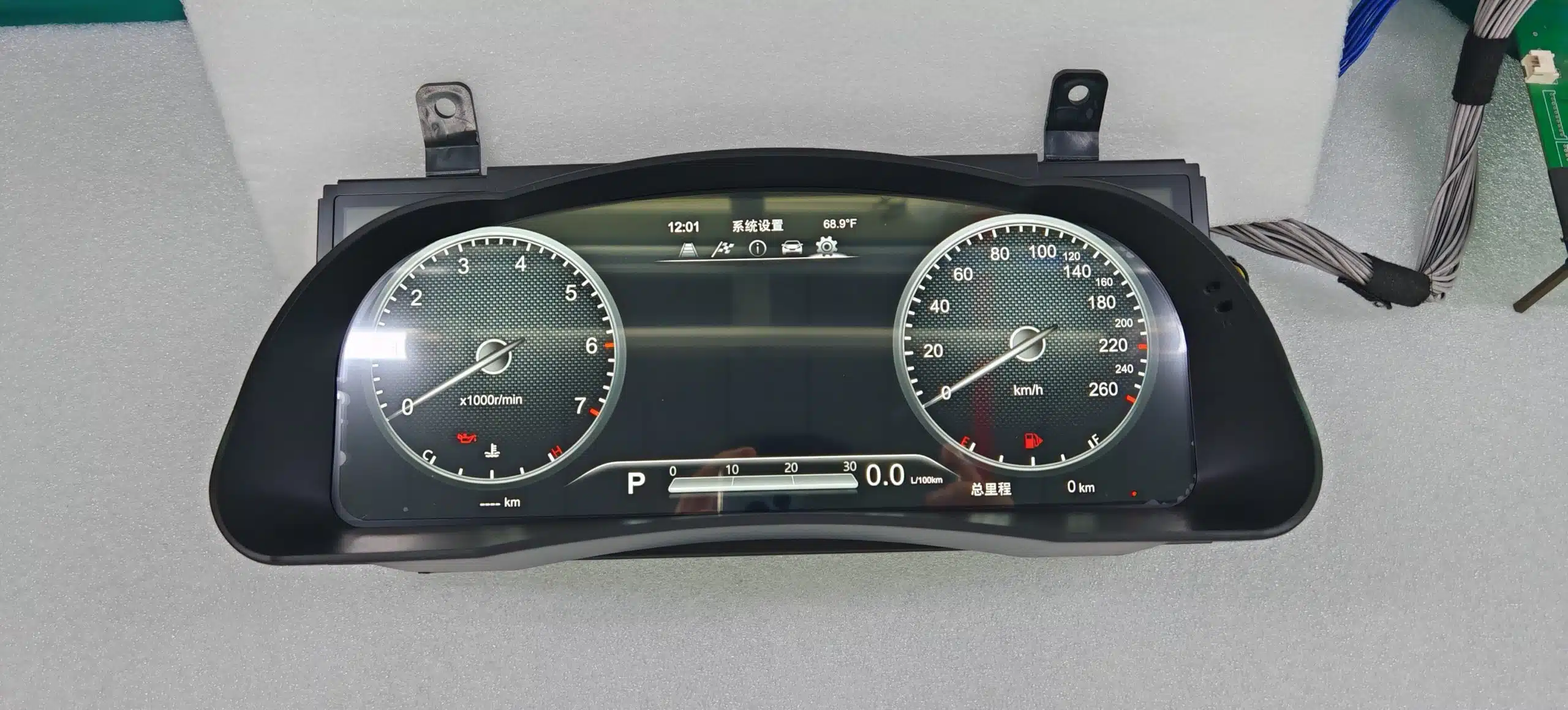
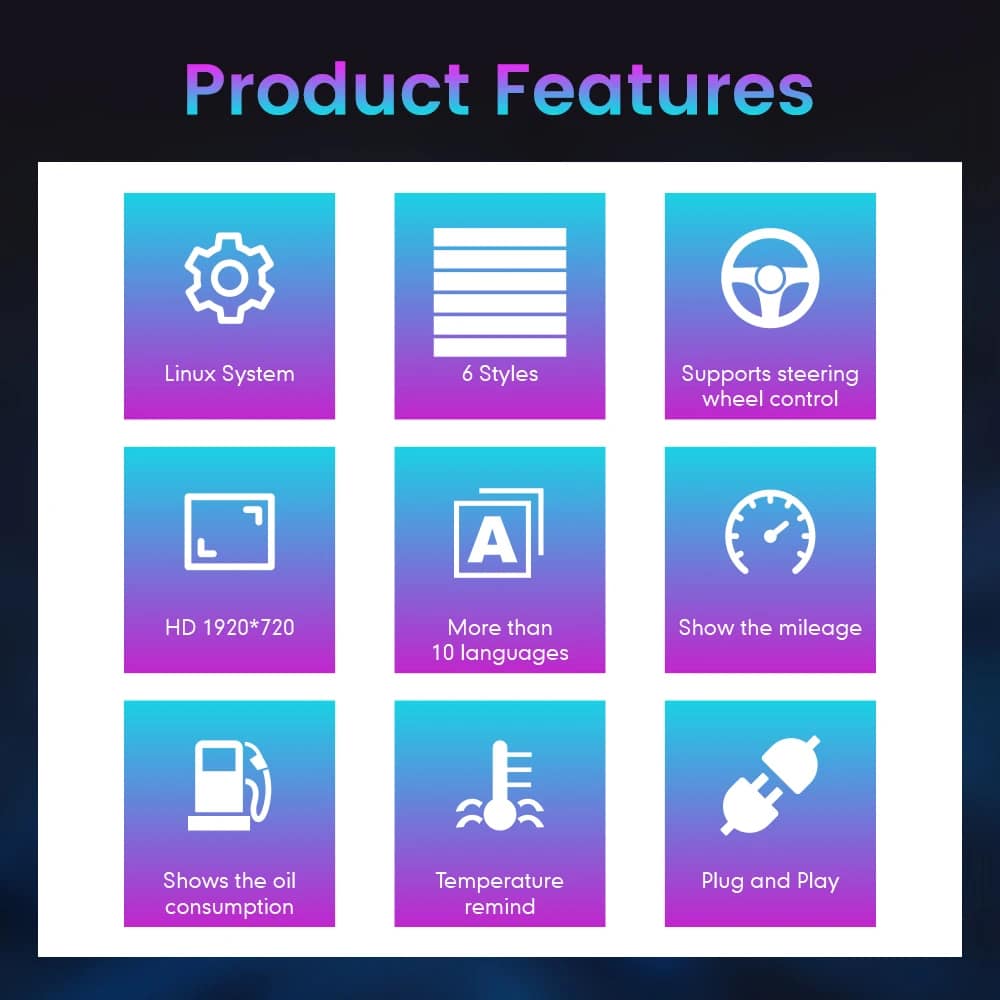
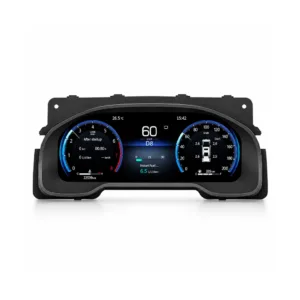
ที่ แผงหน้าปัดดิจิทัล Toyota Highlander แทนที่ชุดมาตรวัดแบบดั้งเดิมด้วยจอแสดงผล Linux ขนาดกว้าง 12.3 นิ้ว 1920×720 ให้ Highlander ของคุณมีห้องโดยสารที่สะอาดและทันสมัยมากขึ้น โดยเน้นที่ผู้ขับขี่เป็นหลัก.
ดูความเร็วรอบต่อนาที (RPM), ระยะทาง, ข้อมูลการเดินทาง, ข้อมูลเชื้อเพลิง, ข้อมูลความดันลมยาง และคำเตือนของรถยนต์ที่รองรับผ่านหน้าจอดิจิทัลที่ชัดเจน ซึ่งง่ายต่อการอ่านในระหว่างการใช้งานประจำวัน.
นี่คือการอัปเกรดชุดมาตรวัดแบบสมบูรณ์ ไม่ได้แทนที่ วิทยุตรงกลาง และไม่ใช่โมดูลที่ใช้ CarPlay เท่านั้น ทำให้คุณสามารถ ปรับปรุงการแสดงผลสำหรับผู้ขับขี่ให้ทันสมัยได้โดยไม่ต้องเปลี่ยนระบบ อินโฟเทนเมนต์ทั้งหมดของคุณ.
หน้าจอขนาดใหญ่ 1920×720 ให้ข้อมูลการขับขี่มีพื้นที่มากขึ้น และ เพิ่มทัศนวิสัยจากตำแหน่งที่นั่งของผู้ขับขี่.
ดูความเร็วที่รองรับ, รอบต่อนาที (RPM), ระยะทาง, ระยะทางทริป, น้ำมัน, ความดันลมยาง และ ข้อมูลเตือนในหน้าจอที่มุ่งเน้นผู้ขับขี่.
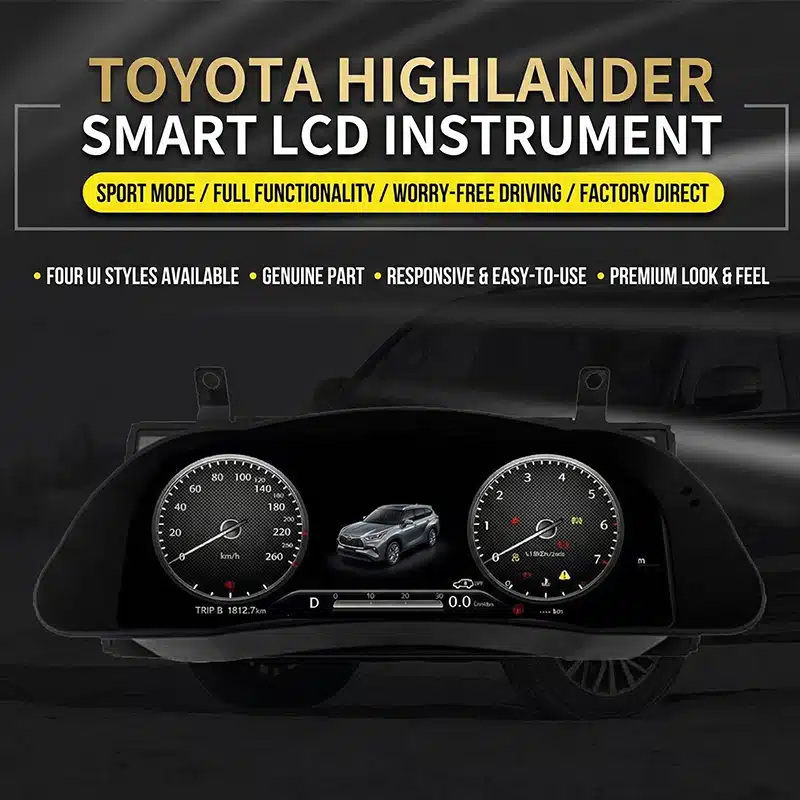
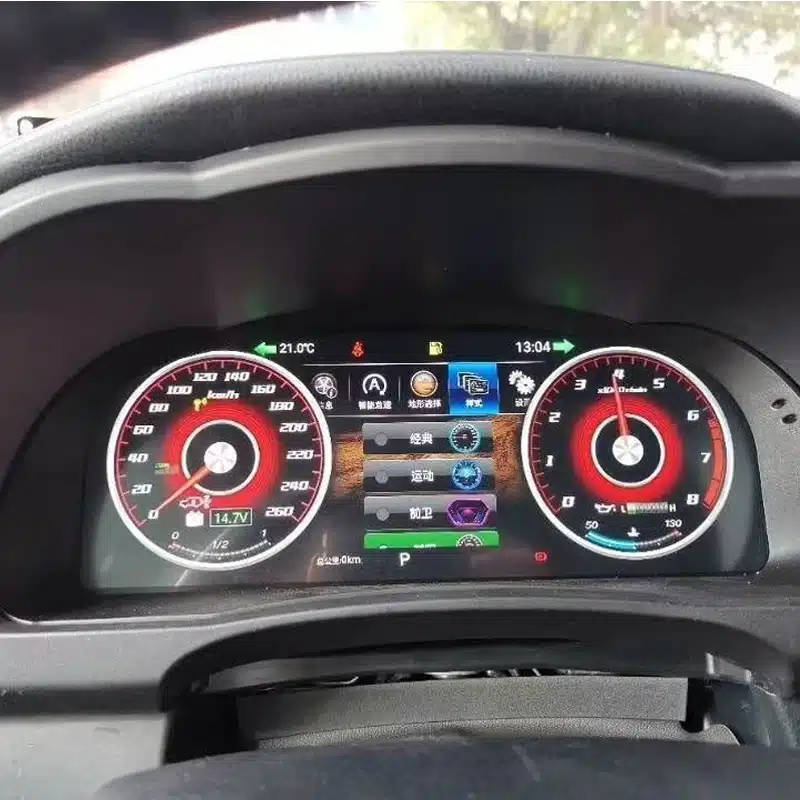
เปลี่ยนรูปลักษณ์ของกลุ่มข้อมูลให้เหมาะกับการขับขี่ในชีวิตประจำวัน, การท่องเที่ยว, ข้อมูลสไตล์กีฬา หรือการขับขี่แบบออฟโรด.
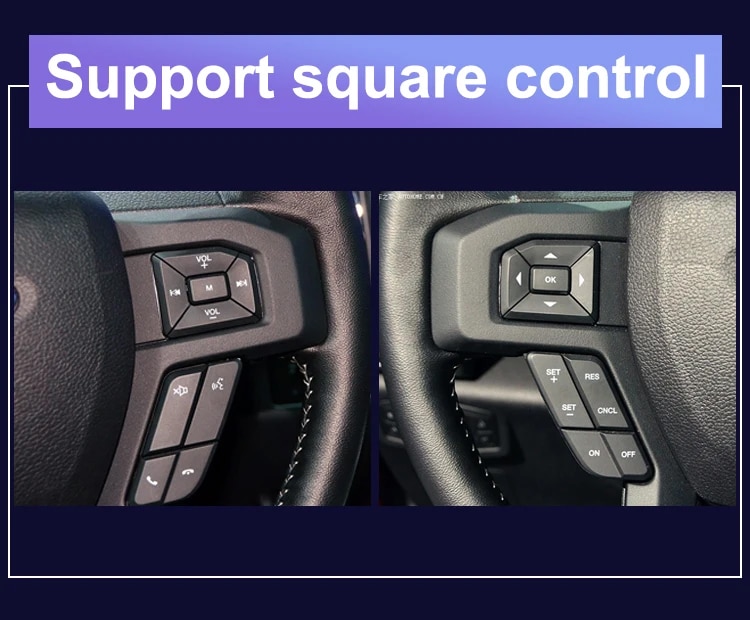
ใช้ปุ่มบนพวงมาลัยแบบดั้งเดิมที่รองรับเพื่อเปลี่ยนหน้าจอนิทรรศการ และใช้งานฟังก์ชันของกลุ่มหน้าปัดที่รองรับ.
ตัวเรือนถูกออกแบบตามรูปทรงของแผงหน้าปัด Highlander เพื่อให้ได้ ความเรียบร้อยและดูเป็นหนึ่งเดียวกันมากขึ้น.
iKAGOO ตรวจสอบปี, แผงหน้าปัด, กลุ่มแผงควบคุมเดิม, ระบบส่งกำลัง และการกำหนดค่าภูมิภาคของคุณก่อนเตรียมคำสั่งซื้อของคุณ.
แผงหน้าปัดดิจิทัลขนาด 12.3 นิ้วนี้ได้รับการออกแบบมาสำหรับ Toyota Highlander รุ่นปี 2015–2019 ที่รองรับเท่านั้น เป็นการอัปเกรดที่แข็งแกร่ง สำหรับเจ้าของที่ต้องการมาตรวัดความเร็วดิจิทัลขนาดใหญ่ขึ้น ข้อมูลยานพาหนะที่มองเห็นได้ชัดเจนขึ้น และสภาพแวดล้อมการขับขี่ที่ทันสมัยยิ่งขึ้น.
เพื่อเตรียมเวอร์ชันที่ถูกต้อง iKAGOO จะตรวจสอบปีรถของคุณ, รูปแดชบอร์ด, ลักษณะของแผงหน้าปัดเดิม, การกำหนดค่าเป็นน้ำมันหรือไฮบริด, ตำแหน่งพวงมาลัย และตลาดรถก่อนการจัดส่ง ซึ่งช่วยให้เราเตรียมจอแสดงผล, การเดินสายไฟ และการตั้งค่าที่ถูกต้องสำหรับคำสั่งซื้อของคุณ.
มูลค่าการอัปเกรดในชีวิตประจำวัน
ประโยชน์หลักไม่ใช่เพียงแค่การแทนที่มาตรวัดเชิงกลด้วย หน้าจอเท่านั้น แต่ยังทำให้ข้อมูลที่คุณใช้ทุกวันง่ายต่อการอ่าน จัดระเบียบได้ง่ายขึ้น และเพลิดเพลินในการดูมากขึ้น.
มาตรวัดดิจิทัลและกราฟิกขนาดใหญ่ทำให้ข้อมูลความเร็วและเครื่องยนต์ ง่ายต่อการรับรู้โดยไม่ต้องพึ่งพาหน้าจอข้อมูลตรงกลางขนาดเล็ก.
ข้อมูลการสนับสนุนระยะทาง, การเดินทาง, น้ำมันเชื้อเพลิง, ระยะทางที่ทำได้, ความดันลมยาง และข้อมูลเตือน สามารถจัดระเบียบในรูปแบบดิจิทัลที่ชัดเจนขึ้นได้.
เลือกจากรูปแบบการแสดงผลที่มีอยู่เพื่อเน้นมาตรวัดแบบคลาสสิก, ข้อมูลกีฬา, ข้อมูลการเดินทาง หรือรูปแบบการแสดงผลที่สะอาดตาสำหรับการขับขี่ในชีวิตประจำวัน.
ปุ่มควบคุมบนพวงมาลัยแบบเดิมที่รองรับยังคงใช้งานได้ เพื่อให้คุณ สามารถเปลี่ยนหน้าจอกลุ่มข้อมูลและเข้าถึงข้อมูลการขับขี่ได้อย่างสะดวกยิ่งขึ้น.
อัปเกรดส่วนของภายในที่อยู่ตรงหน้าคุณโดยตรง โดยไม่ต้อง เปลี่ยนวิทยุหรือเปลี่ยนระบบคอนโซลกลางทั้งหมด.
iKAGOO ใช้ข้อมูลและรูปภาพของยานพาหนะของคุณเพื่อช่วยเตรียม การกำหนดค่าคลัสเตอร์ที่เหมาะสมและโซลูชันการเชื่อมต่อที่ตรงกัน.
ฟังก์ชันการทำงานของยานพาหนะเดิมที่รองรับ
ด้วยรุ่นรถที่ถูกต้อง, การต่อสายไฟที่ตรงกัน และการติดตั้งที่ถูกต้อง ชุดมาตรวัดถูกออกแบบมาเพื่อแสดงข้อมูลที่รองรับ จากรถ Highlander ของคุณต่อไป.
ข้อมูลความเร็วของยานพาหนะและความเร็วของเครื่องยนต์ยังคงแสดงอยู่ ผ่านอินเตอร์เฟซเกจดิจิทัลใหม่.
ข้อมูลระยะทางที่รองรับ, ข้อมูลการเดินทาง และข้อมูลการเดินทางยังคงสามารถใช้งานได้ หลังจากที่กลุ่มได้ถูกเตรียมและกำหนดค่าอย่างถูกต้องแล้ว.
ระดับเชื้อเพลิง ข้อมูลการบริโภคที่รองรับ และระยะทางที่เหลืออยู่ ยังคงแสดงอยู่สำหรับการวางแผนการเดินทางในชีวิตประจำวัน.
ข้อมูลความดันลมยางที่ได้รับการสนับสนุนและคำเตือนเกี่ยวกับยางยังคง ปรากฏให้เห็นผ่านหน้าจอแสดงผลดิจิทัล.
การแจ้งเตือนเครื่องยนต์, เบรก, เข็มขัดนิรภัย และสถานะของยานพาหนะที่ได้รับการสนับสนุน จะยังคงแสดงอยู่หลังจากการติดตั้งที่ถูกต้อง.
ปุ่มบนพวงมาลัยเดิมที่รองรับยังคงใช้งานได้สำหรับ การควบคุมหน้าจอกลุ่มและตั้งค่าที่เข้ากันได้.
เวอร์ชันที่รองรับอนุญาตให้เลือกหน่วย MPH หรือ KM/H และหน่วยอุณหภูมิหรือความดันลมยางที่เกี่ยวข้องได้.
ข้อมูล ACC ที่รองรับและข้อมูลการออกนอกเลนสามารถแสดงต่อไปได้ ในรถยนต์ที่ติดตั้งฟังก์ชันเหล่านี้มาแต่เดิม.
ดูรายละเอียดการอัปเกรด
สำรวจรูปทรงของกลุ่ม, รูปลักษณ์ภายในรถ และรูปแบบหน้าจอที่มีให้ เพื่อเข้าใจว่าการอัปเกรดเปลี่ยนแปลง สภาพแวดล้อมการขับขี่ของ Highlander อย่างไร.


iKAGOO การประเมินการซื้อ
การประเมิน iKAGOO ทั้งสามนี้จะช่วยให้คุณตัดสินใจว่าการอัปเกรด เหมาะกับแผนการเป็นเจ้าของ การกำหนดค่าของยานพาหนะ และ เส้นทางการติดตั้งที่คุณต้องการหรือไม่.
การอัปเกรดนี้มอบความคุ้มค่าในชีวิตประจำวันอย่างแข็งแกร่งสำหรับเจ้าของรถไฮแลนเดอร์ที่ วางแผนจะเก็บรถไว้และต้องการประสบการณ์ข้อมูลผู้ขับขี่ที่ชัดเจนและทันสมัยยิ่งขึ้น.
การอัปเกรดอาจไม่จำเป็นมากนักเมื่อชุดมาตรวัดเดิมยังทำงานได้ดี และคุณต้องการรักษาภายในให้คงสภาพดั้งเดิมอย่างสมบูรณ์.
ผลิตภัณฑ์นี้ได้รับการประเมินภายใต้กรอบการประเมินความจำเป็นในการอัปเกรด iKAGOO ซึ่งพิจารณาจากสภาพของระบบโรงงาน, การปรับปรุงการใช้งานประจำวัน, มูลค่าการครอบครองในระยะยาว, ทางเลือกที่มีอยู่ และคุณค่าการใช้งานจริงของการอัปเกรด.
อ่านกรอบความจำเป็นในการอัปเกรด iKAGOOการออกแบบที่เฉพาะสำหรับรถไฮแลนเดอร์ เส้นทางการเชื่อมต่อที่เข้ากันได้ และ ฟังก์ชันข้อมูลยานพาหนะที่รองรับ ถูกออกแบบมาเพื่อให้การอัปเกรด รู้สึกเหมือนเป็นส่วนหนึ่งของรถมากกว่าการเพิ่มเป็นจอแสดงผลแยกต่างหาก.
คุณภาพความเข้ากันได้รวมถึงการติดตั้งทางกายภาพ, ข้อมูลรถยนต์, การควบคุมต้นฉบับ, การแสดงคำเตือน, การออกแบบอินเตอร์เฟซ และการรวมระบบโดยรวม ไม่ได้หมายความว่าเปอร์เซ็นต์การตรงกันของ ฟังก์ชันต้นฉบับจะถูกนำออกไป.
ผลลัพธ์นี้อ้างอิงจากกรอบความเข้ากันได้ของยานพาหนะต้นฉบับ iKAGOO ซึ่งประเมินความต่อเนื่องของฟังก์ชันจากโรงงาน, การควบคุมต้นฉบับ, ข้อมูลยานพาหนะและการรวมคำเตือน, สถาปัตยกรรมทางกายภาพ, การโต้ตอบแบบโรงงาน และการรวมการติดตั้ง.
ผลลัพธ์แสดงถึงคุณภาพการผสานรวมโดยรวมของการ อัปเกรด. ไม่ได้หมายความว่าเปอร์เซ็นต์เดียวกันของฟังก์ชันโรงงาน จะสูญเสียหรือเก็บรักษาไว้.
อ่านกรอบความเข้ากันได้ของยานพาหนะต้นฉบับ iKAGOOแนะนำให้ติดตั้งโดยผู้เชี่ยวชาญ เนื่องจากงานนี้รวมถึง การถอดชิ้นส่วนบริเวณอุปกรณ์, การจับคู่ขั้วต่อ, การตั้งค่ายานพาหนะ และ การตรวจสอบการทำงานของระบบเตือน, ข้อมูล และพลังงานอย่างครบถ้วน.
ระดับการติดตั้งที่สูงขึ้นสะท้อนถึงปริมาณงานมืออาชีพ ที่ต้องการ. ไม่ได้บ่งชี้ถึงคุณภาพของผลิตภัณฑ์ที่ต่ำลง, ความเข้ากันได้ที่ต่ำลง, หรือมูลค่าการอัปเกรดที่ต่ำลง.
ระดับการติดตั้งนี้ถูกกำหนดภายใต้กรอบความยากในการติดตั้งอุปกรณ์อิเล็กทรอนิกส์รถยนต์ของ iKAGOO โดยพิจารณาจากการถอดประกอบแผงหน้าปัด การเชื่อมต่อสายไฟ การเดินสายเคเบิล การตั้งค่า CANBUS การทดสอบการทำงาน พฤติกรรมการจ่ายไฟ และระดับประสบการณ์ของผู้ติดตั้งที่จำเป็น.
ความยากในการติดตั้งอธิบายถึงงานที่จำเป็นในการติดตั้งให้เสร็จสมบูรณ์ อย่างถูกต้อง ไม่ได้แสดงถึงคุณภาพของผลิตภัณฑ์ที่ต่ำลง หรือมูลค่าการอัปเกรดที่ต่ำลง.
อ่านกรอบความยากในการติดตั้ง iKAGOOเลือกเส้นทางการอัปเกรดที่เหมาะสม
แต่ละโซลูชันตอบโจทย์ความต้องการที่แตกต่างกัน การเปรียบเทียบนี้ช่วยให้คุณ เลือกตัวเลือกที่ตรงกับสิ่งที่คุณต้องการปรับปรุงในรถ Highlander ของคุณ.
| ตัวเลือก | สิ่งที่เปลี่ยนแปลง | เหมาะที่สุดสำหรับ | ข้อพิจารณาหลัก |
|---|---|---|---|
| iKAGOO ดิจิทัลคลัสเตอร์ | เปลี่ยนชุดมาตรวัดเดิมด้วยจอแสดงผลดิจิทัลแบบสมบูรณ์. | เจ้าของที่ต้องการมาตรวัดสมัยใหม่, ธีมที่เลือกได้ และข้อมูลการขับขี่ที่ชัดเจนขึ้น. | ต้องมีการเตรียมการเฉพาะสำหรับรถยนต์รุ่นนี้และการติดตั้งโดยผู้เชี่ยวชาญ. |
| การซ่อมแซมคลัสเตอร์ต้นฉบับ | ซ่อมแซมชุดอุปกรณ์เครื่องมือจากโรงงานที่มีอยู่. | เจ้าของที่ต้องการรักษาลักษณะเดิมไว้และเพียงแค่ต้องการ แก้ไขข้อบกพร่องที่มีอยู่เท่านั้น. | กลุ่มที่ได้รับการซ่อมแซมยังคงรักษาการออกแบบการแสดงผลเดิมไว้. |
| ใช้แล้ว ชุดมาตรวัดเดิม | เปลี่ยนชุดมาตรวัดที่มีปัญหาด้วยชุดมาตรวัดแบบเดิมแท้. | เจ้าของที่สามารถหาชิ้นส่วนต้นฉบับที่ตรงกันได้อย่างสมบูรณ์. | ระยะทาง, การเข้ารหัส, ข้อมูลจำเพาะ และสภาพของชิ้นส่วนอาจต้องการ การตรวจสอบเพิ่มเติม. |
| โมดูล CarPlay | เพิ่มการเชื่อมต่อโทรศัพท์ที่รองรับกับระบบอินโฟเทนเมนต์กลาง. | เจ้าของที่ต้องการฟังก์ชันนำทางด้วยโทรศัพท์, เพลง และการโทรเป็นหลัก. | มันไม่ได้แทนที่หรือปรับปรุงชุดมาตรวัดให้ทันสมัย. |
| หน่วยควบคุมหลักระบบแอนดรอยด์ | อัปเกรดหน้าจอตรงกลางและระบบมัลติมีเดีย. | เจ้าของที่ต้องการแอปพลิเคชัน Android, ระบบนำทาง และคุณสมบัติมัลติมีเดีย. | นี่คือผลิตภัณฑ์ที่แตกต่างจากจอแสดงผลอุปกรณ์คนขับนี้. |
สำรวจรายละเอียดสินค้าเพิ่มเติม
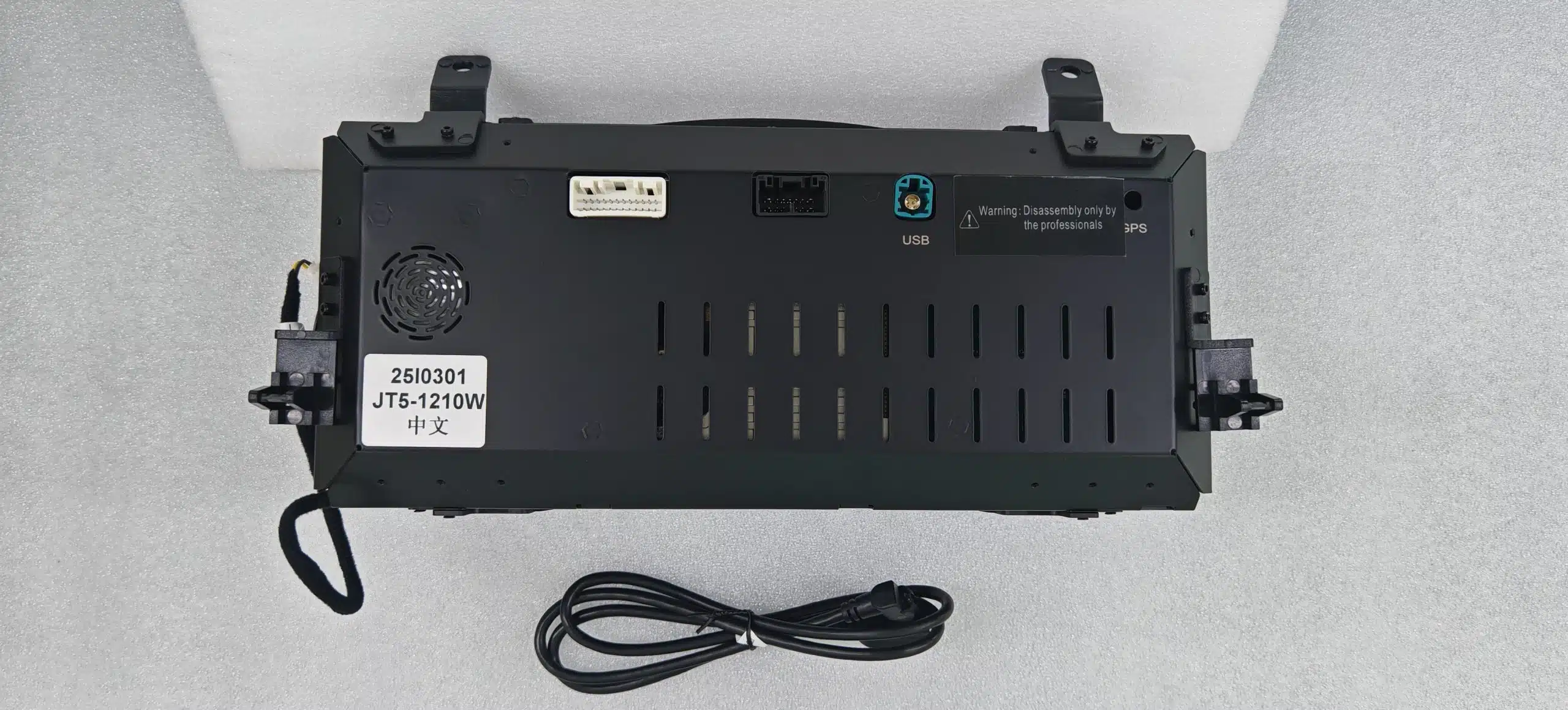
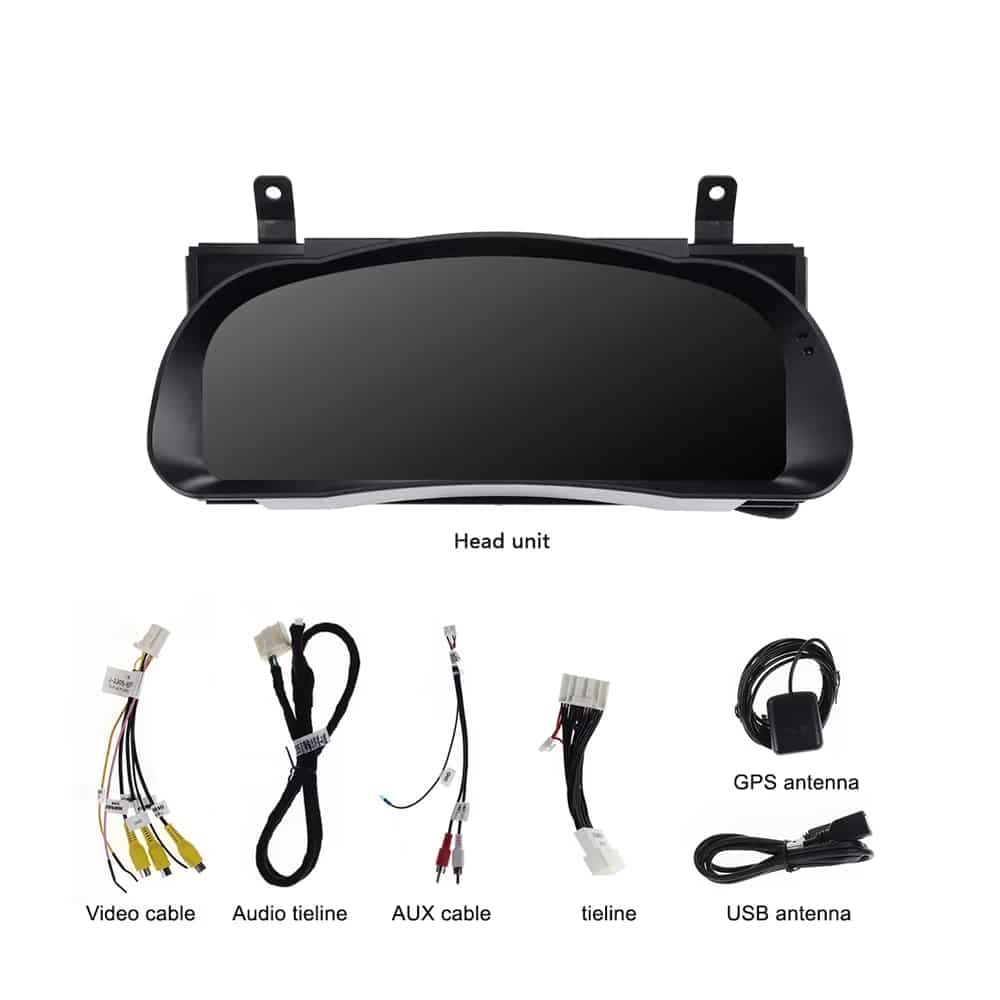
ตรวจสอบตัวเลือกการแสดงผล, กลุ่มทางกายภาพ, การเชื่อมต่อด้านหลัง, สายไฟที่รวมอยู่และตัวอย่างการควบคุมบนพวงมาลัยก่อนเลือก การกำหนดค่าของคุณ.
ข้อมูลจำเพาะของสินค้า
กลุ่มนี้มุ่งเน้นไปที่ข้อมูลรถยนต์และหน้าจอแสดงผลสำหรับผู้ขับขี่ ไม่ได้มีวัตถุประสงค์เพื่อทดแทนฟังก์ชันมัลติมีเดียของหน่วยควบคุมกลางระบบ Android หรือระบบ CarPlay.
| ประเภทสินค้า | ชุดมาตรวัดดิจิทัลแบบดิจิทัลเฉพาะรุ่นรถ |
|---|---|
| การประยุกต์ใช้ยานพาหนะ | โตโยต้า ไฮแลนเดอร์ รองรับรุ่นปี 2015–2019 |
| ขนาดหน้าจอ | 12.3-inch |
| ประเภทจอแสดงผล | จอแสดงผลดิจิทัลแบบ QLED ความละเอียดสูง |
| การแก้ไขปัญหา | 1920 × 720 |
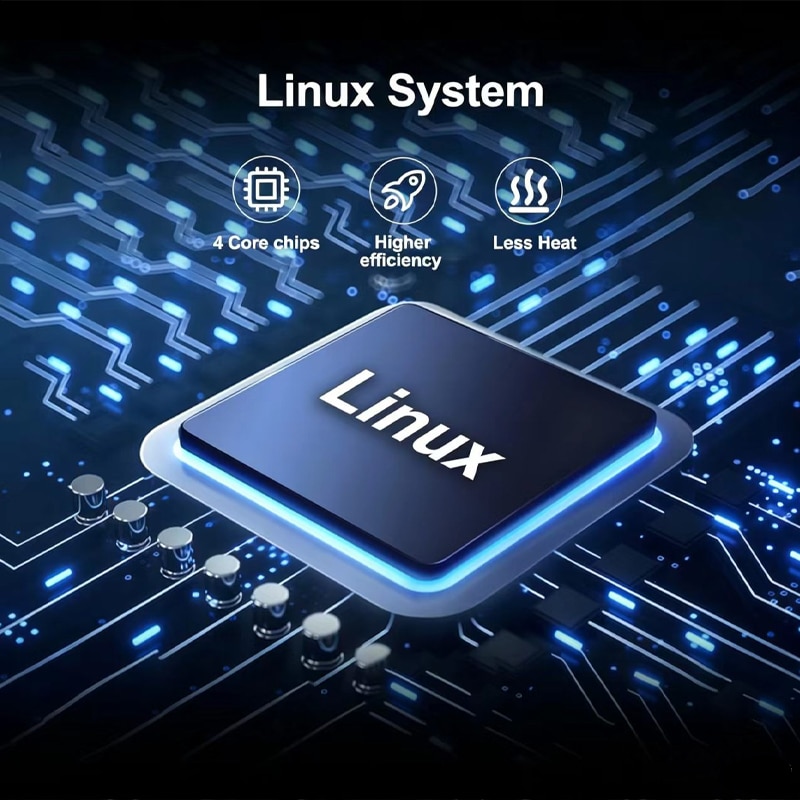
| ระบบปฏิบัติการ | Linux |
| ปรับปรุงประสิทธิภาพ | สูงสุด 60 เฟรมต่อวินาที |
| Startup | การเริ่มต้นระบบ Linux ที่รวดเร็ว ออกแบบมาเพื่อการใช้งานเครื่องมือ |
| ธีมการแสดงผล | หกสไตล์อินเทอร์เฟซที่เลือกได้ |
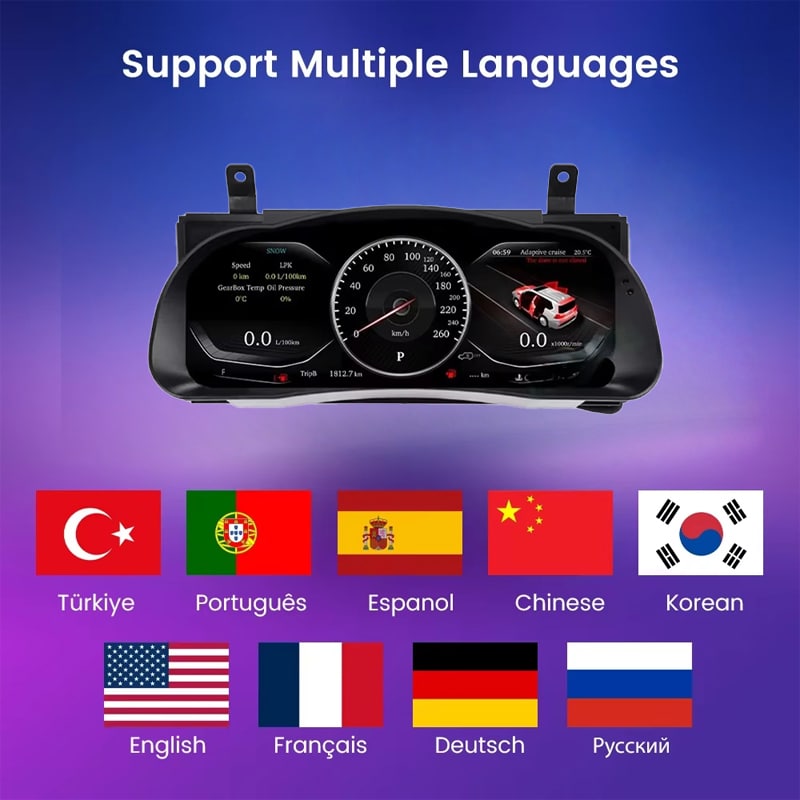
| ภาษา | รองรับมากกว่า 10 ภาษาอินเทอร์เฟซ; กรุณายืนยันภาษาที่คุณต้องการ เมื่อสั่งซื้อ |
| ข้อมูลยานพาหนะ | ความเร็วที่รองรับ, รอบต่อนาที, ระยะทาง, การเดินทาง, น้ำมันเชื้อเพลิง, ระยะทางที่วิ่งได้, TPMS และ ข้อมูลเตือนของรถยนต์ |
| หน่วย | รองรับการตั้งค่าหน่วยความเร็ว MPH/KM/H, อุณหภูมิ และความดันลมยาง |
| ระบบควบคุมเดิม | รองรับการใช้งานปุ่มควบคุมบนพวงมาลัยแบบดั้งเดิม |
| ช่วงการทำงานที่กำหนด | -40°C ถึง +80°C |
| วิธีการเชื่อมต่อ | เส้นทางเชื่อมต่อที่ออกแบบเฉพาะสำหรับรถแต่ละคัน เพื่อหลีกเลี่ยง การตัดสายไฟหลักจากโรงงานที่รองรับโดยเจตนา |
| ตัวเลือกปีที่มีให้บริการ | เวอร์ชัน 2015–2018 และเวอร์ชัน 2018–2019 |
| น้ำหนักการจัดส่ง | 8 กิโลกรัม |
| ขนาดของแพ็กเกจ | 48 × 38 × 28 ซม. |
| จุดเน้นของผลิตภัณฑ์ | มาตรวัดดิจิทัลและข้อมูลยานพาหนะที่รองรับ แอปพลิเคชัน Android Apple CarPlay, Android Auto, ระบบเสียง DSP, 4G, Wi-Fi และฟังก์ชันมัลติมีเดีย Bluetooth ไม่ใช่จุดประสงค์ของผลิตภัณฑ์นี้. |
เลือกการกำหนดค่าที่ถูกต้อง
ปีรุ่นของรถคุณมีความสำคัญ แต่ลักษณะแผงหน้าปัดเดิม ระบบส่งกำลัง และตลาดของรถก็มีส่วนช่วยให้ iKAGOO เตรียมการตั้งค่าที่เหมาะสมที่สุด.
เลือกตัวเลือกนี้สำหรับเครื่องมือที่เก่ากว่าที่เกี่ยวข้อง การกำหนดค่าหลังจากยืนยันลักษณะเดิมของคลัสเตอร์ด้วย iKAGOO.
เลือกตัวเลือกนี้สำหรับการกำหนดค่าเครื่องมือในภายหลังที่เกี่ยวข้อง หลังจากที่ iKAGOO ตรวจสอบเค้าโครงแผงหน้าปัดและแดชบอร์ดดั้งเดิมแล้ว.
ฮาร์ดแวร์และการเชื่อมต่อ
iKAGOO เตรียมอุปกรณ์เชื่อมต่อที่เกี่ยวข้องตาม ข้อมูลยานพาหนะที่ยืนยันในคำสั่งซื้อของคุณ.
การจัดวางสายไฟที่ใช้ได้อาจแตกต่างกันไปตาม ปีของรถยนต์, ชุดเครื่องมือเดิม, ระบบเชื้อเพลิง (แก๊สโซฮอล์หรือไฮบริด) และการตลาดของรถยนต์ iKAGOO จะเตรียมโซลูชันการเชื่อมต่อ หลังจากตรวจสอบรายละเอียดรถยนต์ของคุณ.
iKAGOO การเตรียมรถ
รายละเอียดยานพาหนะที่ชัดเจนเพียงไม่กี่อย่างช่วยให้ iKAGOO สามารถเตรียม การแสดงผล, การเดินสายไฟ และการกำหนดค่าที่เหมาะสมก่อนที่คำสั่งซื้อของคุณจะถูกจัดส่ง.
โปรดระบุปีรุ่นที่แน่นอน โดยเฉพาะเมื่อสั่งซื้อสำหรับ Highlander ปี 2018.
ส่งรูปถ่ายมุมกว้างที่แสดงพวงมาลัย, แผงหน้าปัดเดิม และ แผงคอนโซลโดยรอบ.
ส่งภาพด้านหน้าชัดเจนที่แสดงการจัดวางเกจเดิมและ หน้าจอแสดงข้อมูลตรงกลาง.
ระบุระบบส่งกำลังเพื่อให้สามารถเตรียมการเชื่อมต่อรอบเครื่องยนต์, เชื้อเพลิง หรือพลังงานที่เหมาะสมได้.
ระบุประเทศ, ข้อกำหนดของสหรัฐอเมริกาหากมี, และว่ารถยนต์เป็นพวงมาลัยซ้ายหรือพวงมาลัยขวา.
กรุณาแจ้งให้เราทราบเกี่ยวกับชุดคลัสเตอร์ทดแทน, การเปลี่ยนสายไฟ, ระบบเตือนภัย หรืออุปกรณ์อิเล็กทรอนิกส์รถยนต์ที่ติดตั้งเพิ่มเติม.
การวางแผนการติดตั้ง
การติดตั้งที่ถูกต้องประกอบด้วยการเชื่อมต่อคลัสเตอร์เพียงอย่างเดียวไม่เพียงพอ ผู้ติดตั้งควรตรวจสอบข้อมูลรถยนต์ที่แสดงบนหน้าจอ, ข้อมูลเตือนภัย, ระบบควบคุมการบังคับเลี้ยว และพฤติกรรมการปิดระบบด้วย.
ถ่ายภาพระยะทางเดิม, คำเตือน, หน่วย, ระดับน้ำมันเชื้อเพลิง, แผงหน้าปัดและชุดมาตรวัดก่อนการถอดประกอบ.
ใช้เครื่องมือตัดแต่งที่เหมาะสมและปกป้องแผงหน้าปัด พวงมาลัย คอลัมน์ และพื้นผิวภายในโดยรอบ.
ถอดการเชื่อมต่อไฟฟ้าของยานพาหนะอย่างถูกต้องและถอดชุดอุปกรณ์มาตรวัดเดิมออกโดยไม่ดึงหรือบิดขั้วต่อจากโรงงาน.
เชื่อมต่อทุกการเชื่อมต่อให้ตรงกับรูปร่างของปลั๊ก, การเชื่อมต่อ และคำแนะนำที่ให้มา อย่าบังคับให้ปลั๊กเข้าไปในตัวเชื่อมต่อที่ไม่เหมาะสม.
ยืนยันน้ำมันเบนซินหรือไฮบริด, หน่วย, ภาษา, การควบคุมพวงมาลัย และตั้งค่าข้อมูลยานพาหนะที่เกี่ยวข้อง.
ตรวจสอบความเร็ว, รอบต่อนาที, ระยะทาง, ข้อมูลการเดินทาง, น้ำมันเชื้อเพลิง, TPMS, ไฟเตือน, ระบบควบคุมการขับขี่ และข้อมูลความปลอดภัยที่ติดตั้งไว้.
ปิดและล็อครถยนต์ จากนั้นยืนยันว่ากลุ่ม ปฏิบัติตามพฤติกรรมปิดเครื่องและเข้าสู่โหมดพักตามที่คาดหวัง.
ติดตั้งชิ้นส่วนตกแต่งใหม่เฉพาะเมื่อข้อมูลที่จำเป็นเกี่ยวกับรถยนต์, คำเตือน, ระบบควบคุม และพฤติกรรมของระบบไฟฟ้าได้รับการตรวจสอบแล้วเท่านั้น.
การหยุดที่จุดนี้ช่วยปกป้องยานพาหนะ สายไฟจากโรงงาน และ ชุดมาตรวัดใหม่ ในขณะที่ iKAGOO ให้คำแนะนำการเชื่อมต่อที่ถูกต้อง.
การซื้อและการสนับสนุนหลังการขาย
คำสั่งซื้อของคุณรวมถึงมากกว่าที่แสดงอยู่ iKAGOO ยังช่วยเตรียม การกำหนดค่าของยานพาหนะและสนับสนุนการติดตั้งและ กระบวนการหลังการขาย.
ปีรถของคุณ แผงหน้าปัด ชุดมาตรวัดเดิม ระบบส่งกำลัง และ ข้อมูลภูมิภาคของคุณจะถูกใช้เพื่อเตรียมรุ่นที่เหมาะสม.
คำสั่งซื้อจะถูกจัดส่งผ่านเส้นทางที่สามารถติดตามได้หลังจาก ข้อมูลยานพาหนะและการกำหนดค่าผลิตภัณฑ์ได้รับการเตรียมเรียบร้อยแล้ว.
ข้อบกพร่องของฮาร์ดแวร์ที่ได้รับการตรวจสอบและมีสิทธิ์จะได้รับการจัดการภายใต้ การรับประกันฮาร์ดแวร์แบบจำกัดของ iKAGOO ในปัจจุบัน.
iKAGOO สามารถช่วยตรวจสอบรูปภาพการเชื่อมต่อ การตั้งค่าของยานพาหนะ และ ข้อมูลการทดสอบการทำงานเมื่อต้องการความช่วยเหลือในการติดตั้ง.
กรุณาให้รายละเอียดรถที่ถูกต้องและรูปถ่ายที่ต้องการ ก่อนการซื้อเพื่อให้ iKAGOO สามารถเตรียมเวอร์ชันที่เหมาะสมได้ ข้อมูลรถที่ไม่ถูกต้อง การปรับแต่งที่ไม่ได้แจ้งให้ทราบล่วงหน้า หรือ ข้อจำกัดของระบบรถ จะไม่ถือเป็นเหตุผลในการคืนสินค้าโดยไม่มีเงื่อนไข และไม่สามารถขอคืนเงินได้.
เมื่อ iKAGOO ยืนยันความเข้ากันได้ก่อนการซื้อ ข้อมูลของยานพาหนะ ถูกต้องและลูกค้าให้ความร่วมมือในการแก้ไขปัญหาการติดตั้งที่สมเหตุสมผล ข้อผิดพลาดที่พิสูจน์แล้วว่าเข้ากันไม่ได้กับ iKAGOO จะได้รับการจัดการตามนโยบายการคืนสินค้าและการคืนเงินปัจจุบัน.
การจัดส่งแบบ DDP หรือรวมภาษีจะมีผลเฉพาะเมื่อมีการแสดง หรือยืนยันเฉพาะสำหรับปลายทางและคำสั่งซื้อเท่านั้น.
นโยบายการจัดส่ง • นโยบายการรับประกัน • นโยบายการคืนสินค้าและการคืนเงิน • คู่มือ DDP
คำถามที่พบบ่อยเกี่ยวกับกลุ่มข้อมูลดิจิทัล Highlander
เวอร์ชันที่มีอยู่ได้รับการออกแบบมาสำหรับ Toyota Highlander รุ่นที่รองรับในปี 2015–2019 iKAGOO จะตรวจสอบปี รุ่นเดิม การกำหนดค่าเครื่องยนต์เบนซินหรือไฮบริด ตลาดรถยนต์ ตำแหน่งพวงมาลัย และรูปถ่ายแผงหน้าปัดก่อนเตรียมคำสั่งซื้อ.
เลือกเวอร์ชันระหว่าง 2015–2018 และ 2018–2019 ตาม การกำหนดค่าเครื่องมือดั้งเดิมที่ยืนยันโดย iKAGOO เจ้าของ รถยนต์ปี 2018 ควรจัดเตรียมภาพถ่ายแผงหน้าปัดและกลุ่มเครื่องมือดั้งเดิม เพื่อระบุเวอร์ชันที่ถูกต้อง.
นี่คือชุดมาตรวัดดิจิทัลแบบครบชุดทดแทนเดิม ช่วยอัปเกรดการแสดงผลมาตรวัดของผู้ขับขี่โดยไม่เพิ่ม CarPlay ให้กับ วิทยุกลาง.
ปุ่มบนพวงมาลัยเดิมที่รองรับยังคงทำงานได้ หน้าจอกลุ่มและตั้งค่าที่เข้ากันได้หลังจากเตรียมและกำหนดค่าเวอร์ชันของรถที่ถูกต้องแล้ว.
กลุ่มที่จับคู่ได้รับการออกแบบมาเพื่อแสดงข้อมูลระยะทางของยานพาหนะที่รองรับ หลังจากเตรียมและกำหนดค่าอย่างถูกต้องแล้ว บันทึกเลขไมล์เดิมก่อนการติดตั้งและตรวจสอบ ข้อมูลที่แสดงก่อนการประกอบกลับขั้นสุดท้าย.
ข้อมูล TPMS ที่รองรับและตัวบ่งชี้การเตือนของยานพาหนะ จะยังคงแสดงอยู่ผ่านการเชื่อมต่อข้อมูลยานพาหนะที่ตรงกัน ผู้ติดตั้งควรตรวจสอบทุกการเตือน และตัวบ่งชี้สถานะที่จำเป็นก่อนเสร็จสิ้นการติดตั้ง.
สินค้าชิ้นนี้แทนที่ชุดแผงหน้าปัดแทนที่จะเป็นระบบความบันเทิงกลาง กล้องมองหลังเดิม, วิทยุ, แอมป์ และลำโพงยังคงเป็นส่วนหนึ่งของระบบรถยนต์เดิม.
รถยนต์ที่ใช้เชื้อเพลิงแก๊สโซฮอล์และรถยนต์ไฮบริดต้องการข้อมูลการขับขี่ที่แตกต่างกัน โปรดระบุระบบขับเคลื่อนของคุณอย่างชัดเจนก่อนการจัดส่งเพื่อให้ iKAGOO สามารถเตรียมการแสดงผลและการตั้งค่ารถยนต์ที่เหมาะสมได้.
เส้นทางเชื่อมต่อที่ตรงกันได้รับการออกแบบมาเพื่อหลีกเลี่ยงการตัดสายไฟหลักจากโรงงานโดยเจตนา หากปลั๊กไม่ตรงกันหรือไม่ จำเป็นต้องตัดสายไฟหลักในการติดตั้ง ให้หยุดและติดต่อ iKAGOO เพื่อขอคำแนะนำ.
แนะนำให้ติดตั้งโดยผู้เชี่ยวชาญ งานประกอบด้วยการ ถอดแผงหน้าปัด, เปลี่ยนอุปกรณ์, จัดการขั้วต่อ การตั้งค่ายานพาหนะ และการทดสอบการทำงานของระบบเตือน, ข้อมูล และ การทำงานของพลังงานอย่างครบถ้วน.
หลังการติดตั้ง ปิดและล็อครถยนต์ และยืนยันว่า ชุดควบคุมปิดตัวลงและเข้าสู่สถานะพักตามที่คาดหวัง หากยังคงมีไฟแสดงการทำงาน รีสตาร์ทซ้ำ หรือตื่นขึ้นมาโดยไม่คาดคิด ให้หยุดการติดตั้งชั่วคราวและติดต่อ iKAGOO.
แพ็กเกจประกอบด้วยชุดหน้าปัดดิจิตอลและอุปกรณ์เชื่อมต่อที่เกี่ยวข้อง ที่เตรียมไว้สำหรับรุ่นรถยนต์ที่ได้รับการยืนยันแล้ว ภาพสินค้าแสดงสายวิดีโอ, สายเชื่อมต่อเสียง, สาย AUX, สายเชื่อมต่อหลัก, เสาอากาศ GPS และสาย USB.
ฮาร์ดแวร์ที่มีสิทธิ์จะได้รับการคุ้มครองภายใต้การรับประกันฮาร์ดแวร์แบบจำกัด 12 เดือนของ iKAGOO จากวันที่ส่งมอบที่ได้รับการยืนยัน การติดตั้ง, การกำหนดค่า และการสนับสนุนการแก้ไขปัญหาจะมีให้ตาม เงื่อนไขของผลิตภัณฑ์และนโยบายที่เกี่ยวข้อง.
กรุณาส่งปีที่ต้องการ, รูปแดชบอร์ด, รูปแผงหน้าปัดเดิม, การกำหนดค่าเครื่องยนต์เบนซินหรือไฮบริด, ประเทศหรือตลาดของรถยนต์, ข้อมูล LHD หรือ RHD และรายละเอียดของการปรับแต่งก่อนหน้านี้.
iKAGOO เปรียบเทียบปีรถของคุณ, ลักษณะหน้าปัดเดิม, โครงสร้างแผงหน้าปัด, ระบบส่งกำลัง, การตั้งค่าภูมิภาค และ ตำแหน่งพวงมาลัย กับชุดหน้าปัดและระบบสายไฟที่มีอยู่ ก่อนเตรียมการสั่งซื้อ.
ศึกษาข้อมูลก่อนตัดสินใจซื้อ
เลือกการกำหนดค่าปีของคุณในพื้นที่การซื้อและให้ รูปถ่ายแดชบอร์ด, รูปถ่ายคลัสเตอร์ต้นฉบับ, ข้อมูลระบบส่งกำลังและตลาดยานพาหนะ iKAGOO จะใช้รายละเอียดเหล่านั้นเพื่อเตรียม การแสดงผล, การเดินสายไฟ และการกำหนดค่าที่เหมาะสมสำหรับคำสั่งซื้อของคุณ.
โตโยต้าและไฮแลนเดอร์เป็นเครื่องหมายการค้าของเจ้าของแต่ละราย iKAGOO เป็นผู้จัดจำหน่ายอิสระของอุปกรณ์อิเล็กทรอนิกส์สำหรับยานพาหนะเฉพาะรุ่น และไม่มีความเกี่ยวข้องกับบริษัท โตโยต้า มอเตอร์ คอร์ปอเรชั่น.

ข้อมูลที่ชัดเจนเกี่ยวกับความเข้ากันได้ของรถยนต์ การเตรียมคำสั่งซื้อ การจัดส่งระหว่างประเทศ การรับประกัน การคืนสินค้า และการสนับสนุนหลังการขาย.
อุปกรณ์อิเล็กทรอนิกส์เฉพาะรถยนต์ต้องใช้เวอร์ชันที่ถูกต้อง การเดินสายไฟและการกำหนดค่า กระบวนการของเราถูกออกแบบมาเพื่อลด ปัญหาความเข้ากันได้และการติดตั้งที่หลีกเลี่ยงได้.
อาจมีการตรวจสอบรุ่นรถ ปี ระบบเดิม และข้อมูลการกำหนดค่าที่เกี่ยวข้อง ก่อนการซื้อเพื่อลดความเสี่ยง ในการเลือกรุ่นที่ผิด.
ก่อนการจัดส่ง คำสั่งซื้อจะถูกตรวจสอบกับข้อมูลรถที่ยืนยันแล้ว เพื่อให้สามารถเตรียมรุ่น การกำหนดค่า และส่วนประกอบเฉพาะรถที่จำเป็นได้.
เป้าหมายของเราคือทำให้คำสั่งซื้อของคุณถูกต้องก่อนที่สินค้าจะออกจากเรา. เราตรวจสอบความเข้ากันได้ เตรียมการตั้งค่าที่ถูกต้อง และจะติดต่อ คุณเฉพาะเมื่อมีบางอย่างที่ยังต้องยืนยัน.
สรุปสาระสำคัญของเงื่อนไขหลักที่ใช้กับ คำสั่งซื้อเฉพาะรถ iKAGOO.
คำสั่งซื้อ iKAGOO ส่วนใหญ่จะถูกจัดส่งจากสถานที่เตรียมสินค้าของเราในประเทศจีน หลังจากตรวจสอบการกำหนดค่าผลิตภัณฑ์และข้อมูลรถยนต์แล้ว.
การดำเนินการตามคำสั่งซื้อตามปกติใช้เวลาประมาณ 1–3 วันทำการ.\r\n เวลาในการจัดส่งโดยประมาณหลังจากสินค้าถูกจัดส่งโดยทั่วไปคือ:
การผ่านพิธีการศุลกากร วันหยุด สภาพอากาศ ความล่าช้าของผู้ให้บริการขนส่ง และ\r\n การจัดส่งไปยังพื้นที่ห่างไกลอาจส่งผลต่อการประมาณการเหล่านี้.
การจัดส่งระหว่างประเทศมาตรฐานโดยปกติไม่รวมภาษีมูลค่าเพิ่มของประเทศปลายทาง อากรนำเข้า ค่าธรรมเนียมนายหน้า หรือ\r\n ค่าธรรมเนียมการผ่านพิธีการศุลกากร.
สำหรับจุดหมายปลายทางในสหภาพยุโรปที่เข้าเงื่อนไข, อาจมีบริการจัดส่งแบบ DDP ให้เลือกใช้. ค่าธรรมเนียมที่เกี่ยวข้องกับการนำเข้าจะรวมอยู่เฉพาะเมื่อเลือก DDP ที่ชำระเงินหรือได้รับการยืนยันเป็นลายลักษณ์อักษรจาก iKAGOO ก่อนจัดส่ง.
เมื่อไม่ได้เลือก DDP ค่าธรรมเนียมที่เรียกเก็บโดยศุลกากรท้องถิ่น หรือผู้ให้บริการจัดส่งมักเป็นความรับผิดชอบของผู้รับ.
อาจมีบริการจัดส่งแบบด่วนหรือแบบเร่งด่วนสำหรับสินค้า และจุดหมายปลายทางที่เลือก ความพร้อม ผู้ให้บริการ และ ค่าใช้จ่ายเพิ่มเติมใด ๆ จะได้รับการยืนยันก่อนจัดส่ง.
ทั้งนี้ขึ้นอยู่กับเส้นทางและประเภทสินค้า iKAGOO อาจใช้ DHL, FedEx, UPS, EMS, 4PX หรือผู้ให้บริการโลจิสติกส์ที่ติดตามได้รายอื่น.
หลังจากจัดส่ง หมายเลขติดตามหรือลิงก์ติดตาม มักจะถูกส่งไปยังอีเมลที่ใช้สำหรับคำสั่งซื้อ การอัปเดตการติดตามอาจใช้เวลาหลายวันทำการจึงจะแสดง ในระหว่างการโอนย้ายระหว่างผู้ให้บริการระหว่างประเทศ.
สิทธิ์ในการคืนสินค้าขึ้นอยู่กับเหตุผลในการคืน สภาพสินค้า สถานะการติดตั้ง หลักฐานประกอบ และว่าการคืนนั้นได้รับการอนุมัติจาก iKAGOO หรือไม่.
สำหรับการคืนสินค้าที่ไม่มีความบกพร่องและได้รับอนุมัติ โดยปกติสินค้าต้องไม่ถูกใช้งาน ไม่ถูกติดตั้ง ครบถ้วน และอยู่ในสภาพที่พร้อมจำหน่ายต่อ โดยทั่วไปลูกค้าจะเป็นผู้รับผิดชอบค่าจัดส่งสำหรับการคืนที่ได้รับอนุมัติ.
ค่าจัดส่งเดิม DDP VAT อากรศุลกากร และค่าใช้จ่ายด้านโลจิสติกส์อื่น ๆ โดยทั่วไปไม่สามารถขอคืนเงินได้ เว้นแต่กฎหมายกำหนดไว้หรือ iKAGOO ยืนยันเป็นอย่างอื่น.
ห้ามส่งสินค้าคืนก่อนที่คุณจะได้รับที่อยู่สำหรับการส่งคืนที่ได้รับการอนุมัติและคำแนะนำการคืนสินค้าจาก iKAGOO.
การคุ้มครองเพิ่มเติมอาจมีผลใช้บังคับเมื่อ iKAGOO ได้ตรวจสอบความเข้ากันได้กับรถยนต์ ลูกค้าได้ให้ข้อมูลรถยนต์ที่ถูกต้อง และได้ดำเนินการตามขั้นตอนการติดตั้งและการวินิจฉัยที่สมเหตุสมผล.
หาก iKAGOO ยืนยันว่าไม่มีแนวทางแก้ไขทางเทคนิคที่สมเหตุสมผล และปัญหาดังกล่าวได้ถูกรายงานภายใน 7 วันปฏิทินนับจากวันที่ส่งมอบ, ลูกค้าอาจมีสิทธิ์ได้รับการคืนเงินตามราคาสินค้า โดยไม่จำเป็นต้องส่งคืนสินค้า.
ค่าจัดส่งเดิม DDP VAT อากรศุลกากร และค่าใช้จ่ายอื่น ๆ จากบุคคลที่สาม ไม่รวมอยู่ในการคืนเงินตามราคาสินค้านี้.
ผลิตภัณฑ์ที่เข้าเกณฑ์รวมถึง รับประกันฮาร์ดแวร์แบบจำกัด 12 เดือน ครอบคลุมข้อบกพร่องจากการผลิตที่ได้รับการยืนยันและการขัดข้องของฮาร์ดแวร์ที่เข้าเกณฑ์ ภายใต้การใช้งานปกติ.
ทั้งนี้ขึ้นอยู่กับปัญหาที่ได้รับการยืนยัน การสนับสนุนอาจรวมถึงการวินิจฉัยจากระยะไกล การช่วยเหลือด้านการตั้งค่า ชิ้นส่วนทดแทน การซ่อมแซม การเปลี่ยนสินค้า การคืนเงินบางส่วนหรือคืนเงินเต็มจำนวน.
การตรวจสอบหรือการตรวจสอบโดยบุคคลที่สามไม่ได้ทำให้ การรับประกันทั้งหมดสิ้นสุดลงโดยอัตโนมัติ อย่างไรก็ตาม ความเสียหายที่เกิดจาก การซ่อมแซมโดยไม่ได้รับอนุญาต การดัดแปลงที่ไม่ถูกต้อง วงจรขาด การประกอบกลับอย่างไม่ถูกต้อง การเดินสายไฟผิด การกระแทก น้ำเข้า หรือการใช้ในทางที่ผิดโดยปกติไม่ได้รับความคุ้มครอง.
ติดต่อ iKAGOO ก่อนถอดชิ้นส่วน ดัดแปลง หรือซ่อมแซม ผลิตภัณฑ์ เพื่อให้สามารถให้ขั้นตอนการวินิจฉัยที่ถูกต้องได้.
ติดต่อ iKAGOO ภายใน 7 วันปฏิทินนับจากวันที่ส่งมอบ และเก็บบรรจุภัณฑ์เดิม ป้ายจัดส่ง อุปกรณ์เสริม และผลิตภัณฑ์ไว้.
กรุณาให้ภาพถ่ายหรือวิดีโอที่ชัดเจนแสดง:
หลังจากการตรวจสอบ iKAGOO อาจจัดส่งชิ้นส่วนที่ขาดหายไป เปลี่ยนสินค้า ซ่อมแซม คืนเงิน หรือหาทางออกที่เหมาะสมอื่น ๆ.
ติดต่อ iKAGOO โดยเร็วที่สุดและก่อนการติดตั้ง สำหรับการเปลี่ยนแปลงที่อยู่ การกำหนดค่ารถยนต์หรือผลิตภัณฑ์ โปรดติดต่อ เราภายใน 12 ชั่วโมงหลังจากสั่งซื้อ.
การเปลี่ยนหรือคืนสินค้าอาจได้รับการอนุมัติเมื่อผลิตภัณฑ์ที่เลือกผิด ยังไม่ถูกใช้งาน ยังไม่ถูกติดตั้ง ครบสมบูรณ์ และ เหมาะสำหรับการขายต่อ โดยปกติลูกค้าจะต้องรับผิดชอบ ค่าจัดส่งและส่วนต่างราคาที่เกี่ยวข้อง.
ผลิตภัณฑ์เฉพาะรุ่นรถอาจเข้าสู่กระบวนการจัดหา การเขียนโปรแกรม การทดสอบ หรือการกำหนดค่าหลังการชำระเงินไม่นาน เมื่อการเตรียมการ หรือการจัดส่งเริ่มต้นแล้ว การยกเลิกอาจไม่สามารถทำได้อีกต่อไป หรืออาจหักค่าใช้จ่ายที่เกิดขึ้นแล้วอย่างสมเหตุสมผล.
เนื้อหาในแพ็คเกจอาจแตกต่างกันไปตามผลิตภัณฑ์ รุ่นรถ และระบบโรงงาน และการกำหนดค่าที่เลือก.
ทั้งนี้ขึ้นอยู่กับผลิตภัณฑ์ แพ็คเกจอาจมีส่วนประกอบหลักได้แก่ ตัวอุปกรณ์ ชุดสายไฟเฉพาะรุ่นรถ อินเทอร์เฟซ CANBUS อะแดปเตอร์ สาย USB เสาอากาศ ไมโครโฟน อุปกรณ์ยึดติด หรืออุปกรณ์ติดตั้งอื่น ๆ ที่จำเป็น.
ดูรูปผลิตภัณฑ์ ข้อมูลจำเพาะ และการยืนยันคำสั่งซื้อ เพื่อทราบเนื้อหาที่แน่นอนของคำสั่งซื้อของคุณ.
คุณสามารถติดต่อ iKAGOO ผ่านฟอร์มติดต่อบนเว็บไซต์ WhatsApp หรือช่องทางสนับสนุนอื่น ๆ ที่มีให้ เวลาตอบกลับ โดยทั่วไปอยู่ภายใน 24 ชั่วโมงทำการ.
เพื่อการวินิจฉัยทางเทคนิคที่เร็วขึ้น โปรดระบุหมายเลขคำสั่งซื้อ, รุ่นและปีของรถ, รูปถ่ายระบบจากโรงงานที่เกี่ยวข้อง, รูปผลิตภัณฑ์ และวิดีโอที่ชัดเจนซึ่งแสดงปัญหา.
การชำระเงินจะดำเนินการผ่านวิธีการชำระเงินที่ปลอดภัยซึ่งแสดงระหว่างการชำระเงิน.
ตัวเลือกบัตร กระเป๋าเงิน และการผ่อนชำระที่มีอาจแตกต่างกันไปตามประเทศ สกุลเงิน ผู้ให้บริการชำระเงิน และคุณสมบัติของลูกค้า.
บริการผ่อนชำระ รวมถึงตัวเลือกที่นำเสนอโดย PayPal หรือผู้ให้บริการชำระเงินรายอื่น ยังคงขึ้นอยู่กับความพร้อมในภูมิภาคและข้อกำหนดการอนุมัติของผู้ให้บริการนั้น.
ส่วนนี้เป็นคู่มือสรุปสำหรับลูกค้า หน้านโยบายฉบับสมบูรณ์ที่เผยแพร่ ใบยืนยันคำสั่งซื้อ และกฎหมายคุ้มครองผู้บริโภคที่เกี่ยวข้องจะมีผลบังคับก่อน หากข้อความใดแตกต่างกัน.
$780.00 ราคาเดิมคือ: $780.00.$680.00ราคาปัจจุบันคือ: $680.00.
ค่าจัดส่งสุดท้ายจะยืนยันจากที่อยู่จัดส่งของคุณที่หน้าชำระเงิน.

เลือกสิ่งที่คุณวางแผนจะซื้อ เราจะแสดงรายละเอียดที่จำเป็นสำหรับสินค้านั้นเท่านั้น.
เราจะตรวจสอบรายละเอียดและส่งเวอร์ชันผลิตภัณฑ์ที่แนะนำไปยังอีเมลของคุณ.
เราใช้คุกกี้ที่จำเป็นเพื่อให้เว็บไซต์ปลอดภัยและทำงานได้อย่างถูกต้อง เมื่อคุณยินยอม เราอาจใช้คุกกี้วิเคราะห์เพื่อปรับปรุงประสบการณ์การใช้งาน ดูของเรา นโยบายความเป็นส่วนตัว.





โคลิน เมอร์เซอร์ –
ผมสนใจเป็นพิเศษว่ากลุ่มระบบจะทำงานอย่างไรในตอนเช้าที่อากาศหนาวเย็น จนถึงตอนนี้ ระบบบูตได้รวดเร็ว และหน้าจอแสดงผลชัดเจนเมื่อห้องโดยสารยังเย็นอยู่ ข้อมูลเกี่ยวกับความดันลมยางมีประโยชน์มากในช่วงที่อุณหภูมิเปลี่ยนแปลงในฤดูหนาว ต้องขับรถหลายครั้งเพื่อตัดสินใจว่าผมชอบการจัดวางหน้าจอแบบใด แต่เมื่อตั้งค่าพื้นฐานเสร็จแล้ว ระบบก็เข้าใจได้ง่าย.